Page 2 - Contents
Description of the machine . . . . . . . . . . . . . . . . . . . . . . . . . . . . . . . . . . . . . . . . . . 4 Caring for the environment . . . . . . . . . . . . . . . . . . . . . . . . . . . . . . . . . . . . . . . . . . 6 Warning and Safety instructions . . . . . . . . . . . . . . . . . . . . . ...
Page 4 - External view; Description of the machine
External view a Hot water spout b Coffee spouts, height-adjustable c Handle to open machine front d Control dial for steam e Steam spout with milk frother f Drip tray with grilles g Selector switch h Display i Coffee portion buttons j Rinse and pre-warming button k Hot water button Description of th...
Page 5 - Interior view; Coffee glossary
Interior view l Coffee bean container m Slide control to select fineness of ground coffee n Slide control to select quantity of ground coffee o Water container p Waste unit q Brew unit Coffee glossary To help you understand the language of coffee, please read the glossary of coffeeterms at the end o...
Page 6 - Caring for the environment
Disposal of the packingmaterial The transport and protective packinghas been selected from materials whichare environmentally friendly for disposaland can normally be recycled. Ensure that any plastic wrappings,bags etc. are disposed of safely andkept out of the reach of babies andyoung children. Da...
Page 7 - suitable for use in the open air.; Warning and Safety instructions
This machine complies with allrelevant legal safety requirements.Improper use of the machine can,however, present a risk of bothpersonal injury and materialdamage. To avoid the risk of accidents anddamage to the machine, please readthese instructions carefully beforeinstallation and before using for...
Page 8 - Use
This equipment may only beinstalled in mobile installations such as ships, caravans, aircraft etc. ifa risk assessment of the installation hasbeen carried out by a suitably qualifiedengineer. Before the machine is connected,the steam control dial must be in the off position. This is to prevent anunc...
Page 10 - Disposal of your old machine
In countries where there are areaswhich may be subject to infestation by cockroaches or other vermin, payparticular attention to keeping themachine and its surroundings in aclean condition at all times. Anydamage which may be caused bycockroaches and other vermin will notbe covered by the guarantee....
Page 11 - Brief description
Unlike standard coffee machines, thismachine has a container for coffee beans so that they can be freshly ground for every cup, to benefit fullyfrom the flavour. First the ground coffee is moistenedwith hot water ( pre-brewing ), to develop the aroma. Next, hot water is forced at high pressure throu...
Page 12 - . The same function is used to; clean; the system and the coffee spouts; standby mode; so it is always
To ensure that the flavour can developfully and be maintained for longer themachine has an additional function to automatically rinse and pre-warm thesystem . The same function is used to clean the system and the coffee spouts after use. Hot water from the hot water spout canbe used to pre-warm the ...
Page 13 - Programming the machine
The machine can be programmed in easy stages forsetting to your exact requirements. The followingprogramming options are available: Language German, Dutch, Portuguese, Spanish, English, Italian, French Rinsing on, off Water hardness hardness 1, hardness 2, hardness 3, hardness 4 Temperature large co...
Page 14 - not
To programme the machine, ^ Turn the selector to the programming position. Themachine is now in programming mode and willrespond according to the symbols shown underthe buttons. ^ By pressing the - or e button – the required programming option in the display can be highlighted with an asterisk. Pres...
Page 15 - Choosing a language; save
Choosing a language The language for the commands in the display canbe selected before the machine is used for the firsttime. ^ Turn the selector anti-clockwise to theprogramming position. The machine is now in programming mode andwill respond according to the symbols shownunder the buttons. The fol...
Page 16 - Rinsing; the first cup of coffee.
Rinsing To remove any coffee grounds from the system thewater piping and brew unit must be rinsed throughevery day before the first drink is prepared. Ifprogramme "Rinsing" is set to "On" rinsing will startautomatically when the machine is cold and theselector switch is set to the &#...
Page 17 - This will bring you back from the sub-menu.; Setting the water hardness
^ Press the e button to switch rinsing on or off. It is a good idea to set this option to "On"so that the rinse process cannot beforgotten. ^ Press ENTER to save this setting, or turn the selector to "0" to undo the alterations if a mistake has been made. This will bring you back fro...
Page 18 - The following will appear in the display:
^ Dip the strip in your drinking water forapproximately a second, then shake off anyexcess water. The results will be evident after about 1 minute. If the water is harder than 7.0 mmol/l or 700 mg/l(40 °d), limescale will build up more rapidy thanwith soft water. Descaling will need to be carriedout...
Page 19 - Selecting the temperature for drinks
^ Press ENTER to confirm this option. The sub-menu will appear in the display asfollows: ^ Press the e button to set the water hardness level (hardness 1 - hardness 4) ^ Press ENTER to save this setting, or turn the selector to "0" to undo the alterations if a mistake has been made. This wil...
Page 24 - Setting a standby time
^ Press the e button to switch the function to On or Off. ^ Press ENTER to save this setting, or turn the selector to "0" to undo the alterations if a mistake has been made. This will bring you back from the sub-menu. Displaying the number of cups of coffeealready dispensed (Total coffee) Se...
Page 26 - System lock
The machine can be locked to ensure that it is notoperated by unsupervised children or persons whoare unacquainted with the operating instructions. Activating the system lock ^ Turn the selector anti-clockwise to the "Lock"position: The following will appear in the display: ^ Press the - but...
Page 27 - Filling the water container; Open the front of the machine.; Filling the water and coffee bean containers
Please clean the machine thoroughly beforefilling the water container and the coffee beancontainer, (see "Cleaning and care"). Filling the water container The quality of the water plays animportant part in the overall quality of thecoffee. The water container should therefore be emptied and ...
Page 29 - Filling the coffee bean container; Close the front of the machine.
Filling the coffee bean container Only put roasted espresso or coffee beans in thecontainer. Anything else, including ground coffeewill damage the grinder.Do not use coffee beans which have beentreated with caramel, sugar or other substances.Do not put drinks containing sugar, or instantcoffee in th...
Page 30 - Setting the portion sizes
Important: the water piping must be rinsedthrough and the machine cleaned thoroughlybefore the first drink of coffee is prepared. Usethe rinse button for this, (see "Cleaning andcare"), and then prepare hot water afterwards,(see "Preparing drinks"). The flavour of the coffee produced...
Page 31 - Coffee and espresso cups; Place one cup under both coffee spouts.; both; The grinding process appears in the display:
Coffee and espresso cups ^ Turn the selector clockwise to the In Operationposition (with or without lighting). If the machine is still cold the display will show thefollowing messages in succession: "Fresh water?" to remind you to fill the watercontainer with cold, fresh drinking water. If a...
Page 32 - Leave the cup under the; Tea cup
Warning: Leave the cup under the spouts for a few seconds after the coffeehas been dispensed to catch any remaining drips. ^ The procedure is the same for the other two coffeeportion buttons. The volumes of water programmed in will now bedispensed every time. Tea cup To programme in the volume of wa...
Page 34 - Warming the system and the cups; Making coffee
Important: the water piping must be rinsedthrough every day and the machine cleanedthoroughly before the first drink of coffee isprepared. This will take place automatically if theRinsing programme is set to "On" and themachine is cold. Hot water will run out of bothspouts into the drip tray...
Page 38 - Place a cup under each of the coffee spouts.
Cancelling preparation ^ To cancel the coffee making process, press one ofthe coffee portion buttons and preparation will bestopped immediately. To prepare two cups simultaneously ^ Place a cup under each of the coffee spouts. ^ Press the required coffee portion button in quicksuccession to bring up...
Page 39 - Cappuccino; that narrows towards the top.; slowly; turn the steam control dial anti-clockwise.
Cappuccino To make cappuccino you need a china or porcelaincup, a large container such as a milk jug and milk. Cold, low-fat milk (1.5% fat) is best forcreating froth and ideally it should beprepared in a cold, stainless steel jug that narrows towards the top. ^ Half fill the jug/container with cold...
Page 40 - turn the steam
^ Position the steam spout just below the surface ofthe milk in the jug and slowly turn the steam control dial anti-clockwise. ^ Move the jug in circles until a thick froth has builtup, then lower the spout deeper into the milk toheat the rest. Do not let the milk boil! This would causethe froth to ...
Page 41 - Hot water
Hot water When it is switched on, the machine will dispensehot water at any time for tea or other drinks. ^ Turn the selector clockwise to the In Operationposition (with or without lighting). If the selector is already in this position with themessage " Standby. . . " shown in the display, t...
Page 42 - After use; Press the rinsing and pre-warming button
After use Before switching the machine off for anylength of time, the water pipes, brew unitand spouts should be cleaned to remove any residual coffee. Place a suitable container underthe spouts. ^ Press the rinsing and pre-warming button e . The following will appear in the display: ^ Press ENTER a...
Page 43 - Grinding the coffee; – If espresso flows too quickly into the cup, it; Programming the coffee grinder
A good espresso with a thick, even froth dependsnot only on the quality, pressure and temperature ofthe water and the quality of the coffee beans, butalso on the quantity of beans and how finely they areground. The froth should have an even colour with darkstripes running through it. Grinding the co...
Page 44 - Setting the quantity
To alter the grinder setting ^ push the upper slide control to the left (for finergrinding) or to the right (for coarser grinding). You should be able to feel the notches clearlywhen moving the slide control. If the slide refuses to move, ^ close the machine and dispense a cup ofespresso coffee. The...
Page 45 - Rinse button; Cleaning and care
N.B.: To ensure the machine functions correctly, itis essential that you maintain and clean it asinstructed in these operating instructions and inthe video supplied with your machine using thecleaning/descaling agents supplied by Miele. Failure to do so can result in poor quality coffee,bacterial co...
Page 46 - Water container; Clean; the water container by hand; using a mild; Machine front
The following message will appear in the display: ^ Press ENTER again to confirm your selection. Hot water will be dispensed from both spouts, toclean the water pipes, the brew unit and the coffeespouts. The following will appear in the display: Water container Empty the water container daily and fi...
Page 47 - Stainless steel fronted machines; Please observe the different cleaning instructions for; Stainless steel surfaces; When descaling the machine wipe up any; spillages
Avoid the following on all types of front: – cleaning agents containing soda, acids or chlorides, – abrasive cleaning agents, e.g. powder cleaners and cream cleaners. – abrasive sponges, e.g. pot scourers, or sponges which have been previously used with abrasivecleaning agents. To prevent the risk o...
Page 48 - Aluminium fronts; Interior
Stainless steel coloured controls The controls may suffer discolouration or damageif soiling is left on them for too long. Remove anysoiling straight away. – Do not use stainless steel cleaners on the controls. When descaling the machine wipe up any spillages of descaling agent immediately! Aluminiu...
Page 49 - Drip tray; Remove the grilles from the drip tray.
Drip tray At the rear of the drip tray is a float which willprotrude from the drip tray when it is full. Removethe tray and empty and clean it.However, to avoid a build-up of odours, the drip trayshould be cleaned every day. ^ Remove the grilles from the drip tray. Both grilles can be washed either ...
Page 50 - Waste unit; the machine will not work.
Waste unit Clean the waste unit daily to prevent coffee groundsfrom turning mouldy.There will probably also be water in the waste unitleft over from the rinsing process. Lining the waste unit with one or twopieces of kitchen paper towel will make iteasier to clean. ^ Grasp the waste unit and pull it...
Page 51 - Brew unit; The; brew unit must be cleaned by hand
If the "Empty waste unit" message appears in the display window after you have just cleanedthe unit out you will need to take it out of themachine and push it back into position again andthen press the ENTER button. Otherwise themachine will get blocked. This is a safety featureto prevent th...
Page 53 - Lubricating the brew unit
^ Remove the brew unit. ^ Fit the hexagonal key supplied to the connectionpoint in the brew unit, turn anti-clockwise whilegripping the filter firmly. ^ Remove the filter with the screw. ^ Clean the filter with hot water and dry thoroughly. ^ Replace the filter in the brew unit and secure it bycaref...
Page 54 - Rinsing cycle: Degreasing the brew unit
^ Clean the bolt a , and smear a little silicone lubricant on it and on the joints b . ^ Place the brew unit in the machine. Rinsing cycle: Degreasing the brew unit Depending on the fat content of the coffee used, thebrew unit could become blocked. It should thereforebe cleaned after approx. 500 por...
Page 56 - Milk frother; Loosen the upper locking ring
Milk frother Always clean the steam spout immediately after use,as it is harder to clean once milk has dried on. ^ Loosen the upper locking ring a and pull the steam spout cover downwards b . ^ Clean the cover with a mild solution of hot waterand washing up liquid or in the dishwasher, thendry it. M...
Page 57 - For descaling you should only use the; descaling; . These have been specially; spillages of descaling agent; Descaling
The machine should be descaled regularly toensure that it functions correctly. It will remind youwhen this needs to be carried out. When you are at the stage where only 100 portionscan be made before the next descaling programmehas to be run the following message will appear inthe display : "Des...
Page 58 - To run the descaling programme
To run the descaling programme ^ Open the front of the machine. ^ Remove the water container, and fill it with 2 litresof warm water (max. 50°C). Then dissolve 2 Mieledescaling tablets in it. ^ Shut the lid of the water container and replace it inthe machine. ^ Close the front of the machine. ^ Turn...
Page 61 - Display messages
The machine has an electronic safety system that reports any problems in thedisplay. Most faults are easily recitifed. Message Cause + Effect Remedy Fill coff. beansReady for use The coffee bean container is empty.The machine is only dispensing hotwater and steam. Fill the container with coffee bean...
Page 62 - Problem solving
Repairs to electrical machines should only becarried out by a suitably qualified and competentperson in accordance with local and nationalsafety regulations. Repairs and other work byunqualified persons could be dangerous. Themanufacturer cannot be held liable forunauthorised work. Various messages ...
Page 65 - The programme is cancelled.
. . . coffee is not dispensed, even though thebeans have been ground and there is sufficientwater in the water container. ^ Check whether the slide control for the fineness ofthe coffee is at the finest setting or if the slidecontrol for the amount of coffee to be ground hasbeen set at the largest a...
Page 68 - After Sales Service
In the event of a fault which you cannot correctyourself, or if the machine is under guarantee,please contact: – Your Miele Dealer or – The Miele Service Department (see back cover for address). When contacting the Service Department, pleasequote the model and serial number of your machine.These are...
Page 69 - Do not connect via an extension lead.
All electrical work should be carried out by asuitably qualified and competent person only, instrict accordance with national and local safetyregulations. Installation, repairs and other work by unqualifiedpersons could be dangerous. The manufacturercannot be held liable for unauthorised work. Ensur...
Page 70 - Non-rewireable plugs BS 1363
Non-rewireable plugs BS 1363 The fuse cover must be refitted when changing thefuse, and if the fuse cover is lost, the plug must notbe used until a suitable replacement is obtained.The colour of the correct replacement cover is thatof the coloured insert in the base of the plug, or thecolour that is...
Page 71 - Electrical connection AUS, NZ
All electrical work should be carried out only by asuitably competent person, in strict accordance withnational and local safety regulations. The machine is supplied with a mains cable withmoulded plug for connection to a 230 - 240 V mainssupply. The voltage, rated load and plug rating are given on ...
Page 72 - Installation
Building-in options The coffee machine is designed to be built into aMiele tall unit. * only for AUS, NZ: ³ 520 mm It can also be combined with other Miele built-inappliances. If the coffee machine is to be built inabove another appliance, there must be a full-width,closed shelf between them (except...
Page 75 - Adjusting the hinges; To adjust the door in direction
Adjusting the hinges When fitting a door to the machine, or fitting it into aMiele tall unit, the hinges on the machine and thehousing unit can be adjusted for alignment. ^ To adjust the door in direction a , turn screw a . ^ To adjust the door forwards or backwards,(direction b ), turn screw b . In...
Page 76 - Glossary
Arabica is a high quality coffee bean. It is long and flat with a groove runningaround it. The caffeine content isapproximately 0.8 - 1.3%. It is strongand aromatic, but less bitter than theRobusta bean.We recommend this type of coffeebean. Blending is the secret of the coffee roaster. The blend det...


 Miele 11106260
User Manual
Miele 11106260
User Manual
 Miele 11648140
User Manual
Miele 11648140
User Manual
 Miele 11648170
User Manual
Miele 11648170
User Manual
 Miele 11648400
User Manual
Miele 11648400
User Manual
 Miele 11733820
User Manual
Miele 11733820
User Manual
 Miele 11733830
User Manual
Miele 11733830
User Manual
 Miele 11733860
User Manual
Miele 11733860
User Manual
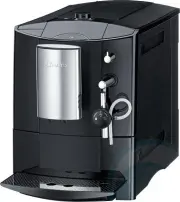 Miele CM5000BL
User Manual
Miele CM5000BL
User Manual