Page 3 - Contents
IMPORTANT SAFETY INSTRUCTIONS . . . . . . . . . . . . . . . . . . . . . . . . . . . . . . . . . 5 Guide to the machine . . . . . . . . . . . . . . . . . . . . . . . . . . . . . . . . . . . . . . . . . . . . . . . 8 Displays . . . . . . . . . . . . . . . . . . . . . . . . . . . . . . . . . . . . . . ...
Page 5 - Electrical safety; IMPORTANT SAFETY INSTRUCTIONS
When using electrical appliances, basic safety precautions should always befollowed, including the following: Read all instructions before installation or use of the coffee system. Please read these instructionscarefully to prevent accidents andmachine damage. This appliance is for household useonly...
Page 6 - Use
Installation work and repairs shouldonly be performed by a trained technician in accordance with nationaland local safety regulations. Repairsand other work by unauthorizedpersons could be dangerous. Never open the outer casing of theappliance. Tampering with electrical connections or componentsand ...
Page 7 - SAVE THESE
The water lines must be rinsed andthe machine cleaned thoroughly before the first coffee is prepared. See"Daily coffee system care". The use of accessories notrecommended by the appliance manufacturer may result in fire, electricshock or injury. Do not reach into the perforator.Injuries may ...
Page 8 - Front view; Press; Guide to the machine
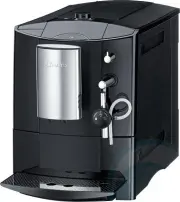
Front view a Left display b Left jog shuttle Press this jog shuttle to turn the machine on and off. Turning it selects a desired program, option or setting. c Right jog shuttle Press this jog shuttle: – to start and stop the dispensing of coffee or hot water. – to select an option to alter or custom...
Page 9 - Interior view
Interior view l Main switch m Capsule plate (replaced with the descaling funnelwhen descaling is performed) n Perforator (not visible, penetrates capsule toassist in the brewing process) o Capsule carousel p Carousel tray q Water tank r Drip tray with grid (grid avoids spilling during transport) s W...
Page 10 - Left display; Drink selection; Right display; Displays
Left display COSI K 1 2 3 4 5 L o n G k C – Drink selection Up to 5 different coffee types K , as well as, steam L and hot water o – User profile Up to 4 different users n – Important maintenance Rinsing G , descaling k – Selection of Settings C Right display LANGUAGE F Y K n I I J Z – selects coffe...
Page 11 - Turning the machine on and off; Turning on; Press the left jog shuttle.; Míele; Turning off; First steps to use
Turning the machine on and off The appliance must be correctlyinstalled and connected before thefirst use. Turning on ^ Press the left jog shuttle. Míele Welcome! When turned on for the first time, awelcome screen along with othermessages will appear in the rightdisplay. The welcome screen will bedi...
Page 13 - Filling the water tank; Open the appliance door.; Filling water and coffee capsules
Filling the water tank The water tank should be washed andfilled with fresh cold tap water beforeeach day of use. Never put hot water or any otherliquid except cold water into thewater tank. ^ Open the appliance door. ^ Lift the water tank and pull it out. ^ Fill the container with fresh, cold tapwa...
Page 14 - Pull the carousel tray,; Changing the coffee capsules; Push the carousel ring,
Filling the coffee capsulecarousel Only insert Nespresso coffeecapsules in the carousel.Damaged, broken or dentedcapsules should not be used theymay jam in the machine. There are five chambers, each can holdfour capsules. The coffee types have tobe allocated to their respectivechambers to get the de...
Page 15 - Allocating the coffee types; empty; Allocating various coffee types
Twelve different Nespresso coffee typesare available for this coffee system.They differentiate in terms of acidity,fruitness, bitterness and roast.Therefore the preparing times will vary. See "The Espresso / Lungo range" formore information on the coffee types. Allocating the coffee types Fi...
Page 16 - Setting a new coffee type; Press the right jog shuttle.; To enter text; and; Not saving an entry
Allocating different coffeetypes CHAMBER 5 ARPEGGIO ~ ^ Turn the right jog shuttle to thedesired coffee type and press toconfirm it to that chamber. Setting a new coffee type CHAMBER 5 + save as ~ ^ Turn the right jog shuttle to "save as"if no coffee type is allocated yet, tosave a new coffe...
Page 17 - Making coffee
Rinse the water lines beforepreparing the first drink of the day. Ifthe "Automatic rinsing" option is setto "on" and the machine is still coldthis will take place automatically. Theheating system will heat and thewater lines will be rinsed. If the "Automatic rinsing" option i...
Page 18 - Prewarming the cups; To prewarm with hot water; To prewarm with steam; Press the steam lever down.
Prewarming the cups Prewarming the cups allows the coffeeto fully develop the flavor and aroma. Use caution. Steam and hot waterare very hot. ^ Place a cup under the steam / hotwater valve. To prewarm with hot water HOT WATER K 1 2 3 4 5 L o n G k C ^ Turn the left jog shuttle to the "Hotwater&#...
Page 19 - Espresso and coffee; Espresso; Interrupting the brewing
Espresso and coffee The flavor of the coffee depends on thecoffee capsule and the quantity ofwater used. To ensure the machineuses exactly the amount of water to suityour taste and your cup size, there is achoice of four serving sizes forespresso / coffee. Aside from the serving size, makingcoffee a...
Page 21 - Frothing milk into the cup; Fill the cappuccinatore to the; upper; Turn the spout to the cup symbol.
Frothing milk into the cup ^ Prewarm the cup before filling withfroth. ^ Fill the cappuccinatore to the upper "max" mark with cold milk. ^ Turn the spout to the cup symbol. ^ Turn the valve over the handle to thefroth symbol. ^ Place the cappuccinatore under thesteam valve. ^ Place a cup und...
Page 22 - Rinsing the lid; does not; After use
Frothing milk in the cappuccinatore ^ Fill the cappuccinatore to the lower "max" mark with cold milk. ^ Turn the spout to the cappuccinatoresymbol. ^ Turn the valve over the handle to thefroth symbol. HEATING WITH STEAM K 1 2 3 4 5 L o n G k C ^ Turn the left jog shuttle to "Heatingwith ...
Page 23 - Hot water; Press the right jog shuttle to confirm.; Dispensing hot water
Hot water ^ Place a cup under the hot water /steam valve. HOT WATER K 1 2 3 4 5 L o n G k C ^ Turn the left jog shuttle to "Hot water". ^ Press the right jog shuttle to confirm. ^ Press again to stop the water fromdispensing. Dispensing hot water 23
Page 24 - Setting a default serving size; Setting serving sizes
The flavor of the coffee depends on thecoffee type and the quantity of waterused. To ensure the machine usesexactly the amount of water to suit yourtaste and your cup size, there is achoice of two serving sizes forespresso / coffee. q The espresso symbol dispenses a standard size espresso.The espres...
Page 25 - Setting the user name; Setting user profiles
Setting the user name Up to four different user profiles can beprogrammed to accommodate differentpreferences and serving sizes. See"Setting serving sizes". SETTINGS F K 1 2 3 4 5 L o n G k C ^ Turn the left jog shuttle to "Settings". USER NAME F Y K n I I J Z ^ Turn the right jog sh...
Page 27 - Selecting a language; A check marks the selected language.; Selectable languages:; English US and; Settings
The coffee system can be customizedto suit individual preferences. Selecting a language SETTINGS F K 1 2 3 4 5 L o n G k C ^ Turn the left jog shuttle to "Settings". LANGUAGE F Y K n I I J Z The language symbol is selected in theright display. ^ Press the right jog shuttle to selectthe langu...
Page 28 - Setting the time of day; Press the right jog shuttle again.
Setting the time of day SETTINGS F K 1 2 3 4 5 L o n G k C ^ Turn the left jog shuttle to "Settings". LANGUAGE F Y K n I I J Z The language symbol is highlighted inthe right display. TIMES F Y K n I I J Z ^ Turn the right jog shuttle to the clocksymbol, press to confirm. TIME OF DAY Y o A ^ ...
Page 29 - Turning off after Standby time
Turning off after Standby time To conserve energy the coffee systemcan be set to turn off automatically aftera programmed time interval. A time period between 20 minutes and2 hours can be selected. The time ismeasured from the last time coffee /espresso was dispensed. SETTINGS F K 1 2 3 4 5 L o n G ...
Page 30 - Turning on at a preset time
Turning on at a preset time A specific time can be set to turn themachine on, e.g. for breakfast. In orderto use this function the clock has to beset. SETTINGS F K 1 2 3 4 5 L o n G k C ^ Turn the left jog shuttle to "Settings". TIMES F Y K n I I J Z ^ Turn the right jog shuttle to the clock...
Page 31 - Turning off at a preset time; Deleting the preset times
Turning off at a preset time A specific time can be set to turn thecoffee system off. In order to use thisfunction the clock has to be set. SETTINGS F K 1 2 3 4 5 L o n G k C ^ Turn the left jog shuttle to "Settings". TIMES F Y K n I I J Z ^ Turn the right jog shuttle to the clocksymbol, pre...
Page 32 - Display brightness
Setting lighting, displaycontrast and brightness SETTINGS F K 1 2 3 4 5 L o n G k C ^ Turn the left jog shuttle to "Settings". PROGRAMMING F Y K n I I J Z ^ Turn the right jog shuttle to the"Programming" symbol, press toconfirm. LIGHTING n I A M T U N A ^ Turn the right jog shuttle t...
Page 33 - Automatic rinsing; A check marks the current setting.
Automatic rinsing The rinsing feature flushes out coffeeresidue and pre-warms the coffeesystem. When "Automatic rinsing - on"is selected the system will automaticallybe rinsed when the appliance is turnedon or off. "Heating - up please wait" isshown in the display. If this feature is...
Page 34 - Steam system
Steam system To conserve energy, the steam systemcan be turned off if steam is not usedall the time. Residual heat may allow themachine to dispense some steamwhen the steam system is turned off.Use caution. SETTINGS F K 1 2 3 4 5 L o n G k C ^ Turn the left jog shuttle to "Settings". PROGRAM...
Page 35 - Factory setting
Total coffee counter (INFO) If the option "Info" is selected, thedisplay will show the number of cups ofcoffee dispensed to date (espresso,coffee, double espresso / coffee). SETTINGS F K 1 2 3 4 5 L o n G k C ^ Turn the left jog shuttle to "Settings". INFO F Y K n I I J Z ^ Turn the ...
Page 36 - Locking the coffee system; Unlocking the coffee system; System lock
The coffee system can be locked sothat it cannot be used by children orthose not familiar with the operatinginstructions. Locking the coffee system ^ Turn the coffee system off bypressing the left jog shuttle. SYSTEM LOCK W ^ Turn the right jog shuttle until thedisplay shows "System lock". ^...
Page 37 - Rinse; Dishwasher safe; Daily coffee system care
Turn the machine off at the mainswitch before cleaning. Allow the coffee system to coolbefore cleaning. Danger of burns! Do not clean the unit with a steamcleaner. Never use abrasive cleaning agents.These will damage the machine. Rinse If you do not wish to rinse the linesautomatically, they have to...
Page 38 - Interior; Capsule carousel and tray; Common coffee system care
Interior ^ Clean all interior parts and areas ofthe machine with a solution of hotwater and liquid dish soap. Seebelow for more details. Capsule carousel and tray ^ Pull out and remove. Both pieces aredishwasher safe. Capsule carousel niche ^ Clean the sensor in the carousel trayniche. Dry with a so...
Page 39 - Capsule plate; Press the checkered part,; Steam valve
Capsule plate The capsule plate will soil more or lessdepending on the oil content of thecoffee capsule used. Clean the capsule plate as necessaryor when the machine needs to bedescaled with the supplied cleaningtablets. The cleaning tablets can bepurchased from Miele. ^ Press the checkered part, a ...
Page 40 - Exterior; Stainless steel surfaces; Cappuccinatore
Exterior The front of the appliance can becleaned with a sponge and a solution ofwarm water and non abrasive liquiddish soap. Dry with a soft cloth. Only use a slightly damp spongewhen cleaning the controls. Watercould penetrate into the electronicsand cause damage. Wipe any spills from descalingimm...
Page 41 - Maintenance
^ Reassemble the lid as shown in thegraphics. ^ Be sure that the valve sits above thecappuccinatore handle. Otherwisethe frothing process will not work. Maintenance The perforator should be changed after15000 cups of coffee / espresso. Theperforator can be purchased from Miele. It is recommended to ...
Page 43 - water tank; Descaling; Descaling the appliance
The coffee system must be descaledregularly. The time period depends onthe water hardness set. The appliancewill display a reminder message andwill eventually lock if not descaled. Once the system is at the point whereonly 50 drinks can be prepared beforedescaling must be performed, thedisplay will ...
Page 44 - Follow these prompts.; This will cause the
The right display will prompt youthrough the single steps of thedescaling process. Follow these prompts. See "Descaling prompts" for moreinformation. Do not skip any steps and do notremove a part unless prompted bythe display. This will cause the program to fault and descaling willrestart. A...
Page 45 - Descaling prompts; For clarification regarding the prompts see the following:; Please use the waste container
Descaling prompts For clarification regarding the prompts see the following: Please add descaling agent to thewater container ^ Remove the water tank. ^ Fill the water tank with cold tap waterto the k mark. If not filled to the mark, descaling will be prematurelycanceled. ^ Dissolve two of the enclo...
Page 46 - Fault messages
If an error occurs a fault message will appear in the right display. Minor problemscan be fixed without a service call. Message Possible fault Solution Chamber empty -please refill The selected coffee chamber is empty. Fill with coffee capsules. Please fill with fresh water This is a reminder to fil...
Page 47 - Machine Problems; What if the light does not illuminate when turned on?; Frequently asked questions
Repairs to electrical appliances should only be carried out by a suitablyqualified person in accordance with local and national safety regulations.Repairs and other work by unqualified persons could be dangerous. Themanufacturer cannot be held responsible for unauthorized work. Machine Problems What...
Page 48 - The contacts are soiled.
What if the light turns suddenly off? The light turns off automatically when the machine has not been used for 10minutes. What if the door cannot be opened or closed? The steam lever is not pushed up all theway. Press the lever down and then up againall the way. What if the time of day needs to be r...
Page 49 - Preparing / dispensing problems; Take out the water tank and then insert it again.; What if no hot water or steam is dispensed from the steam valve?
Preparing / dispensing problems What if no drink is prepared although there are coffee capsules and water inthe tank? Take out the water tank and then insert it again. What if no coffee is prepared although water is in the tank and coffeecapsules are in the carousel? A coffee capsule is jammed in th...
Page 50 - What if the steam smells like rubber?; The rubber odor will wear off with time and usage.; What if the cappuccinatore dispenses no frothed milk?; Turn the spout to the cup.; What if the coffee dispensing is interrupted?
What if the steam heating system is turned off but steam can still bedispensed? Steam can be dispensed as long as thesteam heating system is warm. Once cooled the system will no longerdispense steam. What if the steam smells like rubber? The rubber odor will wear off with time and usage. What if the...
Page 51 - Coffee results; The capsule plate is soiled.
Coffee results What if the dispensed coffee has some ground coffee in it? The capsule plate is soiled. Clean the capsule plate. What if the water flow stopped when programming the serving size? – If the maximum water amount isreached, the water dispensing stopsautomatically. The maximum wateramount ...
Page 52 - Descaling problems; What if the descaling process was started accidently?; The machine needs to be descaled.
Descaling problems What if the descaling process was started accidently? The descaling process cannot beinterrupted once the right jog shuttle ispressed. The process now needs to becompleted as a safety measure.Descaling is important to increase thelife of the machine and to ensure thebest results p...
Page 53 - What if the message F 75 or F 76 shows in the display?
"F" messages What if F 10 shows? – No water can be pumped fromthe water tank. – F 10 also shows, if the water tankwas not filled correctly duringdescaling. – Fill the system with water. See "Beforeusing the coffee system for the firsttime". – Remove and reinsert the water tank. – Ref...
Page 54 - From the carousel tray; From the capsule plate; Remove the coffee capsule; only; with; Removing a jammed capsule
, Turn the machine off at the main switch in the upper left corner. Danger of electric shock. The machine must be turned off before performing the nextsteps. From the carousel tray ^ Open the appliance door. ^ Turn the machine off at the mainswitch. ^ Insert a spoon handle underneath thecarousel tra...
Page 55 - MieleCare; , our Extended Service; MieleCare; is the only Extended Service; MieleCare; After sales service
In the event of a fault which you cannoteasily fix yourself, please contact theMiele Technical Service Department atthe address on the back of this booklet. When contacting the Technical ServiceDepartment, please quote the modeland serial number of your appliancegiven on the data plate inside theapp...
Page 56 - Electrical connection
The coffee system comes equippedwith a 6 ft. (1.8 m) power cord with aNEMA 5-15P molded plug forconnection to a 120 V, 15 A, 60 Hzpower supply. Connection should be made via asuitable isolator, with an on-off switchwhich should be easily accessible forservicing work. Installation, repairs and other ...
Page 57 - Installation options; A countertop option for the CVA 2650 is possible with the; Installation
Installation options A countertop option for the CVA 2650 is possible with the CVSG 50 casing. The coffee system is designed to be built into cabinetry. Installation 57
Page 60 - To install the CVA 2650 below a hanging cabinet a
To install the CVA 2650 below a hanging cabinet a CVUG 50 casing (optional accessory) is required. Installation 60
Page 61 - If you have a cabinet with
Installation Make sure power is not supplied tothe appliance while installation ormaintenance work is performed.Disconnect the power supply to thework area by unplugging the unit,tripping the circuit breaker orremoving the fuse. The coffeesystem must be properly installedbefore being used. ^ Plug th...
Page 62 - Programming; Setting the language; To turn off the machine
Programming The appliance must be correctlyinstalled and connected before thefirst use. Setting the language ^ Press the left jog shuttle to turn themachine on. Míele Welcome! When turned on for the first time, awelcome screen as well as othermessages will appear in the rightdisplay. The welcome scr...
Page 63 - be mixed in equal parts with; Never; To adjust or set the water hardness
Setting the water hardness The hardness of the water used in thecoffee system must be determined andprogrammed into the appliance. Thewater hardness will determine howfrequently the unit must be descaled toproperly maintain the coffee system.The machine monitors the volume ofwater passing through it...
Page 64 - Coffee glossary
Caffè is the Italian term for a standard espresso. Caffè americano is a thin espresso with water added. Caffè corretto is espresso with a splash of liquor. Caffè freddo is iced coffee. An extended version of espresso servedwith ice. Caffè latte is a double espresso in a large cup filled with hot mil...
Page 65 - The Espresso range
Ristretto (black) is the typical Italian espresso. It is ashort, strong, full-bodied espresso witha touch of acidity. It has a pleasantlylingering taste. Strength: 10Ideal cup size: Ristretto, Espresso orCappuccino Arpeggio (dark purple) is a Mediterranean blend parexcellence with a strong character...
Page 66 - The Lungo range
Vivalto (sky blue) is an intense Lungo which combines abeautifully roasted note with a subtlefloral note. With its noticeable cremaand mild aroma, it is also deliciousprepared with milk. Strength: 6Ideal cup size: Lungo Decaffeinato Lungo (coral) delivers a smooth body and a fineroundness in the mou...
Page 67 - Caring for the environment
Disposal of packing material The cardboard box and packingmaterials protect the appliance duringshipping. They have been designed tobe biodegradable and recyclable.Please recycle. Ensure that any plastic wrappings,bags, etc. are disposed of safely andkept out of the reach of children.Danger of suffo...


 Miele 11106260
User Manual
Miele 11106260
User Manual
 Miele 11648140
User Manual
Miele 11648140
User Manual
 Miele 11648170
User Manual
Miele 11648170
User Manual
 Miele 11648400
User Manual
Miele 11648400
User Manual
 Miele 11733820
User Manual
Miele 11733820
User Manual
 Miele 11733830
User Manual
Miele 11733830
User Manual
 Miele 11733860
User Manual
Miele 11733860
User Manual
 Miele CM5000BL
User Manual
Miele CM5000BL
User Manual