Page 2 - Contents
IMPORTANT SAFETY INSTRUCTIONS . . . . . . . . . . . . . . . . . . . . . . . . . . . . . . . . . 4 Guide to the machine . . . . . . . . . . . . . . . . . . . . . . . . . . . . . . . . . . . . . . . . . . . . . . 8 Display and controls . . . . . . . . . . . . . . . . . . . . . . . . . . . . . . . . . ...
Page 4 - Proper Use; This coffee system is not designed; IMPORTANT SAFETY INSTRUCTIONS
When using electrical appliances basic safety precautions should always befollowed, including the following: Read all instructions before installation or use of the coffee system. Please read these instructionscarefully to prevent accidents andmachine damage. This appliance complies with currentsafe...
Page 6 - Safety
~ Do not place the appliance on or near a hot gas or electric burner, or in aheated oven. ~ The use of accessory attachments not recommended by the appliancemanufacturer may result in fire, electricshock or injury to persons. ~ Protect the coffee machine from water and water spray. ~ Installation, m...
Page 8 - Guide to the machine
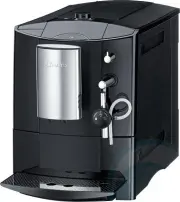
a Cup warming surface b Bean container, ground coffee chute and rotary selector to control thefineness of the ground coffee c Display and controls d Hot water spout e Central spout with integratedcappuccinatore f Waste container g Drip tray h Drip tray cover i Milk tube aperture j Main switch k Comp...
Page 9 - Display and controls
Display and controls Drink buttons Press these buttons to prepare thedesired drink. The symbols mean: . Espresso b / Coffee a k Latte Macchiato g H Cappuccino f To prepare a drink, press the corresponding button once. For two portions of a drink, press the corresponding button briefly twice insucces...
Page 10 - To select an action or setting
Button illumination When the drink buttons are illuminated,you are in the main menu and canprepare drinks. If drink preparation hascommenced, only the correspondingdrink button is illuminated. The semicircle also lights up on theOK button shortly before the steam isproduced, e.g. for milk froth. The...
Page 11 - To set the language; Preparing the coffee machine for use
Please read the operatinginstructions and take the time tofamiliarize yourself with the coffeemachine before using it for the firsttime. Before using for the first time ^ Set up the coffee machine andremove any protective film (see"Installation"). Clean the coffee machine thoroughly(see "...
Page 12 - To set the time of day; In the display you will see:; Place a suitable container; TIP; Continue following the instructions; Water hardness
To set the time of day ^ Turn the rotary selector until thecurrent hour appears in the display.Press the OK button. ^ Turn the rotary selector until thecurrent minutes appear in thedisplay.Press the OK button. The setting is now saved.SET UP SUCCESSFUL will now appearin the display. ^ Press the OK b...
Page 13 - The setting is now saved.
Determining the water hardness You can test the water hardness withthe supplied test strips. Your localwater supplier will also be able toadvise you on the water hardness inyour area. ^ Dip the test strip in water for asecond, then shake off any excesswater. The result will be visible afterabout one...
Page 14 - tank up and out using the handle; Filling the water tank
The quality of the water used plays animportant part in the overall quality ofthe coffee. The water tank should be emptiedand filled with fresh, cold tap water. Hot or warm water, or other liquidscould damage the coffee system. Do not use mineral water. Mineralwater will cause lime scale depositsto ...
Page 15 - Filling the coffee bean container
Fill the coffee bean container withroasted espresso or coffee beans. Important: Only use roastedespresso or coffee beans in thecontainer.Anything else, including groundcoffee, will damage the grinder. Important: Do not use coffee beansthat have been treated with sugar,caramel or other substances. Do...
Page 16 - Turning on; Turning off; Turning the machine On / Off
The On/Off button - (Standby) can be used to turn the coffee system on or off,if the main switch at the back of themachine is turned on. Turning on When the machine is turned on, it heatsup and rinses out the pipework. Thiscleans and heats the pipework readyfor coffee preparation. After rinsing, hot...
Page 17 - To switch cup heating on or off; or
Cups should always be pre-heated toallow the flavor of espresso and othercoffee drinks to develop and beretained.The smaller the volume ofcoffee/espresso and the thicker thecup, the more important it is to pre-heatthe cup. You can use the cup heating surface onthe top of the coffee machine topre-hea...
Page 18 - Adjusting the coffee dispensers to the cup height
The coffee dispensers can be raised orlowered to the height of your cup. If thedispensers are closer the beverage willnot cool down as quickly and the cremawill have a better consistency. ^ Pull the coffee dispenser down to thesame level as the rim of the cup. or ^ Push the dispenser up until there ...
Page 19 - Canceling preparation
Preparation can be canceled whileSTOP is showing in the display. To cancel the preparation of coffee or espresso , ^ press the OK button. Drink preparation will be canceled. To cancel the preparation of specialty coffees with milk or two portions of a drink , you can cancel – the preparation of the ...
Page 20 - Preparing espresso or coffee; When the; Espresso or coffee
Preparing espresso or coffee When the . or / buttons are pressed, the coffee system automatically grindsthe beans to brew the coffee. SELECT TYPE OF DRINK will appear inthe display. ^ Place a cup under the coffeedispensers. ^ To make an espresso press the . button. or ^ To make a coffee press the / ...
Page 21 - one; Adding ground coffee; cancel; Making coffee or espresso using ground coffee
To make espresso or coffee usingready ground coffee, add a portion ofground coffee to the ground coffeechute. This allows you to prepare adecaffeinated coffee, if the beancontainer is already filled with regularcoffee beans for example. The coffee machine will automaticallyrecognize that ground coff...
Page 22 - To make an espresso press the
Making coffee or espressousing ground coffee You can now select whether you wantto dispense a coffee or an espressomade with ground coffee. If no button is pressed withinapprox. 15 seconds, the ground coffeeis emptied into the waste container. The following message appears in thedisplay: SELECT DRIN...
Page 23 - Specialty coffees with milk
You can choose from a variety ofspecialty coffees. with milk Cappuccino consists of about two-thirds milk froth and one-thirdespresso. Latte macchiato consists of one-third each of hot milk, milk froth andespresso. Caffè latte consists of hot milk and coffee. Hot milk or milk froth can also be prepa...
Page 24 - cappuccino
Making specialty coffees withmilk Caution! Danger of burning andscalding from hot steam coming outof the cappuccinatore. The liquidsand steam dispensed are very hot. The coffee machine heats up when abutton is pressed to request a drink.HEATING-UP PHASE will appear in thedisplay. Steam is then used ...
Page 25 - you can make; latte; at the touch of a button.; caffè latte; After dispensing milk
Specialty coffees using groundcoffee You can also make cappuccino, lattemacchiato or caffè latte from groundcoffee. ^ Fill the ground coffee chute withground coffee (see "Espresso orcoffee from ground coffee"). When SELECT TYPE OF DRINK USEGROUND COFFEE appears in thedisplay, ^ you can make ...
Page 26 - Preparing hot water
You can make hot drinks or preheatcups using the hot water function. Caution! Danger of scalding andburns. The water dispensed is veryhot. SELECT TYPE OF DRINK will appear inthe display. ^ Place a suitable container under thehot water spout. ^ Press the OK button until MENUappears in the display. ^ ...
Page 27 - Grinder setting; too coarse; Adjusting the grinder setting
You can customize the coffee machineto suit the type of coffee used.You can: – adjust the grinder setting, – change the amount of coffee, – pre-brew the freshly ground coffee, and – set the brewing temperature. Grinder setting You can adjust the grinder setting tosuit the type of coffee you are usin...
Page 28 - Amount of coffee; too low; Adjusting the strength of the coffee
Amount of coffee The coffee machine can grind andbrew 6-14 g of coffee per cup. Thegreater the quantity, the stronger thecoffee or espresso. There are various ways to tell whetherthe amount of coffee is set correctly. The amount of coffee is too low , if – espresso or coffee flows into the cup too q...
Page 29 - Pre-brewing the coffee
Pre-brewing the coffee When the pre-brewing function isswitched on, the freshly ground coffeeis first moistened with a little hot water.Then the remaining water is forcedthrough the moistened coffee at highpressure. This helps release the flavorof the coffee. The pre-brewing function can be turnedon...
Page 30 - – low; Not all types of coffee can; Brewing temperature
Brewing temperature The ideal brewing temperaturedepends on the type of coffee, andwhether espresso or coffee is beingprepared. You can set different temperatures forespresso and coffee There is a choiceof three brewing temperatures: – low – normal – high TIP Not all types of coffee can withstand a ...
Page 31 - Setting the serving size
The coffee machine is equipped withportion programing. You can programthe amount of water used for eachportion of espresso, coffee or hot waterto suit your taste and cup size. For drinks prepared with milk, you canalso set the duration of the steam usedfor heating or frothing the milk. You canalso p...
Page 34 - Calling up the SETTINGS menu; Press the OK button for 2 seconds.; If the coffee machine is turned off; The SETTINGS menu
You can use the SETTINGS menu tocustomize the coffee machine to suityour personal requirements. Calling up the SETTINGS menu ^ Press the OK button for 2 seconds. MENU r SETTINGS s ^ Turn the rotary selector untilSETTINGS appears in the display. ^ Press the OK button. Now you can adjust the settings,...
Page 35 - Possible setting options; The factory setting for the currently selected option is shown in; bold
Possible setting options The factory setting for the currently selected option is shown in bold . Option Available settings Language English, German and other languages Time of day(available in Comfort mode) Time format 12 H/ 24 H Set Timer(available in Comfort mode) Set switch on at / switch off af...
Page 37 - Language; Time of day and clock display; not; To set the clock display
Language SELECT TYPE OF DRINK will appear inthe display. ^ Press the OK button until MENUappears in the display. ^ Turn the rotary selector untilSETTINGS appears in the display.Press the OK button. SETTINGS r LANGUAGE F s ^ Select LANGUAGE F and press the OK button. ^ Select the desired language and...
Page 38 - Timer functions; Comfort mode
^ Select 24 H, if you want the time tobe shown as a 24 hour clock. or ^ Select 12 H, if you want the time tobe shown as a 12 hour clock. ^ Press the OK button. The setting is now saved. To set the time of day ^ Select SET and press the OK button. ^ Turn the rotary selector until thecurrent hour appe...
Page 39 - switch on at the required
Setting the timer SELECT TYPE OF DRINK will appear inthe display. ^ Press the OK button until MENUappears in the display. ^ Turn the rotary selector untilSETTINGS appears in the display.Press the OK button. SETTINGS r TIMER s ^ Select TIMER and press theOK button. ^ Turn the rotary selector until SE...
Page 40 - will appear in the
Switch off after If none of the buttons has been pressedor no drink has been prepared, thecoffee machine will turn itself off afterone hour to save energy. You can change this timer functionsetting for "Switch off after" to anothertime between 15 minutes and 9 hours. ^ Select SWITCH OFF AFTE...
Page 41 - Operating modes; Eco mode; To select the operating mode
Operating modes You can operate the coffee machine in Eco mode or in Comfort mode . The Eco mode is an energy-saving mode. The coffee machine will switch toenergy saving mode if it has not beenused to prepare a drink for some time.The coffee machine will heat up againwhen a button is pressed. The &#...
Page 42 - To display information; To return to the previous menu,; To lock the coffee machine; will
To display information In the menu option INFO the number ofportions prepared for each individualdrink can be displayed. You can also see whether more than 50portions can be dispensed before themachine needs to be descaled (NO.PORTIONS UNTIL DESCALING). SELECT TYPE OF DRINK will appear inthe display...
Page 43 - Factory default
When the coffee machine is switchedoff it is locked and drinks cannot bedispensed. To deactivate the system locktemporarily You can deactivate the system locktemporarily, if you want to preparedrinks, for example. ^ Press the OK button for 3 seconds . You can now prepare drinks. As soon as you turn ...
Page 44 - Demo mode; To activate demo mode; To deactivate demo mode
Demo mode Do not activate this setting fordomestic use. The coffee machine can bedemonstrated in the showroom or atexhibitions in "demo mode". In thismode the machine lights up, but nodrinks are prepared or actions carriedout. To activate demo mode The coffee machine cannot beswitched off wi...
Page 45 - Quick guide; Recommended frequency; Clean by hand only; Cleaning and care
Quick guide The coffee system must be cleaned regularly to prevent a build-up of bacteria. Recommended frequency What do I have to do? Each time milk is prepared, if morethan one hour has passed since thelast time milk was prepared Rinsing the milk system Daily(before you turn the coffee machineoff)...
Page 46 - Calling up the MAINTENANCE menu
Danger of burning and scalding onhot components or by hot liquids!Always allow the coffee machine tocool down before cleaning. Notethat the water in the drip tray can bevery hot. Do not use a steam cleaner to cleanthe coffee machine. The steamcould cause a short circuit. To avoid damage to the surfa...
Page 47 - Rinsing the system; Rinsing the system manually; Rinsing the milk system; rinse the milk system
Rinsing the system The coffee machine rinses itself when itis turned on. This means that the pipesare pre-heated with warm water readyfor you to prepare a delicious coffeedrink immediately. If a coffee drink has been prepared, thecoffee machine also rinses itself beforeturning off. This removes any ...
Page 48 - Cleaning the milk system
The following will appear in the display: RINSING THE MILK SYSTEM START ^ Press the OK button. ^ Place the milk tube into the left-handopening in the drip tray, wheninstructed in the display. ^ Press the OK button. The milk system is rinsed out. Cleaning the milk system Caution! Bacteria can causein...
Page 49 - Lift the cover forward and off.
Dismantling and cleaning the milksystem The milk system can be cleaned in thedishwasher or by hand using hot waterand liquid dish soap. Place the individual components in thedishwasher for thorough cleaning. ^ Pull the coffee dispensers all the waydown. ^ Lift the cover forward and off. ^ Pull the i...
Page 50 - The milk system has been cleaned.
Now re-assemble the cappuccinatore: ^ Reassemble the integratedcappuccinatore. ^ Push the integrated cappuccinatoreinto the central spout. Push hard untilthe dispensers are correctly locatedunder the spout edge. ^ Replace the stainless steel cover andthen push the central spout back upinto position....
Page 51 - Clean all parts; by hand only; using; Water container
Cleaning the stainless steelmilk flask (depending on the model) The milk flask should be taken apartand cleaned every day. ^ Clean all parts by hand only using hot water and liquid dish soap. Ifnecessary, a small brush can beused to remove any stubborn milkdeposits. ^ Rinse all parts carefully under...
Page 53 - Clean the space under the drip tray.; Waste container; Dry the waste container.
Make sure that the metal contactdiscs on the drip tray are cleanedand dried properly. The discs willnot be able to detect that the driptray is full if they are dirty or damp. ^ Clean the space under the drip tray. ^ Replace the waste container in thedrip tray and push the drip tray backinto the coff...
Page 54 - Brew unit
Bean container and groundcoffee chute Disconnect the coffee machine fromthe power supply before cleaning. TIP Use a vacuum cleaner to remove any dry coffee residues from the beancontainer and the ground coffee chute. ^ Open the lid on the right hand side ofthe coffee machine. Remove thecoffee bean c...
Page 57 - Exterior; Do not dry the; mat; surfaces of black
Exterior Remove any soiling promptly. Thesurfaces can become discolored orotherwise altered if soiling is notremoved right away. Make sure that no water gets inbehind the display. The exterior surfaces aresusceptible to scratching. Contactwith unsuitable cleaning agentscould cause discoloration. Do ...
Page 58 - must; Descaling solution; Place; Descaling
Limescale builds up in the coffeemachine during use. The limescalebuildup in the machine will depend onthe hardness of your local water supply.Limescale must be removed regularly. The machine will guide you through thedescaling process. Various instructionswill appear in the display, e.g. you willbe...
Page 59 - The descaling process will begin.
Be sure to mix water and descalingtablets in the right proportions. It isimportant that you fill the watercontainer with enough water. Toolittle water can cause the descalingprogram to be stopped prematurely. ^ Replace the water container in thecoffee machine. Various messages will appear in thedisp...
Page 60 - Energy saving mode
Eco-Mode When using Eco Mode the coffeesystem will save energy. The coffee system will switch to Ecomode if it has not been used to preparea drink in some time. When in Ecomode the heat function is not onconstantly, therefore reducing energyusage. The coffee system will heat up againwhen a drink is ...
Page 61 - Do not; Messages in the display; Message; Frequently asked questions
, Repairs should only be carried out by a qualified and trained person in accordance with local and national safety regulations. Unauthorized repairscould cause personal injury or machine damage. Do not open the outer casing of the coffee system. You can easily resolve many of the minor problems you...
Page 65 - Unsatisfactory results; Problem
Unsatisfactory results Problem Possible cause and solution Water is dispensedfrom the coffeedispensers whencoffee has beenselected. The ground coffee chute lid was opened and closedwithout coffee being put into it. YES was then selectedwhen the GROUND COFFEE option appeared in thedisplay. ^ If groun...
Page 67 - Unusual performance of the coffee machine; The brew unit filters are blocked.
Unusual performance of the coffee machine Problem Possible cause and solution When a drink isselected very little ornothing at all isdispensed from thecoffee dispensers. The brew unit filters are blocked. ^ Clean the brew unit (see "Brew unit"). ^ Degrease the brew unit (see "Cleaning th...
Page 71 - Repairs; After sales service
Repairs In the event of a fault which you cannotcorrect yourself please contact theMiele Service Department by phonenumber at the back of this booklet. ^ Please quote the model type andnumber of your appliance. These can be found on the data platelocated behind the drip tray inside thecoffee system....
Page 72 - Accessories
The following accessories are includedwith your coffee system depending on the model : – Measuring spoon for ground coffee – Integrated cappuccinatore as a spare part – Cleaning tablets to clean/degrease the brew unit – Descaling tablets for descaling the water pipework – Test strips to determine th...
Page 73 - Packing; Transport
If the coffee machine will not be usedfor an extended period of time, e.g.vacation, or will be transported over along distance, the machine should beprepared as follows. Please note: – Empty and clean the coffee bean container – Empty and clean the water container – Evaporating the coffee machine – ...
Page 75 - Installation instructions
Installation instructions Information is subject to change. Please refer to our website to obtain the mostcurrent product specification, technical & warranty information.
Page 76 - Electrical connection
All electrical work should beperformed by a qualified electricianin strict accordance with nationaland local safety regulations.Installation, repairs and other workby unqualified persons could bedangerous. Verify that the voltage, load and circuitrating information found on the dataplate match the h...
Page 77 - Installation
Danger of overheating!Ensure that there is sufficientventilation around the coffee system.Be sure the vents at the top of themachine are not coveredcompletely. Danger of overheating. If the coffeesystem is installed behind a cabinetdoor, it may only be used with thedoor open. Do not close the cabine...
Page 78 - Dimensions
Page 79 - Caring for the environment
Disposal of packing material The cardboard box and packingmaterials protect the appliance duringshipping. They have been designed tobe biodegradable and recyclable.Please recycle. Ensure that any plastic wrappings,bags, etc. are disposed of safely andkept out of the reach of children.Danger of suffo...


 Miele 11106260
User Manual
Miele 11106260
User Manual
 Miele 11648140
User Manual
Miele 11648140
User Manual
 Miele 11648170
User Manual
Miele 11648170
User Manual
 Miele 11648400
User Manual
Miele 11648400
User Manual
 Miele 11733820
User Manual
Miele 11733820
User Manual
 Miele 11733830
User Manual
Miele 11733830
User Manual
 Miele 11733860
User Manual
Miele 11733860
User Manual
 Miele CM5000BL
User Manual
Miele CM5000BL
User Manual