Page 2 - Caring for the environment; Packaging material
Caring for the environment 2 Packaging material The packaging material used protectsthe machine during transportation.Please retain the original box andpolystyrene pieces so that you canpack the machine securely, should youneed to transport it in the future. Disposing of your oldappliance Electrical...
Page 3 - Contents
Contents 3 Caring for the environment .............................................................................. 2 Warning and Safety instructions ...................................................................... 6 Product description ...........................................................
Page 4 - Parameters
Contents 4 Parameters ......................................................................................................... 40 Displaying and changing parameters .................................................................. 40Portion size .......................................................
Page 6 - Warning and Safety instructions
Warning and Safety instructions 6 This coffee machine complies with all the stipulated safetyrequirements. Inappropriate use can, however, lead to personalinjury and material damage. Read the operating instructions carefully before using the coffeemachine. They contain important information on the i...
Page 7 - Correct application; This coffee machine is intended for home use.
Warning and Safety instructions 7 Correct application This coffee machine is intended for home use. This coffee machine is not intended for outdoor use. This coffee machine must not be used at altitudes above 2000 m. It must only be used as a domestic appliance to make espresso, cappuccino, ...
Page 8 - Safety with children
Warning and Safety instructions 8 Safety with children Danger of burning and scalding on the dispensing spouts. Children's skin is far more sensitive to high temperatures than thatof adults. Ensure children do not touch hot surfaces of the coffee machine orplace parts of their body under the dispe...
Page 9 - Technical safety
Warning and Safety instructions 9 Technical safety A damaged coffee machine is dangerous. Check it for any visible damage before setting it up. Never attempt to use a damaged coffeemachine. To avoid the risk of damage to the machine, make sure the connection data (voltage and frequency) on the d...
Page 11 - Correct use
Warning and Safety instructions 11 Correct use Danger of burning and scalding on the dispensing spouts. The liquids and steam dispensed are very hot. Keep well away from the area underneath the spouts when hotliquids and steam are being dispensed. Do not touch hot components. Hot liquid or steam c...
Page 13 - Cleaning and care
Warning and Safety instructions 13 Cleaning and care Refer to the relevant instructions in “Cleaning and care”. Clean the coffee machine and the milk flask (supplied as standard, depending on model) daily, particularly before using for the first time. All parts of the milk system need to be cl...
Page 14 - For machines with stainless steel surfaces:; Do not use sticky notes, adhesive tape, masking tape or other
Warning and Safety instructions 14 For machines with stainless steel surfaces: Do not use sticky notes, adhesive tape, masking tape or other types of adhesive on the stainless steel surfaces. Stainless steel surfaces are susceptible to scratching. Even magnets can cause scratches.
Page 15 - Product description
Product description 15 a Hot-water spout b Control panel c Cup heater* d Water container e Ground coffee chute f Bean container g Grinder setting (behind theappliance door) h Brew unit (behind the appliancedoor) i Height-adjustable central spout j Drip tray with lid and wastecontainer k Milk pipewor...
Page 16 - Milk siphon
Product description 16 a Milk flask* b Milk siphon c Milk pipework with rinse valve * depending on model: CM 6360,CM 6560
Page 17 - Controls and indicators; For making drinks
Controls and indicators 17 a On/Off button For switching coffee machine on andoff b Display For showing information about thecurrent action or status c Drink buttons For making drinks d Optical interface (For Miele Customer ServiceDepartment only) e Sensor control – For making other drinks: r...
Page 18 - Drink button symbols
Controls and indicators 18 Drink button symbols Espresso Coffee Long coffee Cappuccino Latte macchiato Espresso macchiato Tea water
Page 19 - Operation; Sensors; Miele; Miele; OK
Operation 19 Sensors To operate the coffee machine, touchthe sensors with your finger. An audible signal is generated eachtime a sensor is touched. You canadjust the volume of the signal tonesor switch the tones off (see “Settings –Volume”). Drinks menu When the following appears in thedisplay, you ...
Page 20 - Symbols in the display; Symbol; minute minder has been started (see “Tea –
Operation 20 Symbols in the display The following symbols may also appear in the display in addition to the text: Symbol Explanation This symbol indicates the “Settings” menu and the“Language” menu option. This symbol indicates that there is additional informationand advice about using the coffe...
Page 21 - Miele@home availability
Miele@home 21 Your coffee machine is equipped withan integrated WiFi module. In order to use it, you will need: - A WiFi network - The Miele@mobile app - A Miele user account The user account can be created via theMiele@mobile app. The Miele@mobile app will guide youthrough the process of connecting...
Page 22 - Before using for the first time; Selecting the display language; Setting the water hardness level
Before using for the first time 22 Before using for the first time Remove any notices from themachine. Remove the protective foil from thedrip tray cover and place the drip traycover into the lower panel. Place the coffee machine on a levelflat surface that is not sensitive towater (see “Insta...
Page 23 - Selecting the Performance mode
Before using for the first time 23 Selecting the Performance mode You can select the appropriate mode tosuit your personal preferences (see“Settings – Performance mode”). - Eco mode : This is an energy-saving mode. - Barista mode : This mode has been optimised for unadulterated coffeeenjoyment. - La...
Page 24 - Filling the water container; Risk to health due to
Filling the water container 24 Risk to health due to contaminated water.Bacteria can develop in water whichhas been sitting in the watercontainer for too long and is a risk toyour health.Change the water in the watercontainer every day . Risk of damage due to incorrect operation.Unsuitable liqui...
Page 25 - Filling the coffee bean container; Risk of damage to the grinder
Filling the coffee bean container 25 Coffee or espresso can be made fromwhole roasted coffee beans which arefreshly ground in the coffee machine foreach portion. This requires the coffeebean container to be filled with coffeebeans. Alternatively, you can make coffeedrinks with ready ground coffee. ...
Page 26 - Switching on and off; Touch the On/Off button; appears in the display,
Switching on and off 26 Switching the coffee machineon Touch the On/Off button . The coffee machine heats up and rinsesthe pipework. Hot water will run out ofthe central spout. When Select drink appears in the display, you can make drinks. If the coffee machine is already atoperating temperatur...
Page 27 - Cup heating; Touch the
Cup heating 27 (depending on model: CM 6360,CM 6560) Cups should always be pre-heated toallow the flavour of the coffee todevelop and be retained.The smaller the volume of the coffee/espresso and the thicker the cup, themore important it is to pre-heat the cup. You can pre-heat cups or glasses onthe...
Page 28 - Adjusting the central spout to the correct cup height
Adjusting the central spout to the correct cup height 28 You can adjust the central spout to suitthe height of the cup you are using sothat the coffee or espresso will not cooldown as quickly and the crema willhave a better consistency. Pull the central spout down until it isat the same level as t...
Page 29 - Making drinks
Making drinks 29 Danger of burning and scalding on the dispensing spouts.The liquids and steam dispensed arevery hot and can cause scalding.Keep well away from the areaunderneath the spouts when hotliquids and steam are beingdispensed.Do not touch hot components. Making coffee with andwithout milk...
Page 30 - Milk preparation
Making drinks 30 Milk preparation Milk or milk alternatives (e.g. soyamilk) containing added sugar canclog up the milk pipe and the rest ofthe milk pipework. Residues fromunsuitable liquids can interfere withmilk preparation.The milk used must not contain anyadditives.Only use pasteurised cow's milk...
Page 31 - The milk flask
Making drinks 31 Using a milk carton with the milksiphon The milk siphon enables you to preparemilk directly from milk cartons or othersuitable containers. First insert the connecting piece ontothe long stainless steel tube. Makesure that the slanted end of thestainless steel tube is pointingdownw...
Page 32 - Making a coffee; Cancelling a drink; DoubleShot
Making drinks 32 Connect the stainless steel tube tothe inside of the lid. Make sure thatthe slanted end of the stainless steeltube is pointing downwards. Fill the milk flask with milk up to amaximum of 2 cm below the rim. Sealthe milk flask with the lid. Place the milk flask to the right next...
Page 33 - Making a DoubleShot; sensor
Making drinks 33 DoubleShot can be activated for alldrinks apart from “Ristretto”. Making a DoubleShot of coffee Press the sensor control immediately before or after you startmaking a drink. Dispensing starts and the sensor control lights up. 2 portions of coffeebeans will be ground and b...
Page 34 - maximum of 12 g
Making drinks 34 Making coffee drinks withground coffee To make drinks using ready groundcoffee, add a portion of ground coffeeto the ground coffee chute.This allows you to make a decaffeinatedcoffee if the bean container is alreadyfilled with regular coffee beans, forexample. Only 1 portion of cof...
Page 35 - Tea
Making drinks 35 Tea The coffee machine is not intended forcommercial or scientific purposes.Temperatures given are approximateand can vary according to ambientconditions. To make tea, you can select from thefollowing options: - Japanese tea is a high-quality green tea which boasts a fine, fresh,“gr...
Page 37 - Dispensing warm or hot water
Making drinks 37 After the brewing time has elapsed, abuzzer will sound and the symbol will flash. Remove the tea filter or tea bag whenthe desired brewing time haselapsed. Dispensing warm or hot water Danger of burning and scalding on the hot water spout. The liquidsand steam dispensed are v...
Page 38 - not
Expert mode 38 The Expert mode function allows you to change the portion size while the drinkis being made. The setting will not be saved and will only apply for the currentdrink. Switching Expert mode on andoff The drinks menu is displayed. Touch the sensor. Select Settings | Expert mode ...
Page 39 - Grinder setting; too coarsely; Adjusting the fineness of grind; and
Grinder setting 39 When the beans are ground correctly,the coffee or espresso will flow evenlyinto the cup with a good crema.The crema should have an evenhazelnut brown colour. The grinder setting you select will beused for all coffee drinks. There are various ways to tell whetherthe coffee grinder ...
Page 40 - Portion size
Parameters 40 Displaying and changingparameters You can change the portion size for alldrinks.In addition, you set the quantity ofcoffee, the brewing temperature andpre-brewing for each coffee drinkindividually. Touch and then select Parameters . Select a drink and confirm with OK . The para...
Page 41 - Ground quantity; too low; Brewing temperature
Parameters 41 Tip: For the drinks pictured on the control panel, you can change theportion size by pressing and holding thebutton down while the drink is beingdispensed. To do this, keep the drinkssensor pressed until the machine startsdispensing. During dispensing, Save appears in the display. Grou...
Page 42 - Creating profiles; Editing profiles
Profiles 42 In addition to the Miele drinks menu(Miele profile), you can create individualprofiles to cater for different tastes andpreferences. Within the profile, you can adjust theportion sizes and parametersindividually for all drinks. The name of the current profile isshown in the top left of t...
Page 43 - Manual
Profiles 43 - Manual : The selected profile will remain active until you select anotherone. - After each use : The machine will revert to the Miele profile whenever adrink is dispensed. - When switched on : The Miele profile will be displayed whenever the coffeemachine is switched on, regardless ofw...
Page 44 - MobileStart; Switching MobileStart
MobileStart 44 With MobileStart you can, for example,start making a drink via theMiele@mobile app. You will only be able to useMobileStart if Miele@home has beenset up for your coffee machine. Danger of burning and scalding on the dispensing spouts.If liquids or steam are dispensedwhile the machin...
Page 46 - Eco mode
Settings 46 Eco mode Eco mode is an energy-saving mode.The system does not heat up untilsomeone starts making a drink. Barista mode This performance mode has beenoptimised for unadulterated coffeeenjoyment. Users can enjoy coffee-based drinks without any delay as thecoffee machine remains heated to ...
Page 47 - If your water hardness is >21 °dH; System lock; Press and hold
Settings 47 Water hardness Calciumcontent mg/l Ca 2+ or ppm (mg Ca 2+ /l) Setting s °dH mmol/l 7 1.3 50 7 8 1.4 57 8 9 1.6 64 9 10 1.8 71 10 11 2.0 79 11 12 2.1 86 12 13 2.3 93 13 14 2.5 100 14 15 2.7 107 15 16 2.9 114 16 17 3.0 121 17 18 3.2 129 18 19 3.4 136 19 20 3.6 143 20 21 3.8 150 21 22 3.9 1...
Page 49 - Software version; Factory defaults
Settings 49 You can install the update immediatelyor postpone this until later. When thecoffee machine is switched on again,you will be reminded about the update. Deactivate RemoteUpdate if you do notwant to install the update. The update may take several minutes. Please note the following informati...
Page 50 - Risk to health due to inadequate cleaning; Overview of cleaning intervals
Cleaning and care 50 Risk to health due to inadequate cleaning Heat and moisture inside the coffee machine can cause coffee residues tobecome mouldy and/or milk residues to go off and pose a risk to health.Carefully clean the coffee machine regularly. Overview of cleaning intervals Recommended fre...
Page 52 - Unsuitable cleaning agents
Cleaning and care 52 Danger of burning and scalding on hot components or by hot liquids.Components can become very hotduring operation. Touching hotcomponents can cause burning. Theliquids and steam dispensed are veryhot and can cause scalding.Keep well away from the areaunderneath the spouts when...
Page 53 - Drip tray and waste container; every day
Cleaning and care 53 Drip tray and waste container Clean the drip tray and wastecontainer every day to avoid unpleasant smells and mildew. The waste container is located in thedrip tray. Water from rinsing alsocollects in the waste container. A prompt will appear in the coffeemachine display when th...
Page 54 - Cleaning the drip tray cover; Remove the drip tray cover.; Water container; Clean the water container lid
Cleaning and care 54 Cleaning the drip tray cover Remove the drip tray cover. The drip tray cover can be cleaned inthe dishwasher, or by hand usingwarm water and a little washing-upliquid. Dry the drip tray. Refit the drip tray. Make sure that thedrip tray cover is correctly fitted (seepictu...
Page 55 - Remove the water container.
Cleaning and care 55 Removing and cleaning thewater container filter Clean the water container filter once amonth. The water container filter is locatedunder the water container. Remove the water container. Unscrew the cap. Remove the sealingring and the filter. Rinse all parts carefully under...
Page 56 - out the black component.
Cleaning and care 56 Pull off the upper silicone sectionwith the aperture for the milkpipework . The grey silicone section contains ablack, cylindrical component . Pull out the black component. Remove the dispensing spouts . Clean all parts thoroughly. Clean the surfaces of the ce...
Page 57 - The “seam” on the milk pipework; Cleaning the steam jet; Clean the steam jet once a month.
Cleaning and care 57 Refit the dispensing unit onto thecentral spout. Replace the stainless steel cover andconnect the milk pipework if required. Tip: The “seam” on the milk pipework and on the central spout makes it easierto assemble. Cleaning the steam jet Clean the steam jet once a month. P...
Page 58 - not use
Cleaning and care 58 Cleaning the milk pipeworkand rinse valve Risk of damage due to incorrectcleaning.The silicone plug can be damagedby pointed objects, e.g. also thecleaning brush, and stop working.Do not use pointed objects, e.g. a needle, for cleaning.Only clean the silicone plug underrunning w...
Page 59 - Alternatively, you can soak the; Cleaning the milk siphon; Clean the milk siphon every day.; Cleaning the milk flask
Cleaning and care 59 Rinse the milk pipework and the rinsevalve body under running water. Clean all components in adishwasher. Tip: Alternatively, you can soak the individual components overnight inwater and washing-up liquid. Rinse thecomponents under running waterafterwards. Reassemble the r...
Page 60 - Cleaning the casing; Rinsing the milk pipework
Cleaning and care 60 Bean container and groundcoffee chute Danger of injury from the grinder! Switch off the machine anddisconnect it from the power supplybefore cleaning the bean container. Coffee beans contain oils which candeposit on the walls of the beancontainer and hinder the flow of thebean...
Page 64 - turn the handle to the right; Descaling the machine; Descaling
Cleaning and care 64 Press the button under the handle ofthe brew unit and, whilst doing so, turn the handle to the right . Close the appliance door. Follow the further instructions givenin the display. The cleaning process is complete whenthe drinks menu appears. Descaling the machine R...
Page 65 - Preparing the descaling solution
Cleaning and care 65 Descale the appliance will appear on the display. The cleaning process cannot becancelled. It must be completedthrough to the end. Confirm with OK . The process will start. Follow the instructions in the display. If the operating temperature is toohigh for the descaling pro...
Page 66 - descaling solution
Cleaning and care 66 Remove the water container andrinse it thoroughly with clean water.Ensure that no descaling solution residue remains in the watercontainer. Fill the water container atleast up to the mark with fresh tap water. The descaling process is completewhen the drinks menu appears.
Page 67 - Problem solving guide; Messages in the display
Problem solving guide 67 Many malfunctions and faults that can occur in daily operation can be easilyremedied. Time and money will be saved because a service call will not beneeded. The following guide may help you to find the reason for a malfunction or a fault,and to correct it. Messages in the di...
Page 68 - Problem; The brew unit cannot be positioned correctly.; appears in the display, put
Problem solving guide 68 Problem Cause and remedy F73 or Check the brew unit The brew unit cannot be positioned correctly. Switch the coffee machine off with the On/Off button . Switch off at the wall socket and unplug the coffeemachine. Wait for two minutes before inserting theplug back in t...
Page 69 - Place a maximum of
Problem solving guide 69 Problem Cause and remedy Too much ground coffee There is too much ground coffee in the ground coffeechute. The brew unit cannot compact ground coffee if morethan 12 g (2 level spoonfuls) of ground coffee areadded to the coffee chute. The ground coffee will beemptied into the...
Page 70 - Unusual performance of the coffee machine
Problem solving guide 70 Unusual performance of the coffee machine Problem Cause and remedy The display remainsdark when the coffeemachine is turned onusing the On/Off but-ton . The On/Off button was not held for long enough. Touch and hold the On/Off button for at least 3 seconds. The pl...
Page 71 - appears
Problem solving guide 71 Problem Cause and remedy Fill and replace the watercontainer appears after switching on eventhough the container isfilled and fitted in themachine. The appliancedoes not rinse. The coffee machine needs descaling. Switch the coffee machine off with the On/Off button . Wa...
Page 72 - Confirm the message with
Problem solving guide 72 Problem Cause and remedy Empty the drip tray and thewaste container appears in the display, eventhough the drip tray hasbeen emptied. This is not a fault. The drip tray was not properlyremoved and/or replaced too quickly. Insert the drip tray and thewaste container appears i...
Page 73 - appears in
Problem solving guide 73 Problem Cause and remedy Coffee dispensing is re-peatedly interruptedand the message Fill the bean container appears in the display. This is not a fault.The brew unit has not detected the ground coffee.Certain types of coffee produce a small amount ofcoffee when they are gro...
Page 77 - Unsatisfactory results
Problem solving guide 77 Unsatisfactory results Problem Cause and remedy The coffee is not hotenough. The cup has not been pre-heated.The smaller the cup and the thicker its sides, themore important it is to pre-heat it. Pre-heat the cups, e.g. using the cup heating(depending on model). The brewin...
Page 79 - Transporting the machine; Packing the machine
Transporting the machine 79 If you are not going to use the coffeemachine for an extended period of time,e.g. whilst on holiday, or if it needs tobe moved, a number of procedures willneed be carried out to ensure its safety. - Empty and clean the coffee bean container - Empty and clean the water con...
Page 80 - After sales service and warranty; Contact in the event of a fault
After sales service and warranty 80 Contact in the event of a fault In the event of any faults which youcannot remedy yourself, please contactyour Miele dealer or the Miele CustomerService Department. You can book a Miele CustomerService Department call-out online atwww.miele.com/service. Contact in...
Page 81 - Accessories; Accessories supplied
Accessories 81 These products and other usefulaccessories can be ordered via theMiele webshop, from Miele (see backcover for contact details) or from yourMiele dealer. Accessories supplied - Starter set “Miele appliance care” Various cleaning products aresupplied depending on model. - Cleaning brush...
Page 82 - Saving energy
Saving energy 82 The following tips can help you saveenergy and money as well as care forthe environment: - Operate the coffee machine in Eco mode . - Switch the coffee machine off with the On/Off button if it is not going to be used for a while. - Change the setting for the Switch off after time...
Page 83 - Electrical connection; The fuse rating must be at least 10 A.
Electrical connection 83 Before connecting the coffee machine,make sure that the connection data onthe data plate (voltage and frequency)matches the mains electricity supply.This data must correspond in order toavoid the risk of damage to the coffeemachine. If in any doubt, consult aqualified electr...
Page 84 - Installation
Installation *INSTALLATION* 84 Danger of overheating due to insufficient ventilation.If the coffee machine is notsufficiently ventilated, the appliancecan overheat.Please ensure that there is adequateventilation around the coffeemachine.Do not cover the coffee machinewith tea towels etc. while it ...
Page 85 - Dimensions
Page 86 - Technical data
Technical data 86 Electricity consumption in standby: < 0.1 W Electricity consumption innetworked standby: < 0.5 W Pump pressure: Max. 15 bar Through-flow heater: 1 stainless steel thermo block Dimensions (W x H x D): 251 x 359 x 427 mm Net weight: 9.9 kg Connection cable length: 140 cm Water ...
Page 87 - Conformity declaration
Conformity declaration 87 Miele hereby declares that this coffeemachine complies with Directive2014/53/EU. The complete text of the EU declarationof conformity is available from one ofthe following internet addresses: - Products, Download from www.miele.co.uk - For service, information, operating in...


 Miele 11106260
User Manual
Miele 11106260
User Manual
 Miele 11648140
User Manual
Miele 11648140
User Manual
 Miele 11648400
User Manual
Miele 11648400
User Manual
 Miele 11733820
User Manual
Miele 11733820
User Manual
 Miele 11733830
User Manual
Miele 11733830
User Manual
 Miele 11733860
User Manual
Miele 11733860
User Manual
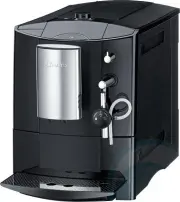 Miele CM5000BL
User Manual
Miele CM5000BL
User Manual
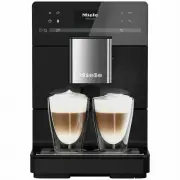 Miele CM5310BLK
User Manual
Miele CM5310BLK
User Manual