Page 2 - Contents
2 Contents Product Overview ................................................................................................... 3 Front view ................................................................................................................................................... 3 Side view...
Page 3 - Product Overview; Front view
3 Product Overview Front view The light on the front of the range extender gives you information about power, updating and signal strength. Light color Status/ description Solid Blue • Power on, ready for device connection Blinking Blue (normal state) • Starting up. • Upgrading firmware. Blinking Or...
Page 4 - Side view
4 Side view WPS™ Button —Use Wi-Fi Protected Setup to automatically and securely add compatible wireless devices to your network with Push Button Connect. Refer to Using WPS on page 6 . Reset Button —Press and hold until the power light on the front of the range extender blinks to reset to factory d...
Page 5 - Bottom view
5 Bottom view Ethernet Port —Connect wired devices to your wireless network with an ethernet (network) cable. A green light turns on when an ethernet device is connected and active on this port. An orange light blinks when the extender is sending or receiving data over the port.
Page 6 - How to Install the Range Extender; Setting up as a wireless range extender
6 How to Install the Range Extender There are two ways to use your Linksys range extender: as a wireless range extender or as a wired range extender (access point). Wireless range extenders repeat existing Wi-Fi signals. Wired range extenders (access points) create new Wi-Fi hotspots when connected ...
Page 7 - Within the next two minutes complete step
7 2. Wait for the light on the front of your range extender to blink orange before going to step 3. This can take up to a minute. 3. Extend your network. a. Press the WPS button on your router. Within the next two minutes complete step 3b. b. Press the WPS button on the side of your range extender. ...
Page 10 - Setting up in a web browser; This can take up to a minute
10 Setting up in a web browser Use this setup method if you don’t have a WPS button on your router, or if you don’t want to use WPS to set up your RE7350. 1. Plug in the range extender Plug in the range extender midway between your router and the area without Wi-Fi. Using your mobile device or lapto...
Page 12 - Setting up as wired range extender (access point)
12 Setting up as wired range extender (access point) Browser-based setup 1. Prepare for setup Be sure your router has a working internet connection and you have an ethernet cable long enough to connect the router to the range extender. 2. Plug the range extender into a wall outlet. 3. Wait for the b...
Page 14 - Accessing Your Range Extender Settings
14 Accessing Your Range Extender Settings To change or view range extender settings, first connect to an extended network, e.g., MyWiFi_Ext. In a browser, go to http://extender.linksys.com and enter the range extender’s admin password. Your range extender's default admin password is "admin"....
Page 16 - Using Range Extender Settings
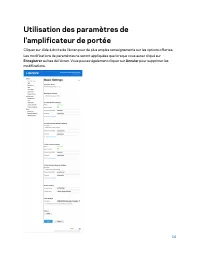
16 Using Range Extender Settings Click Help on the right side of the screen for additional information on the screen’s options. Changes to settings will not be effective until you click Save at the bottom of the screen. You also can click Cancel to clear any changes.
Page 17 - WPS; Connecting devices to your network through the range extender
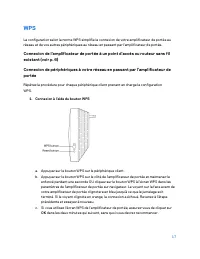
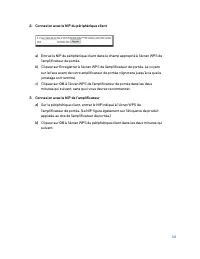
17 WPS WPS makes it easy to connect your range extender to your network and connect other devices to your network through the range extender. Connecting the range extender to an existing access point or wireless router (see p. 6) Connecting devices to your network through the range extender Repeat t...
Page 19 - Site Survey
19 Site Survey Site Survey gives a snapshot of all access points and wireless routers within range of the extender. Log in to the range extender’s browser-based settings (see “Accessing Your Range Extender Settings” on page 14 ). Click the Wireless tab. Click the Site Survey page. • Select—Click the...
Page 20 - Access Control
20 QoS (Quality of Service) RE7350 supports WMM (Wi-Fi Multimedia), which enhances the quality of service (QoS) on a network. QoS prioritizes data packets according to four traffic classes: voice, video, best effort, and background. We recommend keeping the default QoS settings. Cross-Band Cross-Ban...
Page 21 - Troubleshooting; You cannot get your range extender connected; You cannot access your range extender
21 Troubleshooting Your range extender works on 2.4GHz and 5 GHz networks. You cannot get your range extender connected Check the position of your router and range extender. • For first-time setup, you may need to place the range extender closer to the router. After you set up your range extender, y...
Page 23 - You have intermittent connection problems
23 You have intermittent connection problems Plug in the range extender midway between your router and the area without Wi-Fi. Be sure you have at least 50% of your router’s Wi-Fi signal at that point on the device you used for setup. If you have two bars or lower, move closer to your router. To che...
Page 24 - Specifications; Environmental
24 Specifications RE7350 Description AX1800 WiFi 6 Range Extender Standards IEEE 802.11ax/ac/a/n/g/b, 802.3ab/u Port Gigabit Buttons Reset, WPS Light Front: 1 multicolor light for power, system status Bottom: ethernet (link, activity) Wireless Security WPA2, WPA3/WPA2-mixed, WPA3-Personal Environmen...
Page 27 - Table des matières
2 Table des matières Vue d'ensemble du produit .................................................................................. 3 Vue avant .................................................................................................................................................... 3 Vue lat...
Page 28 - Vue d'ensemble du produit; Vue avant
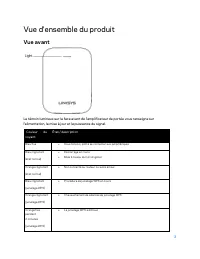
3 Vue d'ensemble du produit Vue avant Le témoin lumineux sur la face avant de l'amplificateur de portée vous renseigne sur l'alimentation, la mise à jour et la puissance du signal. Couleur du voyant État / description Bleu fixe • Sous tension, prêt à se connecter aux périphériques Bleu clignotant (é...
Page 29 - Vue latérale
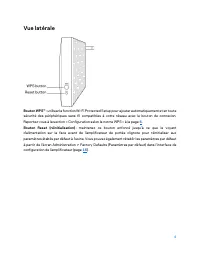
4 Vue latérale Bouton WPS™ : utilisez la fonction Wi-Fi Protected Setup pour ajouter automatiquement et en toute sécurité des périphériques sans fil compatibles à votre réseau avec le bouton de connexion. Reportez-vous à la section « Configuration selon la norme WPS » à la page 6 . Bouton Reset (réi...
Page 30 - Vue du dessous
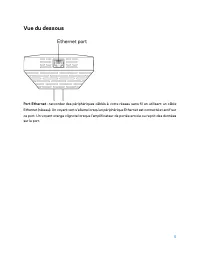
5 Vue du dessous Port Ethernet : raccordez des périphériques câblés à votre réseau sans fil en utilisant un câble Ethernet (réseau). Un voyant vert s'allume lorsqu'un périphérique Ethernet est connecté et actif sur ce port. Un voyant orange clignote lorsque l'amplificateur de portée envoie ou reçoit...
Page 31 - Installation de l'amplificateur de portée; Configuration comme amplificateur de portée sans fil
6 Installation de l'amplificateur de portée Votre amplificateur de portée Linksys peut être utilisé de deux façons : comme amplificateur de portée sans fil ou comme amplificateur de portée filaire (point d'accès). Les amplificateurs de portée sans fil répètent des signaux sans fil existants. Les amp...
Page 32 - Dans les deux
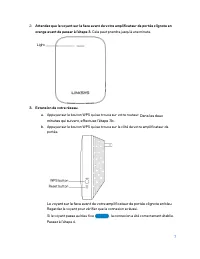
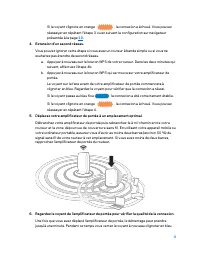
7 2. Attendez que le voyant sur la face avant de votre amplificateur de portée clignote en orange avant de passer à l'étape 3. Cela peut prendre jusqu'à une minute. 3. Extension de votre réseau. a. Appuyez sur le bouton WPS qui se trouve sur votre routeur. Dans les deux minutes qui suivent, effectue...
Page 35 - Configuration dans un navigateur Web
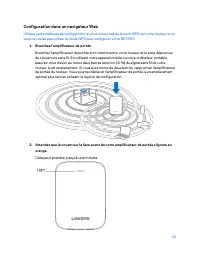
10 Configuration dans un navigateur Web Utilisez cette méthode de configuration si vous n'avez pas de bouton WPS sur votre routeur ou si vous ne voulez pas utiliser le mode WPS pour configurer votre RE7350. 1. Branchez l'amplificateur de portée Branchez l'amplificateur de portée à mi-chemin entre vo...
Page 37 - Configuration sur navigateur
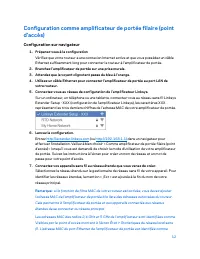
12 Configuration comme amplificateur de portée filaire (point d'accès) Configuration sur navigateur 1. Préparez-vous à la configuration Vérifiez que votre routeur a une connexion Internet active et que vous possédez un câble Ethernet suffisamment long pour connecter le routeur à l'amplificateur de p...
Page 44 - Analyse du site
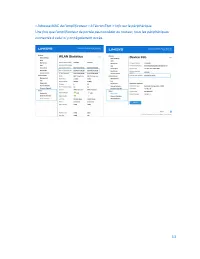
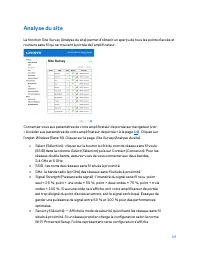
19 Analyse du site La fonction Site Survey (Analyse du site) permet d'obtenir un aperçu de tous les points d'accès et routeurs sans fil qui se trouvent à portée de l'amplificateur. Connectez-vous aux paramètres de votre amplificateur de portée sur navigateur (voir « Accéder aux paramètres de votre a...
Page 46 - Dépannage; Impossible de connecter votre amplificateur de portée
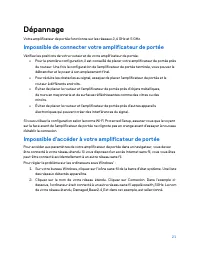
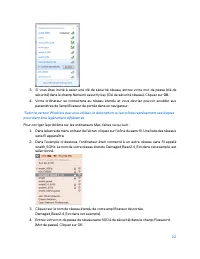
21 Dépannage Votre amplificateur de portée fonctionne sur les réseaux 2,4 GHz et 5 GHz. Impossible de connecter votre amplificateur de portée Vérifiez les positions de votre routeur et de votre amplificateur de portée. • Pour la première configuration, il est conseillé de placer votre amplificateur ...
Page 48 - Vous avez des problèmes de connexion intermittents
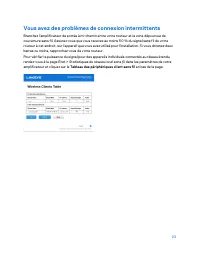
23 Vous avez des problèmes de connexion intermittents Branchez l'amplificateur de portée à mi-chemin entre votre routeur et la zone dépourvue de couverture sans fil. Assurez-vous que vous recevez au moins 50 % du signal sans fil de votre routeur à cet endroit, sur l'appareil que vous avez utilisé po...
Page 49 - Spécifications; Environnement d’exploitation
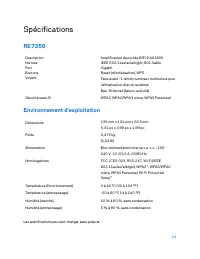
24 Spécifications RE7350 Description Amplificateur de portée WiFi 6 AX1800 Normes IEEE 802.11ax/ac/a/n/g/b, 802.3ab/u Port Gigabit Boutons Reset (réinitialisation), WPS Voyant Face avant : 1 témoin lumineux multicolore pour l’alimentation, état du système Bas : Ethernet (liaison, activité) Sécurité ...