Page 2 - Danger of suffocation due to packing material; Content
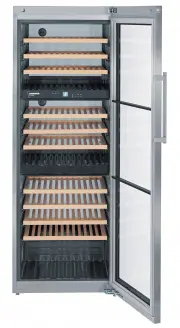
16 Description of the appliance Activated charcoal filter Adjustable- height feet Operating and control elements Type plate Lock Interior light (LED light strip) Activated charcoal filter Interior light (LED light strip) Pull-out shelves Pull-out shelves Pull-out shelves Activated charcoal filter In...
Page 3 - products covered by the 2007/47/EC Medical Devices Directive.
17 GB Safety instructions and warnings • To prevent injury or damage to the unit, the ap - pliance should be unpacked and set up by two people. • In the event that the appliance is damaged on delivery, contact the supplier immediately before connecting to the mains. • To guarantee safe operation, en...
Page 4 - Do not cover ventilation openings; Saving energy; Do not operate the appliance outside the; Description of the appliance; The socket must not be situated behind the appli-
18 Appliance dimensions Setting up • Avoid positioning the appliance in direct sunlight or near cookers, radiators and similar sources of heat. • The floor on which the appliance stands should be horizontal and level.Compensate for uneven floors with the adjustable feet. • Do not cover ventilation o...
Page 5 - Setting the temperature; Zone; Reducing the temperature; Down; Increasing the temperature; Up; Switching the appliance on and off; Switching the appliance on; Operating and control elements; touch capacitance; Interior light On/Off button; Temperature display; Child lock is activated
19 Setting the temperature The temperature of all compartments can be set separately. Use the Zone button to select the compartment whose temperature you wish to adjust. The symbol indicates which compartment is active. Reducing the temperature Press the Down button. Increasing the temperature Press...
Page 6 - Fan; Ventilation; Door open alarm; Temperature alarm; Alarm; Temperature alarm after a fault in the appliance; Alarm; Deactivating the child lock; Additional functions; Activating the child lock
20 Fan The interior fan ensures a constant and even interior temperature and a suitable climate for wine storage. The humidity in the appliance can be increased even further by activating the Ventilation button. This has a particularly positive effect for long-term storage. The increased level of hu...
Page 7 - Demo mode; When in this mode, the cooling circuit is switched off!; The temperature display flashes.; Interior light; Note; • Press the; Adjusting the display brightness
21 GB Demo mode Demo mode can be activated for presenting the appliance at exhibitions or in salesrooms as though in normal operating mode. DEMO appears in the display. When in this mode, the cooling circuit is switched off! If this mode is activated by accident, it can be deactivated as detailed be...
Page 8 - Equipment; Presentation shelf; Click the label holder into place and
22 Equipment Presentation shelf The middle pull-out shelf in the top compartment can be used for the presentation of wine bottles or to keep opened bottles at the perfect temperature. The presentation shelf can be used in all three zones. The wooden shelf above it must be removed so that the presen-...
Page 9 - Storage diagram
23 Cleaning Before cleaning always switch off the appliance. Pull out the mains plug or switch off or unscrew the fuse. • Clean the inside and outer walls with lukewarm water and a lit - tle detergent. Do not use abrasive or acid cleaners or chemical solvents. • Use a glass cleaner to clean the glas...
Page 10 - Changing over door hinges; Changing the door hinges must be done by two people.
24 Changing over door hinges Door hinges should only be changed by a trained expert. Changing the door hinges must be done by two people. 3. Slide red safety bracket over the hinge. The two knobs on the safety bracket must be fully insert- ed into the marked openings on the hinge. 1. Open door as fa...
Page 11 - Refer to warning in point 7.; This must point upwards when fitted.; Note for fitting bottom door cover
25 GB 11. Remove screw. 12. Pivot soft stop mechanism out- wards on the right, pull to the right and remove. 13. Slide spacer to the left and re- move. 8 9 10 11 12 13 17 18 8. Compress the cover in centre and release. Remove cover. 9. Transfer plate to other side of cover. 10. Slide red safety brac...
Page 12 - Click cover into place.; Important
26 25. Release pressure plates at the front 1 and pull them backwards to remove 2 . 26. Transfer door handle and plugs to the opposite side. 26 25 23 24 23. Unscrew lock and re-fit on the op- posite side. 24. Click cover into place. 27. Push on pressure plates until they engage. 27 19 20 21 22 19. R...
Page 15 - Shutting your appliance down; it off and disconnect the plug or switch off or remove the fuse.; Adjusting the lateral tilt of the door; Close door and check that it is
29 GB Shutting your appliance down If your appliance is to be shut down for any length of time, switch it off and disconnect the plug or switch off or remove the fuse. Clean the appliance and leave the door open in order to prevent unpleasant smells. The appliance complies with the relevant safety r...