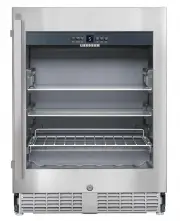
Page 2 - Danger of suffocation due to packing material; Description of the appliance; Installation instructions
2 Operating and control ele- ments Type plate Interior light (LED light strip) Pull-out grid shelf Dust filter Adjustable glass shelf Sectioned glass shelf Disposal notes The appliance contains reusable materials and should be disposed of properly - not simply with unsorted household refuse. Applian...
Page 3 - The appliance is not intended for com
3 Safety instructions and warnings • To prevent injury or damage to the unit, the ap - pliance should be unpacked and set up by two people. • In the event that the appliance is damaged on delivery, contact the supplier immediately before connecting to the mains. • To guarantee safe operation, ensure...
Page 4 - Setting up; Do not cover ventilation openings; Switching the appliance on and off; Switching the appliance on; Operating and control elements; The socket must not be situated behind the appli-; Climate rating; Do not operate the appliance outside the; Setting the temperature; Increasing the temperature
4 Setting up • Avoid positioning the appliance in direct sunlight or near cookers, radiators and similar sources of heat. • Standard EN 378 specifies that the room in which you install your appliance must have a volume of 1 m 3 per 8 g of R 600a refriger- ant used in the appliance, so as to avoid th...
Page 5 - Temperature alarm after a fault in the appliance; Interior light; Locking the appliance
5 Door open alarm If the door is left open for more than 60 seconds, the audible warning signal will sound. If the door must be opened for a lengthy period to place items into the appliance, cancel the audible warning signal by pressing the Alarm button. The alarm switches back to standby when the d...
Page 6 - Setup mode; Activating the child lock; Note
6 Setup mode In setup mode you can set the child lock and adjust the brightness of the display. The child lock is designed to protect the appliance from being switched off accidentally. Activating the child lock Press for 5 seconds. Display = Display = Display = Display = Display = Deactivating the ...
Page 7 - Equipment; Sectioned glass shelf; front half; IMPORTANT
7 Pull-out shelf The pull-out shelf allows bot- tles or cans to be viewed and removed more easily. Equipment Sectioned glass shelf If you need to make space for tall containers, simply carefully slide the front half of the sectioned glass shelf underneath the back half. IMPORTANT 1 The sectioned gla...
Page 8 - Cleaning; Before cleaning, always switch off the appliance. Disconnect; Do not use steam cleaners because of the; Cleaning the dust filter; Do not; Cleaning the appliance interior
8 Cleaning Before cleaning, always switch off the appliance. Disconnect from the mains or switch off or unscrew the fuse. • Clean the inside and outer walls with lukewarm water and a lit - tle detergent. Do not use abrasive or acid cleaners or chemical solvents. • Use a glass cleaner to clean the gl...
Page 9 - Malfunctions; The fans inside the appliance are running although the; Shutting your appliance down
9 Malfunctions • F1 appears in the display. – The appliance has suffered a fault. Contact the customer service department. • The fans inside the appliance are running although the fan function has been deactivated and the compressor (refrigeration unit) is idle. – This is a normal operating state de...
Page 10 - Mounting the dust filter; at the bottom; Appliance venting; Cut-out section in the plinth panel; Supplied accessories; Important
10 Mounting the dust filter The supplied dust filter prevents that dirt enters the motor compartment, reducing the refrigeration performance. Therefore always install the dust filter. Remove the protective film from the dust filter. Insert the filter at the bottom and click into place at the top . A...
Page 11 - Appliance dimensions; Installation dimensions; View from
11 Appliance dimensions 1 In this area, the power cord comes out of the appliance rear. Free length of the power cord = 2000 mm Choose the position of the socket considering these specifications. The socket must not be situated behind the appli- ance and must be easily accessible. Installation dimen...
Page 12 - Installing the appliance; When sliding in the appliance, make sure that the mains
12 4 x 30 TX™ 15 4. 2. 3. Installing the appliance 2 . Adjust the height of the appliance to 4 mm less than the recess height by turning the adjustable feet clockwise. Turn the spanner anticlockwise to raise the appliance front and clockwise to lower it. Position the spanner accordingly Important Th...
Page 13 - If the foam moulding is not installed, the appliance will not; The foam moulding must be touching the ventilation grille.
13 5. 6. 7. 8. 7. Insert the ventilation grille in the plinth panel. 5. Screw the appliance to the body of the unit at the bottom on the left and right. 6. Insert the foam moulding ap- prox. 10 mm into the opening in the appliance plinth as in- dicated. Important If the foam moulding is not installe...
Page 14 - Changing over door hinges
14 Changing over door hinges Door hinges should only be changed by a trained expert. Changing the door hinges must be done by two people. 1. 2. 3. 4. 5. 1. Remove screw. 2. Remove screw. Important The door must now be held secure by somebody. 3. Pull out hinge pin. 4. Remove upper hinge pin. 5. Move...
Page 17 - Adjusting the lateral tilt of the door
17 24. 22. 25. 23. Close door and check that it is aligned with the side walls of the appliance. Adjusting the lateral tilt of the door If the door is at an angle, adjust the angle. 24. Undo screws and slide hinge bracket to the right or left. Tighten screws. 21. Insert the bottom hinge pin in the s...