Page 2 - Contents; ment; Range of appliance use; Appliance at a glance
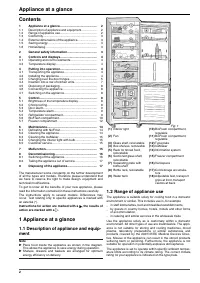
Contents 1 Appliance at a glance............................................ 2 1.1 Description of appliance and equipment.................. 2 1.2 Range of appliance use............................................ 2 1.3 Conformity................................................................ 3 1.4 ...
Page 3 - ance; General safety information
Note u Compliance with the ambient temperatures indicated is required, otherwise the cooling performance is reduced. Climate rating for ambient temperatures of SN 10 °C to 32 °C N 16 °C to 32 °C ST 16 °C to 38 °C T 16 °C to 43 °C 1.3 Conformity The refrigerant circuit has been tested for leaks. The ...
Page 4 - Operating and control elements; Putting into operation; Transporting the appliance; Installing the appliance; Controls and displays
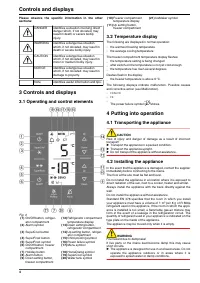
Please observe the specific information in the other sections: DANGER identifies a situation involving direct danger which, if not obviated, may result in death or severe bodily injury. WARNING identifies a dangerous situation which, if not obviated, may result in death or severe bodily injury. CAUT...
Page 5 - Changing over the door hinges; Releasing the cable connection on the; Putting into operation
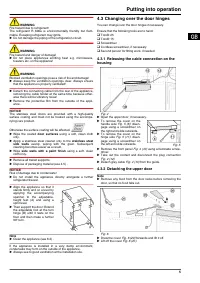
WARNING Fire hazard due to refrigerant! The refrigerant R 600a is environmentally friendly but flam- mable. Escaping refrigerant may ignite. u Do not damage the piping of the refrigeration circuit. WARNING Fire hazard and danger of damage! u Do not place appliances emitting heat e.g. microwaves, toa...
Page 6 - Transferring the middle bearing elements
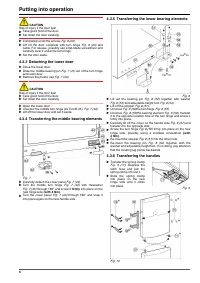
CAUTION Risk of injury if the door tips! u Take good hold of the door. u Set down the door carefully. u Completely undo the screws Fig. 6 (22). u Lift off the door complete with turn hinge Fig. 6 (23) and cable. For release, possibly use a flat-blade screwdriver and carefully lever it under the turn...
Page 7 - Insertion into a row of kitchen units
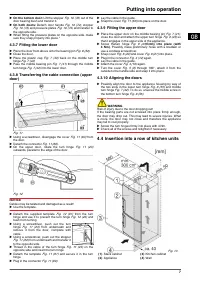
u On the bottom door: Lift the stopper Fig. 10 (70) out of the door bearing bush and transfer it. u On both doors: Detach door handle Fig. 10 (72), stopper Fig. 10 (73) and pressure plates Fig. 10 (74) and transfer to the opposite side. u When fitting the pressure plates on the opposite side, make s...
Page 8 - Disposing of packaging; Connecting the appliance; Switching on the appliance; Switching on the freezer compartment; Brightness of the temperature; Control
The appliance can be inserted into a row of kitchen units. To match the appliance Fig. 13 (2) to the height of the row of units, a suitable stack cabinet Fig. 13 (1) can be fitted above the appliance.When inserting the appliance into a row of kitchen units (max. depth 580 mm ), the appliance can be ...
Page 9 - Temperature alarm; Refrigerator compartment
When c1 is indicated in the display: u Tto activate the child lock, briefly press the SuperFrost button Fig. 3 (4). w The child lock symbol Fig. 3 (15) shines. c flashes in the display. When c0 is indicated in the display: u to deactivate the child lock, briefly press the SuperFrost button Fig. 3 (4...
Page 10 - BioFresh compartment
w SuperCool is automatically deactivated after 6 to12 hours The appliance continues to operate in the energy-saving, normal mode. To prematurely deactivate SuperCool u Briefly press SuperCool button Fig. 3 (3). w The SuperCool symbol Fig. 3 (19) goes out in the display. w SuperCool is deactivated. 5...
Page 11 - BioFresh compartment
Note u Please note that protein-rich food deteriorates faster, i.e. shellfish and crustaceans deteriorate faster than fish, fish faster than meat. Standard values for storage time at high humidity Vegetables, salad Artichokes up to 14 days Celery up to 28 days Cauliflower up to 21 days Broccoli up t...
Page 12 - Freezer compartment
5.6.7 Humidity control plate Fig. 17 u To remove the humidity control plate: Having removed the drawers, carefully draw the plate forwards and lower it for removal. u To insert the humidity control plate: Insert the cover mould- ings of the plate into the rear holder Fig. 17 (1) from under- neath an...
Page 14 - Defrosting with NoFrost; Maintenance
If large quantities of ice cubes are needed, the complete IceMaker drawer can be exchanged for the adjacent drawer. When the drawer is closed, the IceMaker automatically re- commences production.Once the IceMaker has been switched on for the first time, it may take up to 24 hours until the first ice...
Page 15 - Cleaning the IceMaker; Changing the interior light with bulb; Malfunction
6.3 Cleaning the IceMaker The drawer of the IceMaker has to be emptied and slid in. u To activate the setting mode: press the SuperFrost button Fig. 3 (4) for about 5 s. w The display indicates c . w The menu symbol Fig. 3 (17) shines. u Using the Up setting button, freezer compartment Fig. 3 (11)/ ...
Page 16 - Switching off the appliance; Switching off the freezer compartment; Decommissioning
A bubbling and gurgling noise. → This noise comes from the refrigerant flowing in the refriger- ation circuit. u The sound is normal. A quiet clicking noise. → The noise is produced whenever the refrigeration unit (motor) automatically switches on or off. u The sound is normal. A hum. It is briefly ...
Page 17 - Taking the appliance out of service; Disposing of the appliance
w The temperature display of the refrigerator compartment Fig. 3 (12) is dark. The refrigerator compartment and BioFresh compartment are switched off. 8.2 Taking the appliance out of service u Empty the appliance. u Put the IceMaker in the cleaning position (see Mainte- nance). u Pull out the power ...