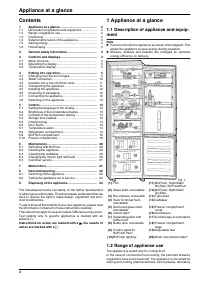
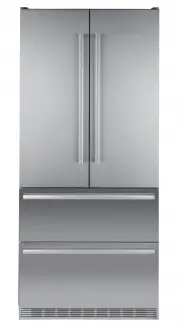
Page 2 - Contents; ment; Range of appliance use; Appliance at a glance
Contents 1 Appliance at a glance............................................ 2 1.1 Description of appliance and equipment.................. 2 1.2 Range of appliance use............................................ 2 1.3 Conformity................................................................ 3 1.4 ...
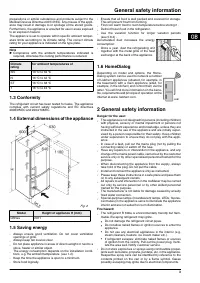
Page 3 - External dimensions of the appliance; General safety information
preparations or similar substances and products subject to the Medical Devices Directive 2007/47/EC. Any misuse of the appli- ance may result in damage to or spoilage of the stored goods. Furthermore, the appliance is unsuited for use in areas exposed to an explosion hazard.The appliance is set to o...
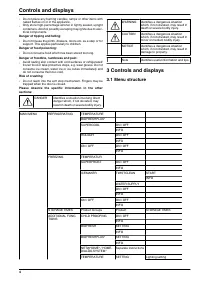
Page 4 - Controls and displays
- Do not place any burning candles, lamps or other items with naked flames on or in the appliance. - Only store high-percentage alcohol in tightly sealed, upright containers. Alcohol possibly escaping may ignite due to elec- trical components. Danger of tipping and falling: - Do not misuse the plint...
Page 5 - Changing over the door hinges; Detaching the upper soft stop mechanism; Putting into operation
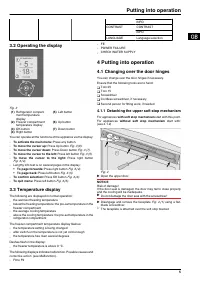
INFO CONTRAST CONTRASTINFO LANGUAGE Language selection 3.2 Operating the display Fig. 3 (1) Refrigerator compart- ment temperature display (5) Left button (2) Freezer compartment temperature display (6) Up button (3) OK button (7) Down button (4) Right button You can operate all the functions of the...
Page 6 - Detaching the lower soft stop mechanism
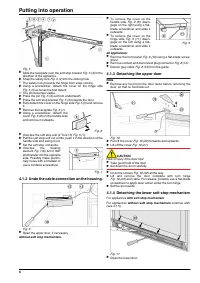
Fig. 5 u Slide the faceplate over the soft stop bracket Fig. 5 (4) in the direction of the appliance. u Snap the safety lock Fig. 5 (2) into the oblong hole. w The safety lock prevents the hinge from snap-closing. u Using a screwdriver, detach the cover on the hinge side Fig. 5 (5) as far as the fir...
Page 7 - Transferring the middle bearing elements
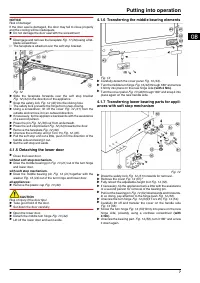
NOTICE Risk of damage! If the door seal is damaged, the door may fail to close properly and the cooling will be inadequate. u Do not damage the door seal with the screwdriver! u Disengage and remove the faceplate Fig. 11 (30) using a flat- blade screwdriver. w The faceplate is attached over the soft...
Page 8 - ances without soft stop mechanism
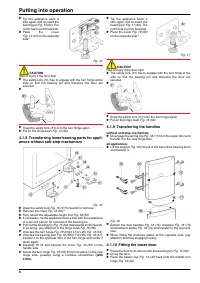
u Tip the appliance back a little again and re-insert the bearing pin Fig. 15 (52). The notch has to point forwards. u Place the cover Fig. 14 (57) on the opposite side.* Fig. 15 CAUTION Risk of injury if the door tips! u The safety lock (51) has to engage with the turn hinge at the side so that the...
Page 9 - 1 Fitting the lower soft stop mechanism
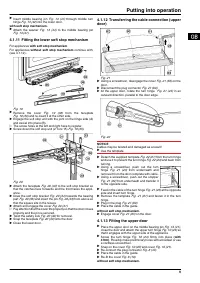
u Insert middle bearing pin Fig. 13 (41) through middle turn hinge Fig. 13 (42) into the lower door. with soft stop mechanism. u Attach the washer Fig. 13 (44) to the middle bearing pin Fig. 13 (41). 4.1.11 Fitting the lower soft stop mechanism For appliances with soft stop mechanism.For appliances ...
Page 10 - 4 Fitting the upper soft stop mechanism
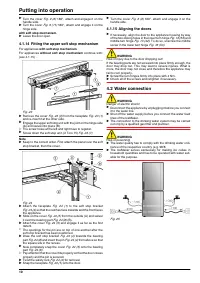
u Turn the cover Fig. 9 (6) 180°, attach and engage it on the handle side. u Turn the cover Fig. 9 (11) 180°, attach and engage it on the hinge side. with soft stop mechanism. u Leave the door open. 4.1.14 Fitting the upper soft stop mechanism For appliances with soft stop mechanism.For appliances w...
Page 13 - Control
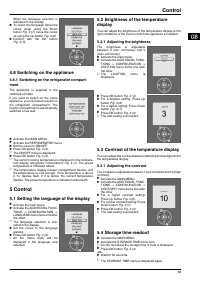
When the language selection is indicated in the display: u To select the language: Move the cursor down using the Down button Fig. 3 (7), move the cursor up using the Up button Fig. 3 (6). u Confirm with the OK button Fig. 3 (3). 4.8 Switching on the appliance 4.8.1 Switching on the refrigerator com...
Page 14 - Temperature alarm; Refrigerator compartment
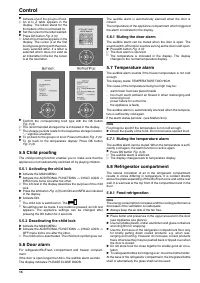
u Activate one of the groups of food. w An A to Z table appears in the display. The letters stand for the first letters of the food looked for. u Set the cursor to the letter wanted. u Press OK button Fig. 3 (3). w A list of food names appears in the display. The cursor is at the first food type beg...
Page 16 - BioFresh compartment
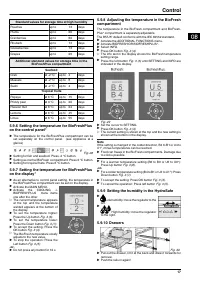
u Re-positioning the boxes: Lift them for removal and re-position them as required. u To detach lid: Open 90° and raise to disengage. 5.8.8 Removing the bottle holder u Always take hold of the bottle holder on the plastic part. 5.9 BioFresh compartment The BioFresh compartment allows some types of f...
Page 18 - Freezer compartment; Adjusting the temperature in the freezer
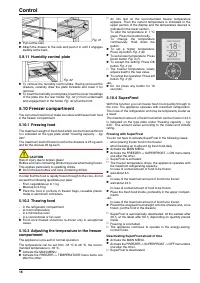
Fig. 31 u Pull out the rails. u Attach the drawer to the rails and push it in until it engages audibly at the back. 5.9.11 Humidity control plate Fig. 32 u To remove the humidity control plate: Having removed the drawers, carefully draw the plate forwards and lower it for removal. u To insert the hu...
Page 20 - Defrosting with NoFrost; Cleaning the IceMaker; Maintenance
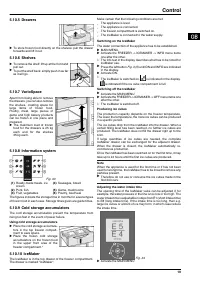
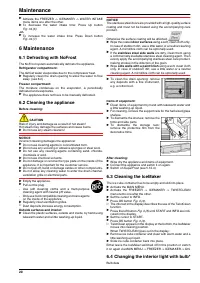
u Activate the FREEZER -> ICEMAKER -> WATER INTAKE menu items one after the other. u To decrease the water intake time: Press Up button Fig. 34 (6). -or- u To increase the water intake time: Press Down button Fig. 34 (7). 6 Maintenance 6.1 Defrosting with NoFrost The NoFrost system automatical...
Page 21 - Malfunction
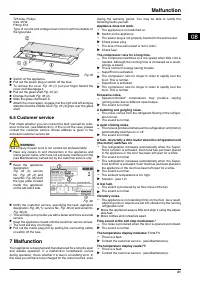
T25 tube, Philips max. 25 W Fitting: E14 Type of current and voltage must conform with the details on the type plate Fig. 35 u Switch off the appliance. u Pull out the power plug or switch off the fuse. u To remove the cover Fig. 35 (1): put your finger behind the cover and disengage it. u Pull out ...
Page 22 - Switching off the appliance; Switching off the freezer compartment; Taking the appliance out of service; Decommissioning
The display indicates: POWER FAILURE. The audible alarm sounds. → The freezer temperature rose too high over the last hours or days due to a power failure or power interruption. u To switch off the warning bleep: press OK button Fig. 3 (3). w The display indicates the freezer temperature again. u If...
Page 23 - Disposing of the appliance
u Pull out the power plug. u Clean the appliance (see 6.2) . u Leave the door open to prevent odour. 9 Disposing of the appliance The appliance contains some reusable materials and should be disposed of properly - not simply with unsorted household refuse. Appliances which are no longer needed must ...