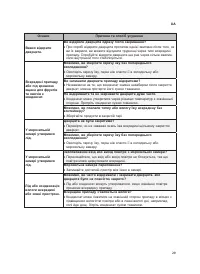
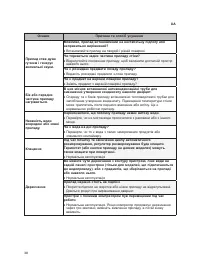
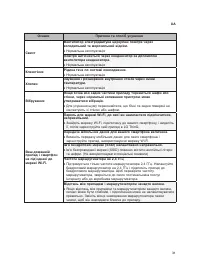
Page 2 - ЗМІСТ
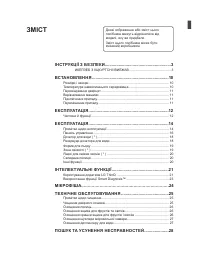
ЗМІСТ Деякі зображення або зміст цього посібника можуть відрізнятися від моделі, яку ви придбали. Зміст цього посібника може бути змінений виробником. ІНСТРУКЦІЇ З БЕЗПЕКИ .........................................................3 ............................................. 3 ВСТАНОВЛЕННЯ ...........
Page 3 - «УВАГА»; ОБЕРЕЖНО; Діти
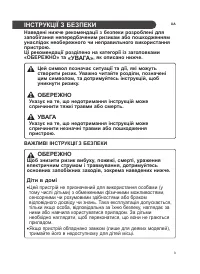
3 ІНСТРУКЦІЇ З БЕЗПЕКИ UA Наведені нижче рекомендації з безпеки розроблені для запобігання непередбаченим ризикам або пошкодженням унаслідок необережного чи неправильного використання пристрою. Ці рекомендації розділено на категорії із заголовками «ОБЕРЕЖНО» та «УВАГА» , як описано нижче. И К Е П З ...
Page 4 - Встановлення; LG
4 Встановлення • Транспортувати прилад повинні щонайменше двоє людей, надійно тримаючи його. • Переконайтеся, що розетка заземлена належним чином, і що контакт заземлення кабелю живлення непошкоджений та не видалений з штепсельної вилки. Для отримання більш докладної інформації про заземлення зверта...
Page 5 - ЕКСПЛУАТАЦІЯ
5 • Будьте обережні, щоб не дати дверцятам впасти в процесі збирання або розбирання. • Будьте обережні, щоб не перетиснути та не пошкодити кабель живлення під час монтажу або демонтажу дверцят. • Не підключайте перехідник або інше приладдя до вилки живлення. ЕКСПЛУАТАЦІЯ • Не використовуйте прилад д...
Page 6 - Обслуговування; LG Electronics
6 • Якщо є витік газу (ізобутан, пропан, природний газ і т.д.), не торкайтеся приладу або мережевого шнуру і негайно провітрить приміщення. Цей прилад використовує в якості холодоагенту газ (ізобутан, R600a). Хоча використовується невелика кількість газу, він, тим не менше, є горючим. Витік газу під...
Page 8 - УВАГА
8 УВАГА Щоб знизити ризик незначних травм, збою в роботі, пошкодження пристрою чи майна, під час використання цього обладнання, дотримуйтесь основних запобіжних заходів, зокрема наведених нижче. Встановлення • Не нахиляйте прилад, щоб тягнути або штовхати його при транспортуванні. • Переконайтеся, щ...
Page 10 - ВСТАНОВЛЕННЯ; Розміри
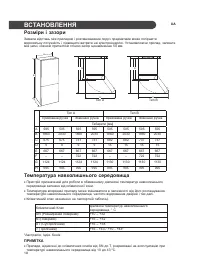
10 ВСТАНОВЛЕННЯ Розміри і зазори Замала відстань між приладом і розташованими поруч предметами може погіршити морозильну потужність і підвищити витрати на електроенергію. Установлюючи прилад, залиште між ним і кожною прилеглою стіною зазор щонайменше 50 мм. A C B E F G D H E F G D H Тип A Тип B Прих...
Page 12 - Експлуатація; Частини
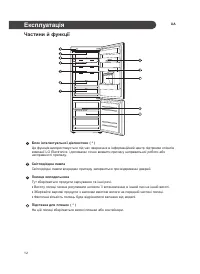
12 Експлуатація UA Частини й функції Блок інтелектуальної діагностики ( * ) Ця функція використовується під час звернення в інформаційний центр підтримки клієнтів компанії LG Electronics і допомагає точно виявити причину неправильної роботи або несправності приладу . Світлодіодна лампа Світлодіодні ...
Page 14 - Примітки; Рекомендації
14 Експлуатація UA Примітки щодо експлуатації • Користувачі повинні мати на увазі: якщо дверцята зариті не повністю, всередині може утворюватися лід. Також лід може утворюватися за високої вологості влітку і якщо дверцята морозильної камери відкриваються надто часто. • Слідкуйте за тим, щоб їжа, що ...
Page 16 - Елементи
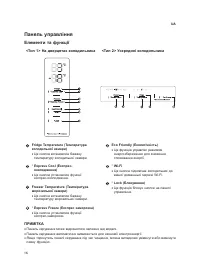
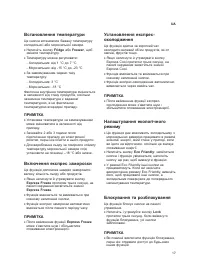
16 UA ПРИМІТКА • Панель керування може відрізнятися залежно від моделі. • Панель керування автоматично вимикається для економії електроенергії. • Якщо торкнутись панелі керування під час чищення, можна випадково увімкнути або вимкнути певну функцію. Панель управління Елементи та функції < Тип 2&g...
Page 19 - Зона
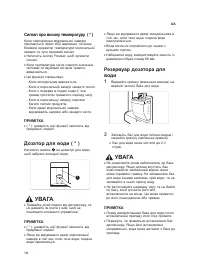
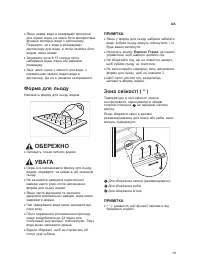
19 UA • Якщо немає води в резервуарі пристрою для подачі води, не може бути використана функція холодної води з диспенсеру . Перевірте, чи є вода в резервуварі диспенсеру для води, а потім залийте його водою, якщо немає. • Зачекайте хоча б 15 секунд після набирання води, перш ніж виймати резервуар. ...
Page 20 - Сигналізація; Виявлення
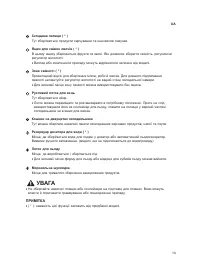
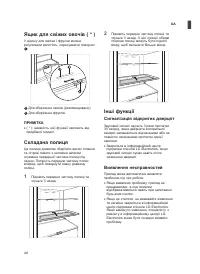
20 UA Ящик для свіжих овочів ( * ) У відсіку для овочів і фруктів можна регулювати вологість, пересуваючи повзунок 1 . 2 Для зберігання овочів (рекомендовано). 3 Для зберігання фруктів. ПРИМІТКА • ( * ): наявність цієї функції залежить від придбаної моделі. Складана полиця Ця полиця дозволяє зберіга...
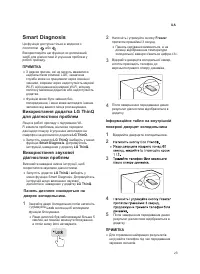
Page 21 - Додаток; Функції; Перед
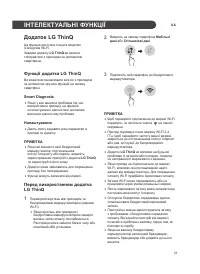
2 1 UA ІНТЕЛЕКТУАЛЬНІ ФУНКЦІЇ Додаток LG ThinQ Ця функція доступна тільки в моделях із модулем Wi-Fi. Завдяки додатку LG ThinQ ви можете спілкуватися з приладом за допомогою смартфона. Функції додатка LG ThinQ Ви можете встановлювати зв'язок з приладом за допомогою зручних функцій на своєму смартфон...
Page 22 - Технічні
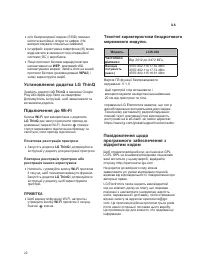
2 2 UA • Ім'я безпроводової мережі (SSID) повинно містити англійські літери та цифри. (Не використовувати спеціальні символи) • Інтерфейс користувача смартфона (ІК) може відрізнятися в залежності від операційної системи (ОС) і виробника. • Якщо протокол безпеки маршрутизатора налаштовано на WEP , мо...
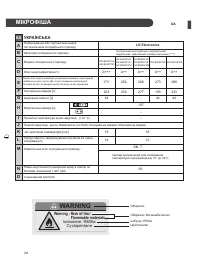
Page 24 - ИНФОРМАЦИЯ О ПРОДУКТЕ; Wa; so; WARNING; МІКРОФІША
24 UA ИНФОРМАЦИЯ О ПРОДУКТЕ UA УКРАЇНСЬКА A LG Electronics B C Категорія холодильного приладу: D A++ E 254 F H 107 - I - J K 16 L 12 M Кліматичний клас холодильного приладу: SN, T прилад призначений для споживання температури середовища від 10˚ до 43˚С. N 36 O G Найменування або торговельна марка по...
Page 33 - FREEZER
www.lg.com OWNER'S MANUAL FRIDGE& FREEZER Read this owner's manual thoroughly before operating the appliance and keep it handy for reference at all times. Copyright © 2018-2020 LG Electronics Inc. All Rights Reserved
Page 34 - TABLE OF CONTENTS
TABLE OF CONTENTS This manual may contain images or content different from the model you purchased.This manual is subject to revision by the manufacturer. SAFETY INSTRUCTIONS .......................................................3 IMPORTANT SAFETY INSTRUCTIONS .........................................
Page 35 - SAFETY INSTRUCTIONS; ‘WARNING’; Children in the Household
3 SAFETY INSTRUCTIONS EN The following safety guidelines are intended to prevent unforeseen risks or damage from unsafe or incorrect operation of the appliance. The guidelines are separated into ‘WARNING’ and ‘CAUTION’ as described below. This symbol is displayed to indicate matters and operations t...
Page 36 - Installation
4 EN Installation • This appliance should only be transported by two or more people holding the appliance securely. • Ensure that the socket outlet is properly grounded, and that the earth pin on the power cord is not damaged or removed from the power plug. For more details on grounding, inquire at ...
Page 37 - Operation
5 EN • Be careful not to pinch, crush, or damage the power cable during assembly or disassembly of the appliance door. • Do not connect a plug adapter or other accessories to the power plug. Operation • Do not use the appliance for any purpose (storage of medical or experimental materials or shippin...
Page 38 - Maintenance
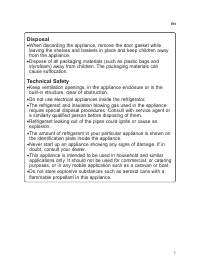
6 EN • Do not use or store flammable or combustible substances (ether, benzene, alcohol, chemical, LPG, combustible spray, insecticide, air freshener, cosmetics, etc.) near the appliance. • Immediately unplug the power plug and contact an LG Electronics customer information centre if you detect a st...
Page 40 - CAUTION; To reduce the risk of minor injury to persons, malfunction,
8 EN CAUTION To reduce the risk of minor injury to persons, malfunction, or damage to the product or property when using this product, follow basic precautions, including the following: Installation • Do not tilt the appliance to pull or push it when transporting. • Make sure not to get a body part ...
Page 42 - INSTALLATION; Dimensions and Clearances
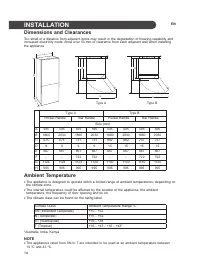
10 INSTALLATION EN Dimensions and Clearances Too small of a distance from adjacent items may result in the degradation of freezing capability and increased electricity costs. Allow over 50 mm of clearance from each adjacent wall when installing the appliance. A C B E F G D H E F G D H Type A Type B ...
Page 43 - Connecting the Appliance; Moving the Appliance; Leveling the Appliance
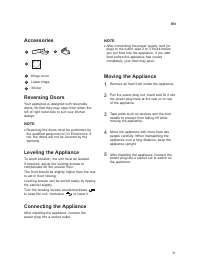
11 Connecting the Appliance After installing the appliance, connect the power plug into a socket outlet. NOTE • After connecting the power supply cord (or plug) to the outlet, wait 2 or 3 hours before you put food into the appliance. If you add food before the appliance has cooled completely, your f...
Page 44 - OPERATION; Parts and Functions
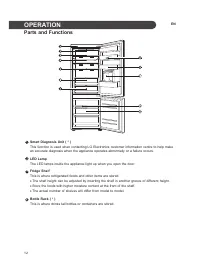
12 OPERATION EN Parts and Functions Smart Diagnosis Unit ( * ) This function is used when contacting LG Electronics customer information centre to help make an accurate diagnosis when the appliance operates abnormally or a failure occurs. LED Lamp The LED lamps inside the appliance light up when you...
Page 46 - Notes for Operation; Suggestion for Energy Saving
14 Notes for Operation • Users should keep in mind that frost can form. If the door is not closed completely, if the humidity is high during the summer, or if the freezer door is opened frequently. • Ensure there is sufficient space between food stored on the shelf or door basket to allow the door t...
Page 47 - Storing Foods Effectively
15 Max Freezing Capacity • The Express Freeze function will set the freezer to its maximum freezing capacity.This generally takes up to 24 hours and automatically switches off. • If the maximum freezing capacity is to be used, Express Freeze must be switched on for seven hours before fresh produce i...
Page 48 - ti
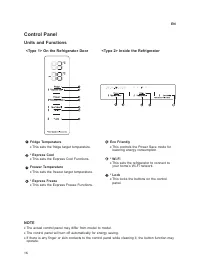
16 E T O N • . l e d o m o t l e d o m m o rf r e ff i d y a m l e n a p l o rt n o c l a u t c a e h T • The control panel will turn off automatically for energy saving. • If there is any finger or skin contacts to the control panel while cleaning it, the button function may operate. y l d n e ir F...
Page 49 - Setting the Temperature; Setting Express Freeze; Setting Express Cool; Setting Eco Friendly
17 Setting the Temperature This sets the fridge temperature or freezer temperature. • Press the Fridge button or Freezer button to adjust the temperature. • The temperature can be adjusted. − Fridge : from 1 °C to 7 °C − Freezer : from -15 °C to -23 °C • The initial temperature is set. − Fridge : 3 ...
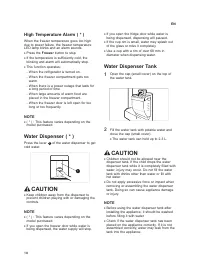
Page 50 - Water Dispenser Tank
18 ) * ( m r a l A e r u t a r e p m e T h g i H When the freezer temperature goes too high due to power failure, the freezer temperature . s d n u o s m r a l a n a d n a s k n il b p m a l D E L • e h t s s e r P Freezer . p o t s o t n o tt u b • e h t , d l o c y lt n e i c if f u s s i e r u t ...
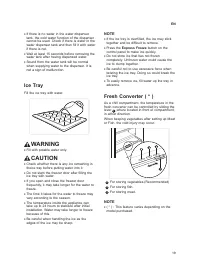
Page 51 - Ice Tray
19 NOTE • If the ice tray is overfilled, the ice may stick together and be difficult to remove. • Press the Express Freeze button on the control panel to make ice quickly. • Do not store ice that has not frozen completely. Unfrozen water could cause the ice to clump together. • Be careful not to use...
Page 52 - Folding Shelf; Door Open Alarm
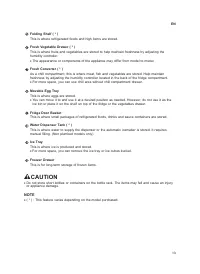
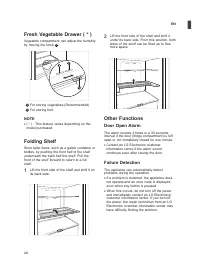
20 Fresh Vegetable Drawer ( * ) Vegetable compartment can adjust the humidity by moving the knob 1 . For storing vegetables.(Recommended)For storing fruit. NOTE • ( * ) : This feature varies depending on the model purchased. Folding Shelf Store taller items, such as a gallon container or bottles, by...
Page 53 - SMART FUNCTIONS; LG ThinQ Application; LG ThinQ Application Features; Before Using LG ThinQ
2 1 EN SMART FUNCTIONS LG ThinQ Application This feature is only available on models with Wi-Fi. The LG ThinQ application allows you to communicate with the appliance using a smartphone. LG ThinQ Application Features Communicate with the appliance from a smartphone using the convenient smart feature...
Page 54 - Open Source Software Notice; Wireless LAN Module Specifications
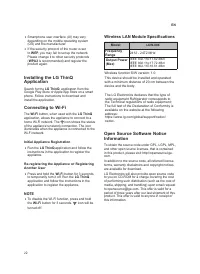
2 2 EN • Smartphone user interface (UI) may vary depending on the mobile operating system (OS) and the manufacturer. • If the security protocol of the router is set to WEP , you may fail to set up the network. Please change it to other security protocols ( WPA2 is recommended) and register the produ...
Page 55 - Using LG ThinQ to Diagnose
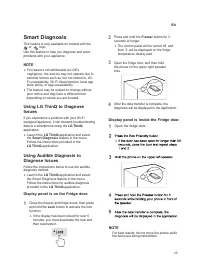
2 3 EN Using Audible Diagnosis to Diagnose Issues Follow the instructions below to use the audible diagnosis method. • Launch the LG ThinQ application and select the Smart Diagnosis feature in the menu. Follow the instructions for audible diagnosis provided in the LG ThinQ application. 1 Close the f...
Page 56 - ENGLISH; PRODUCT FICHE
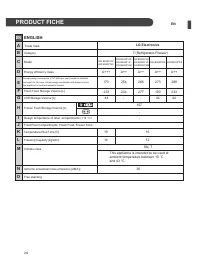
24 EN ИНФОРМАЦИЯ О ПРОДУКТЕ EN ENGLISH A LG Electronics B GW-B459S*HZ GW-B459S*JZ C Category D A++ E 254 F H 107 - I - J K 16 L 12 M Climate class SN, T N 36 O G Model Energy efficiency class Fresh Food Storage Volume [L] Chill Storage Volume [L] Frozen Food Storage Volume [L] Design temperature of ...
Page 57 - MAINTENANCE; Notes for Cleaning; Removing the Fridge Door Basket
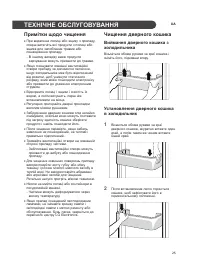
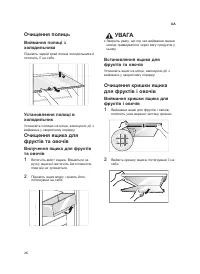
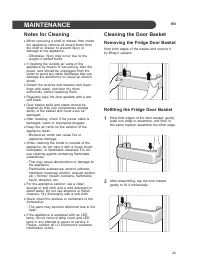
25 MAINTENANCE EN Notes for Cleaning • When removing a shelf or drawer from inside the appliance, remove all stored foods from the shelf or drawer to prevent injury or damage to the appliance. − Otherwise, injury may occur due to the weight of stored foods. • If cleaning the outside air vents of the...
Page 58 - Refitting the Vegetable Drawer; Cleaning the Shelf; Cleaning the Vegetable
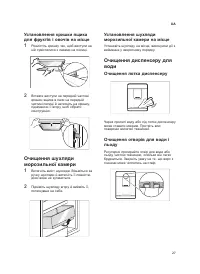
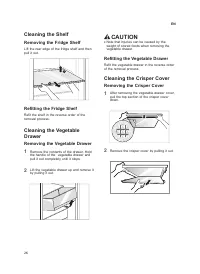
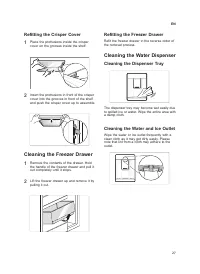
26 N O I T U A C • e h t y b d e s u a c e b n a c s e ir u j n i t a h t e t o N weight of stored foods when removing the . r e w a r d e l b a t e g e v Refitting the Vegetable Drawer Refit the vegetable drawer in the reverse order . s s e c o r p l a v o m e r e h t f o r e v o C r e p s ir C e h...
Page 60 - TROUBLESHOOTING
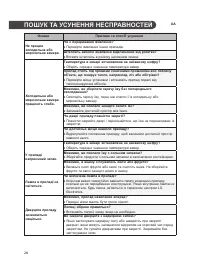
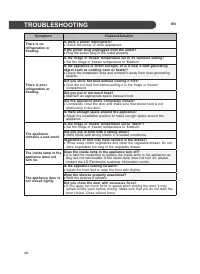
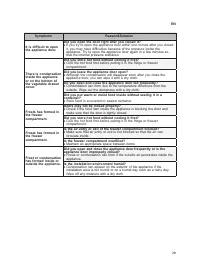
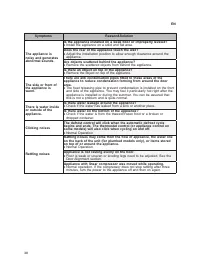
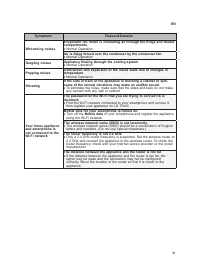
28 TROUBLESHOOTING EN Symptoms Reason&Solution There is no refrigeration or freezing. Is there a power interruption? • Check the power of other appliances. If the power plug unplugged from the outlet? • Plug the power plug in the outlet properly. There is poor refrigeration or freezing. Is the f...