Page 2 - BEFORE USE; Read this before operation
2 BEFORE USE ,,,,, ,, ,,,,,,,,, Read this before operation ● Choose the installation location of your unit carefully. Avoid placing it in direct sunlight or close to a source of heat. Also avoid locations subject to vibrations and excessive dust, heat, cold or moisture. ● The ventilation holes shoul...
Page 3 - Transparent dust cover
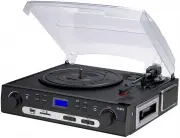
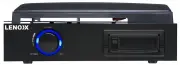
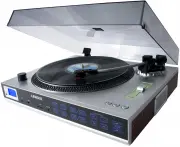
3 The turntable features: 1. 3-speed turntable fit for 33 1/3, 45, 78 RPM 2. belt-drive and semi-automatic play tone arm 4. ceramic stereo cartridge with jewel stylus 5. built-in 45 rpm adapter 6. slot-in USB/SD/MMC for encoding & decoding 7. analog AM/FM/FM stereo radio 8. cassette tape playbac...
Page 4 - CONNECTION; Note: When you insert both; USB flash disk; and SD Card, the recorded file will be; PHONO OPERATION; saved into the latter inserting device.; Note2: Recorded file in mp3 format with 128bit.
4 CONNECTION 1. Connect the power cord to AC outlet 230V/50Hz. 2. Switch the function selector to PHONO/AUX IN/USB&SD/TUNER function. Now your system is ready to play the music. FM/AM OPERATION ,,,,,,,, ,, 1. Set FUNCTION switch to TUNER mode, then choose needed band (AM, FM and FM stereo) by BA...
Page 5 - The external sound sourcing can be recorded to the
5 CASSETTE TAPE OPERATION 1. Press the Function switch to AUX IN (TAPE) position first. 2. Insert a pre-recorded cassette tape into tape slot, with the exposed side facing right. By pushing, the cassette will slide into the tape mechanism and play start automatically. Note: one end of tape will rema...
Page 6 - PHONES OUTPUT/EARPHONE JACK; Private listen of earphone also can be realized through this jack.; TIPS FOR BETTER PERFORMANCE; HOW TO REPLACE THE NEEDLE; To replace the needle, please refer to the instructions below.; Removing the needle form the cartridge; direction shown in sketch “A”; Inserting the needle
6 1. Be sure power is on, insert USB flash disk or Mp3 player into USB port and/or insert MEMORY CARD (SD/MMC) into SD socket. 2. Set FUNCTION switch to USB/SD position 3. The device supports for Mp3 and WMA formats. During play status, press PLAY/PAUSE button once to halt playing, press it again to...
Page 7 - MAINTENANCE AND CARE
7 1. Hold the tip of the needle head shell and insert it by pressing in the direction illustrated by “B” 2. Push the needle head shell upwards in the direction illustrated by “C” until the needle locks into the tip position. ,,,,,,,,,, MAINTENANCE AND CARE ,, ,,,, Caring for the player ● Apparatus s...