Page 2 - EN; Contents; What should I do if th
30 EN Contents Safety Information ............................................................................................................................ 31 Description of your oven ....................................................................................................................
Page 3 - Safety Information; Warning! Risk of suffocation, injury or permanent disability.; Do not let children play with the appliance.; GENERAL SAFETY
31 EN Safety Information Before the installation and use of the appliance, carefully read the supplied instructions. The manufacturer is not responsible if an incorrect installation and use causes injuries and damages. Always keep the instructions with the appliance for future reference. CHILDREN AN...
Page 4 - Safety; INSTALLATION
32 EN Safety Information Do not lean or sit on the open oven door. This may damage the oven, especially in the hinge zone. The door can bear a maximum weight of 8 kg. The grills can bear a maximum load of 8 kg. To avoid damaging the oven, do not exceed this load. INSTALLATION The electrical in...
Page 5 - Description of your oven
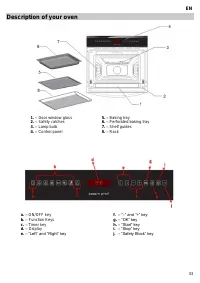
33 EN Description of your oven 1. – Door window glass 5. – Baking tray 2. – Safety catches 6. – Perforated baking tray 3. – Lamp bulb 7. – Shelf guides 4. – Control panel 8. – Rack a. – ON/OFF key f. – “–” and “+” key b. – Function Keys g. – “OK” key c. – Timer key h. – “Start” key d. – Display i. –...
Page 6 - Description of Functions
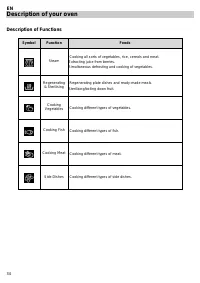
34 EN Description of your oven Description of Functions Symbol Function Foods Steam Cooking all sorts of vegetables, rice, cereals and meat. Extracting juice from berries. Simultaneous defrosting and cooking of vegetables. Regenerating & Sterilising Regenerating plate dishes and ready-made meals...
Page 7 - Basic settings; Initial Settings; OK; Water Hardness setting
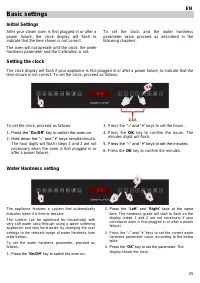
35 EN Basic settings Initial Settings After your steam oven is first plugged in or after a power failure, the clock display will flash to indicate that the time shown is not correct. The oven will not operate until the clock, the water hardness parameter and the Calibration is set. To set the clock ...
Page 8 - Hiding/Displaying the Clock; Safety blocking; “Safety Block”
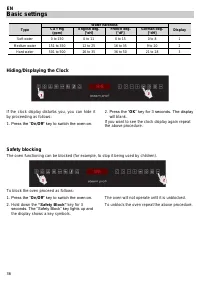
36 EN Basic settings Type Water hardness Display Ca + Mg (ppm) English deg. [°eH] French deg. [°dF] German deg. [°dH] Soft water 0 to 150 0 to 11 0 to 15 0 to 8 1 Medium water 151 to 350 12 to 25 16 to 35 9 to 20 2 Hard water 501 to 500 26 to 35 36 to 50 21 to 28 3 Hiding/Displaying the Clock If the...
Page 9 - Timer
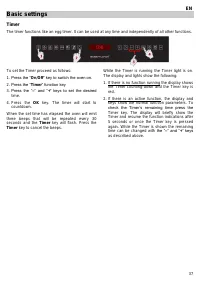
37 EN Basic settings Timer The timer functions like an egg timer. It can be used at any time and independently of all other functions. To set the Timer proceed as follows: 1. Press the “ On/Off ” key to switch the oven on. 2. Press the “ Timer ” function key 3. Press the “ – ” and “ + ” keys to set ...
Page 10 - Basic functions; Steam function; Regenerating & Sterilising
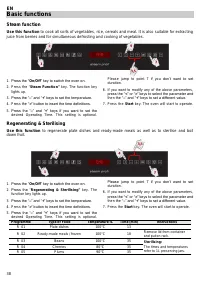
38 EN Basic functions Steam function Use this function to cook all sorts of vegetables, rice, cereals and meat. It is also suitable for extracting juice from berries and for simultaneous defrosting and cooking of vegetables. 1. Press the “ On/Off ” key to switch the oven on. 2. Press the “ Steam Fun...
Page 11 - Special Functions; Cooking Vegetables; cook the vegetables described in the table below.
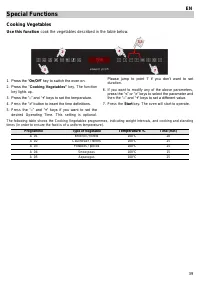
39 EN Special Functions Cooking Vegetables Use this function cook the vegetables described in the table below. 1. Press the “ On/Off ” key to switch the oven on. 2. Press the “ Cooking Vegetables” key. The function key lights up. 3. Press the “ – ” and “ + ” keys to set the temperature. 4. Press the...
Page 12 - Cooking Fish; cook the fish types described in the table below.
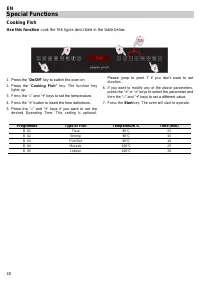
40 EN Special Functions Cooking Fish Use this function cook the fish types described in the table below. 1. Press the “ On/Off ” key to switch the oven on. 2. Press the “ Cooking Fish” key. The function key lights up. 3. Press th e “ – ” and “ + ” keys to set the temperature. 4. Press the “ > ” b...
Page 13 - Cooking Meat; cook the meat types described in the table below.
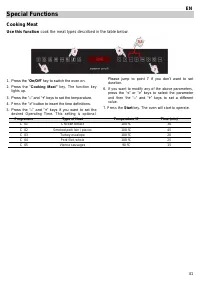
41 EN Special Functions Cooking Meat Use this function cook the meat types described in the table below. 1. Press the “ On/Off ” key to switch the oven on. 2. Press the “ Cooking Meat” key. The function key lights up. 3. Press the “ – ” and “ + ” keys to set the temperature. 4. Press the “ > ” bu...
Page 14 - Cooking Side Dishes; cook the foods described in the table below.
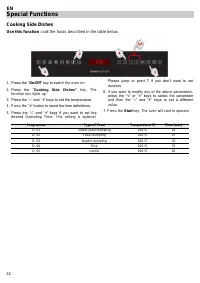
42 EN Special Functions Cooking Side Dishes Use this function cook the foods described in the table below. 1. Press the “ On/Off ” key to switch the oven on. 2. Press the “ Cooking Side Dishes” key. The function key lights up. 3. Press the “ – ” and “ + ” keys to set the temperature. 4. Press the “ ...
Page 15 - Water feeding; Filling the water tank; All functions require the water tank to be full.; Refilling the water; Dry the water tank and introduce it back into; DEP; This warning can be cleared by pressing the; Stop
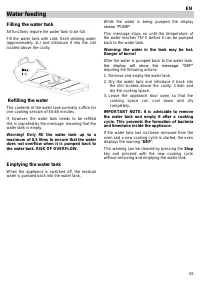
43 EN Water feeding Filling the water tank All functions require the water tank to be full. Fill the water tank with cold, fresh drinking water (approximately 1L) and introduce it into the slot located above the cavity. Refilling the water The contents of the water tank normally suffice for one cook...
Page 17 - Usage, tables and tips; Use of accessories; For more precise information refer to the tables.
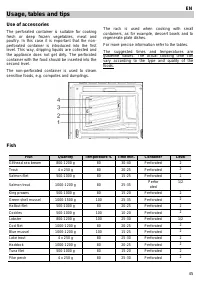
45 EN Usage, tables and tips Use of accessories The perforated container is suitable for cooking fresh or deep frozen vegetables, meat and poultry. In this case it is important that the non-perforated container is introduced into the first level. This way, dripping liquids are collected and the appl...
Page 18 - Meat
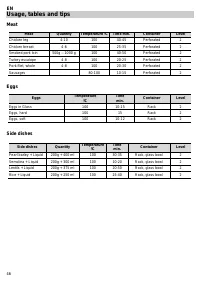
46 EN Usage, tables and tips Meat Meat Quantity Temperature ºC Time min. Container Level Chicken leg 4-10 100 40-45 Perforated 2 Chicken breast 4-6 100 25-35 Perforated 2 Smoked pork loin 500g – 1000 g 100 40-50 Perforated 2 Turkey escalope 4-8 100 20-25 Perforated 2 Pork filet, whole 4-8 100 20-30 ...
Page 19 - Vegetables
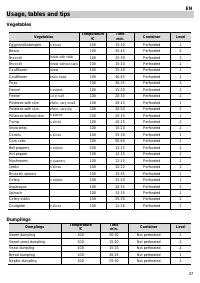
47 EN Usage, tables and tips Vegetables Vegetables Temperature ºC Time min. Container Level Eggplant/Aubergine in slices 100 15-20 Perforated 2 Beans 100 35-45 Perforated 2 Broccoli florets with stalk 100 25-30 Perforated 2 Broccoli florets without stalk 100 15-20 Perforated 2 Cauliflower florets 10...
Page 20 - Desserts
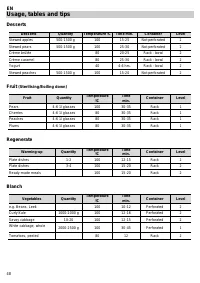
48 EN Usage, tables and tips Desserts Desserts Quantity Temperature ºC Time min. Container Level Stewed apples 500-1500 g 100 15-25 Not perforated 2 Stewed pears 500-1500 g 100 25-30 Not perforated 2 Crème brûlée 80 20-25 Rack - bowl 2 Crème caramel 80 25-30 Rack - bowl 2 Yogurt 40 4-6 hrs. Rack - b...
Page 21 - Defrost; Two level cooking; Different cooking times are controlled this way:; Insert the fish in the 1
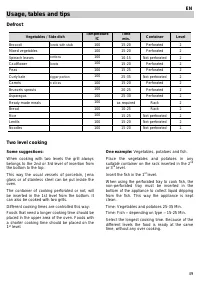
49 EN Usage, tables and tips Defrost Vegetables / Side dish Temperature ºC Time min. Container Level Broccoli florets with stalk 100 15-20 Perforated 2 Mixed vegetables 100 15-20 Perforated 2 Spinach leaves portions 100 10-15 Not perforated 2 Cauliflower florets 100 15-20 Perforated 2 Peas 100 15-25...
Page 22 - Care and maintenance; Cleaning the cooking space; Open the appliance door as far as it will go.
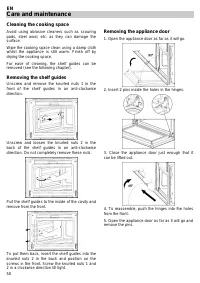
50 EN Care and maintenance Cleaning the cooking space Avoid using abrasive cleaners such as scouring pads, steel wool, etc. as they can damage the surface. Wipe the cooking space clean using a damp cloth whilst the appliance is still warm. Finish off by drying the cooking space. For ease of cleaning...
Page 23 - Descaling; . If the Descaling; durgol®
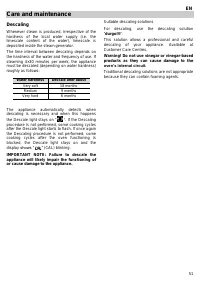
51 EN Care and maintenance Descaling Whenever steam is produced, irrespective of the hardness of the local water supply (i.e. the limescale content of the water), limescale is deposited inside the steam generator. The time interval between descaling depends on the hardness of the water and frequency...
Page 24 - Descaling procedure
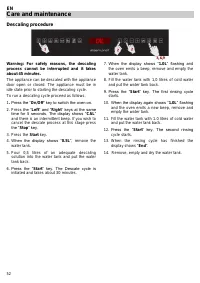
52 EN Care and maintenance Descaling procedure Warning: For safety reasons, the descaling process cannot be interrupted and it takes about 45 minutes. The appliance can be descaled with the appliance door open or closed. The appliance must be in idle state prior to starting the descaling cycle. To r...
Page 25 - Oven cleaning; Front surface; In an oven with an aluminium front,; use a mild; Oven interior; Do not use oven; Accessories
53 EN Oven cleaning Warning! Cleaning should be done with the oven power switched off. Take the plug out of the socket or switch off the oven’s power circuit. Do not use aggressive or abrasive cleaning products, scourers that scratch surfaces or sharp objects, since stains may appear. Do not use hig...
Page 26 - What should I do if the oven doesn’t work?; Replacing the light bulb
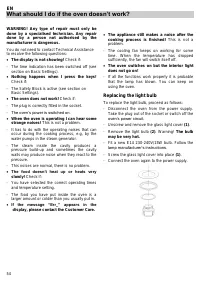
54 EN What should I do if the oven doesn’t work? WARNING! Any type of repair must only be done by a specialised technician. Any repair done by a person not authorised by the manufacturer is dangerous. You do not need to contact Technical Assistance to resolve the following questions: The display i...
Page 27 - Technical characteristics
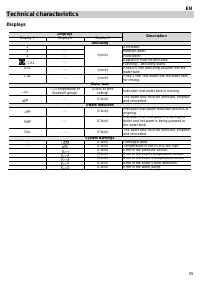
55 EN Technical characteristics Displays Displays Description Display 1 Display 2 Display 3 Descaling 1 (clock) Soft water. 2 --- Medium water. 3 --- Hard water. / CAL --- Appliance must be descaled. Flashing – descaling starts. 0.5L --- (clock) Feed 0.6 litre descaling solution into the water tank....
Page 28 - Specifications; Environmental protection; Disposal of the packaging
56 EN Technical characteristics Specifications AC Voltage ....................................................................................... (see characteristics plate) Power required ................................................................................. 1500 W Exterior dimensi...
Page 29 - Installation instructions; Before installation; follow the instructions supplied separately.
57 EN Installation instructions Before installation Check that the input voltage indicated on the characteristics plate is the same as the voltage of the power outlet you are going to use. Open the oven door and take out all the accessories and remove the packing material. Warning! The front surface...
Page 30 - Einbau / Installation; DE
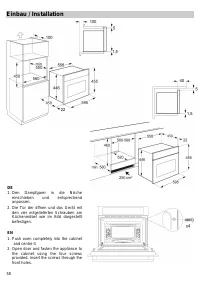
58 Einbau / Installation DE 1. Den Dampfgarer in die Nische einschieben und entsprechend anpassen. 2. Die Tür der öffnen und das Gerät mit den vier mitgelieferten Schrauben am Küchenmöbel wie im Bild dargestellt befestigen. EN 1. Push oven completely into the cabinet and centre it. 2. Open door and ...