Page 3 - Table of contents
Table of contents Introduction 4 Purpose.......................................................... 4 Overview 5 Konftel 70 overview........................................ 5Physical layout................................................ 6Connection layout........................................... 8...
Page 4 - INTRODUCTION; PURPOSE
INTRODUCTION PURPOSE This document describes the procedures for using Konftel 70 and is primarilyintended for the end users. 4
Page 5 - OVERVIEW; KONFTEL 70 OVERVIEW
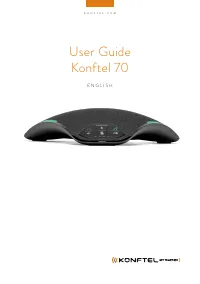
OVERVIEW KONFTEL 70 OVERVIEW Konftel 70 is a speakerphone that you can use to conduct virtual meetings andlisten to music with excellent quality with OmniSound® audio optimizationtechnology. It provides an improved user experience with full-duplex and echocancellation functionality. You can connect ...
Page 6 - PHYSICAL LAYOUT; Callout number
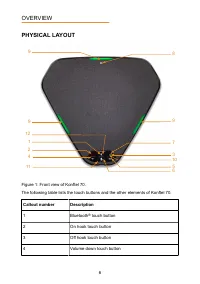
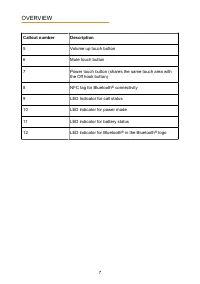
PHYSICAL LAYOUT 9 9 8 9 1 3 11 7 10 4 6 2 5 12 Figure 1: Front view of Konftel 70. The following table lists the touch buttons and the other elements of Konftel 70. Callout number Description 1 Bluetooth ® touch button 2 On hook touch button 3 Off hook touch button 4 Volume down touch button OVERVIE...
Page 8 - CONNECTION LAYOUT
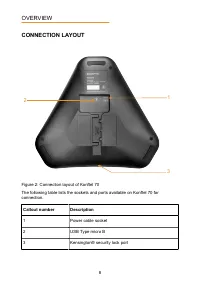
CONNECTION LAYOUT 1 2 3 Figure 2: Connection layout of Konftel 70 The following table lists the sockets and ports available on Konftel 70 forconnection. Callout number Description 1 Power cable socket 2 USB Type micro B 3 Kensington® security lock port OVERVIEW 8
Page 10 - LED STATUS INDICATORS; LED color
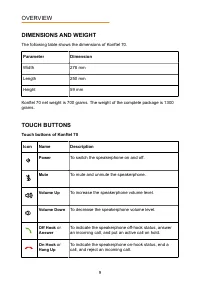
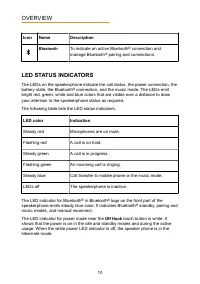
Icon Name Description Bluetooth To indicate an active Bluetooth ® connection and manage Bluetooth ® pairing and connections. LED STATUS INDICATORS The LEDs on the speakerphone indicate the call status, the power connection, thebattery state, the Bluetooth ® connection, and the music mode. The LEDs e...
Page 11 - LED BATTERY STATE INDICATORS; LEDs; SPECIFICATIONS
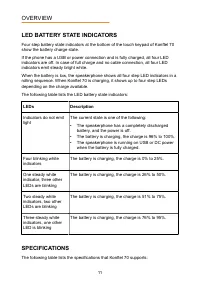
LED BATTERY STATE INDICATORS Four step battery state indicators at the bottom of the touch keypad of Konftel 70show the battery charge state. If the phone has a USB or power connection and is fully charged, all four LEDindicators are off. In case of full charge and no cable connection, all four LEDi...
Page 12 - SAFETY GUIDELINES
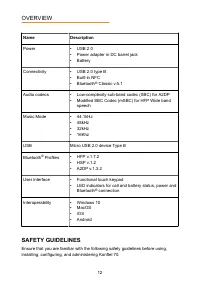
Name Description Power • USB 2.0 • Power adapter in DC barrel jack • Battery Connectivity • USB 2.0 type B • Built-in NFC • Bluetooth ® Classic v.5.1 Audio codecs • Low-complexity sub-band codec (SBC) for A2DP • Modified SBC Codec (mSBC) for HFP Wide bandspeech Music Mode • 44.1kHz • 48kHz • 32kHz •...
Page 14 - CONNECTIVITY; CONNECTION PRIORITY
CONNECTIVITY CONNECTION PRIORITY Konftel 70 supports personal computer or Bluetooth ® host connection to enhance the sound quality. OmniSound ® provides automatic echo cancellation and eliminates distracting background noise. To make a Voice over IP (VoIP) call, you can use an applicable VoIP softwa...
Page 15 - BLUETOOTH CONNECTION; Bluetooth pairing and connection
Connecting to a computer Connect Konftel 70 to a computer to use the speakerphone as a high-qualityconferencing equipment. The computer operating system automatically selects Konftel 70 as a speaker andmicrophone. If your computer does not automatically select Konftel 70 as an audiodevice, manually ...
Page 16 - Reconnecting already paired devices
You can pair a maximum of eight devices with Konftel 70. To pair a new host thatalready has eight other paired devices in the list, Konftel 70 deletes the oldestpairing information. Pairing and connecting with NFC You can pair Konftel 70 with your Bluetooth ® host using the NFC feature. Enable NFC o...
Page 18 - SPEAKERPHONE OPERATIONS; ANSWERING INCOMING CALLS
SPEAKERPHONE OPERATIONS ANSWERING INCOMING CALLS When there is an incoming call on your computer soft client or a Bluetooth ® host, use Konftel 70 to answer it. • Connect your Konftel 70 to a personal computer or a Bluetooth ® host. • Make sure there is an incoming call. On Konftel 70, press the Ans...
Page 19 - PUTTING A CALL ON HOLD; ENDING CALLS
Establish the Bluetooth ® connection between your Bluetooth ® host and Konftel 70. On Konftel 70, press the Bluetooth button. Optional: Press the Bluetooth button again to transfer the call back to your Bluetooth ® host. PUTTING A CALL ON HOLD Use this procedure to put an ongoing call on hold. Trans...
Page 20 - POWER SUPPLY CHARACTERISTICS; POWER MODES; Entering the idle power mode from the hibernate mode; Entering the standby power mode from the idle mode
POWER SUPPLY CHARACTERISTICS POWER MODES Konftel 70 supports different power modes to save power. The following powermodes are available: • Hibernate mode . The speakerphone consumes negligible power. Konftel 70 waits for its activation. The white power LED indicator is off. • Idle mode . Konftel 70...
Page 21 - Mode
• To enter the standby mode, do one of the following: • Connect the Bluetooth ® host device. • Connect the USB host device. • To return the speakerphone to the idle mode, do one of the following: • Disconnect the Bluetooth ® host device. • Disconnect the USB host device. POWER SUPPLY PRIORITY Konfte...
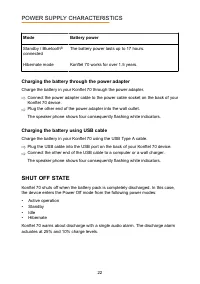
Page 22 - Charging the battery through the power adapter; SHUT OFF STATE
Mode Battery power Standby / Bluetooth ® connected The battery power lasts up to 17 hours. Hibernate mode Konftel 70 works for over 1.5 years. Charging the battery through the power adapter Charge the battery in your Konftel 70 through the power adapter. Connect the power adapter cable to the power ...
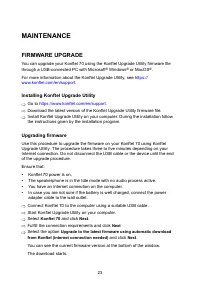
Page 23 - MAINTENANCE; FIRMWARE UPGRADE; Installing Konftel Upgrade Utility
MAINTENANCE FIRMWARE UPGRADE You can upgrade your Konftel 70 using the Konftel Upgrade Utility firmware filethrough a USB-connected PC with Microsoft ® Windows ® or MacOS ® . For more information about the Konftel Upgrade Utility, see https:// www.konftel.com/en/support . Installing Konftel Upgrade ...
Page 24 - HARDWARE RESET
Click Install . The installation process starts. Do not switch off your computer or Konftel 70during the installation. The call status LED indicators start flashing red. When the installation process ends, the speakerphone reboots.Click Finish . HARDWARE RESET If you need to reset your Konftel 70, y...
Page 25 - Index
Index A answering incoming calls 18 audio optimization technology 5 B battery 21 battery charging 21 battery pack 21 Bluetooth connection 14 , 15 buttons 6 C cable retention 15 charging battery power adapter 22 USB 22 computer speaker 14 conference unit 14 connection layout 8 connection to a compute...