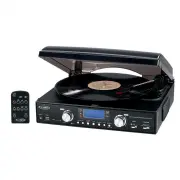
Page 2 - IMPORTANT SAFETY INSTRUCTIONS
EN-1 IMPORTANT SAFETY INSTRUCTIONS WARNING: TO REDUCE THE RISK OF FIRE OR ELECTRIC SHOCK, DO NOT EXPOSE THIS APPLIANCE TO RAIN OR MOISTURE. DANGEROUS HIGH VOLTAGES ARE PRESENT INSIDE THE ENCLOSURE. DO NOT OPEN THE CABINET REFER SERVICING TO QUALIFIED PERSONNEL ONLY. CAUTION: PLEASE READ AND OBSERVE ...
Page 3 - manufacturer’s instructions.; CAUTION:
EN-2 7. Do not block any of the ventilation openings. Install in accordance with the manufacturer’s instructions. 8. Do not install near any heat sources such as radiators, heat registers, stoves, or other apparatus (including amplifiers) that produce heat. 9. Do not defeat the safety purpose of the...
Page 4 - – Consult the dealer or an experienced radio/TV technician for help.
EN-3 FCC NOTICE: This equipment has been tested and found to comply with the limits for a Class B digital device, pursuant to Part 15 of the FCC Rules. These limits are designed to provide reasonable protection against harmful interference in a residential installation. This equipment generates, use...
Page 5 - LOCATION OF CONTROLS
EN-4 LOCATION OF CONTROLS MAIN UNIT 1. Turntable 16. Play / Pause Button 2. 45 RPM Adaptor 17. Record Button 3. Cue-lever (use this lever to lift the tone arm). 18. Skip + Button 4. Tone Arm 19. Skip - Button 5. Speed Selector 20. SD/MMC Card Slot 6. Tone Arm Holder 21. Headphone Jack 7. Speaker 22....
Page 6 - Avoid installing the unit in locations described below:; POWER SOURCE; or “PHONO”. The LCD backlight will turn on.; ACTIVATING THE REMOTE CONTROL
EN-5 REMOTE CONTROL UNIT 1. PLAY/PAUSE BUTTON 2. RECORD BUTTON 3. STOP/USB/SD BUTTON 4. SKIP- BUTTON 5. SKIP+ BUTTON 6. DISPLAY BUTTON 7. PROG BUTTON 8. MODE BUTTON 9. FOLDER UP BUTTON 10. FOLDER DOWN BUTTON 11. DELETE BUTTON IMPORTANT NOTES Avoid installing the unit in locations described below: ...
Page 7 - BATTERY CARE; leaking battery can cause damage to the Remote Control.; BATTERY REPLACEMENT; Remote Control and void the warranty.; USING THE REMOTE CONTROL CORRECTLY; to. The radio station frequency shows on the LCD DISPLAY.
EN-6 BATTERY CARE i. If the unit is not to be used for an extended period of time, remove the battery. An old or leaking battery can cause damage to the Remote Control. ii. Do not dispose of batteries in fire, batteries may explode or leak. BATTERY REPLACEMENT When the battery becomes weak, the oper...
Page 9 - ENCODING RECORDS TO MP3; SEL
EN-8 IMPORTANT: Moving or jarring the Turntable without securing the Tone Arm Clamp (6) could result in damage to the Tone Arm (4). ENCODING RECORDS TO MP3 You can convert you favorite records into MP3 files and store then on a USB Flash Drive or SD/MMC Memory Card via the USB port (22) or SD/MMC sl...
Page 10 - TRACK SKIP; ‘ appears in the Display.
EN-9 USB / CARD OPERATION The following tasks can be accomplished by either using the controls on the REMOTE Control or those which have similar function markings on the JTA-460 main unit. This icon indicates that a task can only be performed using the controls on JTA-460. 1. Select the USB / CARD...
Page 11 - FOLDER; Press the button once to start playback from the next track.
EN-10 2. The track will be repeated and stop until the STOP Button (3) is pressed. 3. To repeat a Folder, press the MODE button (8) twice. " FOLDER " will light up. The selected Folder will be repeated and stop until the STOP Button (3) is pressed. 4. To repeat all the tracks, press the MODE...
Page 14 - Unplug the connection cable.; READ THIS IMPORTANT INFORMATION BEFORE USING YOUR HEADPHONES
EN-13 4. Sound will then come out from the system’s built-in speakers and the external Amplifier’s speakers simultaneously. 5. Set the VOLUME CONTROL (23) to “MIN” and adjust the sound level using the VOLUME CONTROL on the external Amplifier as desired. 6. Turn the System and the external Amplifier ...
Page 16 - 0 DAY LIMITED WARRANTY AND SERVICE
EN-15 90 DAY LIMITED WARRANTY AND SERVICE VALID IN THE U.S.A ONLY SPECTRA MERCHANDISING INTERNATIONAL, INC. warrants this unit to be free from defective materials or factory workmanship for a period of 90 days from the date of original customer purchase and provided the product is utilized within th...
Page 17 - Por favor lea y observe cuidadosamente este
MODELO JTA-460 GIRADISCOS ESTERÉO CON 3 VELOCIDADES CON CODIFICACIÓN A MP3 Y RADIO ESTÉREO AM/FM Manual del Usuario Por favor lea y observe cuidadosamente este Manual de Instrucciones cuidadosamente antes de utilizar la unidad y reténgalo para futura referencia
Page 18 - PRECAUCIÓN; RIESGO DE CHOQUE ELÉCTRICO
SP-1 IMPORTANTES INSTRUCCIONES DE SEGURIDAD ADVERTENCIA: PARA REDUCIR EL RIESGO DE INCENDIO O CHOQUE ELÉCTRICO, NO EXPONGA ESTE EQUIPO A LA LLUVIA O HUMEDAD. EXISTE ALTO VOLTAJE PELIGROSO PARA LA SALUD EN LA PARTE INTERIOR. NO ABRA EL GABINETE, REALICE EL MANTENIMIENTO SOLAMENTE CON LA AYUDA DE PERS...
Page 20 - ANUNCIO FCC; Reorientar o reubicar la antena receptora.; ¡PROTEJA SUS MUEBLES!
SP-3 ANUNCIO FCC Este equipo ha sido probado y se encuentra conforme con los límites de un dispositivo digital Clase B, observando la Parte 15 de las Reglas FCC. Estos límites están diseñados para suministrar protección razonable contra la interferencia nociva en una instalación residencial. Este eq...
Page 21 - UBICACIÓN DE LOS CONTROLES
SP-4 UBICACIÓN DE LOS CONTROLES UNIDAD PRINCIPAL 1. Giradiscos 16. Botón Reproducir/Pausa 2. Adaptador RPM 45 17. Botón Grabar 3. Nivelador de Brazo Automático (utilice este nivelador para levantar el brazo) 18. Botón Saltar + 4. Brazo automático 19. Botón Saltar - 5. Selector de Velocidad 20. Ranur...
Page 22 - Evite instalar la unidad en estos lugares:; FUENTE DE ALIMENTACIÓN
SP-5 UNIDAD DE CONTROL REMOTO 1. BOTÓN PAUSA/ REPRODUCIR 2. BOTÓN GRABAR 3. BOTÓN SD/USB/PARADA 4. BOTÓN SALTAR - 5. BOTÓN SALTAR + 6. BOTÓN PANTALLA 7. BOTÓN PROG 8. BOTÓN MODO 9. BOTÓN CARPETA ARRIBA 10. BOTÓN CARPETA ABAJO 11. BOTÓN BORRAR NOTAS IMPORTANTES Evite instalar la unidad en estos lugar...
Page 23 - CUIDADO DE LA BATERÍA; batería que pierde puede causar daño al Control Remoto.; REEMPLAZO DE BATERÍA; incorrecta puede dañar el Control Remoto y anular la garantía.; USO CORRECTO DEL CONTROL REMOTO
SP-6 CUIDADO DE LA BATERÍA i. Si la unidad no va a utilizarse durante un periodo extenso de tiempo, remueva la pila. Una batería que pierde puede causar daño al Control Remoto. ii. No deseche las baterías en el fuego, ya que pueden explotar o perder. REEMPLAZO DE BATERÍA Cuando la pila está por gast...
Page 25 - CODIFICAR DISCOS MP3
SP-8 IMPORTANTE: Si mueve o fuerza el giradiscos sin asegurar el soporte del brazo se podría dañar el Brazo. CODIFICAR DISCOS MP3 Usted puede convertir sus discos favoritos en archivos MP3 y guardarlos en un dispositivo de memoria flash USA o Tarjeta de Memoria SD/MMC vía el puerto USB (22) o ranura...
Page 26 - OPERACIÓN USB / TARJETA; La pantalla mostrará “USB NO” cuando el Puerto USB esté
SP-9 OPERACIÓN USB / TARJETA Las siguientes tareas pueden lograrse utilizando los controles del Control Remoto o aquellos que tengan marcas de función similar en la unidad principal JTA-460. Este icono indica que una tarea sólo puede realizarse utilizando los controles en JTA-460. 1. Seleccione el...
Page 27 - REPETIR 1/CARPETA/ TODA LA REPRODUCCIÓN; ’ aparece en la Pantalla.
SP-10 REPETIR 1/CARPETA/ TODA LA REPRODUCCIÓN 1. Durante la reproducción, si usted desea repetir la misma pista, simplemente presione el Botón MODO (8) una vez. ‘ ’ aparece en la Pantalla. 2. La pista se repetirá y no se detendrá hasta que el Botón de PARADA (3) sea presionado. 3. Para repetir una C...
Page 29 - COPIAR ARCHIVOS ENTRE USB Y TARJETA; El número total de pistas en USB se mostrará y; BORRAR ARCHIVOS; para seleccionar la pista a borrar, por ejemplo pista 5.; DEL; ” aparecerá en pantalla unas veces y luego desaparecerá.
SP-12 COPIAR ARCHIVOS ENTRE USB Y TARJETA Los archivos guardados en su memoria flash USB o su tarjeta SD/MMC pueden copiarse entre estos dispositivos. Por favor, siga las instrucciones debajo para copiar los archivos entre el puerto USB y la ranura de la Tarjeta. Las siguientes tareas pueden logrars...
Page 30 - ’ aparecerá en la
SP-13 3. Para confirmar, presione el botón GRABAR (2) una vez. ‘ DEL ’ aparecerá en la Pantalla durante unos segundos y luego la Pantalla volverá al modo de parada de reproducción de USB/Tarjeta con el número total de pistas menos una. 38 Archivos Originales Luego de borrar la pista 5. 4. Repetir 1-...
Page 31 - ni substancias solventes.
SP-14 NOTA: Recomendamos que reduzca el control de volumen a un nivel más bajo antes de colocarse los auriculares. Luego de colocarse los auriculares, aumente gradualmente el volumen a un nivel cómodo para escuchar. REEMPLAZO DE PUA POR FAVOR REFIÉRASE AL DIAGRAMA ABAJO PARA REEMPLAZAR LA PUA. NO SE...
Page 32 - GUÍA DE SOLUCIÓN DE PROBLEMAS
SP-15 GUÍA DE SOLUCIÓN DE PROBLEMAS Si usted experimente dificultades en el uso de esta Radio HD, por favor verifique lo siguiente o llama al Servicio al Cliente al número 1-800-777-5331. PROBLEMA POSIBLE CAUSA SOLUCIÓN La unidad está desconectada de la toma CA. Conecte a una toma. La unidad no ...