Page 3 - INTRODUCTION; Your safety and the safety of others are very important.; DANGER; IMPORTANT SAFETY INSTRUCTIONS; SAFETY
INTRODUCTION | 3 INTRODUCTION INTR ODUCTION All safety messages will tell you what the potential hazard is, tell you how to reduce the chance of injury, and tell you what can happen if the instructions are not followed. Your safety and the safety of others are very important. We have provided many i...
Page 4 - REGISTERING YOUR APPLIANCE; PRODUCT IDENTIFICATION
4 | INTRODUCTION INTRODUCTION REGISTERING YOUR APPLIANCE Gain access to our concierge-level Customer Support by registering your appliance. We make product registration simple and straightforward so you can start using your exclusive JennAir benefits today. Registering your appliance allows you to: ...
Page 5 - PRODUCT FEATURES; CONTROL PANEL
INTRODUCTION | 5 INTR ODUCTION PRODUCT FEATURES 1. CONTROL PANEL Offers different abilities such as self- cleaning and ice production modes. 2. ICE SCOOP WITH HOLDER Ice scoop is located in its designated holder inside the ice maker. 3. WATER FILTER Helps filter your water and ice for a cleaner tast...
Page 6 - PRODUCT CONTROLS; CLEAN
PRODUCT CONTROLS 1. ON/OFF Press the ON/OFF button to Start/Stop ice production. Pressing the On/Off button does not shut off power to the ice maker. Allow 24 hours to produce the first batch of ice. Discard the first two batches produced. 2. CLEAN It is recommended that you clean the ice maker when...
Page 7 - GETTING STARTED; HOW YOUR ICE MAKER WORKS
GETTING STARTED | 7 GETTING STARTED GETTING S TARTED HOW YOUR ICE MAKER WORKS When you first start your ice maker, the water pan will fill and the system will rinse itself before starting to make ice. This rinsing process takes about 5 minutes. Under normal operating conditions, the ice maker will c...
Page 8 - INSTALLING THE WATER FILTER; REPLACING THE WATER FILTER
8 | GETTING STARTED GETTING STARTED INSTALLING THE WATER FILTER A water filter is provided but not required for this unit. Minerals are expelled during the ice production process, making a water filter unnecessary. For information on where to purchase replacement filters, see “To Order Accessories” ...
Page 9 - WATER FILTER STATUS LIGHTS
GETTING STARTED | 9 GETTING STARTED GETTING S TARTED WATER FILTER STATUS LIGHTS The water filter status lights will let you know when to change your water filter. ■ The “Order Filter” status light will be illuminated when it is time to order a replacement filter. ■ The “Replace Filter” status light ...
Page 10 - CARE AND CLEANING; CLEANING THE INTERIOR; WARNING
10 | CARE AND CLEANING CARE AND CLEANING CLEANING THE INTERIOR Your ice-making appliance needs to be cleaned regularly for the ice maker to operate at peak efficiency and to avoid premature failure of system components. See the “Ice Production” section on page 12. 1. Unplug ice maker or disconnect p...
Page 11 - CLEANING THE
CARE AND CLEANING | 11 CARE AND CLEANING C ARE AND CLEANING CLEANING THE ICE MAKER SYSTEM Minerals that are removed f rom water during the f reezing cycle will eventually form a hard, scaly deposit in the water system. Cleaning the system regularly helps remove the mineral scale buildup. How often y...
Page 12 - TROUBLESHOOTING; ICE MAKER OPERATION; ICE PRODUCTION
12 | TROUBLESHOOTING TROUBLESHOOTING ICE MAKER OPERATION ICE MAKER WILL NOT OPERATE Electrical Shock Hazard Plug into a grounded 3 prong outlet.Do not remove ground prong.Do not use an adapter.Do not use an extension cord.Failure to follow these instructions can result in death, fire, or electrical ...
Page 13 - ICE QUALITY; PLUMBING PROBLEMS
TROUBLESHOOTING | 13 TROUBLESHOOTING TROUBLESHOO TING ICE QUALITY OFF-TASTE, ODOR, OR GRAY COLOR IN THE ICE ■ If there is unusually high mineral content in the water supply, the water may need to be treated. ■ If there is mineral scale buildup, you should clean the ice maker. ■ Do not store any food...
Page 14 - ASSISTANCE; TO ORDER ACCESSORIES
14 | ASSISTANCE ASSISTANCE TO ORDER ACCESSORIES To order accessories in the U.S.A., visit our website www.jennair.com/accessories or call 1-800-JennAir (536-6247). In Canada, visit our website www.jennair.ca or call 1-800-JennAir (536-6247). Water Filter Order Part Number F2WC9I1 or ICE2 Drain Pump ...
Page 15 - PERFORMANCE DATA SHEET
ASSISTANCE | 15 ASSISTANCE A SSIS TANCE PERFORMANCE DATA SHEET ICE MAKER WATER FILTRATION SYSTEM MODEL P6GEG2KL, P6KG2KL, P6WG2KL CAPACITY 2000 GALLONS (7571 LITERS) This system has been tested according to NSF/ANSI Standards 42 for the reduction of the substances listed below. The concentration of ...
Page 16 - TEN YEAR LIMITED WARRANTY
16 | WARRANTY JENNAIR ® REFRIGERATION LIMITED WARRANTY ATTACH YOUR RECEIPT HERE. PROOF OF PURCHASE IS REQUIRED TO OBTAIN WARRANTY SERVICE. Please have the following information available when you call the Customer eXperience Center: Q Name, address, and telephone number Q Model number and serial num...
Page 20 - Votre sécurité et celle des autres est très importante.; AVERTISSEMENT; SÉCURITAIRE
20 | INTRODUCTION INTRODUCTION Risque possible de décès ou de blessure grave si vous ne suivez pas immédiatement les instructions. Risque possible de décès ou de blessure grave si vous ne suivez pas les instructions. Tous les messages de sécurité vous diront quel est le danger potentiel et vous dise...
Page 21 - IMPORTANTES INSTRUCTIONS DE SÉCURITÉ
INTRODUCTION | 21 INTRODUCTION INTR ODUCTION IMPORTANTES INSTRUCTIONS DE SÉCURITÉ AVERTISSEMENT : Pour réduire les risques d’incendie, de choc électrique ou de blessures lors de l’utilisation du machine à glaçons, prendre quelques précautions fondamentales, y compris les suivantes : CONSERVER CES IN...
Page 22 - ENREGISTREMENT DE VOTRE; TABLE DES MATIÈRES; IDENTIFICATION DU PRODUIT; ENTRETIEN ET NETTOYAGE; DÉPANNAGE
22 | INTRODUCTION INTRODUCTION ENREGISTREMENT DE VOTRE APPAREIL Accédez à notre service à la clientèle de niveau concierge en enregistrant votre appareil. Nous simplifions l’enregistrement des produits afin que vous puissiez commencer à utiliser vos avantages JennAir exclusifs aujourd’hui. L’enregis...
Page 23 - CARACTÉRISTIQUES DU PRODUIT; PANNEAU DE COMMANDES
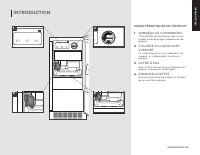
INTRODUCTION | 23 INTRODUCTION INTR ODUCTION CARACTÉRISTIQUES DU PRODUIT 1. PANNEAU DE COMMANDES Off re différentes possibilités comme les modes autonettoyage et production de glaçons. 2. CUILLÈRE À GLAÇON AVEC SUPPORT La cuillère à glaçons est située dans son support, à l’intérieur de la machine à ...
Page 24 - COMMANDES DU PRODUIT; MAX ICE (production de glaçons
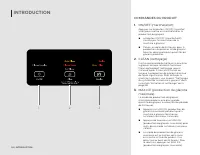
INTRODUCTION COMMANDES DU PRODUIT 1. ON/OFF (marche/arrêt) Appuyer sur le bouton ON/OFF (marche/ arrêt) pour mettre en marche/arrêter la production de glaçons. Le bouton ON/OFF (marche/arrêt) n’arrête pas l’alimentation de la machine à glaçons. Prévoir un délai de 24 heures pour la production du pre...
Page 25 - COMMENT UTILISER LA MACHINE
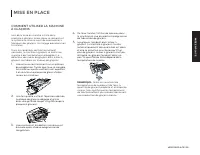
MISE EN PLACE | 25 MISE EN PLACE MISE EN PLACE COMMENT UTILISER LA MACHINE À GLAÇONS Lors de la mise en marche initiale de la machine à glaçons, le bac d’eau se remplira et le système se rincera avant de commencer à fabriquer des glaçons. Ce rinçage prend environ 5 minutes. Dans les conditions de fo...
Page 26 - INSTALLATION DU FILTRE À EAU
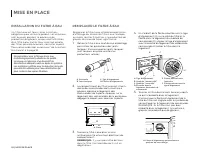
26 | MISE EN PLACE MISE EN PLACE INSTALLATION DU FILTRE À EAU Un filtre à eau est fourni, mais il n’est pas obligatoire pour utiliser le produit. Les minéraux sont évacués pendant le processus de production de glaçons, ce qui rend l’utilisation d’un filtre à eau inutile. Pour savoir où acheter des f...
Page 27 - TÉMOINS LUMINEUX DE L’ÉTAT DU
MISE EN PLACE | 27 MISE EN PLACE MISE EN PLACE TÉMOINS LUMINEUX DE L’ÉTAT DU FILTRE À EAU Les témoins lumineux du filtre à eau vous aideront à savoir quand changer le filtre à eau. ■ Le témoin lumineux “Order Filter” (commander filtre) s’allume lorsqu’il est temps de commander un filtre de rechange....
Page 28 - NETTOYAGE DE L’INTÉRIEUR
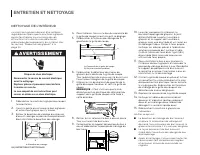
28 | ENTRETIEN ET NETTOYAGE ENTRETIEN ET NETTOYAGE NETTOYAGE DE L’INTÉRIEUR La machine à glaçons doivent être nettoyés régulièrement pour que la machine à glaçons puisse fonctionner au maximum de son efficacité et afin d’éviter une défaillance prématurée des composants du système. Voir les section “...
Page 29 - NETTOYAGE DU SYSTÈME DE LA
ENTRETIEN ET NETTOYAGE | 29 ENTRETIEN ET NETTOYAGE ENTRETIEN ET NETT O YAGE NETTOYAGE DU SYSTÈME DE LA MACHINE À GLAÇONS Les minéraux qui sont éliminés de l’eau lors du cycle de congélation finiront par former un dépôt de tartre dans le système d’eau. Un nettoyage régulier du système aide à éliminer...
Page 30 - FONCTIONNEMENT DE LA MA-; PRODUCTION DE GLAÇONS
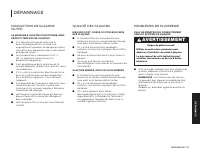
30 | DÉPANNAGE DÉPANNAGE FONCTIONNEMENT DE LA MA- CHINE À GLAÇONS LA MACHINE À GLAÇONS NE FONCTIONNE PAS Risque de choc électrique Brancher sur une prise de courant à 3 alvéoles reliée à la terre.Ne pas enlever la prise de liaison à la terre.Ne pas utiliser d’adaptateur.Ne pas utiliser de rallonge.L...
Page 31 - QUALITÉ DES GLAÇONS
DÉPANNAGE | 31 DÉPANNAGE DÉP ANNAGE QUALITÉ DES GLAÇONS MAUVAIS GOÛT, ODEUR OU COULEUR GRISE DES GLAÇONS ■ Si l’alimentation en eau présente une teneur en minéraux anormalement élevée, l’eau peut avoir besoin d’être traitée. ■ S’il y a une accumulation de dépôts calcaires, la machine à glaçons devra...
Page 32 - POUR COMMANDER DES ACCES-
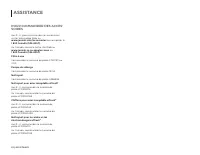
32 | ASSISTANCE ASSISTANCE POUR COMMANDER DES ACCES- SOIRES Aux É.-U., pour commander les accessoires, visiter notre page Web au www.jennair.com/accessories ou composer le 1 800 JennAir (536-6247). Au Canada, consulte notre site Web au www.jennair.ca ou appelez-nous au 1 800 JennAir (536-6247).Filtr...
Page 33 - FICHE DE DONNÉES RELATIVES AU RENDEMENT
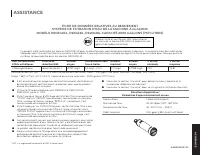
ASSISTANCE | 33 ASSISTANCE A SSIS TANCE FICHE DE DONNÉES RELATIVES AU RENDEMENT SYSTÈME DE FILTRATION D’EAU DE LA MACHINE À GLAÇONS MODÈLE P6GEG2KL, P6KG2KL, P6WG2KL CAPACITÉ 2000 GALLONS (7571 LITRES) Ce produit a été testé selon les normes NSF/ANSI 42 pour la réduction des substances énumérées ci-...
Page 34 - SI VOUS AVEZ BESOIN DE SERVICE :; GARANTIE LIMITÉE DE DIX ANS
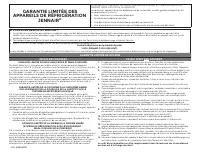
34 | GARANTIE GARANTIE LIMITÉE DES APPAREILS DE RÉFRIGÉRATION JENNAIR ® ATTACHEZ ICI VOTRE REÇU DE VENTE. UNE PREUVE D’ACHAT EST OBLIGATOIRE POUR OBTENIR L’APPLICATION DE LA GARANTIE. Lorsque vous appelez le centre d’eXpérience de la clientèle, veuillez garder à disposition les renseignements suivan...
Page 36 - NOTES