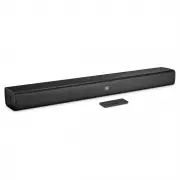
Page 3 - CONTACT US: If you have any questions about JBL BAR; Soundbar; Wall Mount Brackets; PLACE YOUR SOUNDBAR; a. Place the Soundbar on the table
3 www.jbl.com E ngli sh 1. INTRODUCTION Thank you for purchasing the JBL BAR STUDIO. The JBL BAR STUDIO is designed to bring an extraordinary sound experience to your home entertainment system. We urge you to take a few minutes to read through this manual, which describes the product and includes st...
Page 4 - CONNECT YOUR SOUNDBAR; Connect Soundbar to your TV; Connect to TV through Optical; Connect Soundbar to other devices; Connect devices through analog audio cables; How to power on your soundbar system; USE YOUR SOUNDBAR; a. How to use top panel controls
4 4. CONNECT YOUR SOUNDBAR This section helps you connect your soundbar to a TV and other devices, and set up the whole system. Connect Soundbar to your TV Connect your soundbar to a TV. You can listen to audio from TV programs through your soundbar. Connect to TV through HDMI (ARC) An HDMI connecti...
Page 5 - How to use Bluetooth with your Soundbar; PAIRING; How to use a USB device
5 www.jbl.com E ngli sh b. How to use Remote Control 1 3 4 7 16 10 12 11 2 6 5 8 9 14 13 15 AUDIO FEEDBACK SOUND MODE NIGHT MODE VOLUME MUTE BASS SHUFFLE USB OPTICAL BT AUX HDMI SURROUND *For USB playback only; switch between shuffle/ repeat all/ repeat one/ off**Switch between standard/ movie/ musi...
Page 6 - Surround sound mode; LED behaviour; Press and hold 5 seconds SOUND button to reset default; RESPOND TO YOUR TV
6 • Depending on some devices, it may not available to recognize the followings on this unit. -- External HDD -- Card readers -- Locked devices -- Hard type USB devices -- USB hub -- Using USB extension cable -- iPhone/iPod/iPad -- Android device 6. SOUND SETTING This section helps you choose the id...
Page 7 - b. For other TVs, do IR remote learning; PRODUCT SPECIFICATIONS; General
7 www.jbl.com E ngli sh VOLUME MUTE BASS SHUFFLE USB OPTICAL BT AUX HDMI >3 s *For non-compatible TV models, please follow section 7b and do IR remote learning Note: – Make sure that the sound output of your TV is set to “External speaker”. – Depending on the remote control, this function may not...