Page 2 - CAUTION; NOTICE; WARNING
EN CAUTION • Do not operate the robot in areas with exposed electrical outlets in the floor. • If the device passes over a power cord and drags it, there is a chance an object could be pulled off a table or shelf. Before using this device, pick up objects like clothing, loose papers, pull cords for ...
Page 4 - Charging Station; About your Roomba
1 For more information, visit global.irobot.com EN Bottom View Top View Light Touch Sensor Faceplate Dust Bin and Filter Charging Contacts RCON Sensor IR Sensor Window RCON Sensor Charging Contacts Caster Wheel Cliff Sensor Cliff Sensor Cliff Sensor Edge-Sweeping Brush Multi-Surface Brushes Cliff Se...
Page 5 - Positioning the Home Base; Using Your Roomba
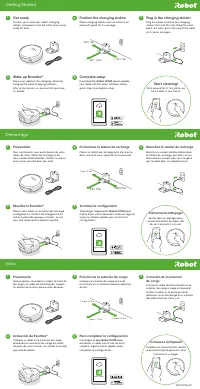
Roomba ® i3/i4 Owner’s Guide 2 EN Good Wi-Fi ® Coverage *Objects are not to scale. 4 ft (1.2 m) from stairs 4 ft (1.2 m) in front 1.5 ft (0.5 m) both sides Positioning the Home Base TM Charging Station WARNING: To prevent the risk of your robot falling downstairs when it is leaving from or returning...
Page 6 - Cleaning
3 For more information, visit global.irobot.com EN Troubleshooting • Your robot will tell you something is wrong by playing an audio alert and turning the light ring indicator red. Press CLEAN for details. Further support and instructional videos are available in the iRobot HOME App. • If you are un...
Page 7 - Dual Mode Virtual Wall; Accessories
Roomba ® i3/i4 Owner’s Guide 4 EN Dual Mode Virtual Wall ® Barrier* Note: For best results, place at least 8 feet (2.5 meters) from the Home Base ™ . Use the Dual Mode Virtual Wall ® barrier to keep the robot in the places you want cleaned — and out of the ones you don’t. It creates an invisible bar...
Page 8 - Care and Maintenance Instructions; Care and Maintenance; Emptying the Bin
5 For more information, visit global.irobot.com EN Care and Maintenance Instructions To keep your robot running at peak performance, perform the procedures on the following pages. There are additional instructional videos in the iRobot HOME App. If you notice the robot picking up less debris from yo...
Page 9 - Washing the Bin; Cleaning the Edge-Sweeping Brush
Roomba ® i3/i4 Owner’s Guide 6 EN Washing the Bin Cleaning the Full Bin Sensors Wipe the inner sensors with a clean, dry cloth Make sure bin is completely dry. Reinsert filter and place bin back in the robot. Wipe the bin door with a clean, dry cloth. 2 3 3 Important: Do not wash the filter. Remove ...
Page 11 - Cleaning the Sensors and Charging Contacts; Outside USA & Canada; iRobot Customer Care
Roomba ® i3/i4 Owner’s Guide 8 EN Cleaning the Sensors and Charging Contacts Wipe, sensors and charging contacts with a clean dry cloth. You can alternatively use a pad of melamine foam to remove built up debris on the robot and Home Base charging contacts. Important: Do not spray cleaning solution ...
Page 12 - Regulator y Information
9 For more information, visit global.irobot.com EN This device complies with part 15 of the FCC Rules. Operation is subject to the following two conditions: (1) This device may not cause harmful interference, and (2) this device must accept any interference received, including interference that may ...