Page 2 - Welcome
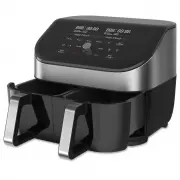
Welcome to your new Instant ™ Vortex ™ Plus! This Instant Vortex Plus ClearCook Dual Air Fryer can help you cook delicious meals with less oil and less hassle. We hope you fall in love with Instant air frying, and enjoy it in your kitchen for years to come! OM. Welcome Before using your new Vortex P...
Page 3 - CONTENTS
CONTENTS Important Safeguards 2 What’s in the box 8 Using your Vortex Plus 9 Initial set up 11 Cooking 13 Smart Programmes 17 Using both baskets 20 Cleaning 23 Troubleshooting 24 Error Codes 25 Learn more 26 Warranty 27
Page 4 - INSTANTTM VORTEXTM PLUS CLEARCOOK; DUAL AIR FRYER 2 X 4L; Safety Instructions; Vortex
2 Safety Warnings 3 Safety Warnings INSTANT™ VORTEX™ PLUS CLEARCOOK DUAL AIR FRYER 2 X 4L Safety Instructions At Instant, we want you to feel comfortable using our products. This Instant ™ Vortex ™ Plus was designed with your safety in mind. When using electrical appliances, basic safety precautions...
Page 5 - IMPORTANT; READ ALL INSTRUCTIONS; Placement
2 Safety Warnings 3 Safety Warnings IMPORTANT SAFEGUARDS READ ALL INSTRUCTIONS Placement DO place the appliance on a countertop only. Always operate the appliance on a stable, non-combustible, level surface. DO NOT place the appliance on or close to a hot gas or electric burner, or a heated oven. DO...
Page 6 - Air Frying Cautions
4 Safety Warnings 5 Safety Warnings DO NOT allow children or persons with reduced physical, sensory or mental capabilities to operate this appliance. Close supervision is necessary when any appliance is used near children and individuals with reduced capabilities. Children should not play with this ...
Page 7 - Accessories
4 Safety Warnings 5 Safety Warnings DO NOT overfill the air fryer. Overfilling may cause food to contact the heating element, which may result in fire, property damage, and/or personal injury. DO NOT pour oil into the cooking container. If needed, spray food lightly with non-stick cooking spray. Usi...
Page 8 - Care and Storage
6 Safety Warnings 7 Safety Warnings 7 Safety Warnings 6 Safety Warnings Care and Storage DO let the appliance cool to room temperature before cleaning or storage. DO NOT store any materials in the appliance when not in use. DO NOT place any combustible materials in the appliance, such as paper, card...
Page 9 - SAVE THESE; CAUTION
6 Safety Warnings 7 Safety Warnings 7 Safety Warnings 6 Safety Warnings DO allow unit to cool before adding or removing parts or accessories. DO regularly inspect the appliance and power cord. DO NOT operate the appliance if the power cord or plug is damaged, or after the appliance malfunctions or i...
Page 10 - WHAT’S IN THE BOX; Air Fryer
8 Get Started 9 Get Started WHAT’S IN THE BOX Air Fryer Parts and accessories Illustrations are for reference only and may differ from the actual product. Remember to recycle! We designed this packaging with sustainability in mind. Please recycle everything that can be recycled where you live. Be su...
Page 11 - USING YOUR VORTEX PLUS; Control panel; We’ve designed the control panel to be simple to use and easy to read.
8 Get Started 9 Get Started USING YOUR VORTEX PLUS Control panel We’ve designed the control panel to be simple to use and easy to read. 1. Left + Right Basket Status Display • Cooking temperature• Cooking time• Messages• Error codes 2. Smart Programmes 3. Temperature Control • Increase or decrease c...
Page 12 - Turning the sound On/Off; Choosing the temperature unit; Reset individual Smart Programmes
10 Get Started 11 Get Started Turning the sound On/Off You can set notification sounds to ON or OFF. • When in Ready or Cooking modes, press and hold Time and Temp for 5 seconds until the display shows Sound On or Sound Off . Error alerts cannot be turned off. Choosing the temperature unit You can d...
Page 13 - INITIAL SET UP; Unpack; To perform a test run:
10 Get Started 11 Get Started INITIAL SET UP Unpack 1. Remove your new Vortex Plus from the box. 2. Remove all the packaging material from in and around the air fryer. 3. Make sure to remove all the accessories from inside the air fryer. 4. Don’t remove the safety warning stickers or the rating labe...
Page 14 - Start
12 Get Started 13 Get Started 4. The Air Fry programme activates by default. 5. Change the cooking temperature to 205°C / 400°F. 6. Change the cooking time to 18 minutes. 7. Select basket 2 . 8. The Air Fry programme activates by default. 9. Change the cooking temperature to 205°C / 400°F. 10. Chang...
Page 15 - COOKING; HOT SURFACES; What to cook in
12 Get Started 13 Get Started COOKING The Vortex Plus uses rapid air circulation to crisp or cook food, giving your meals all the rich, crispy flavour of deep frying, with little to no oil. HOT SURFACES The air fryer will be hot during and after cooking. Always exercise extreme caution when removing...
Page 16 - How to cook; Prep; Time
14 Get Started 15 Get Started How to cook These instructions explain how to cook using one basket at a time. See below for information on using both baskets. Prep Thaw, cut, season or batter your ingredients according to your recipe. Preheat 1. Insert the cooking basket into the air fryer. 2. Press ...
Page 17 - Cook; Turn Food; Finish; End
14 Get Started 15 Get Started Cook 1. Remove the cooking basket and place your food into the basket. 2. Insert the cooking basket into the air fryer. 3. Cooking begins and the cooking countdown timer starts. Turn 1. Part way through the cooking cycle the display shows Turn Food . If you do not remov...
Page 18 - Changing cooking time during cooking; Changing cooking temperature during cooking; Temperature; Cancel cooking during cooking; Cancel
16 Get Started 17 Get Started Changing cooking time during cooking You can change the cooking time after you’ve started a smart programme: 1. Press 1 or 2 to select the basket you want to change. 2. Press Time and use the Control Dial to increase or decrease it. 3. Then press the Control Dial to con...
Page 19 - SMART PROGRAMMES; Air Fry; To air fry; Roast; To roast; Follow the basic instructions for Cooking.
16 Get Started 17 Get Started SMART PROGRAMMES Air Fry You can air fry foods like fries, cauliflower bites, wings, nuggets and more. Setting Default Minimum Maximum Temperature 196°C / 385°F 82°C / 180°F 205°C / 400°F Cooking Time 15 minutes (00:15) 1 minute (00:01) 1 hour (01:00) To air fry • Follo...
Page 20 - Bake; To bake; Grill; To Grill
18 Get Started 19 Get Started Bake You can bake foods like breads, cakes, pastries and buns, with the Vortex Plus as your own “mini oven”. Setting Default Minimum Maximum Temperature 176°C / 350°F 82°C / 180°F 205°C / 400°F Cooking Time 20 minutes (00:20) 1 minute (00:01) 1 hour (01:00) To bake • Fo...
Page 21 - Dehydrate; To dehydrate; Reheat; To reheat
18 Get Started 19 Get Started Dehydrate Dehydrating uses low heat over a long period of time to safely dry out food items, like dried fruit, jerky and dried veggies. Setting Default Minimum Maximum Temperature 54°C / 130°F 35°C / 95°F 79°C / 175°F Cooking Time 8 hours (08:00) 1 hour (01:00) 72 hours...
Page 22 - USING BOTH BASKETS; Cook in both baskets; How to cook in both baskets; How to SyncCook; SyncCook
20 Get Started 21 Get Started USING BOTH BASKETS The Vortex Plus ClearCook Dual Air Fryer lets you cook in both baskets at the same time, with 3 options: Cook in both baskets Cook in both baskets at the same time, using different programmes and settings. SyncCook Cook in both baskets at the same tim...
Page 23 - How to SyncFinish; SyncFinish
20 Get Started 21 Get Started 3. Then press Start and continue following the instructions for Cooking. About SyncCook • You can change the cooking time and temperature settings for both baskets (SyncCook will remain ON) by adjusting the cooking time or temperature. • You can change the cooking time ...
Page 24 - Ending SyncCook; Control Dial; Ending SyncFinish
22 Get Started 23 Get Started Ending SyncCook You can end SyncCook at any time to make changes to one or both cooking programmes. 1. Press 1 or 2 to select the basket you’d like to make changes to. SyncCook stops and the icon no longer displays. 2. Adjust the cooking time or temperature settings and...
Page 25 - CLEANING; To prevent electric shock, unplug before cleaning.
22 Get Started 23 Get Started CLEANING Clean your Vortex Plus after each use. Always let all parts cool to room temperature before cleaning. Before use or storing, make sure all surfaces are dry. To prevent electric shock, unplug before cleaning. DO NOT immerse power cord, plug or the appliance in w...
Page 26 - TROUBLESHOOTING
24 Get Started 25 Get Started TROUBLESHOOTING Problem Cause Solution Air fryer will not turn on The appliance is not properly plugged in. Make sure the power cord is plugged into the outlet firmly. Outlet is not powered. Plug another appliance into the same outlet to test the circuit. The basket is ...
Page 27 - ERROR CODES; Plus. Here are the actions you should take to fix
24 Get Started 25 Get Started ERROR CODES If the control panel displays an error code from this list, there is an issue with the Vortex ™ Plus. Here are the actions you should take to fix the problem. Problem Cause Solution E1 Open circuit. Contact Consumer Care. E2 Temperature sensor short circuit....
Page 28 - LEARN MORE; There’s a whole world of Instant
26 Get Started 27 Warranty LEARN MORE There’s a whole world of Instant ™ Vortex ™ Plus information and help just waiting for you. Here are some of the most helpful resources. Download this manual online instantpot.com.au Register your product instantpot.com.au/support/register Contact Consumer Care ...
Page 29 - WARRANTY; Limited Warranty
26 Get Started 27 Warranty WARRANTY Limited Warranty This Limited Warranty is issued by Instant Brands (Australia) Pty Ltd (Instant Brands Australia) and is effective for one year from the date of original consumer purchase. Proof of original purchase date and return of your appliance is required to...
Page 30 - Limitation and Exclusions
28 Warranty WARRANTY Limitation and Exclusions To the maximum extent permitted by law, the maximum liability of Instant Brands Australia, if any, for any allegedly defective appliance or part shall in no circumstances exceed the purchase price of a comparable replacement appliance or part of the sam...