Page 2 - Welcome
Welcome to your new Instant ® Vortex ™ Plus! This Instant Vortex Plus Dual Air Fryer can help you cook delicious meals with less oil and less hassle. We hope you fall in love with Instant air frying, and enjoy it in your kitchen for years to come! OM. Welcome Before using your new Vortex Plus, read ...
Page 3 - CONTENTS
CONTENTS What’s in the box 2 Using your Vortex Plus 3 Initial set up 5 Cooking 7 Smart Programs 11 Using both baskets 14 Cleaning 17 Learn more 18 Notes 20 140-3090-01_140-3090-01-0301_IB_VortexPlus_8QTDualAirFry_US_GSG_FINAL.indd 1 140-3090-01_140-3090-01-0301_IB_VortexPlus_8QTDualAirFry_US_GSG_FIN...
Page 4 - WHAT’S IN THE BOX; Air Fryer
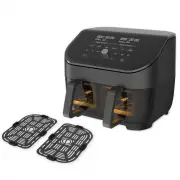
2 Get started 3 Get started WHAT’S IN THE BOX Air Fryer Parts + accessories Illustrations are for reference only and may differ from the actual product. Remember to recycle! We designed this packaging with sustainability in mind. Please recycle everything that can be recycled where you live. Be sure...
Page 5 - USING YOUR VORTEX PLUS; Control panel; We’ve designed the control panel to be simple to use and easy to read.
3 Get started USING YOUR VORTEX PLUS Control panel We’ve designed the control panel to be simple to use and easy to read. 1. Left + Right Basket Status Display • Cooking temperature• Cooking time• Messages• Error codes 2. Smart Programs 3. Temperature Control • Increase or decrease cooking temperatu...
Page 6 - Turning the sound On/Off; Choosing the temperature scale; Reset individual Smart Programs
4 Get started 5 Get started Turning the sound On/Off You can set notification sounds to ON or OFF. • When in Ready or cooking modes, press and hold Time and Temp for 5 seconds until the display shows Sound On or Sound Off . Error alerts cannot be turned off. Choosing the temperature scale You can di...
Page 7 - INITIAL SET UP; Unpack; To perform a test run:
5 Get started INITIAL SET UP Unpack 1. Remove your new Vortex Plus from the box. 2. Remove all the packaging material from in and around the air fryer. 3. Make sure to remove all the accessories from inside the air fryer. 4. Don’t remove the safety warning stickers or the rating label from the air f...
Page 8 - Start
6 Get started 7 Get started 6. Change the cooking time to 18 minutes. 7. Select basket 2 . 8. The Air Fry program activates by default. 9. Change the cooking temperature to 400°F / 205°C. 10. Change the cooking time to 18 minutes. 11. Press Start and the air fryer starts the test run. 12. When the d...
Page 9 - COOKING; HOT SURFACES; What to cook in
7 Get started COOKING The Vortex Plus uses rapid air circulation to crisp or cook food, giving your meals all the rich, crispy flavor of deep frying, with little to no oil. HOT SURFACES The air fryer will be hot during and after cooking. Always exercise extreme caution when removing food from the ho...
Page 10 - How to cook; Prep; Time
8 Get started 9 Get started How to cook These instructions explain how to cook using one basket at a time. See below for information on using both baskets. Prep Thaw, cut, season or batter your ingredients according to your recipe. Preheat 1. Insert the cooking basket into the air fryer. 2. Press 1 ...
Page 11 - Cook; Turn Food; Finish; End; Cooking in both baskets
9 Get started Cook 1. Remove the cooking basket and place your food into the basket. 2. Insert the cooking basket into the air fryer. 3. Cooking begins and the cooking countdown timer starts. Turn 1. Part way through the cooking cycle the display shows Turn Food . If you do not remove the basket aft...
Page 12 - Changing cooking time during cooking; Changing cooking temperature during cooking; Temperature; Cancel cooking during cooking; Cancel
10 Get started 11 Get started Changing cooking time during cooking You can change the cooking time after you’ve started a smart program: 1. Press 1 or 2 to select the basket you want to change. 2. Press Time and use the Control Dial to increase or decrease it. 3. Then press the Control Dial to confi...
Page 13 - SMART PROGRAMS; Air Fry; To air fry; Roast; To roast; Follow the basic instructions for Cooking.
11 Get started SMART PROGRAMS Air Fry You can air fry foods like fries, cauliflower bites, wings, nuggets and more. Setting Default Minimum Maximum Temperature 385°F / 196°C 180°F / 82°C 400°F / 205°C Cooking Time 15 minutes (00:15) 1 minute (00:01) 1 hour (01:00) To air fry • Follow the basic instr...
Page 14 - Bake; To bake; Broil; To broil
12 Get started 13 Get started Bake You can bake foods like breads, cakes, pastries and buns, with the Vortex as your own “mini oven”. Setting Default Minimum Maximum Temperature 350°F / 176°C 180°F / 82°C 400°F / 205°C Cooking Time 20 minutes (00:20) 1 minute (00:01) 1 hour (01:00) To bake • Follow ...
Page 15 - Dehydrate; To dehydrate; Reheat; To reheat
13 Get started Dehydrate Dehydrating uses low heat over a long period of time to safely dry out food items, like dried fruit, jerky and dried veggies. Setting Default Minimum Maximum Temperature 130°F / 54°C 95°F / 35°C 175°F / 79°C Cooking Time 8 hours (08:00) 1 hour (01:00) 72 hours (72:00) To deh...
Page 16 - USING BOTH BASKETS; Cook in both baskets; How to cook in both baskets; How to SyncCook; SyncCook
14 Get started 15 Get started USING BOTH BASKETS The Vortex Plus Dual Air Fryer let you use cook in both baskets at the same time, with 3 options: Cook in both baskets Cook in both baskets at the same time, using different programs and settings. SyncCook Cook in both baskets at the same time, using ...
Page 17 - About SyncCook; How to SyncFinish; SyncFinish
15 Get started About SyncCook • You can change the cooking time and temperature settings for both baskets (SyncCook will remain ON) by adjusting the cooking time or temperature. • You can change the cooking time and temperature settings for either basket (SyncCook will turn OFF) by pressing 1 or 2 t...
Page 18 - Ending SyncCook; Control Dial; Ending SyncFinish
16 Get started 17 Get started Ending SyncCook You can end SyncCook at any time to make changes to one or both cooking programs. 1. Press 1 or 2 to select the basket you’d like to make changes to. SyncCook stops and the icon no longer displays. 2. Adjust the cooking time or temperature settings and p...
Page 19 - CLEANING; To prevent electric shock, unplug before cleaning.; In the manual
17 Get started CLEANING Clean your Instant Vortex Plus after each use. Always let all parts cool to room temperature before cleaning. Before use or storing, make sure all surfaces are dry. To prevent electric shock, unplug before cleaning. DO NOT immerse power cord, plug or the appliance in water or...
Page 20 - LEARN MORE; There’s a whole world of Instant
18 Get started 19 Get started LEARN MORE There’s a whole world of Instant ® Vortex ™ Plus information and help just waiting for you. Here are some of the most helpful resources. Get the full User Manual Instanthome.com Register your product Instanthome.com/register Contact Consumer Care Instanthome....
Page 21 - Product specifications
19 Get started Product specifications Model Volume Wattage Power Weight Dimensions DAF8132BK [Black] Total 8 Quart 7.5 Litres Each basket 4 Quart 3.7 Litres 1700 watts 120V/ 60Hz 16.42 lbs 7.45 kgs in: 15.12 L x 15.87 W x 12.48 Hcm: 38.4 L x 40.3 W x 31.7 H DAF8132SS [Stainless] Total 8 Quart 7.5 Li...
Page 22 - NOTES
20 Get started 21 Get started NOTES 140-3090-01_140-3090-01-0301_IB_VortexPlus_8QTDualAirFry_US_GSG_FINAL.indd 20 140-3090-01_140-3090-01-0301_IB_VortexPlus_8QTDualAirFry_US_GSG_FINAL.indd 20 7/14/21 2:57 PM 7/14/21 2:57 PM
Page 24 - © 2021 Instant Brands Inc.
Instant Brands Inc. 495 March Road, Suite 200 Kanata, Ontario, K2K 3G1 Canada instanthome.com © 2021 Instant Brands Inc. 140-3090-01-0301 140-3090-01_140-3090-01-0301_IB_VortexPlus_8QTDualAirFry_US_GSG_FINAL.indd 22 140-3090-01_140-3090-01-0301_IB_VortexPlus_8QTDualAirFry_US_GSG_FINAL.indd 22 7/14/2...