Page 2 - Welcome; CONTENTS
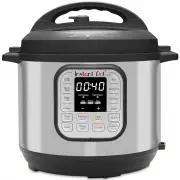
This Instant Pot ® Duo ™ multifunction cooker can help you cook healthy, delicious meals more easily and in less time. We hope you fall in love with Instant Pot cooking, and enjoy it in your kitchen for years to come! This guide is for the Instant Pot Duo version 5. For other user manuals, visit ins...
Page 3 - WHAT’S IN THE BOX; Lid; USING YOUR DUO; Control panel; We’ve designed the control panel to be simple to use and easy to read.
2 Get started 3 Get started WHAT’S IN THE BOX Lid Stainless Steel Inner Cooking Pot Cooker Base Parts + accessories Sealing Ring (installed in lid)Condensation CollectorSteam Rack with Handles (Mini steam rack may not have handles) Illustrations are for reference only and may differ from the actual ...
Page 4 - Status messages; Open the Lid; Turning the sound On/Off; Turn sound on; S On; Turn sound off; SOFF; Delay the start of cooking; Delay Start
4 Get started 5 Get started Status messages The control panel shows information you need to know when using your Instant Pot Duo. Standby mode Preheat mode Lid not properly secured or missing Time• Smart Program: cooking time remaining• Delay Start: time until Smart Program starts• Keep Warm: time f...
Page 5 - Reset Smart Programs to original settings; Reset Individual Smart Programs; OFF; Reset All Smart Programs; Cancel; INITIAL SET UP; Clean before use; Remove the condensation collector
6 Get started 7 Get started 3. Press Delay Start again to toggle to the minutes field and adjust the delay time minutes. 4. Delay Start begins automatically and the timer counts down. 5. When Delay Start ends, the Smart Program begins, and the display indicates On . Delay Start is not available with...
Page 6 - Test run; To perform a test run:; Now you’re ready to cook a meal in your Instant Pot Duo!; PRESSURE COOKING; How to pressure cook; Prep
8 Get started 9 Get started Test run Setting up your new Instant Pot Duo for a test run is a great way to familiarize yourself with how the unit works before you actually cook a meal. To perform a test run: 1. Follow the instructions for pressure cooking on page 9 using the Steam Smart Program. 2. A...
Page 7 - Cook; Release steam; Using liquid to create steam; How to lock the lid; Natural steam release; Sealing; Quick steam release; Venting; Pressure Cooking Caution
10 Get started 11 Get started Cook 10. When the pressure is ready, your Instant Pot Duo will beep once and starts cooking. 11. The cooking timer starts counting down. 12. When the timer reaches 00:00, the cooker will beep 5 times and the cooking stops. You can press Cancel to stop a Smart Program at...
Page 8 - Pressure Cooking Smart Programs; Poultry
12 Get started 13 Get started Pressure Cooking Smart Programs These Smart Programs are designed to pressure cook specific types of food. You can adjust the settings as your recipe directs. Soup/Broth Pressure Low / High Setting Less Normal More Cooking Time 20 minutes (00:20) 35 minutes (00:35) 4 ho...
Page 9 - SAUTÉING; How to sauté
14 Get started 15 Get started Multigrain Pressure Low / High Setting Less Normal More Cooking Time 20 minutes (00:20) 40 minutes (00:40) 1 hour +45 minutes soaking (01:45) Best for Al dente / Brown rice Brown or wild rice Tough grains or a mixture of grains and beans TipThe More setting will add an ...
Page 10 - Deglazing; SLOW COOKING; How to slow cook
16 Get started 17 Get started Deglazing Deglazing is the process of adding a liquid to a hot pan, releasing all of the delicious, caramelized pieces stuck to the bottom. 1. Remove food from inner pot. 2. Add water, broth, or wine. 3. Use wooden spoon or silicone spatula to loosen food stuck to botto...
Page 11 - YOGURT MAKING; How to make yogurt; Pasteurizing Milk
18 Get started 19 Get started YOGURT MAKING You can use your Instant Pot Duo to easily make delicious, fermented dairy and non-dairy yogurt. Choose from these settings in the Yogurt Smart Program: Setting Less Normal More Cooking Time 24 hours (24:00) 30 minutes* (00:30) 3 minutes (00:03) Best for F...
Page 12 - KEEP WARM; Keep warm after cooking; Reheat and keep warm; Keep Warm; CLEANING
20 Get started 21 Get started KEEP WARM The Keep Warm setting turns on automatically after cooking on all Smart Programs except Sauté and Yogurt. You can also use Keep Warm to reheat food. Keep warm after cooking 1. When automatic warming begins, the timer shows the time passed, up to 10 hours. 2. T...
Page 13 - LEARN MORE
22 Get started 23 Get started Part Cleaning instructions Power cord • Use a barely-damp cloth to wipe any particles off cord Cooker base • Wipe the inside of the cooker base as well as the condensation rim with a barely-damp cloth, and allow to air dry • Clean the outside of the cooker base and the ...
Page 14 - Product specifications
24 Get started Product specifications Model Volume Wattage Power Weight Dimensions Duo Mini v5 3 Quart 2.8 Litres 700 watts 120V/ 60Hz 3.9 kg 8.6 lbs. in:11.4Lx10Wx11.2H cm:29Lx25.5Wx28.5H Duo 60 v5 6 Quart 5.7 Litres 1000 watts 120V/ 60Hz 5.35 kg 11.8 lbs. in:13.4Lx12.2Wx12.5H cm:34Lx31Wx31.7H Duo ...
Page 15 - Inc
Instant Brands Inc., 495 March Road, Suite 200 Kanata, Ontario, K2K 3G1 Canada instanthome.com © 2021 Instant Brands ™ Inc 110-0043-01-0301