Page 3 - Important Safety Instructions
3 CAUTION: To reduce the risk of fire or electric shock, do not expose this appliance to rain or moisture. WARNING: To prevent electric shock, do not use this (polarized) plug with an extension cord, receptacle or other outlet unless the blades can be fully inserted to prevent blade exposure. WARNIN...
Page 5 - Product Overview; Front View; POWER
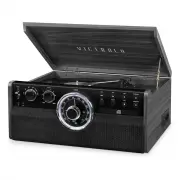
5 Product Overview Front View 1. POWER : Toggle to turn the unit on or off. 2. 3.5mm AUX IN JACK: Connect your external source to the AUX IN jack. 3. 3.5mm HEADPHONE JACK 4. STEREO SPEAKERS 5. DISC TRAY 6. PLAY/PAUSE : Press to start playback, press again to pause. ( Note: This button only works in ...
Page 7 - Parts of the Turntable; Before using the unit,; clockwise; using a coin or screwdriver.; Before use, completely loosen the twist; Use this lever to lift the tone arm.
7 Parts of the Turntable A. Turntable. B. Safety Screw (for transport) Before using the unit, turn the screw clockwise using a coin or screwdriver. Important: When you transport the unit, turn the screw counterclockwise to secure the turntable. C. Speed Selector. D. Tone Arm holder. E. Tone Arm. Bef...
Page 8 - Setup / Basic Operation; Connect the AC power cord; Listening through RCA LINE OUT; The speakers will automatically be deactivated while; Listening to the FM Radio; Tune to the desired station using the Radio Tuner Knob.; Listening to a CD; Press the OPEN/CLOSE button to open the tray.
8 Setup / Basic Operation Setup 1. Remove white protective needle cover by gently pulling towards front of unit. 2. Remove any packaging materials from the unit. 3. Connect the AC power cord to a wall outlet. Note: -You’re strongly recommended that this product should be operated only from the type ...
Page 9 - loaded disc can permanently damage the tray door mechanism.; Repeat Playback; during shuffle playback will randomly select the next track.
9 5. After that the number of tracks will show on the display and it will begin to playback from the first track automatically. 6. To temporarily pause playback, press the PLAY/PAUSE button ( ). Press again to resume. 7. To return to the previous or skip tracks, press the corresponding button ( or )...
Page 10 - Listening to an External Audio Device (BT Mode); The effective distanc; Listening to an External Audio Device (AUX Mode); All operations are only available on your external device.
10 6. When the selection of track numbers has been finished, press the PLAY button ( ) to start program playback. ( Note: when all 20 program tracks are finalized, press the PROGRAM button once and “FI” will appear on the display) 7. Press the STOP ( ) button twice to cancel the program mode and the...
Page 11 - Listening to a Vinyl Record; Note; Listening to a Cassette Tape; Press button lightly and playback will resume.; Maintenance / Proper Handling
11 Listening to a Vinyl Record 1. Rotate to select “PHONO” function. The LED Display will display “PHON”. 2. Gently open the top cover. Note : Be careful not to pinch your finger when opening/closing the top cover. 3. Place a vinyl record on the turntable. When playing a 45 RPM record, use the inclu...
Page 12 - How to Replace the Turntable Stylus; Caution
12 Handling Vinyl Records • Do not touch the record’s grooves. Only handle records by the edges or the label with clean hands. Touching the record surface will cause your record’s quality to deteriorate. • To clean a record, use a soft anti-static cloth to gently wipe the record surface. • Keep reco...
Page 13 - Specifications
13 Specifications GENERAL Power Requirements AC 120 V~60 Hz Power Consumption 40W Dimensions (W x H x D) 18.9 in x 15 in x 7.87 in (approx.) 480 mm x 380 mm x 200 mm (approx.) Weight 18.15 lbs (approx.) 8.25 kg (approx.) AMPLIFIER Output Power 5 W + 5 W Frequency Response 60 to 20,000 Hz SPEAKER SYS...
Page 14 - Troubleshooting Guide; Symptom
14 Troubleshooting Guide Symptom Possible Cause Solution • Unit will not power on. • Unit is unplugged. • Connect the unit to the AC power supply. • No sound output from speakers. • The volume level is set too low. • The input selector does not match the playback source. • Adjust the volume. • Selec...
Page 15 - to
15 For further assistance with your product, call Innovative Technology at TOLL FREE# 1-877-ITECH-97 (1-877-483-2497). Please note: As a result of continual improvements, the design and specifications of this product are subject to change without notice. Bluetooth is a registered trademark of Blueto...
Page 16 - FCC Statement
16 FCC Statement This device complies with Part 15 of the FCC Rules. Operation is subject to the following two conditions: (1) This device may not cause harmful interference, and (2) this device must accept any interference received, including interference that may cause undesired operation. NOTE: T...
Page 18 - Returns without an RMA
18 Victrola is a registered trademark of Innovative Technology Electronics LLC. Innovative Technology Electronics LLC. Limited Warranty: 90 Days Labor, One Year Parts Innovative Technology Electronics LLC. (IT) warrants the product to be free from “Defects” in materials under normal use for a period...