Page 3 - Contents; ภาษาไทย
i ................................................................................................................................................ ...................................................................... ...................................................................... ..............
Page 4 - กํารแกะกล่องอุปกรณ์และค�ําแนะน�ําเกี่ยวกับวิธีกํารติดตั้งขําตั้ง)
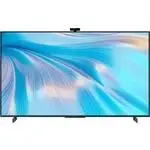
Install the HUAWEI Vision by referring to the unboxing and installation instructions (including the precautions on unboxing the device and instruction on how to install the stand). Pasang HUAWEI Vision dengan merujuk arahan membuka kotak dan pemasangan (termasuk langkah berjaga-jaga semasa membuka k...
Page 5 - English; Appearance of the remote control
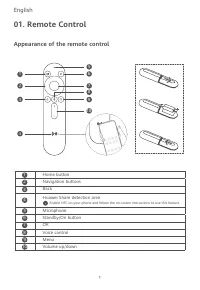
1 English Appearance of the remote control 01. Remote Control 2 3 4 1 56 789 10 Home button Navigation buttons Back Huawei Share detection area Enable NFC on your phone and follow the on-screen instructions to use this feature. Microphone Standby/On button OK Voice control Menu Volume up/down 123 4 ...
Page 6 - Device Connection; devices, for a diversified entertainment experience.
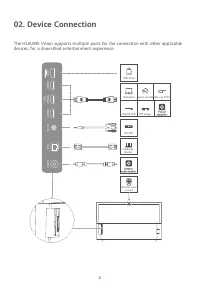
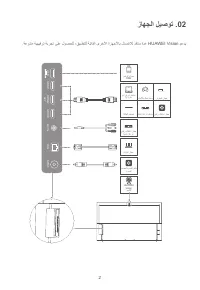
2 02. Device Connection The HUAWEI Vision supports multiple ports for the connection with other applicable devices, for a diversified entertainment experience. USB HDMI1 HDMI2 AR C HDMI3 AV IN LAN SPDIF Gateway device SD STB USB drive Digital STB HD player Computer Game console Blu-ray DVD HUAWEI Vi...
Page 9 - Safety Information
5 05. Safety Information Please read all of the safety information carefully before using your device to ensure its safe and proper operation. Interference with medical equipment ● Some wireless devices may affect the performance of implantable medical devices and other medical equipment, such as pa...
Page 10 - Disposal and recycling information; Restrictions in the 5 GHz band:; Frequency Bands and Power
6 foreign objects into it, or immerse or expose it to water or other liquids. Doing so may lead to fire, explosion, or other hazards. ● If the battery is improperly replaced, it may explode. Replace the battery with the same or equivalent type only. ● Dispose of this device, batteries, and other acc...
Page 11 - Copyright © Huawei 2021. All rights reserved.; Trademarks and Permissions; Bluetooth; Privacy Protection
7 06. Legal Notice Copyright © Huawei 2021. All rights reserved. THIS DOCUMENT IS FOR INFORMATION PURPOSE ONLY, AND DOES NOT CONSTITUTE ANY KIND OF WARRANTIES. Trademarks and Permissions Manufactured under license from Dolby Laboratories. Dolby, Dolby Audio, and the double-D symbol are trademarks of...
Page 12 - Melayu; Reka bentuk kawalan jauh
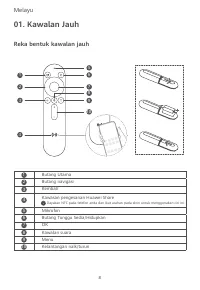
8 Melayu Reka bentuk kawalan jauh 01. Kawalan Jauh Butang Utama Butang navigasi Kembali Kawasan pengesanan Huawei Share Dayakan NFC pada telefon anda dan ikut arahan pada skrin untuk menggunakan ciri ini. Mikrofon Butang Tunggu Sedia/Hidupkan OK Kawalan suara Menu Kelantangan naik/turun 123 4 56789 ...
Page 13 - Sambungan Peranti; yang berkenaan, untuk pelbagai pengalaman hiburan.
9 02. Sambungan Peranti HUAWEI Vision menyokong berbilang port untuk sambungan dengan peranti lain yang berkenaan, untuk pelbagai pengalaman hiburan. USB HDMI1 HDMI2 AR C HDMI3 AV IN LAN SPDIF Pemacu USB Komputer Konsol permainan DVD Blu-ray STB Digital Pemain HD Amplifier kuasa STB SD Pembesar suar...
Page 16 - Maklumat Keselamatan; Gangguan dengan peralatan perubatan
12 05. Maklumat Keselamatan Sila baca semua maklumat keselamatan dengan teliti sebelum menggunakan peranti anda untuk memastikan ia dikendalikan dengan selamat dan betul. Gangguan dengan peralatan perubatan ● Sesetengah peranti wayarles mungkin mempengaruhi prestasi peranti perubatan boleh implan da...
Page 17 - Keselamatan bateri; Maklumat pelupusan dan kitar semula; Pengurangan bahan berbahaya; Sekatan dalam jalur 5 GHz:
13 Keselamatan bateri ● Jauhkan bateri daripada panas yang melampau dan cahaya terus matahari. Jangan letakkannya di atas atau dalam alat yang panas seperti radiator, ketuhar gelombang mikro, dapur atau pemanas air. Jangan bakar bateri kerana ia boleh meletup. Jangan cuba untuk mengubah suai atau me...
Page 18 - Notis Perundangan; Hak cipta © Huawei 2021. Hak cipta terpelihara.; Tanda Perniagaan dan Kebenaran; Perlindungan Privasi
14 06. Notis Perundangan Hak cipta © Huawei 2021. Hak cipta terpelihara. DOKUMEN INI ADALAH UNTUK TUJUAN MAKLUMAT SAHAJA, DAN TIDAK MEMBENTUK APA- APA JENIS WARANTI. Tanda Perniagaan dan Kebenaran Dibuat di bawah lesen daripada Dolby Laboratories. Simbol Dolby, Dolby Audio dan D berganda ialah tanda...
Page 19 - ภําษําไทย; ลักษณะของรีโมทคอนโทรล
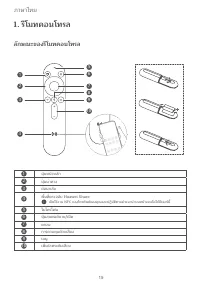
15 ภำษำไทย 1. รีโมทคอนโทรล ลักษณะของรีโมทคอนโทรล ปุ่มหน้าหลัก ปุ่มน�าทาง ย้อนกลับ พื้นที่ตรวจจับ Huawei Share เปิดใช้งาน NFC ของโทรศัพท์ของคุณและปฏิบัติตามค�าแนะน�าบนหน้าจอเพื่อใช้ฟีเจอร์นี้ ไมโครโฟน ปุ่มสแตนด์บาย/เปิด ตกลง การควบคุมด้วยเสียง เมนู เพิ่ม/ลดระดับเสียง 123 4 56789 10 2 3 4 1 56 789 10
Page 20 - การเชื่อมต่ออุปกรณ์; ประสบกํารณ์ด้ํานควํามบันเทิงที่หลํากหลําย
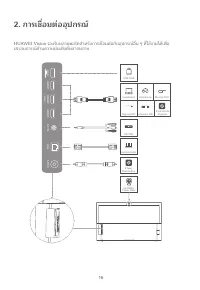
16 USB HDMI1 HDMI2 AR C HDMI3 AV IN LAN SPDIF คอมพิวเตอร์ Blu-ray DVD Digital STB SD STB อุปกรณ์เกตเวย์ ล�ำโพง/ ตัวขยำยเสียง HUAWEI Vision กล้อง คอนโซลเกม 2. การเชื่อมต่ออุปกรณ์ HUAWEI Vision รองรับหลำยพอร์ตส�ำหรับกำรเชื่อมต่อกับอุปกรณ์อื่น ๆ ที่ใช้งำนได้เพื่อ ประสบกำรณ์ด้ำนควำมบันเทิงที่หลำกหลำย ตั...
Page 24 - ข้อจ�ากัดส�าหรับย่านความถี่ 5 GHz:
20 ควำมร้อน เช่น เรดิเอเตอร์ เตำไมโครเวฟ เตำไฟ หรือเครื่องท�ำน�้ำร้อน อย่ำทิ้งแบตเตอรี่ลงในกองไฟเนื่องจำก อำจเกิดกำรระเบิด อย่ำพยำยำมปรับแต่งหรือผลิตแบตเตอรี่ใหม่ หรือพยำยำมใส่วัตถุแปลกปลอมใด ๆ เข้ำไป ในแบตเตอรี่ อย่ำให้แบตเตอรี่จุ่มหรือสัมผัสถูกน�้ำหรือของเหลวอื่น ๆ เนื่องจำกอำจจะท�ำให้เกิดเพลิงไหม...
Page 25 - การปกป้องความเป็นส่วนตัว
21 ลิขสิทธิ์ © Huawei 2021 สงวนลิขสิทธิ์ เอกสำรนี้มีวัตถุประสงค์เพื่อให้ข้อมูลเท่ำนั้น และไม่ได้ถือเป็นกำรรับประกันใด ๆ เครื่องหมายการค้าและการอนุญาต ผลิตขึ้นโดยได้รับอนุญำตจำก Dolby Laboratories Dolby, Dolby Audio และสัญลักษณ์ double-D เป็นเครื่องหมำยกำรค้ำของ Dolby Laboratories ส�ำหรับสิทธิบัตรของ...
Page 26 - Español; Aspecto del mando a distancia; Mando a distancia
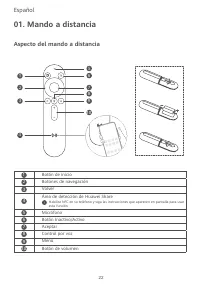
22 Español Aspecto del mando a distancia 01. Mando a distancia Botón de inicio Botones de navegación Volver Área de detección de Huawei Share Habilite NFC en su teléfono y siga las instrucciones que aparecen en pantalla para usar esta función. Micrófono Botón Inactivo/Activo Aceptar Control por voz ...
Page 27 - Conexión del dispositivo
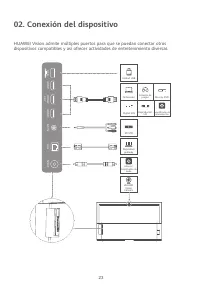
23 02. Conexión del dispositivo HUAWEI Vision admite múltiples puertos para que se puedan conectar otros dispositivos compatibles y así ofrecer actividades de entretenimiento diversas. USB HDMI1 HDMI2 AR C HDMI3 AV IN LAN SPDIF Unidad USB Ordenador Consola de juegos Blu-ray DVD Digital STB Reproduct...
Page 29 - Instalación en pared
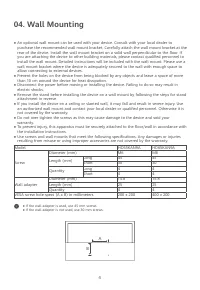
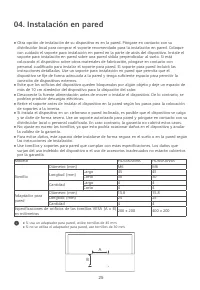
25 04. Instalación en pared ● Si usa un adaptador para pared, utilice tornillos de 45 mm. ● Si no se utiliza el adaptador para pared, use tornillos de 30 mm. ● Otra opción de instalación de su dispositivo es en la pared. Póngase en contacto con su distribuidor local para comprar el soporte recomenda...
Page 30 - Información de seguridad; Interferencias en equipos médicos
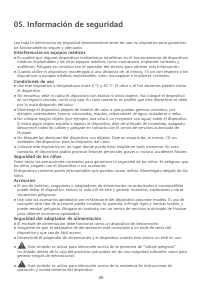
26 05. Información de seguridad Lea toda la información de seguridad detenidamente antes de usar su dispositivo para garantizar un funcionamiento seguro y adecuado. Interferencias en equipos médicos ● Es posible que algunos dispositivos inalámbricos interfieran en el funcionamiento de dispositivos m...
Page 31 - Restricciones de la banda de 5 GHz:
27 Seguridad de la batería ● Mantenga la batería alejada del calor excesivo y de la luz directa del sol. No la coloque dentro de equipos para calentar, como radiadores, hornos microondas, estufas o calentadores de agua, ni sobre ellos. No arroje las baterías al fuego, ya que pueden explotar. No inte...
Page 32 - Copyright © Huawei 2021. Todos los derechos reservados.; Marcas registradas y permisos; Protección de la privacidad
28 06. Aviso legal Copyright © Huawei 2021. Todos los derechos reservados. ESTE DOCUMENTO TIENE FINES MERAMENTE INFORMATIVOS Y NO CONSTITUYE GARANTÍA ALGUNA DE NINGÚN TIPO. Marcas registradas y permisos Fabricado bajo licencia de Dolby Laboratories. Dolby, Dolby Audio y el símbolo de la doble D son ...
Page 33 - Deutsch; Design der Fernbedienung
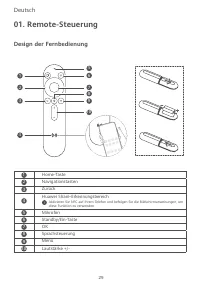
29 Deutsch Design der Fernbedienung 01. Remote-Steuerung Home-Taste Navigationstasten Zurück Huawei Share-Erkennungsbereich Aktivieren Sie NFC auf Ihrem Telefon und befolgen Sie die Bildschirmanweisungen, um diese Funktion zu verwenden. Mikrofon Standby/Ein-Taste OK Sprachsteuerung Menü Lautstärke +...
Page 37 - Sicherheitshinweise; Störungen bei medizinischen Geräten; Sicherheit des Netzadapters
33 05. Sicherheitshinweise Bitte lesen Sie vor der Verwendung Ihres Geräts alle Sicherheitsinformationen sorgfältig durch, um einen sicheren und ordnungsgemäßen Betrieb zu gewährleisten. Störungen bei medizinischen Geräten ● Manche kabellosen Geräte können die Leistung implantierbarer medizinischer ...
Page 38 - Sicherheit des Akkus; Hinweise zur Entsorgung und zum Recycling; Reduzierung von gefährlichen Stoffen; Informationen zur HF-Exposition; Frequenzbänder und Leistung
34 ● Dieses Symbol dient dazu, Sie über das Vorhandensein wichtiger Betriebs- und Wartungsanweisungen für das Gerät zu informieren. Sicherheit des Akkus ● Halten Sie den Akku fern von übermäßiger Hitze und direkter Sonneneinstrahlung. Legen Sie ihn nicht auf oder in Heizgeräte, wie Heizungen, Mikrow...
Page 39 - Rechtliche Hinweise; Copyright © Huawei 2021. Alle Rechte vorbehalten.; Marken und Genehmigungen; Datenschutz
35 06. Rechtliche Hinweise Copyright © Huawei 2021. Alle Rechte vorbehalten. DIESES DOKUMENT IST NUR ZU INFORMATIONSZWECKEN VORGESEHEN UND STELLT KEINE ART VON GARANTIE DAR. Marken und Genehmigungen Hergestellt unter Lizenz von Dolby Laboratories. Dolby, Dolby Audio und das Doppel-D-Symbol sind Mark...
Page 40 - Italiano; Aspetto del telecomando
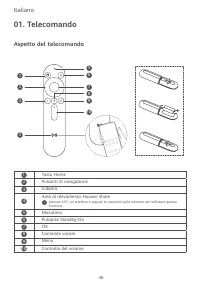
36 Italiano Aspetto del telecomando 01. Telecomando Tasto Home Pulsanti di navigazione Indietro Area di rilevamento Huawei Share Attivare NFC sul telefono e seguire le istruzioni sullo schermo per utilizzare questa funzione. Microfono Pulsante Standby/On OK Comando vocale Menu Controllo del volume 1...
Page 41 - Connessione del dispositivo; un'esperienza di intrattenimento diversificata.
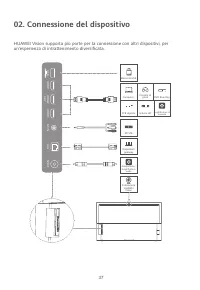
37 02. Connessione del dispositivo HUAWEI Vision supporta più porte per la connessione con altri dispositivi, per un'esperienza di intrattenimento diversificata. USB HDMI1 HDMI2 AR C HDMI3 AV IN LAN SPDIF Memoria USB Computer Console di gioco DVD Blue-Ray STB digitale Lettore HD Amplificatore di ten...
Page 43 - Montaggio a parete
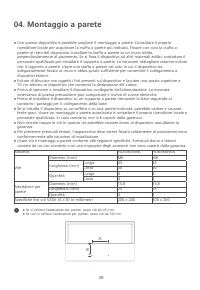
39 04. Montaggio a parete ● Se si utilizza l'adattatore per parete, usare viti da 45 mm. ● Se non si utilizza l'adattatore per parete, usare viti da 30 mm. ● Con questo dispositivo è possibile scegliere il montaggio a parete. Consultare il proprio rivenditore locale per acquistare la staffa a parete...
Page 44 - Informazioni sulla sicurezza; Interferenza con apparecchiature mediche
40 05. Informazioni sulla sicurezza Leggere attentamente tutte le informazioni sulla sicurezza prima di usare il dispositivo per garantirne la sicurezza e il corretto funzionamento. Interferenza con apparecchiature mediche ● Alcuni dispositivi wireless possono influire sulle prestazioni dei disposit...
Page 45 - Sicurezza della batteria; Informazioni su smaltimento e riciclaggio; Riduzione delle sostanze pericolose; Limitazioni nella banda 5 GHz:
41 Sicurezza della batteria ● Conservare la batteria al riparo da fonti di calore eccessivo e dalla luce solare diretta. Non posizionarla sopra o all'interno di dispositivi di riscaldamento quali radiatori, forni a microonde, stufe o scaldabagni. Non gettare le batterie nel fuoco poiché potrebbero e...
Page 46 - Copyright © Huawei 2021. Tutti i diritti riservati.; Marchi e autorizzazioni; Protezione della privacy
42 06. Nota legale Copyright © Huawei 2021. Tutti i diritti riservati. LA FINALITÀ DI QUESTO DOCUMENTO È PURAMENTE INFORMATIVA E NON COSTITUISCE ALCUN TIPO DI GARANZIA. Marchi e autorizzazioni Prodotto con licenza di Dolby Laboratories. Dolby, Dolby Audio e il simbolo della doppia D sono marchi regi...
Page 47 - Français; Description de la télécommande
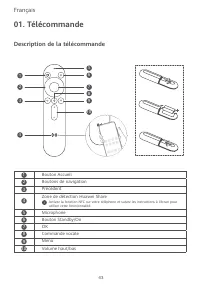
43 Français Description de la télécommande 01. Télécommande Bouton Accueil Boutons de navigation Précédent Zone de détection Huawei Share Activez la fonction NFC sur votre téléphone et suivez les instructions à l'écran pour utiliser cette fonctionnalité. Microphone Bouton Standby/On OK Commande voca...
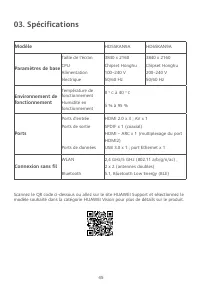
Page 49 - Température de; Ports; Ports de données; Connexion sans fil; WLAN
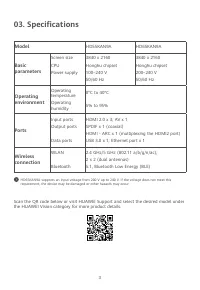
45 03. Spécifications Scannez le QR code ci-dessous ou allez sur le site HUAWEI Support et sélectionnez le modèle souhaité dans la catégorie HUAWEI Vision pour plus de détails sur le produit. Modèle HD55KAN9A HD65KAN9A Paramètres de base Taille de l'écranCPUAlimentation électrique 3840 x 2160Chipset...
Page 51 - Informations relatives à la sécurité; Interférence avec des équipements médicaux; Sécurité pour les enfants; Accessoires; Sécurité de l'adaptateur secteur
47 05. Informations relatives à la sécurité Prenez connaissance attentivement de toutes les informations sur la sécurité avant d'utiliser votre appareil afin de savoir comment le faire fonctionner en toute sécurité. Interférence avec des équipements médicaux ● Certains appareils sans fil peuvent aff...
Page 52 - Sécurité de la batterie; Informations relatives à la mise au rebut et au recyclage; Réduction des substances dangereuses; Exposition aux radiofréquences; Conformité réglementaire UE; Restrictions de la bande 5 GHz :
48 ● Ce symbole signale la présence à l'intérieur du boîtier du produit d'une « tension dangereuse » non isolée qui peut être d'une amplitude suffisante pour constituer un risque de choc. ● Ce symbole signale la présence d'importantes instructions pour l'utilisation et la maintenance (entretien) de ...
Page 54 - Copyright © Huawei 2021. Tous droits réservés.; Marques et autorisations; Protection de la vie privée
50 06. Mentions légales Copyright © Huawei 2021. Tous droits réservés. CE DOCUMENT EST FOURNI UNIQUEMENT À TITRE INFORMATIF. IL NE CONSTITUE AUCUNE FORME DE GARANTIE. Marques et autorisations Fabriqué sous licence de Dolby Laboratories. Dolby, Dolby Audio et le symbole du double D sont des marques c...
Page 55 - Polski; Wygląd pilota; Przycisk powrotu do ekranu głównego
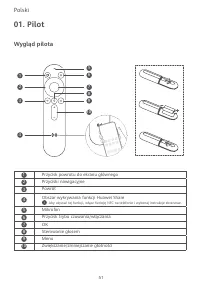
51 Polski Wygląd pilota 01. Pilot Przycisk powrotu do ekranu głównego Przyciski nawigacyjne Powrót Obszar wykrywania funkcji Huawei Share Aby używać tej funkcji, włącz funkcję NFC na telefonie i wykonaj instrukcje ekranowe. Mikrofon Przycisk trybu czuwania/włączania OK Sterowanie głosem Menu Zwiększ...
Page 56 - Połączenie z urządzeniem
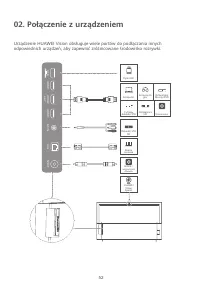
52 02. Połączenie z urządzeniem Urządzenie HUAWEI Vision obsługuje wiele portów do podłączania innych odpowiednich urządzeń, aby zapewnić zróżnicowane środowisko rozrywki. USB HDMI1 HDMI2 AR C HDMI3 AV IN LAN SPDIF Dysk USB Komputer Konsola do gier Odtwarzacz Blu-ray/DVD Cyfrowy dekoder STB Odtwarza...
Page 57 - Mikroukład Honghu; Środowisko pracy; Wilgotność; Porty
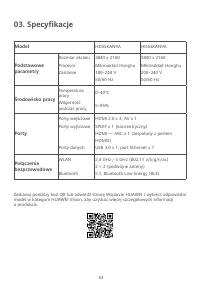
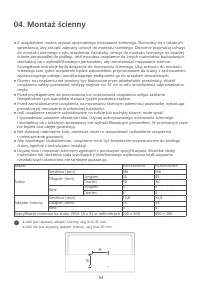
53 03. Specyfikacje Zeskanuj poniższy kod QR lub odwiedź stronę Wsparcie HUAWEI i wybierz odpowiedni model w kategorii HUAWEI Vision, aby uzyskać więcej szczegółowych informacji o produkcie. Model HD55KAN9A HD65KAN9A Podstawowe parametry Rozmiar ekranuProcesorZasilanie 3840 x 2160 Mikroukład Honghu ...
Page 59 - Informacje dotyczące bezpieczeństwa; Zakłócenia pracy sprzętu medycznego; Bezpieczeństwo dzieci
55 05. Informacje dotyczące bezpieczeństwa Przed przystąpieniem do korzystania z urządzenia uważnie zapoznaj się z zasadami bezpiecznej obsługi. Zakłócenia pracy sprzętu medycznego ● Niektóre urządzenia bezprzewodowe mogą wpływać na działanie implantów medycznych i innych urządzeń medycznych, np. ro...
Page 60 - Bezpieczeństwo baterii; Utylizacja i recykling odpadów; Ograniczenie stosowania substancji niebezpiecznych; Zgodność z przepisami UE; Ograniczenia dotyczące transmisji w paśmie 5 GHz:
56 i konserwacji (serwisowania) urządzenia. Bezpieczeństwo baterii ● Baterię należy chronić przed nadmiernym gorącem i bezpośrednim działaniem światła słonecznego. Nie należy umieszczać jej na urządzeniach wydzielających ciepło i wewnątrz nich, takich jak grzejniki, kuchenki mikrofalowe, piece i pod...
Page 61 - Informacje prawne; Copyright © Huawei 2021. Wszelkie prawa zastrzeżone.; Znaki towarowe i zezwolenia; Ochrona prywatności
57 06. Informacje prawne Copyright © Huawei 2021. Wszelkie prawa zastrzeżone. NINIEJSZY DOKUMENT SŁUŻY WYŁĄCZNIE DO CELÓW INFORMACYJNYCH I NIE STANOWI GWARANCJI JAKIEGOKOLWIEK TYPU. Znaki towarowe i zezwolenia Wyprodukowano na licencji Dolby Laboratories. Dolby, Dolby Audio i symbol z podwójnym D są...
Page 62 - Русский; Внешний вид пульта управления; OK
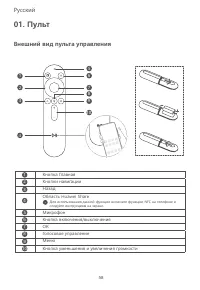
58 Русский Внешний вид пульта управления 01. Пульт Кнопка Главная Кнопки навигации Назад Область Huawei Share Для использования данной функции включите функцию NFC на телефоне и следуйте инструкциям на экране. Микрофон Кнопка включения/выключения OK Голосовое управление Меню Кнопка уменьшения и увел...
Page 65 - Установка на стену
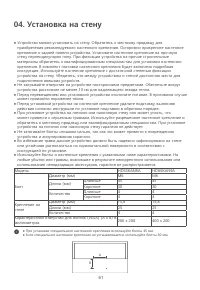
61 04. Установка на стену ● При установке специального настенного крепления используйте болты 45 мм. ● Если специальное настенное крепление не устанавливается, используйте болты 30 мм. ● Устройство можно установить на стену. Обратитесь к местному продавцу для приобретения рекомендуемого настенного к...
Page 66 - Инструкции по технике безопасности; Медицинское оборудование
62 05. Инструкции по технике безопасности Перед использованием устройства внимательно прочтите правила техники безопасности, чтобы обеспечить безопасную и корректную работу. Медицинское оборудование ● Некоторые беспроводные устройства могут повлиять на работу кардиостимуляторов, кохлеарных имплантов...
Page 69 - Правовая информация; Товарные знаки; Защита персональных данных
65 06. Правовая информация Copyright © Huawei, 2021. Все права защищены. ДАННЫЙ ДОКУМЕНТ НОСИТ СПРАВОЧНЫЙ ХАРАКТЕР И НЕ ПОДРАЗУМЕВАЕТ НИКАКИХ ГАРАНТИЙ. Товарные знаки Произведено по лицензии Dolby Laboratories. Dolby, Dolby Audio и символ double-D являются товарными знаками компании Dolby Laboratori...
Page 72 - ريودتلا ةداعإو صُّلختلا لوح تامولعم; EEE; ةرطخلا داوملا نم ّدحلا; RoHS; ( يكلسلالا ددرتلل ض ّرعتلا تامولعم; ErP; قاطن يف ةضورفملا دويقلا
تايافنلا يف ةيراطبلا نم صلختت لا .ةيلحملا نيناوقلل اًقفو ىرخلأا تاقحلملاو ،تايراطبلاو ،زاهجلا اذه نم صلخت ● .ةيراطبلا راجفنا ىلإ ةحيحص ريغ ةقيرطب جتنملا نم صلختلا يدؤي دق .ةيداعلا ةيلزنملا ريودتلا ةداعإو صُّلختلا لوح تامولعم تاجتنملا نم صلختلا بوجو ةئبعتلا داوم وأ ،تادنتسملا وأ ،ةيراطبلا وأ ،جتنملا ...
Page 75 - Honghu; ليغشتلا ةئيب; BLE
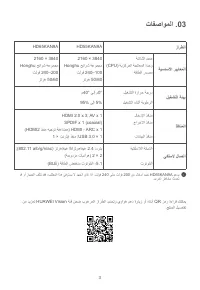
3 زارطلا HD55KAN9A HD65KAN9A ةيساسلأا ريياعملا ةشاشلا مجح ةيزكرملا ةجلاعملا ةدحو ةقاطلا ردصم 2160 × 3840 Honghu حئارش ةعومجم تلوف 240–100 زتره 50/60 2160 × 3840 Honghu حئارش ةعومجم تلوف 240–200 زتره 50/60 ليغشتلا ةئيب ليغشتلا ةرارح ةجرد ليغشتلا ءانثأ ةبوطرلا م40° ىلإ م0° 95% ىلإ 5% ذفانملا لاخدلإا ذ...
Page 77 - دعُب نع مكحتلا ةدحو .; دعُب نع مكحتلا زاهج لكش; Huawei Share; ةيبرعلا ةغللا
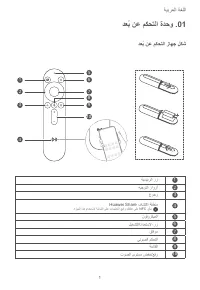
1 دعُب نع مكحتلا ةدحو . 01 دعُب نع مكحتلا زاهج لكش ةيسيئرلا رز هيجوتلا رارزأ عوجر Huawei Share فاشتكا ةقطنم .ةزيملا هذه مادختسلا ةشاشلا ىلع تاميلعتلا عبتاو كفتاه ىلع NFC نّكم نوفوركيملا ليغشتلا/دادعتسلاا رز قفاوم يتوصلا مكحتلا ةمئاقلا توصلا ىوتسم ضفخ/عفر 123 4 56789 10 ةيبرعلا ةغللا 2 3 4 1 56 789 1...
Page 80 - HUAWEI Vision S; عيرسلا ليغشتلا ليلد
HUAWEI Vision S HD55KAN9A/HD65KAN9A 96727213_03 عيرسلا ليغشتلا ليلد