Page 3 - DIRECTORY
SAFETY INFORMATION DIRECTORY SAFETY INFORMATION INSTALLATION Cabinet Diagram (Standing Cabinet) Cabinet Diagram (Ground Cabinet) Installation Important Instructions Installation Steps 04050608 PRODUCT INTRODUCTION Control Panel IntroductionMode IntroductionFirst Use Regular Operation 09101111 ACCESS...
Page 4 - SAFETY INFORMATION; THESE WARNINGS ARE PROVIDED IN THE INTEREST OF SAFETY.; Please use the product in an open environment.
SAFETY INFORMATION Thank you for choosing us! Please read all instructions before using this appliance. This book contains valuable information about operation, care and service. Keep it in a safe place for future reference. Should the appliance be sold or transferred to another owner, or should you...
Page 6 - DECLARATION OF COMPLIANCE; reach of children because these are dangerous to children.; INSTALLATION; picture is different from the actual appliance.
20.The instructions for ovens that have shelves shall include details indicating the correct installations of the shelves. 21.Do not use the oven unless you are wearing something on your feet. Do not touch the oven with wet or damp hands or feet. 22.For oven: Oven door should not be opened often dur...
Page 9 - Installation Important Instructions; immediately, to avoid fire, electric shock or other injuries.
Installation Important Instructions Content that means [mandatory] 1. The safe operation of this appliance can only be guaranteed if it has been installed to a professional standard in accordance with these installation instructions. The installer shall be liable for any damage resulting from incor-...
Page 10 - branch circuit NEUTRAL wire (gray or white colored wire).
3. The power socket shall be accessible to users (such as next to the cabinet) for easy power-off. 4. After installation is complete, make sure that the power plug is firmly inserted into the socket. 5. Please refer to the "Cabinet Diagram" for the requirements of net depth of the cabinet. T...
Page 11 - Installation Steps; cabinet, and connect the power supply.
Installation Steps 1. Please customize the cabinet according to the "Cabinet Diagram". 2. Before installation, please check for normal power socket and appropriate grounding, and check whether the cabinet dimension meets the installation requirements. 3. Place the appliance in designated loc...
Page 12 - PRODUCT INTRODUCTION; please refer to the real object.; Control Panel Introduction; Rotate to select a cooking function.
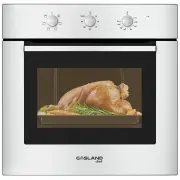
PRODUCT INTRODUCTION When removing food, please wear heat insulating gloves to prevent burns! At the moment of opening the door of the furnace, pay attention to the steam. Please open the door at a small angle to avoid the steam on your face. As the product is constantly upgraded, if there is any di...
Page 13 - Mode Introduction
Mode Introduction Which enables the user to observe the progress of cooking without opening the door. Oven lamp will light for all cooking functions. Bottom Heater: Heat is applied only by the lower heating element of the oven. Use this function for browning the bottom side of food. Suitable for slo...
Page 14 - First Use; Regular Operation
First Use Before using it for the first time, please clean the oven and accessories to a certain extent. 1. Remove the oven packaging shipping protection parts. 2. Remove all accessories from the cavity. 3. Thoroughly clean the attachment with soapy water and a rag or soft brush. 4. Wipe cavity and ...
Page 15 - ACCESSORIES; Accessories Included; Your appliance is equipped with the following accessories:; Barbecue Shelf
K1 K2 K3 ACCESSORIES As the products and accessories are constantly upgraded, if there is any difference between the real object and the picture below, please refer to the real object. Your appliance is accompanied by a range of accessories. Here, you can find an overview of the accessories included...
Page 16 - Accessory Use
Accessory Use For the oven to work properly, the grill rack and baking tray should only be placed between the first and fifth levels. When used together, place the baking tray under the grill. 1 2 3 4 5 www.gaslandchef.com 8350 Patriot Blvd STE B, N. Charleston, SC 29418 13 [email protected] 1 (844)...
Page 17 - CLEANING MAINTENANCE; Whole Machine Clean; door front is glass. Handle carefully to avoid breaking.
7. During use, the appliance becomes very hot. Care should be taken to avoid touching heating elements inside the oven. 8. Do not allow children to go near the oven when it is operating, especially when the grill is on. 9. Ensure that the appliance is switched off before replacing the oven lamp to a...
Page 18 - does not come away from oven easily, DO NOT force it.; NOTE
Lamp Replacement 1. Switch off and disconnect the power from the oven. Ensure that the internal parts are cool before touching internal parts. 2. Remove the lamp cover by turning it counter-clockwise (note: it may be stiff), replace the bulb with a new one of the same type. 3. Insert the new bulb, w...
Page 19 - FAULT HANDLING
WARNING: To avoid electric shock, please ensure that the electricity supply to the appliance is switched off and the appliance is fully cold. Before removing the lamp lens. FAULT HANDLING If the problem cannot be solved or other problems occur, please contact the after- sales service. After cooking,...
Page 20 - TECHNICAL PARAMETERS; Model; Usable Volume
TECHNICAL PARAMETERS Model Usable Volume 65L ES606MS/ES606MB Rated Voltage 208/240V Rated Frequency 50Hz-60Hz Electric Power 2.43/3.24 kW www.gaslandchef.com 8350 Patriot Blvd STE B, N. Charleston, SC 29418 17 [email protected] 1 (844) 538-7890