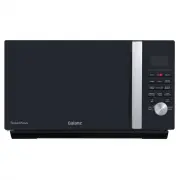
Page 3 - IMPORTANT SAFETY INSTRUCTIONS; CALIFORNIA PROPOSITION 65 WARNING; SAVE THESE INSTRUCTIONS; WARNING
IMPORTANT SAFETY INSTRUCTIONS IMPOR TANT SAFETY INSTRUCTIONS Do not attempt to operate this oven with the door open since open-door operation can result in harmful exposure to microwave technology. It is important not to tamper with the safety interlocks. Do not place any object between the oven fro...
Page 5 - GROUNDING INSTRUCTIONS
IMPORTANT SAFETY INSTRUCTIONS IMPOR TANT SAFETY INSTRUCTIONS installation. If this equipment does cause harmful interference to radio or television reception, which can be determined by turning the equipment off and on, the user is encouraged to try to correct the interference by one or more of the ...
Page 6 - INSTALLATION GUIDE
SAVE THESE INSTRUCTIONS — — — IMPORTANT SAFETY INSTRUCTIONS IMPOR TANT SAFETY INSTRUCTIONS Electrical Requirements The electrical requirements are a 120 volt 60 Hz, AC only, 20 amp. It is recommended that a separate circuit serving only the oven be provided. The oven is equipped with a...
Page 7 - COOKING UTENSILS GUIDE
SAVE THESE INSTRUCTIONS RECOMMENDEDMicrowave browning dish — Use to brown the exterior of small items such as steaks, chops, or pancakes. Follow the directions provided with your browning dish. Microwaveable plastic wrap — Use to retain steam. Leave a small opening for some steam to escape and avoid...
Page 9 - CONTROL PANEL
7 CONTROL PANEL CONTROL P ANEL BAKE Use to bake food (See Page 14). AIR FRY Use to air fry food (See Page 16). ROAST Use to roast food (See Page 18). MICRO Use to microwave food with selected power level (See Page 11). CONV Use to set convection program (See Page 20). MICRO+CONV Use to set combinati...
Page 10 - Product Specifications
8 FIRST TIME USE FIRST TIME USE If you are using your SpeedWave for the first time, please be sure to: Clean the glass turntable, baking and roasting pan , air fry kit with hot water, a small amount of dishwashing liquid and a nonabrasive cleaning pad. Do not immerse the body of the unit...
Page 11 - OPERATION INSTRUCTIONS; Setting the Clock
OPERATION INSTRUCTIONS OPERA TION INSTRUCTIONS 9 3 Press the dial or CLOCK/TIMER to confirm the hour. NOTE: While in the process of setting the clock, you can cancel the settings by pressing the STOP/CANCEL . 4 Turn the dial until the correct minute is displayed. 5 Press the dial or CLOCK/TIMER to c...
Page 12 - Quick Start Microwave; Timer
OPERA TION INSTRUCTIONS OPERATION INSTRUCTIONS Accessory Guide: Glass Turntable This feature allows you to start the oven quickly at maximum microwave power. The longest cooking time is 95 minutes. Quick Start Microwave 10 1 2 You can use the timer feature to count down a specific amount of time whe...
Page 13 - Microwave Cooking
OPERATION INSTRUCTIONS OPERA TION INSTRUCTIONS Accessory Guide: Glass Turntable This feature allows you to choose the power level and cooking time of microwave function. The longest cooking time is 95 minutes. Microwave Cooking 11 1 2 Example: Cook at 30% power level for 3 minutes and 50 seconds. Pr...
Page 14 - Weight Defrost
OPERATION INSTRUCTIONS OPERA TION INSTRUCTIONS Accessory Guide: Glass Turntable The defrosting time and power level are automatically set once the food category and the weight are selected. Weight Defrost 12 2 Turn the dial to select food code ‘dEF3’ (Seafood). Example: How to defrost 8oz seafood. 1...
Page 15 - Time Defrost
OPERATION INSTRUCTIONS OPERA TION INSTRUCTIONS Weight must be in pounds and ounces. If label gives weight in pounds only, change the fraction of a pound to ounces using the following chart. Converting fractions of a pound to ounces: 9 10 11 12 13 14 15 16 .54 to .59 .60 to .65 .66 to .71 .72 to .78 ...
Page 16 - Bake
OPERATION INSTRUCTIONS OPERA TION INSTRUCTIONS Accessory Guide: Glass Turntable Baking and Roasting Pan Bake 14 4 When preheating finishes, ‘PREH’ will stop blinking and the oven will show ‘Add Food 350F’ and sound periodically to remind user to put the food inside. Portion Preheating Temperature Co...
Page 18 - Air Fry
OPERATION INSTRUCTIONS OPERA TION INSTRUCTIONS 16 Accessory Guide: Glass Turntable Air Fry Kit For Air Fry cooking, you can select the type of food you want to cook from the programs listed on the cooking label located on the interior panel of the appliance. Auto Program: How to air fry 16oz chicken...
Page 20 - Roast
OPERATION INSTRUCTIONS OPERA TION INSTRUCTIONS 18 X 2 Accessory Guide: Glass Turntable Baking and Roasting Pan Roast 2 Turn the dial to select food code ‘Ar-5’ (Roasted Potatoes). Auto Program: How to Roast 12oz roasted potatoes. 1 In standby mode, press the ROAST twice to use auto program. 3 Press ...
Page 22 - Convection
OPERATION INSTRUCTIONS OPERA TION INSTRUCTIONS 20 1 Example: How to cook with convection temperature 425°F for 25 minutes. In standby mode, press the CONV pad once to use custom setting (Default is 350°F. Accessory Guide: Glass Turntable Baking and Roasting Pan This feature allows you cook with powe...
Page 23 - Microwave+Convection
OPERATION INSTRUCTIONS OPERA TION INSTRUCTIONS 21 1 Example: How to set the combination of microwave and convection at temperature 425°F for 30 minutes. In standby mode, press MICRO+CONV once to use custom setting (Default is 350°F). Accessory Guide: Glass Turntable Baking and Roasting Pan This oven...
Page 24 - Sensor Cook
OPERATION INSTRUCTIONS OPERA TION INSTRUCTIONS 22 Auto Program: How to Cook 8oz fresh vegetable with sensor. Accessory Guide: Glass Turntable For sensor cook function, you can select the type of food you want to cook from the programs listed on the cooking label located on the interior panel of the ...
Page 25 - Sensor Reheat
OPERA TION INSTRUCTIONS OPERATION INSTRUCTIONS 23 4 The appliance with automatically suggest a cooking time and start countdown. Accessory Guide: : Glass Turntable For sensor reheat function, you can select the type of food you want to cook from the programs listed on the cooking label located on th...
Page 26 - Popcorn
OPERATION INSTRUCTIONS OPERA TION INSTRUCTIONS 24 Example: How to cook popcorn for 3 minutes and 30 seconds. Accessory Guide: Glass Turntable Popcorn NOTE: The default time is 2 minutes and 30 seconds. For default time, you can skip step 2, directly press the dial to start if you prefer. 2 Turn the ...
Page 27 - Child lock
OPERATION INSTRUCTIONS OPERA TION INSTRUCTIONS 25 1 2 3 Example: How to set Turntable On/Off during MICRO programming. The turntable is set to default as always turning. You can turn it on or off by pressing LOCK/TURNTABLE OFF during setting the Microwave program or during cooking in the Microwave p...
Page 28 - Automatic Protection Mechanism
OPERATION INSTRUCTIONS TROUBLESHOOTING TROUBLESHOOTING OVERHEATING PROTECTION - The display may show Er10 which means the appliance has entered into high temperature overheat mode which will protect the appliance from further damage. Audible alert will be heard until STOP/CANCEL is pressed or the ap...
Page 29 - CLEANING AND CARECLEANING AND CARE; CLEANING AND CARE
27 CLEANING AND CARECLEANING AND CARE CLEANING AND CARE Turn off the oven and unplug the power cord from the wall when cleaning. Keep the inside of the oven clean. When food splatters or spilled liquids adhere to oven walls, wipe with a damp cloth. Mild detergents may be used if the oven gets very d...
Page 30 - PRODUCT WARRANTY
28 OPERA TION INSTRUCTIONS PRODUCT WARRANTY PRODUCT W ARRANTY This warranty applies to products sold by Galanz Americas in the U.S. This warranty is in lieu of any other warranty and expressly applies to the individual product only.Galanz product is warrantied for one year following purchase for def...
Page 31 - PLEASE PRINT CLEARLY.
29 OPERA TION INSTRUCTIONS WARRANTY REGISTRATION WARRANTY REGISTRATION Please mail this warranty card to the address below within 30 days of purchase. Galanz Americas, 55 Challenger Road, Suite 503, Ridgefield Park, NJ 07660 . Name Address City State ZIP Phone Email Model Number Serial Number Purcha...