Page 2 - Switching on and off
VI 41 1 1 1. Important Notes Page 3-4 F or your safety Page 3 Operating for the first time Page 4 About use Page 4 The advantages of cooking by induction Page 4 2. Features Page 5 F eatures Page 5 Special accessories Page 5 3. Operation Page 6-8 Switching on and off Page 6 Indicator light / Pot reco...
Page 4 - or your safety; Do not operate the appliance if it is damaged.
3 F or your safety Do not operate the appliance if it is damaged. The appliance must only be connected by an authorised specialist, paying attention to the relevant regulations of the power supplycompanies and the regional constructionregulations. Observe the assembly instructions! The appliance cou...
Page 5 - Operating for the first time; Remove the packaging from the appliance and; About use; The appliance is intended solely for household use; The advantages of cooking by; The heating process takes place at great speed
4 Operating for the first time Remove the packaging from the appliance and dispose of it according to local regulations. Be careful to remove all accessories from the packaging. Keep packaging elements and plasticbags away from children. This appliance is labelled in accordancewith the European Dire...
Page 6 - Display panel
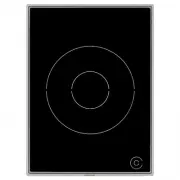
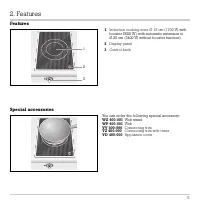
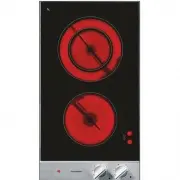
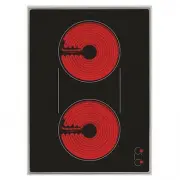
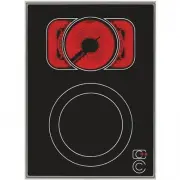
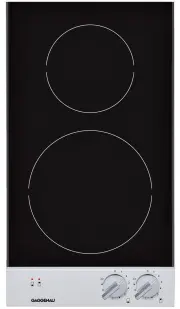
5 F eatures Special accessories 1 Induction cooking zone Ø 18 cm (1700 W , with booster 2500 W) with automatic extension to Ø 28 cm (3400 W, without booster function) 2 Display panel 3 Control knob You can order the following special accessory: WZ 400-001 W ok stand WP 400-001 W ok VV 400-000 Connec...
Page 8 - Booster function; The booster function will boost the power of the
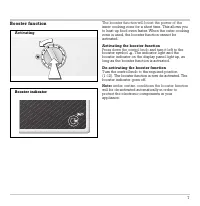
Booster function The booster function will boost the power of the inner cooking zone for a short time. This allows youto heat up food even faster. When the outer cookingzone is used, the booster function cannot beactivated. Activating the booster function Press down the control knob and turn it left...
Page 9 - Visual signals; The appliance is set to automatically switch off
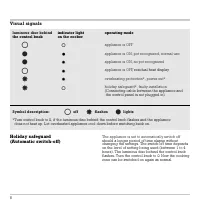
Visual signals Holiday safeguard (Automatic switch-off) The appliance is set to automatically switch off should a longer period of time elapse without changing the settings. The switch-off time dependson the level of setting being used (between 1 to 4hours). The luminous disc behind the control knob...
Page 10 - The values given above must be looked upon as recommended values.
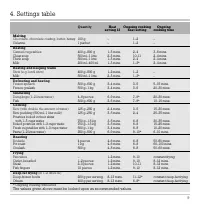
9 4. Settings table Quantity Heat Ongoing cooking Ongoing setting 12 heat setting cooking time Melting Chocolate, chocolate coating, butter , honey 100 g – 1–2 – Gelatine 1 packet – 1–2 – Heating Canned vegetables 400 g–800 g 1–3 mins. 2–4 3–6 mins. Clear soup 500 ml–1 litre 2–3 mins. 10–11 2–4 mins...
Page 11 - Suitable cooking receptacles and how to use them
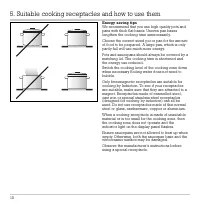
Energy saving tips W e recommend that you use high quality pots and pans with thick flat bases. Uneven pan baseslengthen the cooking time unnecessarily. Choose the correct sized pot or pan for the amountof food to be prepared. A large pan, which is onlypartly full will use much more energy. Pots and...
Page 12 - The wok and accessories; Use the wok stand only on the induction wok; Cooking in the wok
The wok and accessories (not included) The wok and wok stand can be obtained from yourGaggenau dealer. The wok pan has a rounded baseand can only be used together with the wok stand.Please be careful that the wok with the rounded base is secure on the stand during cooking. Always place the wok stand...
Page 15 - This appliance can be combined with all Gaggenau
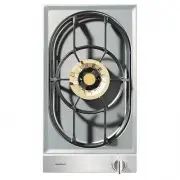
T echnical Data T otal connected load: 3 400 W / 220-240 V Important notes on installation This appliance can be combined with all Gaggenau Vario 400 Series appliances. This appliance may be installed in kitchen combinations made of wood or similar combustiblematerials without taking additional safe...
Page 16 - Preparing the cabinet; • As shown in the installation sketch, drill the
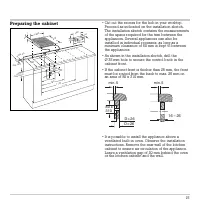
Preparing the cabinet • Cut out the recess for the hob in your worktop.Proceed as indicated on the installation sketch.The installation sketch contains the measurementsof the space required for the trim between the appliances. Several appliances can also be installed in individual recesses, as long ...
Page 17 - Installing the control panel; • Hold the support plate from the rear against the
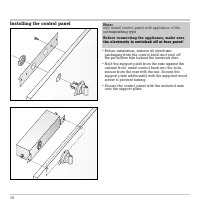
Installing the control panel • Before installation, remove all styrofoam packaging from the control knob and peel off the protective film behind the luminous disc. • Hold the support plate from the rear against the cabinet front, insert control knob into the hole,secure from the rear with the nut. S...
Page 18 - Installing the cooktop; do not stick the hob onto the worktop with
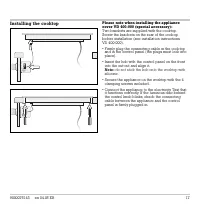
Installing the cooktop Please note when installing the appliance cover VD 400-000 (special accessory): T wo brackets are supplied with the cooktop. Screw the brackets on the rear of the cookop before installation (see installation instructions VD 400-000). • Firmly plug the connecting cable in the c...