Page 3 - Pag; Sincerely, Franke Kaffeemaschinen AG
Pag e 1 Congratulations on your purchase of an A800. Thank you for your confidence in us. The A800 is a powerful and space-saving coffee machine that adapts to your needs perfectly. The A800 will en- able you to offer high-quality coffee specialties rapidly and individually. Your customers will be i...
Page 4 - TAble OF COnTenTS
M aintaining the a800 . . . . . . . . . . . . . . . . . . . . . . . . . . . . . . . . . 32 i ntroduction to the autoMatic cleaning . . . . . . . . . . . . . . . . . . 32 c leaning and Maintenance plan . . . . . . . . . . . . . . . . . . . . . . . . 33 r insing the coffee Machine . . . . . . . . . . ...
Page 5 - FOR YOuR SAFeTY; Flavor Station; Proper use
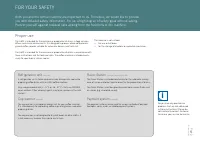
i For your saf ety Pag e 3 The machine is not suitable: • For use out of doors • for the storage of alcoholic or explosive substances Do you have any questions or problems that are not addressed in these instructions? Please do not hesitate to contact Customer Service or your service technician. The...
Page 6 - Important; Danger; General safety concerns when using the A800
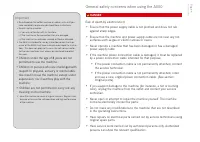
! For your saf ety Pag e 4 Important • Do not operate the coffee machine or add-on units until you have completely read and understood these instructions. • Do not use the machine: • if you are not familiar with its functions.• if the machine or the connection lines are damaged.• if the machine has ...
Page 7 - Note; Warning
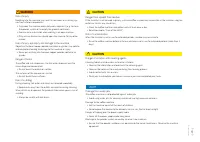
! ! ! Vorsicht Warnung hinWeise ! ! ! For your saf ety Pag e 5 Damage from water jets The coffee machine is not protected against water jets. • Avoid using water jets for cleaning and do not use high-pressure cleaners. Damage to the coffee machine • Set the machine up out of the reach of children.• ...
Page 8 - exPlAnATIOn OF SYMbOlS; Symbols from the Operating Instructions
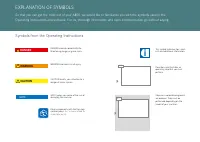
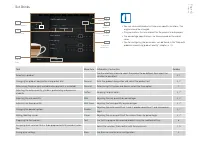
! ! ! 01 4 i 4 01 Steps on a colored background are optional. They must be performed depending on the model of your machine. exPlAnATIOn OF SYMbOlS So that you can get the most out of your A800, we would like to familiarize you with the symbols used in the Operating Instructions and software. For us...
Page 9 - navigating; Symbols used in the software; Symbols on the dashboard
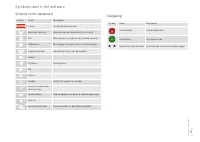
explanation of symbols Pag e 7 navigating Symbol name Description Cancel button Cancel preparation Start button Start preparation Page backwards/forwards Scroll through menus with multiple pages. Symbols used in the software Symbols on the dashboard Symbol name Description Franke Call up Mainten...
Page 10 - pag; Depiction of error messages
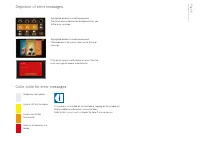
Schliessen Tür off en Personal informieren. i Explanation of symbols pag e 8 if the entire system is aff ected by an error, then the error message will appear automatically. Depiction of error messages System has limited functionality. System still fully functional. Some or all resources are locked. ...
Page 11 - Scope of delivery; SCOPe OF DelIVeRY AnD IDenTIFICATIOn
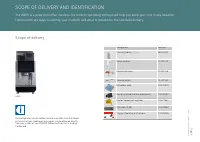
i Scope of deliv er y and identifi cation Pag e 9 The confi guration of your coff ee machine may diff er from that shown in the instructions. Additional accessories may be obtained directly from your retailer or from FRAnKe Kaff eemaschinen AG in Aarburg, Switzerland. Designation Item no. Cleaning t...
Page 12 - Type key; Identifi cation
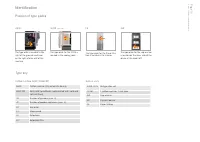
Scope of deliv er y and identifi cation Pag e 10 CW The type plate for the cup warmer is located on the inner side of the device at the lower left. Add-on units Coff ee machine A800 (FCS4050) Su05, Su12 Refrigeration unti1 C 1M 1 coff ee machine, 1 milk type CW Cup warmer AC Payment device FS Flavor...
Page 13 - Introduction; DeSCRIPTIOn OF MACHIne
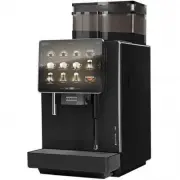
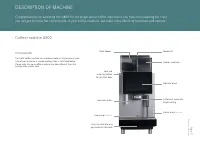
Descr ip tion of mac hine Pag e 11 Cup sensor (optional) Operator panel Drip tray with drip grid (permanently attached) Steam wand (optional) Outlet with automatic height setting bean hopper Powder container lock and unlocking button for the front door Hot water outlet Powder lid Introduction The A8...
Page 14 - Components of the A800
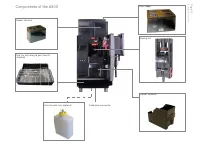
Descr ip tion of mac hine Pag e 12 Fixed water connection external water tank (optional) Drip tray with drip grid (permanently attached) Grounds container Powder container brewing unit bean hopper Components of the A800
Page 15 - Components of the refrigeration unit (Su05)
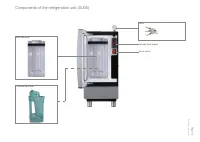
Descr ip tion of mac hine Pag e 13 Main switch Temperature display Cleaning container Milk container Components of the refrigeration unit (Su05) Keys
Page 16 - Payment system
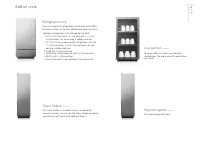
Descr ip tion of mac hine Pag e 14 Payment system (option) For recording payment data. Refrigeration unit You can connect the refrigeration unit directly to the A800 to make sure the milk for your coffee beverages stays fresh.Additional refrigeration units available for the A800: • Su12/Su12 Twin wi...
Page 17 - The operating interface; Switching to energy saver mode
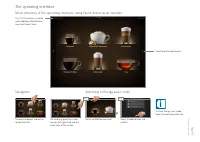
4 01 02 i Descr ip tion of mac hine Pag e 15 For scrolling, press the arrow keys on the right-hand and left- hand sides of the screen. The operating interface Scroll forwards/backwards. The FRAnKe button is used to switch between Maintenance level and Product level. To fi nish energy saver mode, tap...
Page 18 - Inspire Me; Overview of operating modes
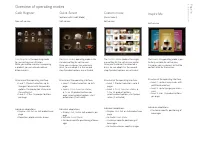
Descr ip tion of mac hine Pag e 16 Individual adaptations: • Customer-specifi c positioning of beverages Self-service Structure of the operating interface: • level 1: up to 6 menu cards with prefi ltered selection • level 2: up to 5 pages per menu card • level 3: 6 or 12 product buttons per page The...
Page 19 - Credit Mode in the Quick Select operating mode
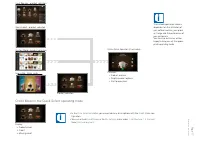
i i Descr ip tion of mac hine Pag e 17 Quick Select - product selection Credit: 6.00 CHF Milk coff ee Vanilla 4.50 CHF Macchiato Vanilla 5.50 CHF Macchiato Caramel 5.50 CHF Milk coff ee 4.00 CHF Macchiato 5.00 CHF Ristretto 3.00 CHF The suitable operation mode is dependent on the utilization of your...
Page 20 - for problem-free enjoyment of your coffee machine here.; InSTAllATIOn AnD TeCHnICAl DATA
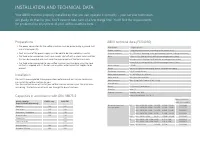
Capacities in accordance with DIn 18873-2 Hourly capacityCups/h (double dispensing) A800 2-step A800 FM espresso 160 160 Café crème 130 130 Americano / long black 130 130 brewed coffee 130 130 Cappuccino - 160 latte macchiato - 130 Hot chocolate 140 140 Hot water (200 ml) 200 200 A800 technical data...
Page 21 - ii; Adjustable feet; Installation dimensions of the A800
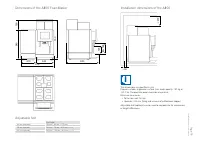
340 270 613 540 190 730 600 145 80 - 185 ≥ 200 ≥ 50 ii Ins tallation and t ec hnical dat a Pag e 19 Total height 40 mm (standard) 730 mm + 40 mm = 770 mm 70 mm (optional) 730 mm + 70 mm = 800 mm (optional) 100 mm (optional) 730 mm + 100 mm = 830 mm (optional) Adjustable feet The dimensions are sp...
Page 22 - Payment system AC
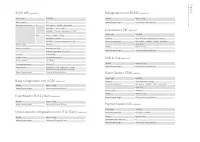
Ins tallation and t ec hnical dat a Pag e 20 FoamMaster Su12 (Twin) (optional) Weight Approx. 26 kg Width/Depth/Height 340 mm/475 mm/540 mm Device type FCS4048 Milk container 5 l electrical connection eu 220 – 240 V 1l n Pe 50/60 HzSu05 FM 1.95 – 2.3 kWSu05 MS Current consumption: 0.72 A uSA 120 ...
Page 23 - Initial commissioning of the A800; COMMISSIOnInG; Daily commissioning of the A800
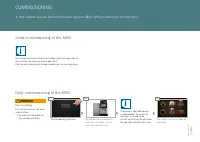
02 03 4 i 4 4 01 i ! Commissioning Pag e 21 Warning The coff ee machine is ready for operation. If necessary, add coff ee beans, suitable powder for automatic machines, milk and syrup. Also fi ll up the machine with water for operation with the water tank. The coff ee machine automati- cally vents t...
Page 24 - Filling the coff ee bean hopper and powder container; FIllInG AnD eMPTYInG; beans, powder and water
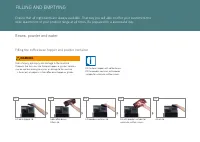
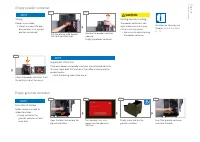
01 02 03 4 4 4 i ! 4 04 05 lift powder container lid. Warning Risk of injury, eye injury and damage to the machine If objects fi nd their way into the bean hopper or grinder, splinters may be ejected, leading to injuries or damage to the machine. • never put any objects in the coff ee bean hopper or...
Page 25 - emptying the bean hopper, setting the grind coarseness
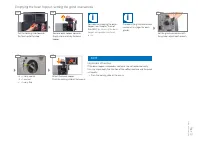
i 01 4 4 05 02 4 i 03 04 4 Filling and em ptying Pag e 23 Set the grind coarseness with the grinder adjustment wrench. Note If needed, the grind coarseness can be set in stages for each grinder. +2 => very coarse 0 => normal -2 => very fi ne For notes on cleaning the bean hopper, see Chapte...
Page 26 - empty grounds container; Caution; empty powder container
! Schliessen Tür off en Personal informieren. i 01 02 4 01 03 04 4 4 4 4 03 02 Filling and em ptying Pag e 24 Note Impairment of function If the bean hopper and powder container are not locked correctly, this may impair both the function of the coff ee machine and the product quality. • Push the loc...
Page 27 - Milk; Preparing the milk system
04 01 02 03 4 4 4 4 4 4 4 4 05 06 07 i i Filling and em ptying Pag e 25 Note For notes on cleaning the milk system, see Chapter Care of the A800, p. 32 . Milk The milk system is prepared semi-automatically after a cleaning or a fi lling procedure. Please observe the instructions in the error event m...
Page 28 - emptying the refrigeration unit
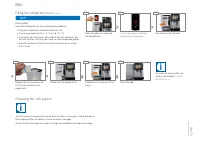
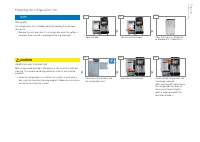
03 4 4 04 05 4 4 ! 4 01 02 06 Filling and em ptying Pag e 26 Switch off the refrigeration unit if no longer required. After switching off , do not close the refrigeration unit door all the way, but leave it slightly open in order to prevent the formation of odors. Insert the milk container. Clean th...
Page 29 - PRePARInG DRInKS; Preparing drinks with Quick Select
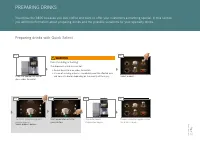
4 4 01 02 05 06 04 4 4 4 4 03 ! Pr eparing dr ink s Pag e 27 The Drink Selection product preview appears. Select product options. Start preparation with the green button. Risk of scalding or burning! The dispensers and drinks are hot. • Do not touch the area under the outlets.• In case of scalding o...
Page 30 - Preparing drinks with Cash Register
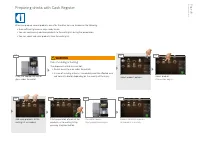
i ! 4 4 02 06 04 4 07 4 03 4 05 4 4 01 Pr eparing dr ink s Pag e 28 Select product. Preparation begins. Product selection appears. All products are ready. Add more products to the waiting list as needed. The outlet lowers. next preparation begins. Select product options. Risk of scalding or burning!...
Page 31 - Preparing drinks with Inspire Me
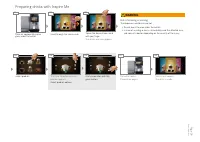
02 03 4 04 07 05 4 4 06 4 4 ! 4 01 08 4 4 Pr eparing dr ink s Pag e 29 Menu cards appear. The drink is ready. The Drink Selection product preview appears. Select product options. Start preparation with the green button. Risk of scalding or burning! The dispensers and drinks are hot. • Do not touch t...
Page 32 - example: Quick Select; Preparing drink with ground coff ee
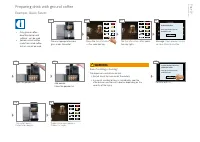
! 4 4 02 03 06 4 08 09 01 4 4 4 4 05 07 04 i 4 4 Pr eparing dr ink s Pag e 30 • Only ground coff ee - decaff einated or with caff eine - can be used. • Soluble instant coff ee made from dried coff ee extract cannot be used. example: Quick Select OK. Message: Open powder lid and add decaff einated co...
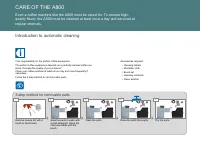
Page 34 - -step method for removable parts; Introduction to automatic; Even a coff ee machine like the A800 must be cared for. To ensure high-
IV 4 4 III 4 4 II V i I accessories required: • cleaning tablets • Microfi ber cloth• Brush set• cleaning container • clean solution Your responsibility for the perfect coff ee experience.The perfect coff ee experience depends on a perfectly cleaned coff ee ma- chine. Increase the quality of your pr...
Page 35 - Cleaning and maintenance plan
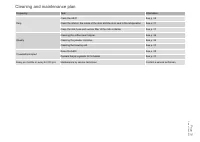
Care of the A800 Page 33 Cleaning and maintenance plan Frequency task Information Daily Clean the A800 See p. 32 Clean the interior, the inside of the door and the door seal in the refrigeration See p. 37 Clean the milk hose and suction filter of the milk container See p. 37 Weekly Cleaning the coff...
Page 36 - Starting the automatic cleaning; Clean the steam wand
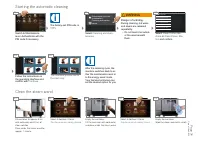
4 4 4 4 i 01 02 03 04 01 02 03 04 01 02 ! 04 05 4 03 i 4 01 02 04 03 05 Care of the A800 Page 34 The factory-set PIN code is 1111. Clean Flavor Station Wipe Protection Prepare Syrup System Prepare milk system Rinse Coff ee Machine ERROR LOG fi les Data transfer and indi- vidualization Cleaning and m...
Page 37 - Cleaning the monitor screen; Rinsing the coff ee machine
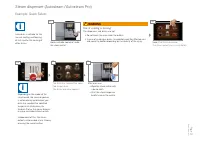
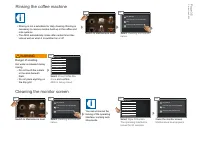
4 4 ! i 4 i 4 4 4 01 02 01 02 4 03 03 4 04 Care of the A800 Page 35 Cleaning and maintenance Data transfer and individualiza- tion My settings Cleaning and maintenance Data transfer and individualiza- tion My settings Clean the monitor screen. Maintenance level appears. select Cleaning and mainte- n...
Page 38 - note; caution; Cleaning the bean hopper and
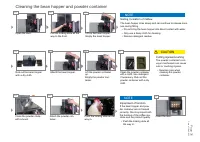
4 4 01 02 4 03 04 05 06 07 10 ! 09 4 4 4 4 4 4 4 4 4 11 08 4 Care of the A800 Page 36 note Impairment of function If the bean hopper and pow- der container are not locked correctly, this may impair both the function of the coff ee ma- chine and the product quality. • Push the locking slide all the w...
Page 39 - Cleaning the accessories; Cleaning the brewing unit
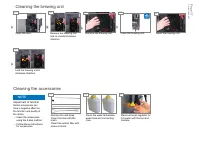
4 4 01 02 4 03 04 4 4 4 05 06 01 02 03 Care of the A800 Page 37 Remove the jet regulator for hot water with the tool and descale. note Impairment of function soiled accessories can have a negative aff ect on the function and quality of the drinks. • Clean the accessories using the 5-step method. • F...
Page 40 - COnFIGuRInG; Introduction to programming
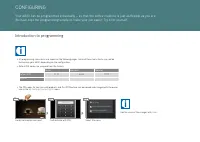
i 4 4 i 01 03 02 • All programming menu items are shown on the following pages. Some of these menu items may not be featured on your A800, depending on the confi guration. • Default PIn codes are assigned from the factory: Owner specialist Operator Default pin 1111 2222 7777 My pin • The PIn codes f...
Page 42 - My Settings; Set Machine
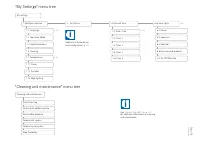
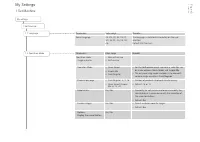
Configur ing Pag e 40 My settings 1 Set Machine 1.1 language Parameters Value range Remarks Operation mode: usage scenario • non-self-service• Self-service Operation Mode • Quick Select• Inspire Me• Cash Register • For the self-service usage scenario, a selection can be made between Quick select and...
Page 45 - Set Drinks
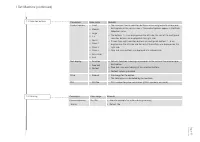
i Configur ing Pag e 43 Select product Select area Confirm variation Preparing the test product Setting the parameters button Save Select variation Test Grind quantity brewing quantity Grinder 2 Grinder 1 Water quantity back Save Coffee ... General Cold cappuccino task Menu item Information / Instru...
Page 46 - Date and Time
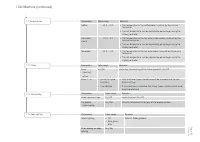
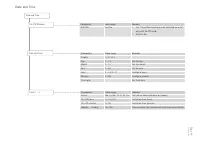
Configur ing Pag e 44 Parameters Value range Remarks With PIn Yes/no • Yes: The coffee machine can be switched on or off only with the PIn code • Default: no On/Off Machine Date and Time Parameters Value range Remarks Display 12 h/24 h - Day 0 - 31 Set the day Month 0 - 12 Set the month Year 0 - 63 ...
Page 47 - Access rights
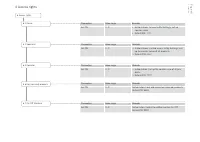
Configur ing Pag e 45 Parameters Value range Remarks Set PIn 0 - 9 Authorization: Switch the coffee machine On/OffDefault PIn: 9999 Parameters Value range Remarks Set PIn 0 - 9 Authorization: lock and unlock key (secured) productsDefault PIn: 8888 Parameters Value range Remarks Set PIn 0 - 9 • Autho...
Page 48 - Counters
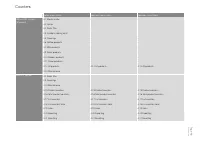
Configur ing Pag e 46 Owner menu items specialist menu items Operator menu items Without Vip system (standard) 4.1 Machine total - - 4.2 Cycles 4.3 Water filter - - 4.4 Grinders/dosing units 4.5 Cleanings - - 4.6 Coffee products - - 4.7 Milk products - - 4.9 Water products - - 4.10 Powder products -...
Page 49 - Functions; InDIVIDuAlIZATIOn AnD DATA TRAnSFeR; Overview
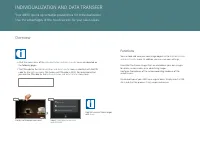
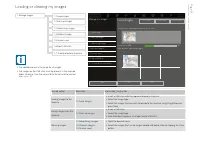
i 4 i 01 02 My settings Individualization and data transfer Cleaning and maintenance You can load and view your own image objects in the Individualization and data transfer menu. In addition, you can save your settings. use either the Franke images that are available or your own images for drinks, s...
Page 50 - Individualization and data transfer
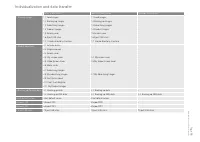
Individualization and dat a transfer Pag e 48 Owner menu items Specialist menu items Operator menu items 1 Manage images 1.1 load images 1.1 load images - 1.2 backing up images 1.2 backing up images - 1.3 Advertising images 1.3 Advertising images - 1.4 Product images 1.4 Product images - 1.5 Screen ...
Page 51 - Individualization and data transfer menu tree
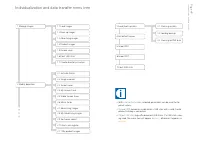
i Individualization and dat a transfer Pag e 49 3.3 backing up xMl data 3.2 loading backup 2.11 My product images 6 Import PKT 7 eject uSb stick • With 4 set default values , selected parameters can be reset to the preset values. • 5 Import FPC becomes usable when a uSb stick with a valid Franke pro...
Page 52 - necessary folder structure on the uSb stick
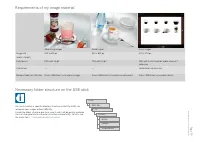
i Individualization and dat a transfer Pag e 50 screensavers images drinks custom rc QMl files Drive You must maintain a specific directory structure so that the A800 can recognize your images without difficulty. Create the folder structure one time, save it and it will be quickly available. You can...
Page 53 - load images; loading or clearing my images
i Individualization and dat a transfer Pag e 51 uSb: Available advertising images Advertising images Product images Screen saver load product images with Drag & Drop 0 to 100 load images Manage my images 26 % 50 0 Free memory (Mb): 1.7 Create directory structure 1.6 eject uSb stick 1.3 Advertisi...
Page 54 - using my images; Confi guring my screen saver; My screen saver
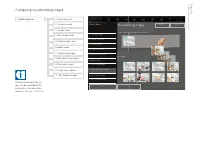
i Individualization and dat a transfer Pag e 52 2.8 My advertising images 2.10 Sort cash register 2.9 Sort quick select 2.8 My advertising images 2.7 Advertising images 2.6 Menu cards 2.3 Screen saver 2.5 Video screen saver 2.2 Image carrousel 2.4 My screen saver 2.1 Activate drinks Desired action M...
Page 55 - My advertising images; Confi guring my advertising images
i Menü anpassen Individualization and dat a transfer Pag e 53 2.10 Sort Cash Register 2.9 Sort Quick Select 2.8 My advertising images 2.7 Advertising images 2.6 Menu cards 2.5 Video screen saver 2.8 My advertising images 2.11 My Product Images 2.5 Video screen saver 2.10 Sort cash register 2.4 My sc...
Page 56 - My Product Images; Assigning my product images
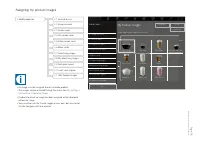
i Individualization and dat a transfer Pag e 54 2.11 My Product Images 2.10 Sort cash register 2.9 Sort quick select 2.8 My advertising images 2.7 Advertising images 2.6 Menu cards 2.5 Video screen saver 2.8 My advertising images 2.11 My Product Images 2.5 Video screen saver 2.10 Sort cash register ...
Page 57 - For all you decommissioning needs; DeCOMMISSIOnInG AnD DISPOSAl; benefi t from our service.; Decommissioning
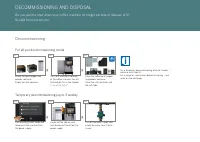
4 4 01 04 05 06 4 4 i 03 02 Clean the coff ee bean hopper and powder container. Clean the milk container and the milk tube. Turn off the water supply and empty the water tank if there is one. Switch off the add-on units and disconnect them from the power supply. Call up energy saver mode and disconn...
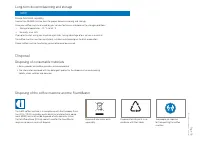
Page 58 - Disposing of the coffee machine and the FoamMaster; long-term decommissioning and storage; Disposal
i Decommissioning and disposal Pag e 56 Two people are required for transporting the coffee machine. Dispose of plastic parts in ac- cordance with their labels. Disposing of the coffee machine and the FoamMaster Dispose of electronic parts separately. The A800 coffee machine is in compliance with th...
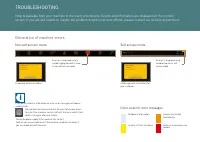
Page 59 - Color code for error messages; TROUBLESHOOTING; Elimination of machine errors
i Schliessen Pulverbehälter ist fast leer! Bitte Pulver füllen. Schliessen Bohnenbehälter ist fast leer! Personal informieren. The machine must be restarted in the event of serious errors. To restart the machine, switch it off with the main switch, then switch it on again after one minute. Check the...
Page 60 - Help with problems concerning product quality
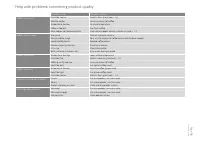
Troubleshoo ting Pag e 58 Possible causes Possible solutions Coffee tastes stale Grind too coarse Select a finer grind (see p. 23 ) Too little coffee Increase amount of coffee Temperature too low Increase temperature Coffee is too oldBean hopper not locked correctly Use fresh coffee Check bean hoppe...
Page 61 - InDex
d iMensions . . . . . . . . . . . . . . . . . . . . . . 19 d isposal . . . . . . . . . . . . . . . . . . . . . 54, 55 c offee Machine . . . . . . . . . . . . . . . . . 55 c onsuMable Materials . . . . . . . . . . . . 55 d rinks a ctivating . . . . . . . . . . . . . . . . . . . . 48 p reparing . . . ...