Page 3 - CONTENTS; Registration
3 CONTENTS Safety and warnings 4 Integrated refrigerator & freezer 9 Before you begin 10 Control panel — Refrigerator 11 Control panel — Freezer 12 Food modes 13 Storage features 15 Special features 16 Wi-Fi connection 17 Using your appliance 18 Care and cleaning 23 Food care 26 User warnings ...
Page 4 - SAFETY AND WARNINGS; Electric Shock Hazard; Failure to do so can result in death, electric; • Read and follow the safety and warnings; This appliance contains flammable
4 SAFETY AND WARNINGS ! WARNING! Electric Shock Hazard Failure to do so can result in death, electric shock, fire or injury to persons. • Read and follow the safety and warnings outlined in this user guide before operating this appliance. ! WARNING! This appliance contains flammable refrigerant is...
Page 5 - READ AND SAVE THIS GUIDE; including the following:; General Use
5 SAFETY AND WARNINGS READ AND SAVE THIS GUIDE WARNING! Read entire manual. Failure to follow all guides and rules could cause personal injury or property damage. When using this appliance, always exercise basic safety precautions including the following: General Use z This product has been designed...
Page 6 - Food safety
6 SAFETY AND WARNINGS z If the power supply cord is damaged, it must only be replaced by your Fisher & Paykel trained and supported service technician because special purpose tools are required. z When moving your appliance away from the wall, be careful not to roll over or damage the power cord...
Page 7 - Water connection
7 SAFETY AND WARNINGS z The thermal insulation foam in this appliance may contain flammable insulation blowing gases, any exposed foam may be highly flammable and must be carefully treated during disposal. z WARNING: Risk of child entrapment. Before you throw away your old refrigerator or freezer, t...
Page 8 - To reduce the risk associated with choking:; installation of the water filter.
8 SAFETY AND WARNINGS WARNING! To reduce the risk associated with choking: z DO NOT allow children under 3 years of age to have access to small parts during the installation of the water filter. Ice making z Avoid contact with the moving parts of the ice maker ejector mechanism, and do not place you...
Page 9 - 1cm Refrigerator; All models available in Left and Right door hinges; 6cm Refrigerator; INTEGRATED REFRIGERATOR & FREEZER
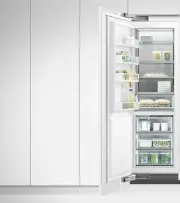
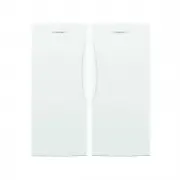
9 45.7cm Freezer RS4621F 61cm Freezer RS6121F 61cm Refrigerator RS6121S & RS6121SH All models available in Left and Right door hinges 76cm Freezer RS7621F 76cm Refrigerator RS7621SH & RS7621S INTEGRATED REFRIGERATOR & FREEZER
Page 10 - BEFORE YOU BEGIN; Freezer features
10 BEFORE YOU BEGIN Freezer features 1 Door shelves 2 Ice maker 3 Shelving 4 Freezer bins 5 Water filter (not shown) z Ensure the installer has completed the final checklist in the installation instructions. z Read this guide, taking special note of the Safety and Warnings section. z Remove all pack...
Page 11 - CONTROL PANEL — REFRIGERATOR
11 CONTROL PANEL — REFRIGERATOR 1 Allows you to unlock the control panel and enable compartment selection. Press 4 seconds to activate your appliance for the first time.The control panel will automatically lock when inactive for more than 10 seconds or when the door is closed. To unlock, press for ...
Page 12 - CONTROL PANEL — FREEZER
12 CONTROL PANEL — FREEZER 1 Allows you to unlock the control panel and enable compartment selection. Press 4 seconds to activate your appliance for the first time.The control panel will automatically lock when inactive for more than 10 seconds or when the door is closed. To unlock, press for 2 sec...
Page 13 - FOOD MODES
13 FOOD MODES Variable temperature zones Separate food modes, in both fridge and freezer, allow you to adjust the temperature independently for optimal storage. Refrigerator FOOD MODES DESCRIPTION TYPES OF FOOD TO STORE Pantry(12°C/54°F) Pantry mode provides a cool, dark place for a wide variety of ...
Page 14 - Freezer
14 FOOD MODES Freezer FOOD MODES DESCRIPTION TYPES OF FOOD TO STORE Soft Freeze(-9°C/16°F) Soft Freeze mode is an extension of your refrigerator, extending the shelf life of perishable items while maintaining the quality. ‘Soft Freeze’ mode allows easy portioning of food and the ability to heat, coo...
Page 15 - STORAGE FEATURES; REFRIGERATOR
15 STORAGE FEATURES REFRIGERATOR Fruit and vegetable bins/Slim bin with humidity control lids Separate fruits and vegetables to prevent the ethylene-sensitive produce from ripening too quickly-helps to extend their storage life. Also used for storing deli items and beverages, or for defrosting foods...
Page 16 - SPECIAL FEATURES; Max Cool
16 SPECIAL FEATURES Max Cool Boosts the cooling speed of your refrigerator by dropping the refrigerator to its coldest temperature for a set time (Pantry - 6 hours, Fridge - 6 hours, Chill - 4 hours) dependent on the food mode in use. Fast Freeze Boosts the freezing speed by dropping the freezer to ...
Page 18 - USING YOUR APPLIANCE; Select the desired compartment.; A light illuminates to indicate the matching; as you scroll down the list.; Selecting the Food Mode
18 USING YOUR APPLIANCE Select the desired compartment. Press to scroll through the available FOOD MODE . A light illuminates to indicate the matching FOOD MODE as you scroll down the list. Selecting the Food Mode Once you turn on your refrigerator for the first time, the compartments will automatic...
Page 19 - will flash and will illuminate after the; Key lock; Press to scroll through the available; for the compartment and food
19 USING YOUR APPLIANCE Bottle Chill (Freezer only) When activated, an alarm will sound, BOTTLE CHILL will flash and will illuminate after the elapsed time to remind you to remove your beverage. To silence the alarm:: Press once. The time taken to chill depends on the size of your beverage. If your ...
Page 20 - To deactivate manually:; Sabbath mode; alarm are; Key mute; will deactivate after 20 minutes.; Alarm mute
20 USING YOUR APPLIANCE To activate: Press , and together for 4 seconds.The icon on the control panel will illuminate. When activated, the display, all alarms and lights are deactivated for 80 hours. To deactivate manually: Press , and together for 4 seconds. Note: If you turn off your appliance wh...
Page 21 - Internal water dispenser (Refrigerator only); To reset the filter indicator:; Water filter
21 USING YOUR APPLIANCE Internal water dispenser (Refrigerator only) The water dispenser is located inside on the left side wall of the refrigerator compartment. To dispense water, gently press the dispensing pad with a glass or container.To stop the flow of water, simply pull your glass or containe...
Page 22 - Flushing through the ice maker; Turn the ice maker off if:; There is no water supply for several hours.
22 USING YOUR APPLIANCE 3 Empty the water, dry the bin and return it correctly.Once your ice maker is turned on the first bin of ice may be discoloured, this is not harmful and normal during the flushing process. Discard the first full bin of ice made. Your ice maker is now ready for use. Automatic ...
Page 23 - Exterior cleaning; Toe kick grilles and filter; Interior cleaning; CARE AND CLEANING; Humidity control lids — Fixed shelf
23 Exterior cleaning The condenser coils of your Integrated Column require periodic cleaning by a Fisher & Paykel trained service technician. Toe kick grilles and filter Your Integrated Column is fitted with a toe kick grille to protect the internal working components. We recommend cleaning the ...
Page 24 - Removing the top bin; Support lugs
24 CARE AND CLEANING 1 2 To remove a bin, extend the bin on its runners, and empty the bin. The runners are pre-lubricated to help open and close the bins. Do not remove the grease from the runners to maintain its smooth function. Removing the top bin Push the securing tabs on both sides of the bin ...
Page 25 - Turn on the ice maker. Discard the first full bin of ice.
25 3 Pull the bin towards you to remove. Push both runners back into the appliance. CARE AND CLEANING Holiday/vacation (Freezer only) Before leaving: Turn the ice maker to OFF on the control panel.Shut off the water supply to the appliance. On return: Turn on the ice maker. Discard the first full bi...
Page 26 - For best food care; We recommend using; or; when you are adding food items to your; Items stored in your refrigerator; FOOD CARE
26 For best food care z Store only high-quality, fresh food in your appliance. z Store perishable foods in the appliance immediately after purchase. Storing at room temperature increases the rate of deterioration and can allow harmful microbial growth. z Foods such as meat, poultry and seafood shoul...
Page 27 - Items stored in your freezer; We recommended cooling carbonated beverages only when the; function
27 FOOD CARE Items stored in your freezer z We recommended cooling carbonated beverages only when the BOTTLE CHILL function is active. Note: Do not store carbonated drinks without this function in the freezer. Failure to remove beverages could lead to freezing liquid and the likelihood of bottle/ ca...
Page 28 - USER WARNINGS AND SOUNDS; Faults
28 USER WARNINGS AND SOUNDS Faults z In the unlikely event a fault occurs, four rapid beeps will be heard and the fault will be displayed on the control panel. z Record the fault code displayed on the control panel and contact a Fisher & Paykel trained and supported service technician in order t...
Page 29 - TROUBLESHOOTING; PROBLEM
29 TROUBLESHOOTING If there is a problem with your appliance, please check the following points before contacting your local Fisher & Paykel trained and supported service technician or the Customer Care Centre. Product parts and accessories can be purchased through the Fisher & Paykel Custom...
Page 32 - ELECTRICAL AND ELECTRONIC EQUIPMENT (WEEE); EU; The symbol
32 EUROPEAN DIRECTIVE 2012/19/EU ON WASTE ELECTRICAL AND ELECTRONIC EQUIPMENT (WEEE) EU This appliance is marked according to the European Directive 2012/19/EU on Waste Electrical and Electronic Equipment (WEEE). By ensuring this product is disposed of correctly, you will help prevent potential nega...
Page 33 - Complete and keep for safe reference:
33 SERVICE & WARRANTY For details of your manufacturer’s warranty and contacts for servicing, refer to your separate service and warranty book provided with your appliance. This product has been designed for use in a normal domestic (residential environment). This product is not designed for any...