Page 2 - Notes; For your safety; Important; Important directions for safety and the environment
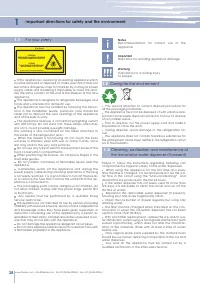
28 28 1 1.1 1.2 1.3 B09001301 Product tested in accordante with EN62471 Risk Group 2 PRUDENZA: NON FISSARE LA LAMPADA IN FUNZIONE. PUÒ ESSERE DANNOSO PER GLI OCCHI. CAUTION: DO NOT STARE AT OPERATING LAMP. MAY BE HARMFUL TO THE EYES. www.fhiaba.com ∙ [email protected] ∙ Tel +39 (0)434 420160 ∙ Fax +...
Page 3 - Installation; Connection to the water system; according to all of the directions in the specific in; Know your appliance; or write us an e-mail at
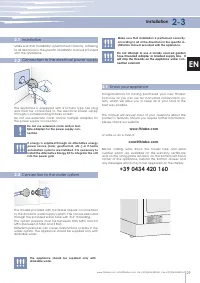
29 2-3 2.1 2.2 2.3 3.1 www.fhiaba.com ∙ [email protected] ∙ Tel +39 (0)434 420160 ∙ Fax +39 (0)434 420161 EN Make sure that installation is performed correctly, adhering to all directions in the specific installation manual provided with the appliance. Installation Connection to the electrical power...
Page 4 - Before starting; Main components; T Models
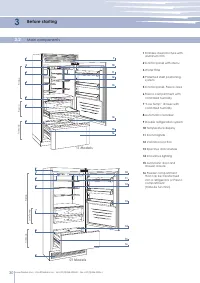
30 3 3.2 1 9 10 11 12 13 14 1516 2 3 4 5 6 8 TriMode 1 10 11 12 13 14 15 16 2 3 4 7 8 9 Low Temp TriMode www.fhiaba.com ∙ [email protected] ∙ Tel +39 (0)434 420160 ∙ Fax +39 (0)434 420161 Before starting Main components 1 Stainless steel structure with aluminum trim 2 Control panel with Menu 3 Water...
Page 5 - H Models; Brilliance Models; Fridge
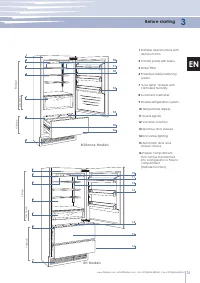
31 3 1 1011 12 13 14 15 16 2 3 4 7 8 9 Low Temp 1 10 11 12 13 14 15 16 2 3 4 7 8 9 Low Temp TriMode TriMode www.fhiaba.com ∙ [email protected] ∙ Tel +39 (0)434 420160 ∙ Fax +39 (0)434 420161 EN Before starting 0H Models Fridge 1 Stainless steel structure with aluminum trim 2 Control panel with Menu ...
Page 6 - Main control panel; Allows access to the appliance function menu; Allows activating or deactivating the automatic ice production.
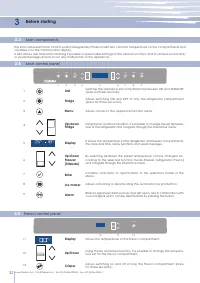
32 3 3.4 3.5 3.3 1 2 3 4 5 6 7 9 8 ICE MAKER ENTER FRIDGE UNIT 1 Unit 2 Fridge 3 Menu 4 Up/down Fridge 5 Display 6 Up/Down Freezer (TriMode) 7 Enter 8 Ice maker 9 Alarm CRISPER 10 11 12 11 Display 13 Crisper 12 Up/Down www.fhiaba.com ∙ [email protected] ∙ Tel +39 (0)434 420160 ∙ Fax +39 (0)434 42016...
Page 7 - Componenti principali; Electronic Control; Single drawer Fridge; FR Models
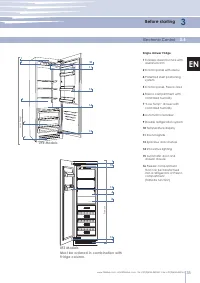
Built-in Ice Maker 33 Componenti principali 3 3.6 1 10 11 13 14 15 13 15 4 8 9 10 1 2 4 9 7 Low Temp Freezer www.fhiaba.com ∙ [email protected] ∙ Tel +39 (0)434 420160 ∙ Fax +39 (0)434 420161 EN Before starting Electronic Control Single drawer Fridge 1 Stainless steel structure with aluminum trim 2 ...
Page 8 - Shows the temperature of the Freezer compartment.
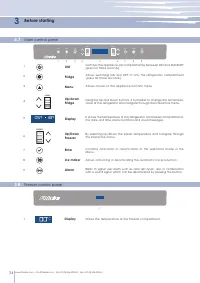
34 3.7 3.8 1 2 3 4 5 6 7 9 8 ICE MAKER ENTER FRIDGE FRIDGE FREEZER UNIT 1 1 1 Unit 2 Fridge 3 Menu 4 Up/down Fridge 5 Display 6 Up/Down Freezer 7 Enter 8 Ice maker 9 Alarm FRIDGE FREEZER 3 Display www.fhiaba.com ∙ [email protected] ∙ Tel +39 (0)434 420160 ∙ Fax +39 (0)434 420161 Main control panel F...
Page 9 - Appliance switching on and off; If at the first startup the Standby message does not appear, but; Switching on and off
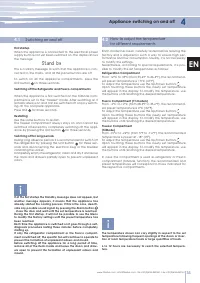
35 4.2 4 4.1 www.fhiaba.com ∙ [email protected] ∙ Tel +39 (0)434 420160 ∙ Fax +39 (0)434 420161 EN Appliance switching on and off If at the first startup the Standby message does not appear, but another message appears, it means that the appliance has already started the cooling process. If this is ...
Page 10 - Ice Maker Activation; Do not activate the Ice Maker unless the appliance is con-; Customization and language settings; To use special functions, select the Menu button; Shopping Fridge
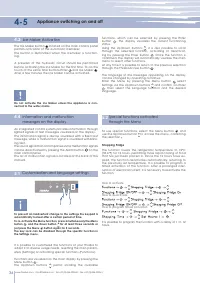
36 4-5 4.3 4.4 5.1 ICE MAKER ENTER FRIDGE UNIT 5.2 www.fhiaba.com ∙ [email protected] ∙ Tel +39 (0)434 420160 ∙ Fax +39 (0)434 420161 An integrated control system provides information through lighted signals or text messages visualized on the display.The information signal is always visualized with ...
Page 11 - Settings and Special Functions; Shopping TriMode; It is possible to program a period from 1 to 90 days.; Ice Maker
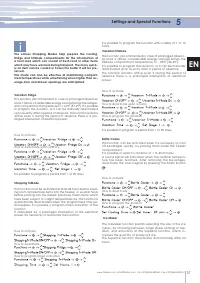
37 5 www.fhiaba.com ∙ [email protected] ∙ Tel +39 (0)434 420160 ∙ Fax +39 (0)434 420161 EN It is possible to program a period from 1 to 90 days. It is possible to program the function with a delay of 1 to 12 hours. Settings and Special Functions This function must be activated at least 24 hours befo...
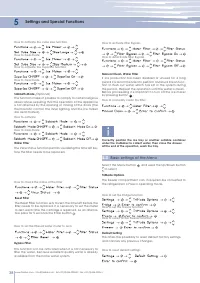
Page 12 - How to check the status of the filter; How to set the filtered water meter to zero; Correctly position the ice tray or another suitable container; How to manually clean the filter; Basic settings of the Menu; Select the Menu button
38 5.3 5 www.fhiaba.com ∙ [email protected] ∙ Tel +39 (0)434 420160 ∙ Fax +39 (0)434 420161 How to activate the cube size function How to deactivate How to activate the SuperIce function How to deactivate The function makes it possible to comply to certain religious observances requiring that the op...
Page 13 - Show Date; ATTENTION: If the default settings are restored, the default mode; Show Time; Keypad lock
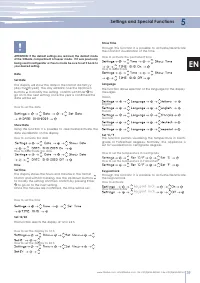
39 5 www.fhiaba.com ∙ [email protected] ∙ Tel +39 (0)434 420160 ∙ Fax +39 (0)434 420161 EN Settings and Special Functions TimeSet Time How to set the time Using this function it is possible to deactivate/activate the date visualization on the display. Show Date How to activate the date How to deacti...
Page 14 - Internal Layout; Do not place hands or fingers near the Icemaker when in
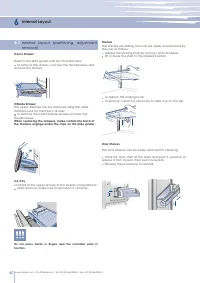
40 6 6.1 1 2 1 2 www.fhiaba.com ∙ [email protected] ∙ Tel +39 (0)434 420160 ∙ Fax +39 (0)434 420161 Internal Layout Internal Layout (positioning, adjustment, removal) Fresco Drawer TriMode Drawer Fixed to the slide guides with two thumbscrews. to remove the drawer, unscrew the thumbscrews and remove...
Page 15 - Activation and use of the Ice Maker; opaque, and will have a strange flavour and become; Do the ice cubes have an unusual odour?; Water Filter; Filter Replacement
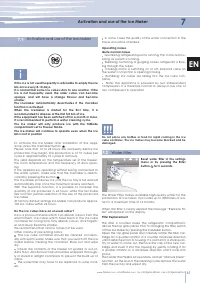
41 7 7.1 7.2 www.fhiaba.com ∙ [email protected] ∙ Tel +39 (0)434 420160 ∙ Fax +39 (0)434 420161 EN Activation and use of the Ice Maker Activation and use of the Ice Maker Do not place any bottles or food for rapid cooling in the ice cube container. The ice maker may become blocked and be damaged. If...
Page 16 - Lighting; To fully use the capacity of the TriMode compartment:
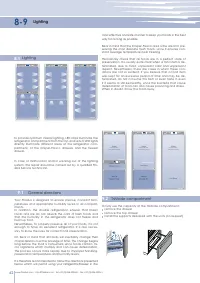
42 8-9 8.1 ICE MAKER ENTER FRIDGE UNIT ICE MAKER ENTER FRIDGE UNIT ICE MAKER ENTER FRIDGE UNIT CRISPER 9.1 9.2 www.fhiaba.com ∙ [email protected] ∙ Tel +39 (0)434 420160 ∙ Fax +39 (0)434 420161 Lighting Lighting To provide optimum interior lighting, LED strips illuminate the refrigerator compartment...
Page 17 - Food Preservation; How to maintain good food quality
43 9 9.3 www.fhiaba.com ∙ [email protected] ∙ Tel +39 (0)434 420160 ∙ Fax +39 (0)434 420161 EN Food Preservation How to maintain good food quality Always take the following precautions: Place any packages of raw meat, fish or poultry in plastic bags so that they do not drip on other foods. Purchase ...
Page 18 - Fresh meat, fish and poultry
44 9 9.4 9.5 www.fhiaba.com ∙ [email protected] ∙ Tel +39 (0)434 420160 ∙ Fax +39 (0)434 420161 Food Preservation When a high level of humidity is present either in the environ- ment or in the foods placed in the Fresco drawers, the bottom of the Fresco compartment might be covered with some water o...
Page 19 - Recommended times for Food Preservation; Fresh foods; Time; Time
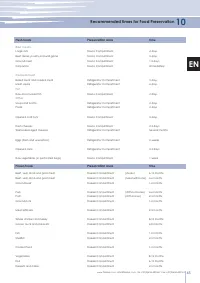
45 10 www.fhiaba.com ∙ [email protected] ∙ Tel +39 (0)434 420160 ∙ Fax +39 (0)434 420161 EN Recommended times for Food Preservation Fresh foods Preservation area Time Raw meats Large cuts Fresco Compartment 4 days Beef steaks, poultry and wild game Fresco Compartment 3 days Ground meat Fresco Compar...
Page 20 - Care and Cleaning; which could scratch and damage the satin finishing on the ap
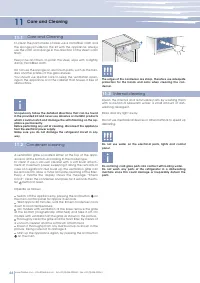
46 11 11.1 11.2 11.3 www.fhiaba.com ∙ [email protected] ∙ Tel +39 (0)434 420160 ∙ Fax +39 (0)434 420161 Care and Cleaning Care and Cleaning Condenser cleaning Internal cleaning Scrupulously follow the detailed directions that can be found in the provided kit and never use abrasive or metallic produc...
Page 21 - Troubleshooting Guide; The doors are difficult to open
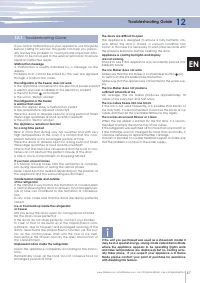
47 12 12.1 www.fhiaba.com ∙ [email protected] ∙ Tel +39 (0)434 420160 ∙ Fax +39 (0)434 420161 EN Troubleshooting Guide Troubleshooting Guide Did you leave the doors open for a long period of time?Do the doors close perfectly?If the doors do not close perfectly, contact your installer.In case of fros...
Page 22 - Malfunction indications appearing on the display; Display message
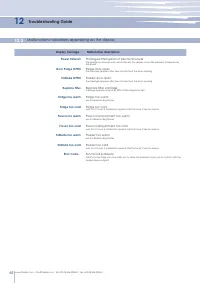
48 12 12.2 www.fhiaba.com ∙ [email protected] ∙ Tel +39 (0)434 420160 ∙ Fax +39 (0)434 420161 Troubleshooting Guide Malfunction indications appearing on the display Display message Malfunction description Power Failure!! Prolonged interruption of electrical power the appliance resumes work automatic...
Page 23 - Customer Care; for further support via our website at; Fhiaba; Before calling for service
49 13 13.1 www.fhiaba.com ∙ [email protected] ∙ Tel +39 (0)434 420160 ∙ Fax +39 (0)434 420161 EN Before calling for service If our recommendations were not sufficient to solve the problem, please get in touch with our Customer Care Center for further support via our website at www.fhiaba.com or by s...
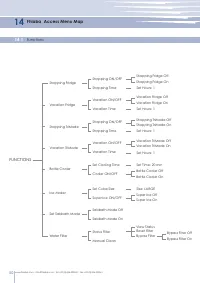
Page 24 - Fhiaba Access Menu Map; Functions; FUNCTIONS
50 14.1 14 www.fhiaba.com ∙ [email protected] ∙ Tel +39 (0)434 420160 ∙ Fax +39 (0)434 420161 Fhiaba Access Menu Map Functions FUNCTIONS Shopping Fridge Shopping TriMode Shopping ON/OFF Shopping ON/OFF Vacation ON/OFF Vacation ON/OFF Shopping Fridge Off Shopping TriMode Off Vacation Fridge Off Vacat...
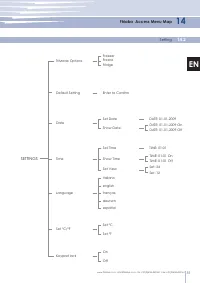
Page 25 - Setting; SETTINGS
51 14 14.2 www.fhiaba.com ∙ [email protected] ∙ Tel +39 (0)434 420160 ∙ Fax +39 (0)434 420161 EN Bypass Filter OffBypass Filter On Fhiaba Access Menu Map Setting SETTINGS TriMode Options Default Setting FreezerFresco Enter to Confirm DATE: 01-01-2009 On TIME: 01:01 On Set: 24 Set Date On Set Time it...