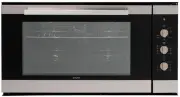
Page 4 - GENERAL WARNINGS - INSTALLATION / REPAIRS; GENERAL WARNINGS - FIRST TIME THE OVEN IS USED -
GENERAL WARNINGS - INSTALLATION / REPAIRS THE MANUFACTURER DECLINES ALL RESPONSIBILITY FOR ANY DAMAGE TO PEOPLE OR ITEMS CAUSED BY INCORRECT INSTALLATION OR IMPROPER, WRONG OR ABSURD USE OF THE APPLIANCE. o Warning: earth connection is required by law. o HOOK-UP : check that the operating specificat...
Page 5 - CONNECTION TO MONO-PHASE ELECTRICITY
o Do not touch the appliance with damp or wet hands or feet. o Do not pull on the power supply cable, or the appliance itself, to remove the plug from the mains power socket. o Hot grease and fat catch fire easily. Be careful. Never try to put out burning oil or fat with water (danger of explosion);...
Page 7 - Installation scheme:
Page 8 - Embossed walled oven cooking suggestions:
Embossed walled oven cooking suggestions: For time and temperature indications for different foods, consult the RECIPES table Together Name of Dish Cooking Function Cooking Temperature Cooking Time Level Cannelloni VENTILATED 180° 00h.45’ 2 Lasagne STATIC VENTILATED 160° 00h.50’ 2 Quiches Ventilated...
Page 9 - Increments temperatures values
ELECTRONIC PROGRAMMER A B C 1 2 3 4 5 6 7 8 KEY FUNCTION 1 + Increments temperatures values 2 - Decrements temperatures values 3 + Time Increments values (timings, programs) 4 Turns on the oven (On/Off) 4 Chlidren Lock if pressed > 4 seconds 5 Timing Edit menu (Minute minder, duration, end of coo...
Page 10 - SEQUENCE ASSOCIATED TO; IMPULSE
SEQUENCE ASSOCIATED TO ҏ (5) key IMPULSE Display after press Display after2 sec. 1 Bell Icon[ ) ] “ 0:00” as default value,otherwise the actual value 2 Cooking Pot Icon[ dur ] “ 0:00” as default value,otherwise the actual value 3 Cooking Pot Icon[ End ] only if present acooking Duration Time of day ...
Page 11 - ) representing the Timings operating states.
TEMPERATURE DISPLAY (A) It shows the temperature setpoint and provides also some icons and atemperature bar-graph indication. CLOCK DISPLAY The 4-digit display (B) shows Timings, Durations, and Messages. Itintegrates also 3 icons ( ) 3 A ) representing the Timings operating states. COOKING POT ICON ...
Page 12 - If not already in Time Of Day Setting, press and keep pressed the; TURNING THE OVEN ON AND OFF; To turn on the oven, press and release the; MINUTE MINDER; key after the value has; MANUAL COOKING
OPERATING INSTRUCTIONS At first power-up, the display shows “00:00” the clock flashing, incrementingby 1 unit each minute.The oven is inibited, and the only two allowed operations are:- Time of Day setting, by means of + (3) / - (4)- Oven turn-on (the currently shown time of day is automatically acc...
Page 13 - ]key will definitively turn off the oven.; COOKING MODE SELECTION; Press and release the; DEFROST
TIME CONTROLLED COOKING Turn on the oven, select a cooking mode, check the temperature in thedisplay and after press ¼ (5) 2 times, the clock display shows “ dur”. Edit the value by means of + (3) and - (4) ranging from a minimum of 0h:00mand a maximum of 10h:00m. After a timeout window of 4 seconds...
Page 14 - ETC; CLEANING FUNCTION; Ŕņ; OVEN CAVITY LIGHT
ETC CLEANING FUNCTION Pour 0.4 - 0.5 litres of soapy water directly on the drip pan. Insert the drippan in the bottom level.Select the cleaning function “Etc” and after 20 minutes the cycle goes off.Once the default time has expired, it is possible to clean the oven with asoft sponge (dirt is easy t...
Page 16 - (6) keys while in editing one of thise two parameters: the; MINUTE MINDER CANCELING; In order to cancel any eventual Minute Minder setting, press the; AUDIO LEVEL FREQUENCY SETTING
TANGENTAL BLOWER HANDLING COOKING MODE SELECTION The blower turns on, no matter which is the cavity temperature, after 15minutes the function is started, or even before if the cavity Probetemperature is > 130°C COOKING MODE STOPPING (OFF, STAND-BY) The blower turns off, no matter which is the cav...
Page 17 - about one-third of the time that would normally be required.
PROGRAMMER AND COOKING FUNCTIONS The temperature shown on the display can be changed using the +/-buttons on the left, with variations of 5°C, from a minimum of 40°C up to amaximum of 250°C. The °C symbol flashes upon reaching the desiredtemperature. COOKING FUNCTIONS OVEN LIGHT Only activates the f...
Page 18 - TRADITIONAL COOKING + FAN; PIZZA FUNCTION; Select the desired temperature between 50°C and 250°C.; VENTILATED COOKING; while using their different respective cooking times.
TRADITIONAL COOKING + FAN This type of cooking is a combination of conventional and ventilated. It is ideal for bread, focaccia, and lasagne. The oven does not require preheating (except for pizza and focaccia).Invert the position of the dishes in the oven a few minutes prior to the endof the cookin...
Page 19 - CENTRE GRILL
FAN + DOUBLE GRILL Heat is directed onto the dishes from the upper heatingelements towards the bottom.The action of the fan, combined with the action of the grill,allows for quick, thorough cooking of special foods.This cycle is ideal for browning and sealing juices and flavour in foods, for example...
Page 20 - SYSTEM FAULTS; PROBLEM; In case of power outage; In the case of a black-out, when the electricity is restored it may be
SYSTEM FAULTS PROBLEM SOLUTION The oven does not work Check whether the omnipolar switch orany residual-current circuit breaker (cut-out) of the electrical system is off. Incase of problems with the electricalsystem, consult a qualified electrician. If the oven still does not work afterresetting the...
Page 21 - ERROR CODES TABLE
ERROR CODES TABLE The electronics system continually performs a series of diagnostic test. Ifsome parameters are incorrect, the control unit deactivates the function anddisplay an error code.The heating elements are turned off, including the fan inside the cookingchamber. Take note of error code and...