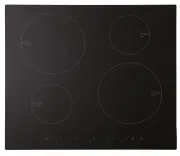
Page 2 - Congratulations; Product Overview; Control Panel
2 Congratulations on the purchase of your new Induction Hob. We recommend that you spend some time to read this Instruction / Installation Manual in order to fully understand how to install correctly and operate it. For installation, please read the installation section. Read all the safety instruct...
Page 4 - Choosing the right Cookware
4 Choosing the right Cookware • Only use cookware with a base suitable for induction cooking. Look for the induction symbol on the packaging or on the bottom of the pan. • You can check whether your cookware is suitable by carrying out a magnet test. Move a magnet towards the base of the pan. If it ...
Page 5 - Using your Induction Hob; To start cooking
5 Using your Induction Hob To start cooking 1. Touch the ON/OFF control . After power on, the buzzer beeps once, all displays show “ – “ or “ – – “, indicating that the induction hob has entered the state of standby mode. 2. Place a suitable pan on the cooking zone that you wish to use. • Make sure ...
Page 6 - When you have finished cooking; Using the Boost function
6 When you have finished cooking 1a. Turn the cooking zone off by scrolling down to “ 0 ” or touching “-” and “+” control together. Make sure the display shows “ 0 ” 1b. Turn the whole cooktop off by touching the ON/OFF control. 2. Beware of hot surfaces H will show which cooking zone is hot to touc...
Page 7 - OR; Locking the Controls
7 2. Touching the boost control, the zone indicator show “P.” and the power reach Max. Cancel the Boost function 1a . Touching the "Boost" control or the”-“ button to cancel the Boost function, then the cooking zone will revert to its original setting. OR 1b. Touching “-“ and “+”control toge...
Page 8 - Over-Temperature Protection; Auto Shutdown Protection
8 To lock the controls Touch the key lock control. The timer indicator will show “ Lo “ To unlock the controls 1. Make sure the Induction hob is turned on. 2. Touch and hold the key lock control for a while. 3. You can now start using your Induction hob. When the hob is in the lock mode, all the con...
Page 9 - Using the Timer; Using the Timer as a Minute Minder
9 Using the Timer You can use the timer in two different ways: • You can use it as a minute minder. In this case, the timer will not turn any cooking zone off when the set time is up. • You can set it to turn one or more cooking zones off after the set time is up. • You can set the timer up to 99 mi...
Page 10 - Setting the timer to turn one or more cooking zones off; If the timer is set on one zone:
10 5. When the time is set, it will begin to count down immediately. The display will show the remaining time and the timer indicator will flash for 5 seconds. 6. Buzzer will beep for 30 seconds and the timer indicator shows “- - “ when the setting time is finished. Setting the timer to turn one or ...
Page 11 - If the timer is set on more than one zone:
11 4. When the time is set, it will begin to count down immediately. The display will show the remaining time and the timer indicator flash for 5 seconds. NOTE: The red dot next to power level indicator will illuminate indicating that zone is selected. 5. When cooking timer expires, the correspondin...
Page 12 - Cooking Guidelines; Cooking Tips
12 Cooking Guidelines Take care when frying as the oil and fat heat up very quickly, particularly if you’re using Power Boost. At extremely high temperatures oil and fat will ignite spontaneously and this presents a serious fire risk. Cooking Tips • When food comes to the boil, reduce the temperatur...
Page 13 - Heat Settings
13 3. Preheat the pan briefly and add two tablespoons of oil. 4. Cook any meat first, put it aside and keeps warm. 5. Stir-fry the vegetables. When they are hot but still crisp, turn the cooking zone to a lower setting, return the meat to the pan and add your sauce. 6. Stir the ingredients gently to...
Page 14 - Care and Cleaning
14 Everyday soiling on glass (fingerprints, marks, stains left by food or non-sugary spillovers on the glass) 1. Switch the power to the cooktop off. 2. Apply a cooktop cleaner while the glass is still warm (but not hot!) 3. Rinse and wipe dry with a clean cloth or paper towel. 4. Switch the power t...
Page 15 - Hints and Tips
15 Hints and Tips Problem Possible causes What to do The induction hob cannot be turned on. No power. Make sure the induction hob is connected to the power supply and that it is switched on. Check whether there is a power outage in your home or area. If you’ve checked everything and the problem pers...
Page 16 - Cooking Hob; Zones; Supply Voltage
16 The induction hob or a cooking zone has turned itself off unexpectedly, a tone sounds and an error code is displayed (typically alternating with one or two digits in the cooking timer display). Technical fault. Please note down the error letters and numbers, switch the power to the induction hob ...
Page 17 - Installation; Selection of installation equipment
17 Weight and Dimensions are approximate. Because we continually strive to improve our products we may change specifications and designs without prior notice. Installation Selection of installation equipment Cut out the work surface according to the sizes shown in the drawing. For the purpose of ins...
Page 18 - Before you install the hob, make sure that; When you have installed the hob, make sure that
18 A(mm) B(mm) C(mm) D E 0 65 50 mini 20 mini Air intake Air exit 5mm Before you install the hob, make sure that • the work surface is square and level, and no structural members interfere with space requirements • the work surface is made of a heat-resistant material • if the hob is installed above...
Page 19 - Before locating the fixing brackets
19 • there is adequate flow of fresh air from outside the cabinetry to the base of the hob • if the hob is installed above a drawer or cupboard space, a thermal protection barrier is installed below the base of the hob • the isolating switch is easily accessible by the customer Before locating the f...