Page 2 - Disclaimer
Disclaimer Please read the product document and ensure that you understand it fully before using the product. After reading this document, keep it for future reference. Improper use of this product may cause serious injury to yourself or others, or cause product damage and property loss. Once you us...
Page 3 - Contents
Contents SpecificationsSafety Instructions EcoFlow App Product Details Getting Started What's in the Box 1 2 4 4 5 8 FAQ Troubleshooting and Display Care and Maintenance 14 15 16 Use 2 Overview 5 How to Install 8 LCD 6 How to Drain 13 Grounding Guide 3 Light Effect 6 How to Power-on 10 Control Butto...
Page 4 - Specifications; Cooling/Heating Specifications; Energy Rating
1 Specifications Cooling/Heating Specifications Model EFKT210 Cooling Capacity/Heating Capacity 1500 W/1800 W Temperature Setting Range 16°C-30°C (60°F-86°F) Refrigerant R290 (130g) Air Flow Volume 290 m³/h Cooling/Heating Rated Input (AC) 560 W Cooling/Heating Rated Input (DC) 505 W Maximum Cooling...
Page 5 - Safety Instructions; Use
2 Safety Instructions Use 1. Do not use this product near a heat source (such as fire or heater), and avoid direct exposure to sunlight. Doing so may cause flammable liquids to leak or explode. 2. If the product catches fire by accident, we recommend that you use fire extinguishers in the following ...
Page 6 - Grounding Guide; EcoFlow App
3 1. This product must be grounded.The product may fail when it is charged. The risk of electric shock can be greatly reduced with a ground wire. This product is equipped with a power cord which has a grounding conductor and a ground plug. The ground plug must be connected to a socket with a ground...
Page 8 - Overview; Product Details
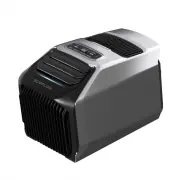
5 Overview Product Details 1. LCD 2. Control buttons 3. Front air outlet fan blade 4. Ambient light 5. Front air inlet & air filter 6. AC charging cable 7. Add-on battery socket (XT150) 8. Solar/car charging socket (XT60) 9. Charging port cover 10. Winder socket 11. Rear air outlet 12. Rear air ...
Page 10 - Control Buttons
7 Power button Press Press and hold Power-on/Screen-off. If there is no operation within 5 minutes, the LCD and ambient light will be off automatically. Press any button to wake them up. Press and hold it for 3 seconds for power-off. Temperature+/Temperature- button Press Press and hold Setting of t...
Page 11 - Getting Started; How to Install
8 Getting Started How to Install Indoor Applications When the air conditioner is used in an enclosed space, you can discharge the exhaust gas by installing an air conditioner exhaust duct for more efficient cooling or heating. The exhaust duct shall not be excessively stretched or bent when it is co...
Page 12 - DIY Instructions on Window Baffle
9 A window baffle is delivered with Wave 2. The baffle can be used after being cut based on the dimensions of the window frame. For the cutting, it is recommended to reserve certain error space to avoid failure of sealing out of too large gap due to expansion caused by heat and contraction caused by...
Page 13 - Outdoor Applications
10 When the interior space is small or when noise cancellation is required, Wave 2 can be placed outdoors and deliver cooling/heating through the exhaust duct. Outdoor Applications A D A D D
Page 14 - AC Outlet
11 How to Power-on This product supports multiple charging methods. Open the charging port cover before using it, then power on. Please close the cover to prevent dust during charging, and wind the AC charging cable around the winder. For shutdown, please press and hold the power button before remov...
Page 15 - Battery pack; Solar Panel/Car Charging Port
12 Battery pack The EcoFlow Wave 2 add-on battery or the portable power station from DELTA family can be used to supply power to Wave 2. The required products and accessories can be purchased in the official distribution channels of EcoFlow. 1. Wave 2 add-on battery 2. EcoFlow portable power station...
Page 16 - How to Drain
13 Car charging port Car Charging Cable Only the fan function is supported due to the low power and the voltage instability of car or solar charging. If the cooling/heating function is required, please use it together with the add-on battery/portable power station. External circulation drainage: Whe...
Page 17 - How to Clean
14 The air inlet may be blocked by large amount of dusts and impurities in the air during outdoor application.Please regularly remove the front and rear air inlet filters, clean them with a damp cloth with mild detergent, dry them in the air, and then reassemble them. How to Clean Manual drainage: A...
Page 18 - Troubleshooting; Error Code
15 Troubleshooting For problems not covered in the preceding table, please consult EcoFlow customer service. Error Code Error Type Solution 1 Battery pack voltage is too high 1. Turn off all the power supplies;2. Supply power with battery pack. 2 Battery pack voltage is too low 1. Connect to the hou...
Page 19 - FAQ; Issue Type
16 FAQ Issue Type Cause Analysis Troubleshooting Abnormal fan ① It is not powered on or it is not started; ② There are foreign matters at the air inlet or there are dirt deposits on the fan blades; ③ The fan is not running. ① Check the power supply or wiring, power on correctly to start it; ② Clean ...
Page 20 - Care and Maintenance
17 Care and Maintenance 1. Please close the socket cover after the unit is stored to prevent dust.2. After the unit is stored after shutdown, it is required to manually drain the damp inside the unit to prevent breeding of bacteria in the damp during long-term storage and avoid overflow of water whe...