Page 4 - Recording to memory card; segments via the mobile app.; Script support
4 Recording to memory card Enable continuous video recording or activate it during specific events, and view recorded video segments via the mobile app. Script support Set up automation scripts and various actions to perform automatically upon trigger events. Two-way voice communication Activate the...
Page 5 - PRODUCT DESCRIPTION; Infrared lighting
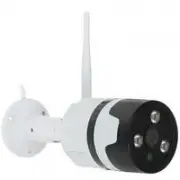
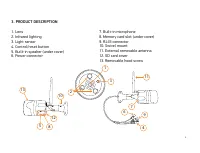
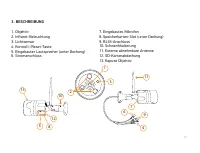
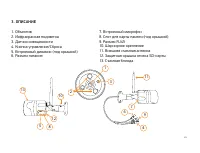
5 3. PRODUCT DESCRIPTION 1. Lens 2. Infrared lighting 3. Light sensor 4. Сontrol/reset button 5. Built-in speaker (under cover) 6. Power connector 7. Built-in microphone 8. Memory card slot (under cover) 9. RJ45 connector 10. Swivel mount 11. External removable antenna 12. SD card cover 13. Removabl...
Page 6 - device to the configuration/pairing mode.
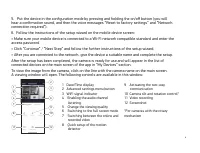
6 Device management The device can be managed:1. Remotely via the mobile app2. In manual mode using the control/reset button Press the button quickly to turn on/off voice prompts. Press and hold (more than 5 s) the button to reset the parameters to factory settings and switch the device to the confi...
Page 10 - • Viewing angle: 75°; the fixing screws tightly.
10 7. TECHNICAL SPECIFICATIONS 6. PRECAUTIONARY MEASURES Image sensor • Sensor type: 1/2.7" CMOS sensor • Resolution: 1920 × 1080 px, FHD Lens • Lens type: All-glass • Lens: 3.6 mm • Viewing angle: 75° • Day/Night mode: Double infrared filter • Coverage range in night mode: 8-10 m Wireless conne...
Page 13 - year; Nippon Klick Systems LLP
13 Warranty period: 1 year The full version of this user manual can be found on the product page at www.digma-global.com MANUFACTURER: Nippon Klick Systems LLP Address: 40 Willoughby Road, London, N8 0JG, United Kingdom of Great Britain and Northern IrelandMade in China IMPORTER IN EU: Merlion Trade...
Page 14 - ge
14 Wir bedanken uns, dass Sie sich für ein DIGMA-Produkt entschieden haben! Bitte lesen Sie die Bedienungsanleitung aufmerksam durch, bevor Sie die IP-Kamera starten, um richtig mit ihr umzugehen und um Schäden vorzubeugen. Software, konstruktive Details des Geräts und Inhalt dieser Bedienungsanleit...
Page 16 - Die kostenlose App; DIGMA SmartLife; für Smartphones und Tablets ist für OS Android (Version 5.0
16 Aufzeichnen auf die Speicherkarte Sie können eine fortlaufende Videoaufzeichnung oder Aufnahmen bestimmter Ereignisse aktivieren. Die aufgezeichneten Videos können Sie dann mit einer Mobile App ansehen. Unterstützung von Szenarien Stellen Sie automatisierte Szenarien ein, um verschiedene automati...
Page 18 - Kamerabedienung; Drücken Sie einmal; kurz; auf den Knopf, um die Sprachansagen zu aktivieren/deaktivieren.; Langes Drücken; Gerät in den Konfigurationsmodus/Anschlussmodus.
18 Kamerabedienung Die Kamera kann bedient werden:1. Durch Fernbedienung über Mobile App2. Manuell mit dem Bedienungs-/Reset-Knopf Drücken Sie einmal kurz auf den Knopf, um die Sprachansagen zu aktivieren/deaktivieren. Langes Drücken (über 5 Sek.) setzt die Parameter auf Werkeinstellungen zurück und...
Page 19 - einschalten, kann das Gerät beschädigt werden.
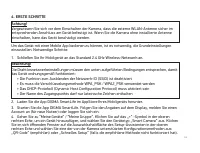
19 4. ERSTE SCHRITTEAchtung! Vergewissern Sie sich vor dem Einschalten der Kamera, dass die externe WLAN-Antenne sicher im entsprechenden Anschluss am Gerät befestigt ist. Wenn Sie die Kamera ohne installierte Antenne einschalten, kann das Gerät beschädigt werden. Um das Gerät mit einer Mobile App b...
Page 21 - ZUSÄTZLICHE EINSTELLUNGEN
21 5. ZUSÄTZLICHE EINSTELLUNGEN 1. Das Gerät ist mit einer Funktion für Sprachansagen zu Modi/Arbeitszustand ausgestattet. Um die Sprachmeldungen zu deaktivieren, drücken Sie einmal kurz auf den Bedienungs-/Reset-Knopf. Danach ertönt ein fortwährender Signalton. Das wiederholte kurze Drücken auf den...
Page 22 - VORSICHTSMASSNAHMEN
22 Bildsensor • Sensortyp: 1/2.7" CMOS-Sensor • Auflösung: 1920 × 1080 px FHD Objektiv • Objektivtyp: Vollglas • Objektiv: 3.6 mm • Weitwinkel: 75° • Tag/Nacht-Modus: Dual-Infrarot-Filter • Distanz im Nachtmodus: 8-10 m Drahtlose Verbindung • Wi-Fi IEEE 802.11 b/g/n (2.4 GHz, 150 Mbit/s (Max)) K...
Page 23 - SICHERHEITSMASSNAHMEN
23 8. LIEFERUMFANG • IP-Kamera DiVision 600• Netzwerkadapter (12V/1A)• Montagesatz• Benutzerhandbuch 9. SICHERHEITSMASSNAHMEN • Sie sollten das Gerät weder selbst reparieren noch auseinander nehmen. Bei Defekten wenden Sie sich an die Mitarbeiter des Servicezentrums. • Zulässige Betriebstemperatur: ...
Page 24 - Dieses Gerät erfordert keine Montage oder Befestigung.; Bedingungen für die Lagerung; ist auf der Verpackung angegeben.; Die Nutzungsdauer; Monate ab Herstellungsdatum.
24 Wichtige Parameter Eingang: DC 12 В 1 АStromverbrauch: 9 W - 12 W Regeln und Bedingungen für die Montage Dieses Gerät erfordert keine Montage oder Befestigung. Bedingungen für die Lagerung Das Gerät soll bei Temperaturen von -5 bis +45°С und einer relativen Feuchtigkeit von nicht mehr als 85 % au...
Page 27 - Назначение продукта; Интернет посредством мобильного приложения; Контроль через интернет; приложение; Детектор движения
27 1. ВВЕДЕНИЕ Назначение продукта Бытовая IP-камера DiVision 600 предназначена для осуществления удаленного видеонаблюдения снаружи и внутри помещений. Устройство имеет функцию дистанционного управления через сеть Интернет посредством мобильного приложения DIGMA SmartLife. 2. ДОСТУПНЫЕ ФУНКЦИИ Конт...
Page 30 - Управление устройством; Используйте; короткое нажатие; на кнопку для включения/выключения голосовых подсказок.; Длительное нажатие; (более 5 с) осуществляет сброс параметров на заводские настройки и
30 Управление устройством Управление устройством осуществляется:1. Дистанционно через мобильное приложение2. В ручном режиме при помощи кнопки управления/сброса Используйте короткое нажатие на кнопку для включения/выключения голосовых подсказок. Длительное нажатие (более 5 с) осуществляет сброс пара...
Page 31 - антенны может вызвать повреждение устройства.
31 4. НАЧАЛО РАБОТЫ Внимание! Перед включением камеры убедитесь, что внешняя WiFi антенна надежно закреплена в соответствующем разъеме на корпусе устройства. Включение камеры без установленной антенны может вызвать повреждение устройства. Для управления устройством посредством мобильного приложения ...
Page 32 - и завершите настройку.
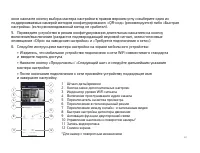
32 окне нажмите кнопку выбора мастера настройки в правом верхнем углу и выберите один из поддерживаемых камерой методов конфигурирования: «QR-код» (рекомендуется) либо «Быстрая настройка» (если рекомендованный метод не сработал).5. Переведите устройство в режим конфигурирования длительным нажатием н...
Page 33 - ДОПОЛНИТЕЛЬНЫЕ НАСТРОЙКИ
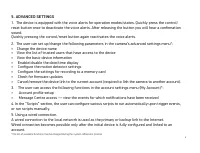
33 5. ДОПОЛНИТЕЛЬНЫЕ НАСТРОЙКИ 1. Устройство снабжено функцией голосовых оповещений о режимах/состояниях работы. Для отключения голосовых оповещений однократно кратковременно нажмите на кнопку управления/сброса. После отпускания кнопки раздастся подтверждающий звуковой сигнал. Повторное кратковремен...
Page 34 - ТЕХНИЧЕСКИЕ ХАРАКТЕРИСТИКИ
34 Датчик изображений • Тип сенсора: 1/2.7" CMOS сенсор • Разрешение: 1920 × 1080 пикс FHD Объектив • Тип объектива: Полностью стеклянный • Объектив: 3.6 мм • Угол обзора: 75° • Дневной/Ночной режим: Двойной инфракрасный фильтр • Дистанция работы в ночном режиме: 8-10 м Беспроводное подключение ...
Page 36 - более 85%, а также избегать попадания прямых солнечных лучей.
36 Основные параметры Вход: DC 12 В 1АПотребление энергии: 9 Вт - 12 Вт Правила и условия монтажа Данное устройство не требует какого-либо монтажа или постоянной фиксации. Условия хранения Устройство требуется хранить при температуре от -5 до +45 °С при относительной влажности не более 85%, а также ...
Page 38 - ООО «Сеть компьютерных клиник»
38 Официальный сайт: www.digma.ru Адреса сервисных центоров: www.digma.ru/support/service Служба технической поддержки: www.digma.ru/support/help Полные условия гарантйиного обслуживания: www.digma.ru/support/warranty ИЗГОТОВИТЕЛЬ:Ниппон Клик Системс ЛЛП Адрес: 40 Виллоугхби Роад, Лондон Н8 ОЖГ, Сое...
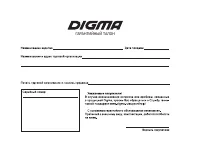
Page 43 - ГАРАНТИЙНЫЙ ТАЛОН