Page 2 - Before you begin; What’s In The Box; Printing Color : Full Color
1 CEOL Power cord Remote and batteries FM antenna AM antenna Before you begin What’s In The Box Required For Setup Optional Network router Router with WPS Speakers iOS device Speaker cables Network cable Mobile phone with Bluetooth T V with optical output Optical cable • For more information, visit ...
Page 3 - Pусский; English
2 L R Connect the left and right speakers to the CEOL. Insert the batteries into the remote. Connect the power cord from the CEOL to a power outlet. Français Nederlands Deutsch Español Italiano Svenska Pусский Polski English 1 2 3 1. Connection 1.RCD-N10E2_ENG_QSG_180522.indd 2 2018/05/28 13:56:34 P...
Page 4 - Wireless; WPS router; Choose from one of the following options; WPS; WPS; WPS Router
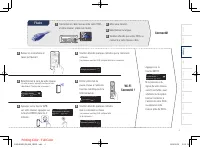
3 Wireless WPS router Wi-Fi router No WPS router Wi-Fi router Power on. Select language. (Please wait as starting the network settings can take a few minutes.) WPS iOS English Select Language : enter ENTER iOS device iOS version 7 or later 2. Connecting to your home network Choose from one of the fo...
Page 5 - Select your networ k name.; Network name; Wired; ( The front panel of the; will show; Press the ENTER button.; Access Point 1
4 Français Nederlands Deutsch Español Italiano Svenska Pусский Polski English Select language. Please wait as completing the connection can take a few minutes. ( The front panel of the CEOL will show the status of the connection.) Press the WPS button on your router. Within 2 minutes, press the ENTE...
Page 6 - Yes; On; Off; /HEOS App and maintain
5 Auto-Update Setting Usage Data Setting Setup Complete! Turns on Auto-Update so that future updates are automatically downloaded and installed when your CEOL is in standby mode. On Auto-Update Feature updates are automatically do... Select “On” to turn on Auto-Update. Off Auto-Update Feature update...
Page 7 - Search; Enjoying music using Apple AirPlay; Play Now
6 3. Enjoying your music! Press the “INTERNET RADIO” button on the remote. Select a station, then press ENTER button. Select “Play Now”, then press ENTER button. Search Favorites Enjoying music using Apple AirPlay Tap the AirPlay icon from within any app that supports AirPlay. Select the “Denon CEOL...
Page 8 - Enjoying music using Bluetooth; Select Bluetooth input by the remote or key.; To reconnect a previously paired Bluetooth device, start at step 2.
7 1 3 2 4 Play music using any app on your device. Enjoying music using Bluetooth Activate Bluetooth on your mobile device. Bluetooth Bluetooth ON Denon CEOL Bluetooth Bluetooth Bluetooth ON Denon CEOL Bluetooth Bluetooth Bluetooth ON Denon CEOL Bluetooth Select Bluetooth input by the remote or key....
Page 9 - connector of the CEOL.; Basic trouble shooting; Download the HEOS App; OPTICAL OUT
8 1 2 No sound:• Check all connections.• Make sure the bare metal wire ends of the speaker wires are in contact with the metal part of the speaker terminals. • Check the digital audio output setting on your TV.• Only 2-channel linear PCM can be input as the digital audio signal to the OPTICAL IN con...
Page 2 - Avant de commencer; Contenu de la boîte; Printing Color : Full Color
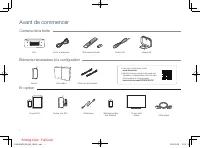
1 CEOL Cordon d’alimentation Télécommande et piles Antenne FM Antenne AM Avant de commencer Contenu de la boîte Éléments nécessaires à la confi guration En option Routeur Routeur avec WPS Haut-parleurs Dispositif iOS Câbles pour haut-parleurs Câble réseau Téléphone portable avec Bluetooth T V avec so...
Page 3 - Connectez les haut-parleurs gauche et droit à la CEOL.; Français; Pусский
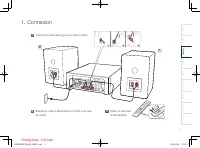
2 L R Connectez les haut-parleurs gauche et droit à la CEOL. Insérez les piles dans la télécommande. Branchez le cordon d’alimentation de la CEOL à une prise de courant. 1 2 3 1. Connexion Français Nederlands Deutsch Español Italiano Svenska Pусский Polski English 3.RCD-N10E2_FRA_QSG_180522.indd 2 2...
Page 4 - Sans fi l; Sélectionnez la langue.; Connexion à votre réseau domestique; WPS; WPS
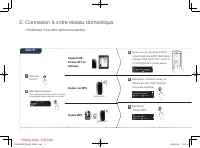
3 Sans fi l Routeur WPS Routeur Wi-Fi Routeur non WPS Routeur Wi-Fi Mise sous tension. Sélectionnez la langue. (Cela peut prendre quelques minutes pour que les paramètres réseau soient pris en compte.) WPS iOS English Select Language : enter ENTER Dispositif iOS Version iOS 7 ou ultérieure 2. Connex...
Page 5 - Filaire
4 Sélectionnez la langue. Veuillez attendre quelques minutes que la connexion se fasse. (Le panneau avant du CEOL indique l’état de la connexion.) Appuyez sur la touche WPS sur votre routeur. Appuyez sur la touche ENTER dans les 2 minutes. Connectez un câble réseau entre votre CEOL et votre routeur....
Page 6 - /HEOS App et maintenez
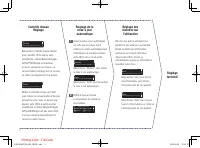
5 Réglage de la mise à jour automatique Réglage des données sur l’utilisation Réglage terminé! Active la mise à jour automatique de sorte que les mises à jour ultérieures soient automatiquement téléchargées et installées lorsque votre CEOL est en mode veille. Marche Mise à jour auto. Les mises à jou...
Page 7 - Écoutez de la musique avec Apple AirPlay
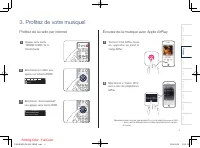
6 3. Profi tez de votre musique! Appuyez sur la touche “INTERNET RADIO” de la télécommande. Sélectionnez une station, puis appuyez sur la touche ENTER. Sélectionnez “Jouez maintenant”, puis appuyez sur la touche ENTER. Recherche Favoris Écoutez de la musique avec Apple AirPlay Touchez l’icône AirPlay...
Page 8 - Profi tez de la musique en utilisant la fonction Bluetooth
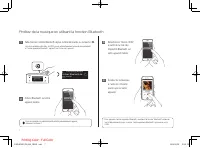
7 1 3 2 4 Écoutez de la musique à l’aide de n’importe quelle app sur votre appareil. Profi tez de la musique en utilisant la fonction Bluetooth Activez Bluetooth sur votre appareil mobile. Bluetooth Bluetooth ON Denon CEOL Bluetooth Bluetooth Bluetooth ON Denon CEOL Bluetooth Bluetooth Bluetooth ON D...
Page 9 - Résolution des problèmes de base; Téléchargez HEOS App
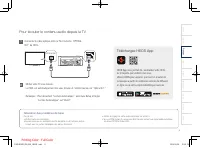
8 1 2 Pas de son:• Vérifi ez toutes les connexions.• Assurez-vous que les extrémités des fi ls de métal nu de l’antenne sont en contact avec les parties métalliques des bornes d’enceinte. • Vérifi ez le réglage de sortie audio numérique sur votre TV.• Un seul PCM linéaire 2 canaux peut être transmis en...