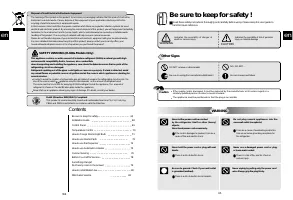
Page 3 - Be sure to keep for safety !; Other Signs; Contents
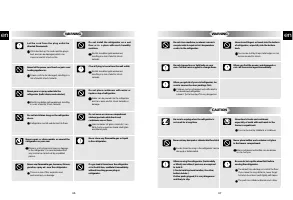
en 65 en Be sure to keep for safety ! Read these safety instructions thoroughly and carefully before using. Please keep this user guide tohand for future reference. WARNING CAUTION Indicates the possibility of danger ofdeath or serious injury Indicates the possibility of risk of personalinjury or ma...
Page 5 - Control Panel; Dispenser Model; Precautions in installation and power connection; Precautions in use; Accessories; Installation Guide
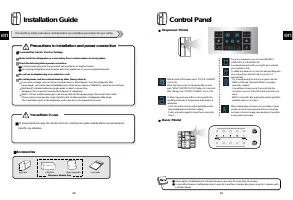
Control Panel Interior lights of refrigerator turn off when the doors are open for more than 10 minutes.In case either freezer or refrigerator door is open for more than a minute, door alarm rings for 5 minutes with1 minute interval. . After 6 month of first power input, “FILTER CHANGE”icon is ON.Wh...
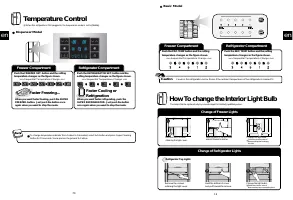
Page 6 - How To change the lnterior Light Bulb; Change of Freezer Lights; Change of Refrigerator Lights; Temperature Control; Freezer Compartment
How To change the lnterior Light Bulb Change of Freezer Lights Remove the 2 screws retaining the light cover. Hold the botton of the light cover and pull forward to remove. Change the light bulb. Follow the reverse order ofdisassembing after changingthe light Remove the screwsretaining the light cov...
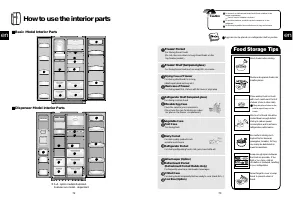
Page 7 - Food Storage Tips; Freezer Pocket; How to use the interior parts; Basic Model Interior Parts
en 73 Wash foods before storing. Divide and separate foods intosmaller pieces. Place watery foods or foodswith much moisture in front ofshelves (close to door side). If they are placed close to thecold air spout, they can befrozen. Warm or hot foods should becooled down enough beforestoring to reduc...
Page 8 - How to use the Automatic Icemaker; In case the icemaker doesn’t work; If the icecubes get stuck and not dispensed; Note; How to use the Dispenser; Temperarture Indicator
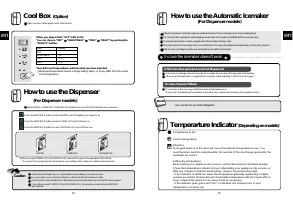
en 75 en How to use the Automatic Icemaker (For Dispenser models) About 10 icecubes (7~8 times a day) are made at one time. If the ice storage case is full, icemaking stops. It is normal for the icemaker to make banging sounds when the icecubes are falling into the ice storage case. To prevent a bad...
Page 9 - How to Clean; Dairy Pocket
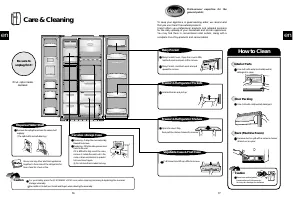
en 77 How to Clean Dairy Pocket Diary Pocket Cover ; Open the cover a little, hold both ends and push left to remove. Diary Pocket ; Hold both ends and pullupward to remove. Freezer & Refrigerator Shelves Open the doors fully, then pull the shelves forward to remove. Vegetable Case & Fruit C...
Page 10 - Problem
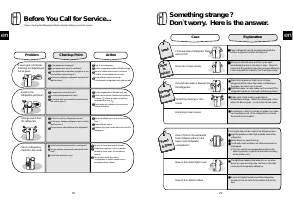
Something strange ? Don t worry. Here is the answer. Case Heat Door is sticky Strange Sound Frost & Dew Explanation Front and side of refrigerator feelswarm or hot. Doors do not open easily. It sounds like water is flowing fromthe refrigerator. Something cracking or clicksound. Humming or buzz s...
Page 11 - Connect the Water Tube to the refrigerator.; After installation of Water Supply System; Attach the Filter Box; Get ready to install the Water Filter; How to install Water Line; WATER SUPPLY KIT; Installation Procedure; Join Connector to the tap water line
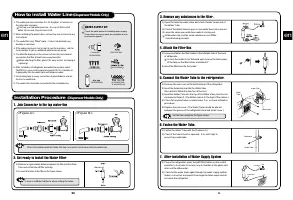
en en 81 6. Fasten the Water Tube. 5. Connect the Water Tube to the refrigerator. 1) Remove the rear cover at the bottom back of the refrigerator. 2) Insert the fastening ring into the Water tube. (Be careful to follow the direction of the nut.) 3) Insert the Water Tube into the top of the Water Val...
Page 12 - After Sales Service
en 82 After Sales Service T TH HIIS S A AP PP PL LIIA AN NC CE E C CO OM MP PL LIIE ES S W WIIT TH H E EE EC C D DIIR RE EC CT TIIV VE ES S 7 73 3//2 23 3,, 9 93 3//6 68 8,, 8 89 9//3 33 36 6,, 9 96 6//5 57 7,, 9 92 2//3 31 1,, 9 94 4//6 62 2 TECHNICAL ASSISTANCE DEPARTMENT If you have already perfo...