Page 2 - Table of Contents
Table of Contents Table of Contents ...................................................................................................... 2 Cybersecurity Statement and Recommendations ...................................................... 4 Cybersecurity Statement .....................................
Page 4 - Cybersecurity Statement and Recommendations; Cybersecurity Statement; Cybersecurity Recommendations; Mandatory actions to be taken towards cybersecurity
Cybersecurity Statement and Recommendations Cybersecurity Statement You are responsible for the risks resulting from connecting your product to the internet, including but not limited to, cyber-attacks, hacking attacks, computer viruses and malware, etc. Please protect your data and personal infor...
Page 7 - Privacy Protection Notice; About the Manual
The network your NVR and IP camera resides on should not be the same network as your public computer network. This will prevent any visitors or unwanted guests from getting access to the same network the security system needs in order to function properly. For latest information about Dahua the cybe...
Page 8 - Product Overview; Product Feature; Networking
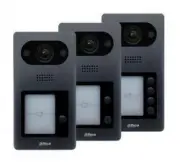
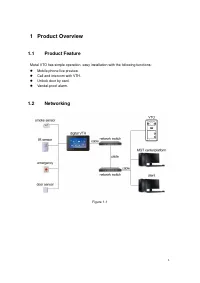
1 1 Product Overview 1.1 Product Feature Metal VTO has simple operation, easy installation with the following functions: Mobile phone live preview. Call and intercom with VTH. Unlock door by card. Vandal-proof alarm. 1.2 Networking Figure 1-1
Page 9 - Structure; Front Panel
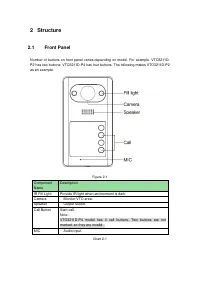
2 Structure 2.1 Front Panel Number of buttons on front panel varies depending on model. For example, VTO3211D- P2 has two buttons; VTO3211D-P4 has four buttons. The following makes VTO3211D-P2 as an example. Figure 2-1 Component Name Description IR Fill Light Provide IR light when environment is dar...
Page 10 - Rear Panel
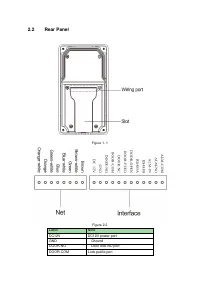
2.2 Rear Panel Figure 1- 1 Figure 2-2 Label Note DC12V DC12V power port GND Ground DOOR-NO Door lock NO port DOOR-COM Lock public port
Page 12 - Install and Debug; Device Wiring; NOT disassemble the device by yourself.
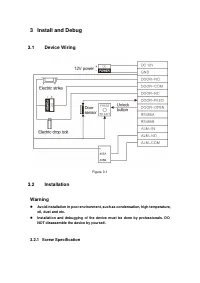
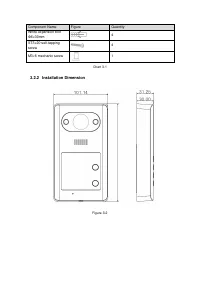
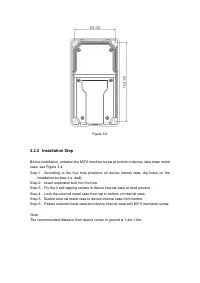
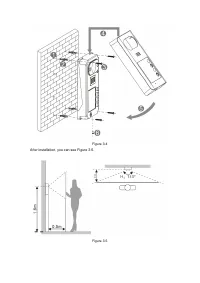
3 Install and Debug 3.1 Device Wiring Figure 3-1 3.2 Installation Warning Avoid installation in poor environment, such as condensation, high temperature, oil, dust and etc. Installation and debugging of the device must be done by professionals. DO NOT disassemble the device by yourself. 3.2.1 Sc...
Page 16 - Debugging
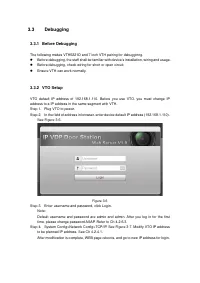
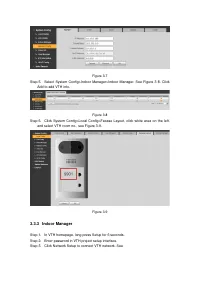
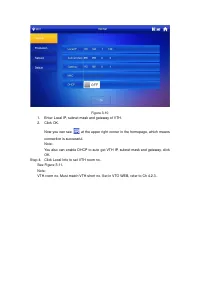
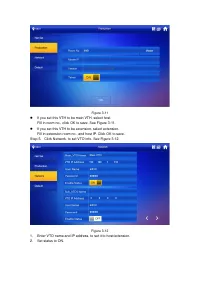
3.3 Debugging 3.3.1 Before Debugging The following makes VTH5221D and 7 inch VTH pairing for debugginng. Before debugging, the staff shall be familiar with device’s installation, wiring and usage. Before debugging, check wiring for short or open circuit. Ensure VTH can work normally. 3.3.2 VTO...
Page 20 - Operation
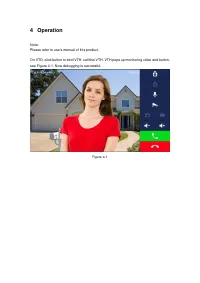
4 Operation Note: Please refer to use's manual of this product. On VTO, click button to bind VTH, call this VTH. VTH pops up monitoring video and button, see Figure 4-1. Now debugging is successful. Figure 4-1
Page 21 - Cell Phone Settings; Set Cell Phone
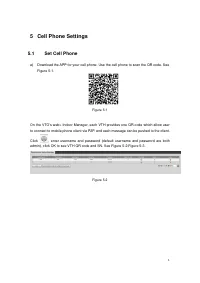
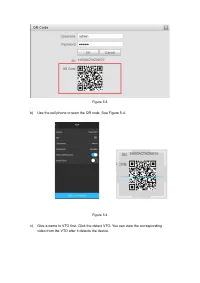
1 5 Cell Phone Settings 5.1 Set Cell Phone a) Download the APP for your cell phone. Use the cell phone to scan the QR code. See Figure 5-1. Figure 5-1 On the VTO’s web> Indoor Manager, each VTH provides one QR code which allow user to connect to mobile phone client via P2P, and each message can b...
Page 23 - Check Results
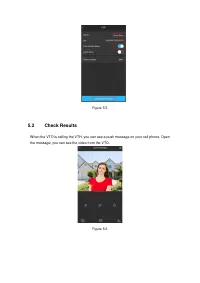
Figure 5-5 5.2 Check Results When the VTO is calling the VTH, you can see a push message on your cell phone. Open the message; you can see the video from the VTO. Figure 5-6
Page 24 - Electric Lock and Magnetic Door Lock; Electric Door Lock
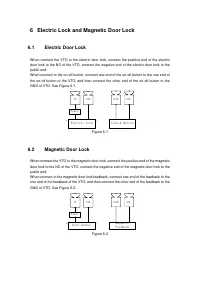
6 Electric Lock and Magnetic Door Lock 6.1 Electric Door Lock When connect the VTO to the electric door lock, connect the positive end of the electric door lock to the NO of the VTO, connect the negative end of the electric door lock to the public end. When connect to the on-off button, connect one ...
Page 25 - Appendix 1 Technical Specifications
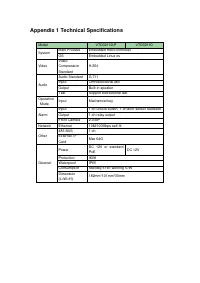
Appendix 1 Technical Specifications Model VTO3211D-P VTO3211D System Main Process Embedded micro controller OS Embedded Linux os Video Video Compression Standard H.264 Audio Audio Standard G.711 Input Omnidirectional Mic Output Built-in speaker Talk Support bidirectional talk Operation Mode Input Me...