Page 2 - P a g e; INSTRUCTION MANUAL
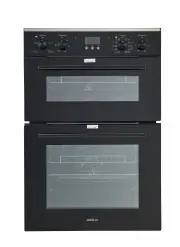
P a g e | 2 web: brohn.com.au INSTRUCTION MANUAL 60 cm Built-in Electric Oven BROD6001BLK
Page 4 - PACKAGE; IMPORTANT - CHECK FOR ANY DAMAGE OR MARKS; at the delivery time; BEFORE USING YOUR NEW APPLIANCE
P a g e | 4 web: brohn.com.au 1 PACKAGE 1.1 IMPORTANT - CHECK FOR ANY DAMAGE OR MARKS Please thoroughly inspect your goods at the delivery time , if you notice any damage to your goods: Please notify the delivery team at the time of delivery and do NOT accept damaged product . Please notify us i...
Page 5 - SAFETY WARNINGS; IMPORTANT INFORMATION
P a g e | 5 web: brohn.com.au 2 SAFETY WARNINGS 2.1 IMPORTANT INFORMATION Read this manual thoroughly before you start using the appliance. The safety precautions instructions reduce the risk of fire, electric shock and injury when correctly complied to. Please take notice of all warnings, follow th...
Page 6 - Make sure you turn off the oven before you commence cleaning.
P a g e | 6 web: brohn.com.au 2.4 USAGE CONDITIONS AND RESTRICTIONS Supervision over children is to ensure that they do not play with the appliance.Never allow them to use, play with or crawl inside the appliance. Cleaning andmaintenance must not be done by children. This appliance is not to be ...
Page 8 - Appliance is equipped with a type ‘’Y’’ cord cable.
P a g e | 8 web: brohn.com.au If the power supply cable is damaged, it must be replaced by its manufacturer or authorized technical service, or any other personnel qualified at the same level. Appliance is equipped with a type ‘’Y’’ cord cable. Make sure the plug is inserted firmly into wall soc...
Page 9 - PRODUCT OVERVIEW; INTRODUCING THE OVEN; Place cookware on the oven racks.
P a g e | 9 web: brohn.com.au 3 PRODUCT OVERVIEW 3.1 INTRODUCING THE OVEN The oven’s large capacity offers the option of cooking on multiple shelves at the same time and cooking large meals which would not be possible in a traditional oven. The first time you use your appliance, heat the empty o...
Page 10 - - Oven function selection knob
P a g e | 10 web: brohn.com.au 1 - Oven function selection knob 2 - Temperature control knob 3 - Oven door handle 4 - Upper oven temperature regulator light 5 - Lower oven temperature regulator light 6 - Decrease 7 - Confirm/Set 8 - Increase Optional Accessories: Deep Tray Tray Big Shelf Telescopic ...
Page 11 - INSTALLATION; Check for any damage on the product before installing it.; PREPARING THE CABINET
P a g e | 11 web: brohn.com.au 4 INSTALLATION WARNING: Check for any damage on the product before installing it. Do not have product installed if it's damaged. Damaged products pose danger for your safety.The power supply to the appliance must be cut off before any adjustments or maintenance work is...
Page 12 - Do not use door and/or handle to carry or move the product.
P a g e | 12 web: brohn.com.au Product Dimensions Aperture Dimensions Height: 885mm 880-890mm Width: 595mm 560mm Depth: 565mm 560mm (min) 4.2 FASTENING THE OVEN Do not use door and/or handle to carry or move the product. Place the oven into the cabinet with two or more people. Ensure that oven's f...
Page 13 - electrician or warranty void.; The oven supplied with the fitted cord and no plug fitted.
P a g e | 13 web: brohn.com.au Open the oven door and fasten the oven to the cabinet using four screws “A” asshown in below diagram. Screws mustn't be over tightened. Otherwise, screwsockets may be worn. Check that oven doesn't move after mounting. If oven isn't mounted in accordance with instru...
Page 14 - Connection Diagram; active connections MUST be removed.; Connecting the electricity supply cable to the mains
P a g e | 14 web: brohn.com.au Fit wires through and connect to the appropriate terminals. Engage wires into plastic clip. Secure plastic clip. Replace cover plate onto rear panel. Connection Diagram 230 V earthed one-phase connection L (Brown) wire to bridge d terminals 1-2 N (Blue) wire to b...
Page 15 - OPERATION; OVEN FUNCTIONS AND OPERATION; To set required function turn the knob to the selected position.; Top Oven
P a g e | 15 web: brohn.com.au 5 OPERATION 5.1 OVEN FUNCTIONS AND OPERATION Operation of the oven is controlled by the function knobs, temperature controller and a timer. To set required function turn the knob to the selected position. Top Oven Bottom Oven Oven switch ON / OFF To turn the oven o...
Page 18 - COOK TIME
P a g e | 18 web: brohn.com.au 5.2 DISPLAY & SYMBOLS 5.2.1 PROGRAMMABLE TIMER / DISPLAY Power light . Indicate the oven status. Cooking Duration “Cook Time” . The function COOK TIME setting the cooking duration a period of time that the dish requires to cook. The display shows the necessary time...
Page 21 - timer will switch on the oven at 10:35 and turn off the oven at 12:05.; OK
P a g e | 21 web: brohn.com.au Example: if the oven operation has to be finished at 12:05 and shall last 1hr30min, both times have to be set respectively: “END TIME” for 12:05; and “COOK TIME” for 1.30 so the timer will switch on the oven at 10:35 and turn off the oven at 12:05. Attention: In case...
Page 22 - COOKING GUIDELINES; SELECTION RECOMMENDATIONS; Preheating
P a g e | 22 web: brohn.com.au 6 COOKING GUIDELINES 6.1 SELECTION RECOMMENDATIONS The following table shows the information of food types and identified their cooking values. Cooking times can vary depending on the network voltage, quality of raw food to be cooked, quantity and temperature. Dishes t...
Page 23 - Cooking Pizza
P a g e | 23 web: brohn.com.au Pastry is too dark on top Place it on a lower rack, lower the temperature, and increase the cooking time. Cooked well on the inside but sticky on the outside Use less liquid, lower the temperature, and increase the cooking time. The pastry sticks to the pan Grease the ...
Page 25 - CLEANING AND MAINTENANCE; KEEP YOUR OVEN IN SHAPE; cleaning. After cleaning the oven chamber wipe it dry.
P a g e | 25 web: brohn.com.au 7 CLEANING AND MAINTENANCE 7.1 KEEP YOUR OVEN IN SHAPE Don’t clean the appliance when it still hot! The inside and external surface of the oven should preferably be cleaned by damp cloth when it is cooled down. If you use your oven for an extended period of time, c...
Page 26 - Removing the doors
P a g e | 26 web: brohn.com.au 7.3 REPLACING OVEN LAMP WARNING: First disconnect the power of appliance and ensure that appliance is cold. Remove the power plug from electrical socket or disconnect the power supply by tripping off circuit breaker (opening circuit) or removing fuse. To avoid the poss...
Page 27 - gently until they clip into place.; CLEANING OVEN GLASS; Remove the inner glass panel
P a g e | 27 web: brohn.com.au c. Gently close the oven door until you hear the sound of engagement. Once they reach a clamping position, with both hands holding the door, continue to push and pull up at the same time so that the hinge bolt removed from the oven. d. After cleaning, the hinge needs t...
Page 28 - TROUBLESHOOTING; Problem
P a g e | 28 web: brohn.com.au 8 TROUBLESHOOTING You may solve the problems you may encounter with your product by checking the following points. Check the table below and try out the suggestions. Problem Possible Cause What to Do Oven does not operate Power supply not available Check for power supp...
Page 30 - TECHNICAL SPECIFICATIONS; The specifications and designs might be changed without notice.
P a g e | 30 web: brohn.com.au 9 TECHNICAL SPECIFICATIONS Electric oven size 38+73 Iitres Oven size 885mm x 595mm x 565mm (WxDxH) Weight Approx. 52kg Voltage rating 220-240V / 380-415V 2N. 50160 Hz Power rating max/3.7kw Energy rating on the energy label Note: The values provided with the appliance ...
Page 31 - 1 CUSTOMER CARE; keep the receipt; For your own protection, please record installer’s details:
P a g e | 31 web: brohn.com.au 11 CUSTOMER CARE Please be advised that without the proof of purchase, your warranty may not bevalid, keep the receipt . For your convenience, please record: STORE NAME/CONTACT DETAILS: ............................................... PURCHASE DATE: .....................