Page 3 - CONTENTS
General Safety 4 Product Overview 6 Basic Operation Positioinig your DAB FM/AM Portable Radio 8 Switch on 9 Time and Date 10 Using Headphones 10 DAB Radio Mode 11 Scanning for DAB Stations 11 FM Radio Mode 13 Audio Mode 14 AM Radio Mode 15 Storing AM Preset 15 Sleep Timer 15 Display Language 16 Trou...
Page 4 - GENERAL SAFETY; IMPORTANT INFORMATION
4 GENERAL SAFETY Read this manual thoroughly before you start using the radio.Store this manual, the completed warranty card, your receipt and the product packaging.The safety precautions instructions reduces the risk of fire, electric shock and injury when correctly complied to. Please follow all i...
Page 6 - PRODUCT OVERVIEW
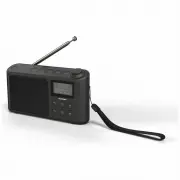
6 PRODUCT OVERVIEW 1. Preset store 1 2. Preset store 2 3. Preset store 3 4. Preset store 4 5. Preset store 5 6. On/Off/Standy7. Volume +/- 8. Speaker 9. LCD display 10. Menu / Info. 11. Preset set 12. Mode: AM/DAB/FM 13. Enter/Auto Scan/ Display 14. Tune Up 15. Tune Down
Page 7 - BASIC OPERATION; PLEASE MAKE SURE NOT TO USE YOUR DAB+ FM/AM; DO NOT USE RADIO WHILE CHARGING, RADIO; Telescopic aerial
7 BASIC OPERATION Positioning your DAB+ FM/AM Radio Please consider carefully in advance where your Radio will be situated and make sure thatit is:• On a stable surface • Within 1.4 metres of a power socket (if using mains power). Please ensure that the mains power lead is not a trip hazard. • At le...
Page 8 - Switch On; Adjusting the Volume; Change the mode
8 BASIC OPERATION (CONT.) Switch On 1. Press and release the Power button on the top of your radio. Your radio will switch on to Standby Mode, short press the Power button and begin an automatic scan for DAB Stations. A progress bar will show the status of the scan and the number of stations found. ...
Page 9 - Time and Date; Using Headphones
9 BASIC OPERATION (CONT.) Time and Date The time is normally set automatically after an auto scan. It can also be set manually. In the System menu scroll to Time. Press ENTER (13) and use the TUNING dial (2) to display the following options: <Set Time/Date>, <Auto update>, <Set 12/24 ...
Page 10 - DAB Radio mode
10 BASIC OPERATION (CONT.) Storing a DAB/FM/AM station 1-5 preset Your Radio can store up to 5 direct access radio stations in its preset buttons located at the top of the radio for instant access to your favourite stations.1. While on your favourite radio station on either DAB/FM/AM mode, press and...
Page 11 - Storing an DAB station preset
11 BASIC OPERATION (CONT.) Storing an DAB station preset Your Radio can store up to 30 DAB stations in its preset memories for instant access toyour favourite stations.1. Tune the Radio to the DAB station that you wish to preset. 2. Press and hold the PRESET button for approximately 2 seconds until ...
Page 15 - Display Language; Software version; Factory reset
15 BASIC OPERATION (CONT.) Display Language You can change the display language of your radio, there are 4 options available; English,French, German and Italian. An ‘*’ will be displayed next to the current setting.With your radio switched on (not in Standby mode):1. Press and hold the MENU button t...