Page 2 - CONTENTS
Page 13 - Technical data
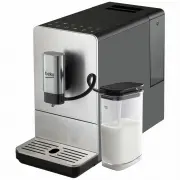
1. External Drip Tray 2. Internal Drip Tray 3. Coffee Grounds Container 4. Adjustable coffee spout 5. Control Panel 6. Coffee Bean compartment 7. Coffee Beans Container Cover 8. Water Tank 9. Power cord 10. Brewer 11. Service Door 12. Cleanness brush 13. Milk container 14. Milk container lid 15. Con...
Page 14 - Fully Automatic Coffee Machine / User Manual; Danger of electric current
1 Important instructions for safety and environment 14 / EN Fully Automatic Coffee Machine / User Manual This section includes the safety instructions that will help providing protection against personal injury and material loss risks. Failure to follow these instruc- tions invalidates the granted w...
Page 15 - Danger of burning or scalding
1 Important instructions for safety and environment 15 / EN Fully Automatic Coffee Machine / User Manual • Before cleaning the bean container, pull the mains plug of the appliance out of the socket. Danger from rotating coffee mill! 1.2 Danger of burning or scalding Parts of the coffee machine can b...
Page 19 - Danger resulting from improper use!
1 Important instructions for safety and environment 19 / EN Fully Automatic Coffee Machine / User Manual 1.4 Intended use The fully automatic coffee machine Beko is intended for use in homes and similar applications, for instance in staff kitchens, shops, offices and similar areas or by customers in...
Page 20 - Limitation of liability
1 Important instructions for safety and environment 20 / EN Fully Automatic Coffee Machine / User Manual 1.5 Limitation of liability All technical information, data and instructions on installation, operation and maintenance of the coffee machine contained in these operating in- structions represent...
Page 21 - Compliance with RoHS Directive
1 Important instructions for safety and environment 21 / EN Fully Automatic Coffee Machine / User Manual 1.7 Compliance with RoHS Directive The product you have purchased complies with EU RoHS Directive (2011/65/EU). It does not contain harmful and prohibited materials speci- fied in the Directive. ...
Page 22 - Display
22 / EN Fully Automatic Coffee Machine / User Manual 2.1 Control Panel Flashing: Low water level/ Water tank missing Lack of bean Lights up stably: coffee grounds container is full Flashing: Internal Drip Tray/coffee grounds container is missingLights up stably: Brewer is missing/ installed improper...
Page 24 - Filling the water tank; About the protect program:; Preparation
24 / EN Fully Automatic Coffee Machine / User Manual 3.1 Installation Remove any protective films, stickers and any other packing material on the appliance. 3.2 Filling the water tank About the protect program: If the water tank is not fully placed into the machine, a protection mode will be acti- v...
Page 26 - Hot Water; Operation
26 / EN Fully Automatic Coffee Machine / User Manual 4.1 Adjusting The Volume Of Your Coffee/ Hot Water You can memorize your desired volume of coffee for espresso and also the hot water from 25ml to 250ml. There is a protective cover for the milk tube connector inlet, just take it off when you need...
Page 28 - If you would like to remain the setting unchanged, press again or
28 / EN Fully Automatic Coffee Machine / User Manual 4. If you would like to remain the setting unchanged, press again or wait for 5 seconds for the machine to return to the standby condition 4 Operation
Page 29 - Cleaning of the appliance; Cleaning
29 / EN Fully Automatic Coffee Machine / User Manual 5.1 Cleaning of the appliance WARNING: Never use any abrasive, vinegar or descaling agents not included in the box to clean the appliance. When lights up, the coffee grounds container needs to be empty. When lights up stably, it indicates that the...
Page 31 - Empty System Function; will flashing. The coffee nozzle will then dispense a small amount
31 / EN Fully Automatic Coffee Machine / User Manual 5.3 Empty System Function The empty system function is recommended to be used before long period of non-use, frost protection and before talking to repair agent. 1. In standby condition, press and hold the and Espresso button to- gether for 5 seco...
Page 32 - Water
32 / EN Fully Automatic Coffee Machine / User Manual WARNING: Water comes out of the coffee nozzle is hot and is collected in the drip tray underneath. Avoid contact with splashes of water. 3. After rinsing, the appliance will return to the standby condition. 5.5 Further Setting 5.5.1 Adjusting The ...
Page 33 - volume is now stored
33 / EN Fully Automatic Coffee Machine / User Manual 5 Cleaning 4. The machine dispenses hot water. Touch and hold the button; release the button when it reaches your desired volume. Dispensing stops now and the volume is now stored The Latte/Cappuccino/Coffee/Hot water button is programmed: every t...
Page 34 - Troubleshooting
34 / EN Fully Automatic Coffee Machine / User Manual Problem Cause Solution The appliance does not work. The appliance is not connected to the mains. - Plug in and press the switch. - Check the cable and the Plug No or delayed response in several trials of pressing on function key on the panel - App...