Page 2 - CONDITIONS OF GUARANTEE...................................................13; CONTENTS
1 YOUR COOKER HOOD’S SPECIFICATIONS ….……………..………….2 IMPORTANT SAFETY INFORMATION……………………………….…3-4 CARING FOR THE ENVIRONMENT…………………………………………5 USING YOUR COOKER HOOD…...6 MAINTAINING AND CLEANING YOUR COOKER HOOD ……….7-9 INSTALLATION INSTRUCTIONS ……………………….……...….10-11 ELECTRICAL CONNECTION……………10 IN...
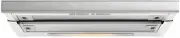
Page 3 - Congratulations on purchasing a Cooker Hood!; DIMENSIONS; Your stainless steel Cooker Hood is fitted with; Specifications of your GEH6018 Cooker Hood
2 Congratulations on purchasing a Cooker Hood! To fully enjoy using your appliance long into the future, please firstly familiarise yourself with its specifications, safety advice and operational instructions included in this manual. You will also need this manual to ensure that your Cooker Hood has...
Page 4 - Important Safety Information:; Please Read this before installing & using.
3 o Any installation work must be carried out by a qualified electrician or competent person. o The hood must be installed in accordance with the installation instructions and all measurements followed. o If the cooker hood is installed for use above a gas appliance then the provision for ventilatio...
Page 5 - replacing light bulbs.
4 o o o Ensure the ducting for the extractor function has the same diameter as the outlet hole all the way through. o Keep young children from using, playing with or tampering with the cooker hood. Older children and infirm persons should be supervised if they are using the cooker hood. o Your cooke...
Page 6 - Note; : Before discarding an old appliance, switch off and; Environmental Note
5 Do not attempt to use the cooker hood if it is damaged in any way. Never attempt to use it without the grease filters fitted or if the filters are excessively greasy! Never flambé cook under this cooker hood . Note : Before discarding an old appliance, switch off and disconnect it from the pow...
Page 7 - To use your cooker hood:; Make sure it has been properly installed.; * Note: The hood should be switched on at least as soon as you start; One switch controls the
6 To use your cooker hood: 1) Make sure it has been properly installed. 2) Find the CONTROL PANEL. It is located centrally on the hood’s front surface, on the underside of the unit. 3) The CONTROL PANEL contains two rows of switches. These perform separate functions. You will need to understand what...
Page 8 - LIGHT ON/OFF switch – Slide the ‘C-1’ switch in figure above from ‘0’ to ‘1’.; Before cleaning, always ensure that you have; Cleaning; Your cooker hood includes an; Cleaning your Cooker Hood:
7 LIGHT ON/OFF switch – Slide the ‘C-1’ switch in figure above from ‘0’ to ‘1’. IMPORTANT: Before cleaning, always ensure that you have switched your cooker hood OFF at the omni-polar switch, set at the wall from the cable: Cleaning Clean the external parts with mild liquid detergents on a damp cl...
Page 9 - You can now clean the anti-grease filter grilles.; Repeat the process if needed. Refit the grease grille; Refit the grease grilles when dry.; Maintenance - Cleaning the Anti-grease Filters
8 normal washing-up detergent. DO NOT USE A DISHWASHER TO ACHIEVE THIS. First remove the grille by pulling down on it. Undo the side catches. You can now clean the anti-grease filter grilles. Soak them for about one hour in hot water with a grease-loosening detergent then rinse off thoroughly with...
Page 10 - Maintenance – Changing the Light Bulb and Carbon Filter
9 Let the filter grilles dry thoroughly before refitting them. a) Changing the LIGHT BULB Disconnect the hood from the power supply. Access the lamp area. Please note that you will have to take off the grease grille at the back to access the lamp area. Always replace burnt-out bulbs with olive...
Page 11 - ELECTRICAL CONNECTION; INSTALLATION INSTRUCTIONS - Electrical
10 If your filter is different (i.e. is the Bayonet Circular- insert type, Position the filter P in order to cover the motor protection grille, ensuring that the ‘X’ on the filter lines up with the ‘Y’ on the conveyor. Then turn clockwise. Reverse to dismount Before installation and usage, read all ...
Page 12 - INSTALLATION INSTRUCTIONS
11 1) The BLUE WIRE must be connected to the terminal marked ‘N’ (Neutral), or coloured Black. 2) The BROWN WIRE must be connected to the terminal marked ‘L’ (‘Live’), or coloured RED (Fig. 7 – at left ) The cooker hood must not be fitted above stoves with a radiant top plate. We recommend that ...
Page 13 - Symptom; The cooker hood will not start!; Troubleshooting
12 B). 6 0 1 9 4 5 1 6 If something has gone wrong with your Cooker Hood, checking against this chart might keep you from having to call for service. Symptom Solution The cooker hood will not start! Check that the hood is connected To the electricity supply. Check that the fan speed control is S...
Page 14 - The cooker hood has switched off; CONDITIONS OF GUARANTEE
13 The cooker hood has switched off During operation! The safety cut-out device has been tripped. Turn off the hob and then wait for the device to reset. Note that if you have installed your Cooker hood too low, this will happen. If it happens frequently, it will be damaged. CONDITIONS OF GUAR...
Page 16 - If you have any further questions please contact; Think Appliances
15 If you have any further questions please contact Think Appliances Pty Ltd : SERVICE DEPARTMENT Phone: 1800 444 357 Fax: 1300 133 279 Email:[email protected] SALES DEPARTMENT Phone: 1300 132 824 Fax: 1300 660 188 Web: www.thinkappliances.com