Page 2 - TABLE OF CONTENTS; Control Panel; Operation Procedure; Instructions en Français
2 TABLE OF CONTENTS Help Us Help You 3 Parts and Features 4 Important Safety Instructions 5 Installation Instructions 6 Before Using Your Microwave Oven 6 Installation of Your Microwave Oven 6 Safety Precautions 6 – 7 Electrical Connection 8 Operating Your Microwave Oven 8 Control Panel 9 Operation ...
Page 3 - HELP US HELP YOU...
3 HELP US HELP YOU… Read this guide carefully. It is intended to help you operate and maintain your new microwave oven properly. Keep it handy to answer your questions. If you don't understand something or you need more assistance, please call: Avanti Customer Service 800-220-5570 Keep proof of orig...
Page 4 - Parts and Features
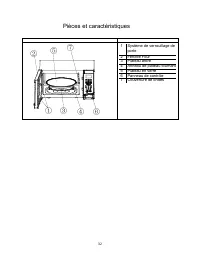
4 Parts and Features ① ③ ④ ⑥ ⑦ ⑤ ② 1 Door Safety Lock System 2 Oven Window 3 Turntable Shaft Roller Ring 4 Turntable Roller Ring 5 Glass Tray 6 Control Panel 7 Wave Guide Cover
Page 5 - Important Safety Instructions; WARNING; To reduce the risk of fire, electrical shock, or; PROP. 65 WARNING FOR CALIFORNIA RESIDENTS
5 Important Safety Instructions WARNING To reduce the risk of fire, electrical shock, or injury when using your appliance, follow these basic precautions: • Read all instructions before using the appliance. • Precautions to avoid possible exposure to excessive microwave energy. • This appliance ...
Page 6 - INSTALLATION INSTRUCTIONS; BEFORE USING YOUR MICROWAVE OVEN; PRECAUTIONS TO AVOID POSSIBLE EXPOSURE TO EXCESSIVE
6 INSTALLATION INSTRUCTIONS BEFORE USING YOUR MICROWAVE OVEN • Remove the exterior and interior packing. • Check to be sure you have all of the following parts: • Glass Tray • Turntable Roller Assembly (Roller or Roller Ring) • Instruction Manual • Inspect the oven after unpacking for any visual d...
Page 8 - ELECTRICAL CONNECTION; GROUNDING INSTRUCTIONS; Warning
8 ELECTRICAL CONNECTION GROUNDING INSTRUCTIONS This appliance must be grounded. In the event of an electrical short circuit, grounding reduces the risk of electrical shock by providing an escape wire for the electric current. This appliance is equipped with a cord having a grounding wire with a gr...
Page 9 - CONTROL PANEL; UNIT FEATURES; Shut the door. Make sure that it is firmly closed.
9 CONTROL PANEL Follow the applicable instructions for operation and control, which are given in “HOW TO SET THE OVEN CONTROLS” on page 11. UNIT FEATURES Pre-Programmed Cooking Modes Baked Potato Popcorn Pizza Beverage Frozen Dinner Reheat Time Cook Defrost by Weight Time Defrost Clock: 12 or 24 Hou...
Page 10 - SPECIAL OVEN FEATURES
10 CONTROL PANEL FEATURE DISPLAY DESCRIPTION Electronic display shows Cooking Time, Cooking Power, Time Remaining in Cooking Cycle, and the Present Time. PRE-PROGRAMMED COOKING MODES BAKED POTATO / BEVERAGE / PIZZA / POPCORN / FROZEN DINNER / REHEAT Allow you to reheat or cook food automatically wit...
Page 11 - HOW TO SET THE OVEN CONTROLS; AUDIBLE SIGNALS; SETTING THE CLOCK
11 HOW TO SET THE OVEN CONTROLS AUDIBLE SIGNALS DURING OVEN SETTINGS ONE SIGNAL: Oven accepts the entry. TWO SIGNALS: Oven does not accept the entry, check and try again. SETTING A COOKING PROGRAM EXPRESS COOK Use the EXPRESS COOK buttons (1 – 6) for quick start pre-timed cooking. ADD 30 SECONDS Tou...
Page 12 - For each potato about 3.5; CONTINUED NEXT PAGE
12 QUICK COOK (PRE-PROGRAMMED) SETTINGS The QUICK COOK settings allow you to cook or reheat food automatically without entering power level or time. For smaller portions, simply touch the applicable pad and start. For larger portions, push the pad repeatedly. POPCORN 1. Touch POPCORN. 2. Touch START...
Page 14 - CARE AND MAINTENANCE; CLEANING YOUR APPLIANCE
14 COOKING TECHNIQUES Your microwave makes cooking easier than conventional cooking, provided you keep these considerations in mind. Stirring Stir foods such as casseroles and vegetables while cooking to distribute heat evenly. Food at the outside of the dish absorbs more energy and heats more qui...
Page 15 - PROBLEM; SERVICE FOR YOUR APPLIANCE; AVANTI PRODUCTS CUSTOMER SERVICES
15 PROBLEMS WITH YOUR APPLIANCE? You can solve many common appliance problems easily, saving you the cost of a possible service call. Try the suggestions below to see if you can solve the problem before calling the servicer. TROUBLESHOOTING GUIDE PROBLEM POSSIBLE CAUSE Appliance does not operate. No...
Page 17 - INSTRUCCIONES EN ESPAÑOL; PRECAUCION
17 INSTRUCCIONES EN ESPAÑOL PRECAUCION PARA REDUCIR EL RIESGO DE INCENDIO, DESCARGA ELECTRICA, O DAÑO CUANDO ESTE USANDO SU HORNO MICROONDAS, SIGA ESTAS INDICACIONES. • LEA TODAS LAS INSTRUCCIONES ANTES DE USAR SU HORNO MICROONDAS. • ALGUNOS PRODUCTOS TALES COMO HUEVOS ENTEROS Y ENVASES SELLADOS (PO...
Page 18 - INDICACIONES PARA LA INSTALACION; ANTES DE USAR SU HORNO MICROONDAS; MEDIDAS DE PRECAUCION; USO GENERAL
18 INDICACIONES PARA LA INSTALACION ANTES DE USAR SU HORNO MICROONDAS • RETIRE LA ENVOLTURA EXTERIOR E INTERIOR • VERIFIQUE QUE TENGA LAS SIGUIENTES PARTES: • PLATO DE VIDRIO • ARO GIRATORIO • MANUAL DE USO • VERIFICAR QUE EL HORNO MICROONDAS NO TENGA LOS SIGUIENTES DAÑOS: • PUERTA MAL ALINEADA O DE...
Page 21 - OPERACION
21 OPERACION • CONECTE EL ENCHUFE A UN TOMACORRIENTE ESTANDAR DE 3 PUNTAS (120V AC 60 HZ,15 AMP). • CUANDO EL HORNO SE CONECTA POR PRIMERA VEZ LA PANTALLA DEL PANEL DE CONTROL MOSTRARA EL MENSAJE “1:00” OPRIME EL BOTON CLOCK PARA PROGRAMAR LA HORA. • LUEGO DE COLOCAR LA COMIDA EN UN ENVASE ADECUADO ...
Page 22 - O EL TIEMPO DE COCCION.
22 NUMBER PADS (0-9) (TECLADO NUMERICO) EL TECLADO DE NUMEROS SIRVE PARA INGRESAR TIEMPOS Y CANTIDADES. CLOCK (RELOJ) SE USA PARA INGRESAR LA HORA ACTUAL EN EL RELOJ. STOP / CLEAR (REINICIO) REINICIA TODAS LAS PROGRAMACIONES SI SE MARCA ANTES DE COMENZAR A COCINAR. START/PAUSE (COMENZAR/PARAR) SE US...
Page 23 - SEÑALES DURANTE LA PROGRAMACION DEL HORNO
23 PRENDIDAS DURANTE EL TODO EL CICLO. CARACTERISTICAS ESPECIALES DE SU HORNO MICROONDAS KITCHEN TIME TIMER (MEDIDOR DE TIEMPO POR MINUTOS) SE USA PARA TOMAR EL TIEMPO A COSAS QUE SE HACEN FUERA DEL HORNO. CUANDO EL TIEMPO PROGRAMADO HAYA TRANSCURRIDO EL HORNO EMITIRA CUATRO VECES EL SONIDO BEEP. LA...
Page 24 - CONFIGURANDO UN PROGRAMA DE COCCION
24 CONFIGURANDO UN PROGRAMA DE COCCION A. ONE STAGE-COOKING (COCCION EN UNA SOLA ETAPA) OPRIME LA TECLA MARCADA TIME COOK 1. USE LAS TECLAS NUMERICAS PARA PROGRAMAR EL TIEMPO DE COCCION. SE PUEDE PROGRAMAR TIEMPOS DE COCCION ENTRE 01 SEGUNDO(S) Y 99 MINUTOS CON 99 SEGUNDOS. 2. SI DESEA PROGRAMAR UN ...
Page 25 - DESCONGELAMIENTO POR PESO (DEFROST BY WEIGHT)
25 PARA USAR CONJUNTAMENTE LAS FUNCIONES DE DESCONGELADO-RAPIDO Y COCCION EN UNA SOLA ETAPA, SIGA ESTAS INSTRUCCIONES: 1. SIGA LOS PASOS 1 Y 2 DE LA FUNCION DESCONGELADO-RAPIDO. 2. PRESIONE LA TECLA COOK E INGRESE EL TIEMPO DE COCCION Y NIVEL DE POTENCIA. 3. PRESIONE LA TECLA START/PAUSE. PARA USAR ...
Page 26 - PROGRAMANDO PARA PREVENIR EL USO DE ESTE MICROONDAS POR NIÑOS; PROGRAMACION DE LA FUNCION COCCION RAPIDA; PIZZAS
26 PROGRAMANDO PARA PREVENIR EL USO DE ESTE MICROONDAS POR NIÑOS ESTE SEGURO PREVIENE ACCIDENTES POR OPERACIONES INDEBIDAS PROVOCADAS POR NIÑOS. PARA PROGRAMARLO MANTENGA PRESIONADA LA TECLA STOP/CLEAR POR 3 SEGUNDOS. EL MENSAJE LOCK (BLOQUEADO) APARECERA EN LA PANTALLA. PARA CANCELAR LA FUNCION MAN...
Page 28 - TECNICAS DE COCINA; MEZCLE
28 TECNICAS DE COCINA COCINAR EN SU HORNO MICROONDAS ES MAS FACIL QUE EN LA COCINA CONVENCIONAL, SIEMPRE QUE TENGA EN MENTE ESTAS CONSIDERACIONES: MEZCLE MUEVA ALIMENTOS TALES COMO GUISOS Y VEGETALES MIENTRAS LOS COCINE PARA DISTRIBUIR EL CALOR DE UNA MANERA PAREJA. LA COMIDA QUE SE ENCUENTRE EN LA ...
Page 29 - CUIDADO Y MANTENIMIENTO; LIMPIEZA DE SU HORNO MICROONDAS
29 CUIDADO Y MANTENIMIENTO LIMPIEZA DE SU HORNO MICROONDAS APAGUE Y DESCONECTE EL ENCHUFE DE PARED ANTES DE LIMPIAR SU HORNO. MANTENGA EL INTERIOR DE SU HORNO MICROONDAS LIMPIO. LOS ALIMENTOS SALPICAN O DERRAMAN PARTICULAS Y LIQUIDOS QUE SE ADHIEREN A LAS PAREDES DEL HORNO, ES RECOMENDABLE LIMPIARLA...
Page 30 - PROBLEMAS CON SU HORNO MICROONDAS?
30 PROBLEMAS CON SU HORNO MICROONDAS? USTED PUEDE RESOLVER MUCHOS PROBLEMAS COMUNES DE SU HORNO MICROONDAS, AHORRANDOLE EL GASTO DE UNA POSIBLE VISITA DEL SERVICIO TECNICO. PRUEBE LAS SIGUIENTES SUGERENCIAS PARA VERIFICAR SI USTED PUEDE RESOLVER EL PROBLEMA ANTES DE LLAMAR AL SERVICIO TECNICO. GUIA ...
Page 32 - Pièces et caractéristiques
32 Pièces et caractéristiques ① ③ ④ ⑥ ⑦ ⑤ ② 1 Système de verrouillage de porte 2 Fen ê tre Four 3 Plateau arbre 4 Anneau de plateau tournant 5 Plateau en verre 6 Panneau de contr ô le 7 Couverture de ondes
Page 33 - Consignes de sécurité importantes; AVERTISSEMENT; Pour réduire le risque d'incendie, de choc
33 Consignes de sécurité importantes AVERTISSEMENT Pour réduire le risque d'incendie, de choc électrique ou de blessure lors de l'utilisation de votre appareil, suivre ces précautions de • Lisez toutes les instructions avant d'utiliser l'appareil. • Précautions pour éviter une éventuelle exposit...
Page 34 - INSTRUCTIONS D'INSTALLATION; Désaligné; INSTALLATION DE VOTRE MICRO-ONDES; PR
34 INSTRUCTIONS D'INSTALLATION AVANT D'UTILISER VOTRE MICRO-ONDES • Retirer l'emballage extérieur et intérieur. • Vérifiez que vous disposez de tous les éléments suivants: • Plateau en verre • Assemblée Roller Platine (rouleaux ou Ring) • Manuel d'instructions • Inspectez le four après le déballag...
Page 36 - CONNEXION ÉLECTRIQUE; INSTRUCTIONS DE MISE; FONCTIONNEMENT DU FOUR; les consignes suivantes:; Attention
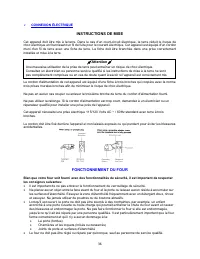
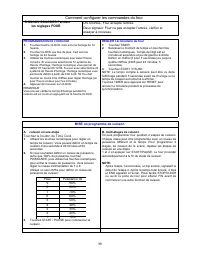
36 CONNEXION ÉLECTRIQUE INSTRUCTIONS DE MISE Cet appareil doit être mis à la terre. Dans le cas d'un court-circuit électrique, la terre réduit le risque de choc électrique en fournissant un fil de fuite pour le courant électrique. Cet appareil est équipé d'un cordon muni d'un fil de terre avec une...
Page 37 - PANNEAU DE CONTRÔLE; UNIT SPECIFICATIONS; être en place pendant la cuisson.
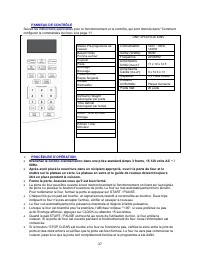
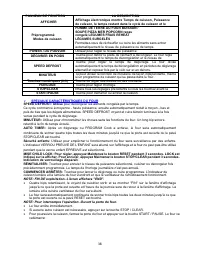
37 PANNEAU DE CONTRÔLE Suivez les instructions applicables pour le fonctionnement et le contrôle, qui sont donnés dans "Comment configurer la commandes du four» à la page 11. Modes Pré-programmé de cuisson Baked Potato Pomme au four Popcorn Pizza Beverage Breuvage Frozen Dinner Repas Surgelés Re...
Page 38 - SPECIAUX CARACTÉRISTIQUES DU FOUR
38 PANNEAU DE FONCTION AFFICHER LA DESCRIPTION Affichage électronique montre Temps de cuisson, Puissance de cuisson, le temps restant dans le cycle de cuisson et le Préprogrammé Modes de cuisson POMME DE TERRE AU FOUR BOISSON / SOUPE PIZZA MER POPCORN repas congelé LEGUMES FRAIS REHEAT LÉGUMES SURGE...
Page 39 - Comment configurer les commandes du four; SIGNAUX SONORES Pendant
39 Comment configurer les commandes du four SIGNAUX SONORES Pendant les réglages FOUR UN SIGNAL: Four accepte l'entrée. Deux signaux: Four ne pas accepter l'entrée, vérifier et essayer à nouveau. MISE un programme de cuisson A. cuisson en une étape Touchez le bouton de Time Cook 1. Utilisez les touc...
Page 40 - SUITE PAGE SUIVANTE
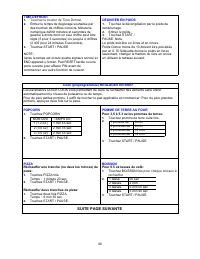
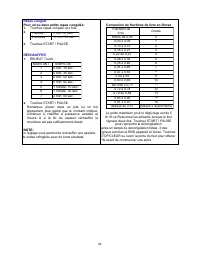
40 Cook (préprogrammée) REGLAGES EN BREF Les paramètres QUICK COOK vous permettent de cuire ou réchauffer des aliments sans entrer automatiquement le niveau de puissance ou de temps. Pour de plus petites portions, il suffit de toucher le pad applicable et commencer. Pour de plus grandes portions, ap...
Page 42 - SOINS ET ENTRETIEN; NETTOYAGE DE VOTRE APPAREIL
42 Les techniques de cuisson Votre micro-ondes rend la cuisine plus facile que la cuisson traditionnelle, à condition de conserver ces considérations à l'esprit. En remuant Remuez comme les casseroles et les légumes pendant la cuisson pour répartir la chaleur uniformément. La nourriture à l'extéri...
Page 43 - PROBLÈME; SERVICE POUR VOTRE APPAREIL; AVANTI PRODUITS SERVICES CLIENTS
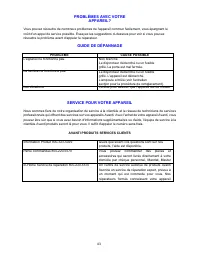
43 PROBLÈMES AVEC VOTRE APPAREIL? Vous pouvez résoudre de nombreux problèmes de l'appareil commun facilement, vous épargnant le coût d'un appel de service possible. Essayez les suggestions ci-dessous pour voir si vous pouvez résoudre le problème avant d'appeler le réparateur. GUIDE DE DÉPANNAGE PROB...
Page 47 - REGISTRATION INFORMATION
47 REGISTRATION INFORMATION Thank you for purchasing this fine Avanti product. Please fill out this form and return it within 100 days of purchase and receive these important benefits to the following address: Avanti Products LLC P.O. Box 520604 - Miami, Florida 33152 USA Protect your product: We ...
Page 48 - PRINTED IN CHINA