Page 2 - TABLE OF CONTENTS
2 TABLE OF CONTENTS Help Us Help You 3 Parts and Features 4 Important Safety Instructions 5 Installation Instructions 6 Before Using Your Microwave Oven 6 Installation of Your Microwave Oven 6 Safety Precautions 6 – 7 Electrical Connection 8 Operating Your Microwave Oven 8 Control Panel 9 Operation ...
Page 3 - HELP US HELP YOU...
3 HELP US HELP YOU… Read this guide carefully. It is intended to help you operate and maintain your new microwave oven properly. Keep it handy to answer your questions. If you don't understand something or you need more assistance, please call: Avanti Customer Service 800-220-5570 Keep proof of orig...
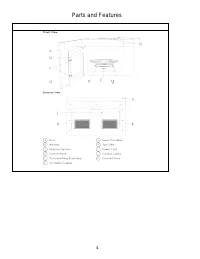
Page 4 - Parts and Features
Page 5 - IMPORTANT SAFETY INSTRUCTIONS; WARNING; SAVE THESE INSTRUCTIONS
5 IMPORTANT SAFETY INSTRUCTIONS When using electrical appliances basic safety precautions should be followed, including the following: WARNING To reduce the risk of burns, electrical shock, fire, injury to persons, or exposure to excessive microwave energy when using your appliance, follow these...
Page 6 - INSTALLATION INSTRUCTIONS; SEE FULL INSTALLATION INSTRUCTIONS IN INSTALLATION MANUAL; PRECAUTIONS TO AVOID POSSIBLE EXPOSURE TO
6 INSTALLATION INSTRUCTIONS BEFORE USING YOUR MICROWAVE OVEN • Remove the exterior and interior packing. • Check to be sure you have all of the following parts: • Glass Tray Installation Hardware Kit • Turntable Roller Assembly (Roller or Roller Ring) (Detailed Breakdown In Installation • Instruct...
Page 7 - GENERAL USE; UTENSILS; FOOD
7 GENERAL USE • DO NOT attempt to tamper with or make any adjustments or repairs to door, control panel or any other partof the oven. Do NOT remove outer panel from oven. Repairs should only be done by qualified servicepersonnel. • DO NOT operate the oven empty. The microwave energy will reflect con...
Page 8 - GROUNDING INSTRUCTIONS; OPERATING YOUR MICROWAVE OVEN; Warning
8 ELECTRICAL CONNECTION GROUNDING INSTRUCTIONS This appliance must be grounded. In the event of an electrical short circuit, grounding reduces the risk of electrical shock by providing an escape wire for the electric current. This appliance is equipped with a cord having a grounding wire with a gr...
Page 9 - CONTROL PANEL; CLOCK; KITCHEN TIMER; The microwave features a convenient timer for your cooking needs.; The maximum cooking time is 99 minutes and 99 seconds.; alert tones will sound.
9 CONTROL PANEL CLOCK Your model features a 12-hour clock. SET TIME OF DAY 1. Press CLOCK to enter the Clock Setting mode. “12:00 PRESS CLOCK ENTER TIME” will appear in the display. 2. Press CLOCK, and then press the number pads to enter the correct time-of- day. For example, if the time is 10:12, p...
Page 10 - FEATURES; VENT FAN; The fan speed cannot be adjusted if the control panel is locked.; SURFACE LIGHTING; LIGHT to toggle among High, Low and Off.; CHILD CONTROL PANEL LOCK
10 FEATURES VENT FAN The Vent Fan feature allows you to exhaust heat and steam from the cooking surface below. • Press VENT HI-LO-OFF to turn On/Off the fan, and to regulate the fan speed. NOTE: The fan speed cannot be adjusted if the control panel is locked. • When the control is pressed the first ...
Page 11 - COOKWARE; opened and plastic pouches should be pierced before cooking.
11 IMPORTANT: Never operate the microwave without food in the oven cavity; this can damage the magnetron tube or glass turntable. You may wish to leave a cup filled with water inside the oven when it is not in use to avoid damage if the oven is unintentionally turned on. COOKWARE IMPORTANT: Tightly ...
Page 12 - MICROWAVE COOKING; TIMED COOKING; Ten power levels are available.; CONVENIENCE COOKING
12 MICROWAVE COOKING TIMED COOKING 1. Press the number pads to set the cooking time. For example, to cook for 10 minutes, press “1,0,0,0” in turn. NOTE: • The maximum cooking time is 99 minutes and 99 seconds. • 100% power is the default. If you wish to cook at 100% power, skip steps 2 and 3, and go...
Page 13 - AUTO COOK; AUTO; program will be cancelled.; DEFROST
13 AUTO COOK The AUTO COOK function automatically sets the appropriate cooking time calculated by sensing the moisture level of the food or beverage being cooked. The AUTO COOK function is programmed to cook the following items: Potato, Fresh Vegetables, Frozen Vegetables, Frozen Dinner, White Rice,...
Page 14 - REHEAT; POPCORN
14 REHEAT The Reheat function is programmed to reheat the following items: Beverage, Dinner Plate, Pizza, Soup/Sauce and Casserole. The Reheat function sets the appropriate heating time automatically. Depending on the item being reheated, the heating time is calculated by either the amount of food o...
Page 15 - CLEANING; MICROWAVE OVEN CARE
15 CLEANING IMPORTANT: • Before cleaning, make sure all controls are off and the microwave oven is cool. Always follow label instructions on cleaning products. • To avoid damage to the microwave oven caused by arcing due to soil buildup, keep the oven cavity, top grille and the area where the door t...
Page 16 - CHARCOAL FILTER; Charcoal Filter; a b
16 CHARCOAL FILTER IMPORTANT: A charcoal filter must be installed in the microwave oven when it is used in a non- vented (recirculating) installation. Your microwave oven comes from the factory with the charcoal filter installed. The charcoal filter cannot be cleaned, so it must be replaced at least...
Page 18 - SERVICE FOR YOUR APPLIANCE
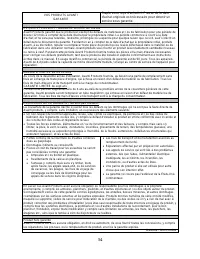
18 SERVICE FOR YOUR APPLIANCE We are proud of our customer service organization and the network of professional service technicians that provide service on your Avanti appliances. With the purchase of your Avanti appliance, you can be confident that if you ever need additional information or assista...
Page 20 - INSTRUCCIONES EN ESPAÑOL; PRECAUCION
20 INSTRUCCIONES EN ESPAÑOL PRECAUCION PARA REDUCIR EL RIESGO DE INCENDIO, DESCARGA ELECTRICA, O DAÑO CUANDO ESTE USANDO SU HORNO MICROONDAS, SIGA ESTAS INDICACIONES. • LEA TODAS LAS INSTRUCCIONES ANTES DE USAR SU HORNO MICROONDAS. • ALGUNOS PRODUCTOS TALES COMO HUEVOS ENTEROS Y ENVASES SELLADOS(POR...
Page 21 - INDICACIONES PARA LA INSTALACION
21 INDICACIONES PARA LA INSTALACION ANTES DE USAR SU HORNO MICROONDAS • RETIRE LA ENVOLTURA EXTERIOR E INTERIOR • VERIFIQUE QUE TENGA LAS SIGUIENTES PARTES: • PLATO DE VIDRIO • ARO GIRATORIO EQUIPO PARA INSTALACION • MANUAL DE USO MANUAL DE INSTALACION • VERIFICAR QUE EL HORNO MICROONDAS NO TENGA LO...
Page 22 - MEDIDAS DE PRECAUCION
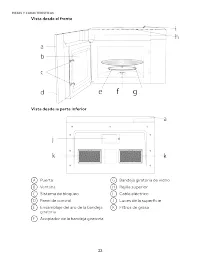
22 MEDIDAS DE PRECAUCION USO GENERAL • NO INTENTE MANIPULAR, AJUSTAR O REPARAR LA PUERTA, EL PANEL DE CONTROL OCUALQUIER PARTE DE SU HORNO MICROONDAS. NO REMUEVA EL PANEL DE CONTROLDEL HORNO. LAS REPARACIONES DEBERAN SER REALIZADAS POR PERSONAL DESERVICIO CALIFICADO. • NO UTILICE EL HORNO CUANDO EST...
Page 24 - RELOJ; Su modelo tiene un reloj de 12 horas.; FIJAR LA HORA DEL DÍA; El tiempo de cocción máximo es de 99 minutos y 99 segundos.; PANEL DE CONTROL
24 RELOJ Su modelo tiene un reloj de 12 horas. FIJAR LA HORA DEL DÍA Detener/Cancelar/Bloquear Descongelado 1. Presione CLOCK (Reloj) para ingresar el modo para fijar la hora. “12:00 PRESS CLOCK ENTER TIME” (12:00 Reloj de prensa Ingrese la hora) aparecerá en la pantalla. 2. Presione CLOCK (Reloj), ...
Page 25 - CARACTERÍSTICAS; VENTILADOR
25 3. Presione START (Inicio) para comenzar la cuenta regresiva del tiempo. NOTA: Cuando termine el tiempo fijado, “END” (Fin) aparecerá en la pantalla y sonarán tres tonos largos de alerta. 4. Presione STOP/CANCEL (Detener/Cancelar) para salir de la función Kitchen Timer (Temporizador de cocina). C...
Page 26 - VER ESTADO; UTENSILIOS DE COCINA; y perforar las bolsas plásticas antes de cocinar.; APTOS PARA HORNOS DE MICROONDAS; USO DEL HORNO DE MICROONDAS
26 VER ESTADO La función Status Recall (Ver estado) le permite verificar los ajustes de tiempo y potencia durante la cocción del microondas. • Presione POWER LEVEL (Nivel de potencia) para visualizar el nivel de potencia fijado. • Presione CLOCK (Reloj) para visualizar la hora. IMPORTANTE: Nunca uti...
Page 27 - COCCIÓN EN EL HORNO DE MICROONDAS; COCCIÓN PROGRAMADA; Cuando termine de cocinar, sonará un tono de alerta 3 veces.; Hay diez niveles de potencia disponibles.; COCCIÓN RÁPIDA
27 COCCIÓN EN EL HORNO DE MICROONDAS COCCIÓN PROGRAMADA 1. Presione los botones numéricos para fijar el tiempo de cocción. Por ejemplo, para cocinar durante 10 minutos, presione “1,0,0,0” seguido. NOTA: • El tiempo de cocción máximo es de 99 minutos y 99 segundos. • La potencia por defecto es del 10...
Page 28 - COCCIÓN POR SENSOR; La función; No abra la puerta durante el proceso de detección. Si lo hace,
28 COCCIÓN POR SENSOR La función Auto Cook (Cocción por sensor) ajusta, de manera automática, el tiempo de cocción adecuado que calcula al detectar el nivel de humedad del alimento o bebida que se cocinará. La función Auto Cook (Cocción por sensor) está programada para cocinar los siguientes aliment...
Page 29 - DESCONGELACIÓN
29 DESCONGELACIÓN La función de descongelación está programado para descongelar seleccionar automáticamente los artículos en peso. El control de descongelación le permite seleccionar entre los siguientes elementos: carne, aves, pescado y pan. 1. Presione DEFROST (Descongelar) una vez. Aparecerá en l...
Page 30 - PALOMITAS DE MAÍZ
30 NOTA: • Si el tiempo de calentamiento de su alimento se calcula a través de la detección de humedad, el proceso de detección comienza una vez que presiona Start (Inicio). • No abra la puerta durante el proceso de detección. Si lo hace, cancelará el programa Reheat (Recalentar). • Cuando finaliza ...
Page 31 - LIMPIEZA; CUIDADO DEL HORNO DE MICROONDAS; ADVERTENCIA
31 LIMPIEZA IMPORTANTE: • Antes de la limpieza, asegúrese de que todos los controles estén apagados y que el horno de microondas esté frío. Siempre siga las instrucciones que vienen en las etiquetas de los productos de limpieza. • Para evitar daños en el horno de microondas, los cuales ocurren cuand...
Page 32 - FILTROS
32 FILTROS FILTRO(S) PARA GRASA Los filtros para grasa se encuentran en la parte de abajo del horno de microondas. Los filtros para grasa deben quitarse y limpiarse a menudo; en general, por lo menos una vez al mes. 1. Retire el filtro para grasa. Tome el aro de metal, deslice el filtro hacia atrás ...
Page 33 - FILTRO DE CARBÓN; Filtro de carbón
33 FILTRO DE CARBÓN IMPORTANTE: Debe colocar un filtro de carbón en el horno de microondas si lo utiliza en una instalación sin salida de ventilación (recirculación). El horno de microondas viene de fábrica con un filtro de carbón instalado. No es posible limpiar el filtro de carbón, lo debe cambiar...
Page 34 - puerta, cuando reemplaza la rejilla superior.; Lengüeta del orificio de los tornillos (2); LUCES
34 6. Alinee el borde superior de la rejilla de modo que cuando se la coloque en su lugar, las lengüetas del orificio del tornillo que se encuentran en la rejilla se alinearán con los orificios en el gabinete del horno de microondas. Empuje lentamente la rejilla hasta que encaje en su lugar y los or...
Page 35 - SOLUCIÓN DE PROBLEMAS
35 Pruebe las soluciones sugeridas aquí y posiblemente se evite el gasto de una visita de servicio técnico. PROBLEMA POSIBLE(S) CAUSA(S) SOLUCIÓN El horno no se pone en marcha El cable de suministro de energía del horno no está enchufado en un tomacorriente. Conecte a un contacto de pared de conexió...
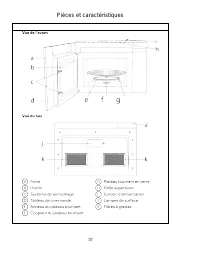
Page 37 - Pièces et caractéristiques
Page 38 - CONSIGNES DE SÉCURITÉ IMPORTANTES; AVERTISSEMENT
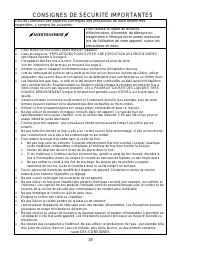
38 CONSIGNES DE SÉCURITÉ IMPORTANTES Lors de l'utilisation des appareils électriques des précautions de base doivent être respectées, y compris les suivantes: AVERTISSEMENT Pour réduire le risque de brûlures, d'électrocution, d'incendie, de blessure ou d'exposition à l'énergie micro-ondes excess...
Page 39 - INSTRUCTIONS NSTALLATION; PRÉCAUTIONS POUR ÉVITER UNE EXPOSITION
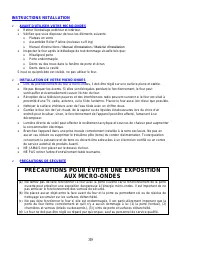
39 INSTRUCTIONS NSTALLATION AVANT D'UTILISER VOTRE MICRO-ONDES • Retirer l'emballage extérieur et intérieur. • Vérifiez que vous disposez de tous les éléments suivants: • Plateau en verre • Assemblée Roller Platine (rouleaux ou Ring) • Manuel d'instructions / Manuel d'installation / Matériel d'ins...
Page 41 - INSTRUCTIONS DE MISE; FONCTIONNEMENT DU FOUR; Attention
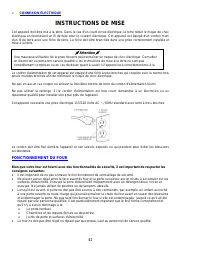
41 CONNEXION ÉLECTRIQUE INSTRUCTIONS DE MISE Cet appareil doit être mis à la terre. Dans le cas d'un court-circuit électrique, la terre réduit le risque de choc électrique en fournissant un fil de fuite pour le courant électrique. Cet appareil est équipé d'un cordon muni d'un fil de terre avec une...
Page 42 - HORLOGE; Votre modèle est équipé d’une horloge de 12 heures.; RÉGLAGE DE L’HEURE DU JOUR; TABLEAU DE COMMANDE
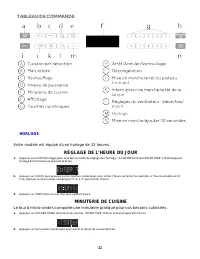
42 HORLOGE Votre modèle est équipé d’une horloge de 12 heures. RÉGLAGE DE L’HEURE DU JOUR 1. Appuyer sur CLOCK (horloge) pour accéder au mode de réglage de l'horloge. “12:00 PRESS CLOCK ENTER TIME” (12:00 Appuyer horloge Entrer le heure) apparaît à l'écran. 2. Appuyer sur CLOCK, puis appuyez sur les...
Page 43 - La durée de cuisson maximum est de 99 minutes et 99 secondes.; CARACTÉRISTIQUES; Vitesse élevée - Appuyer une fois; LAMPE DE SURFACE
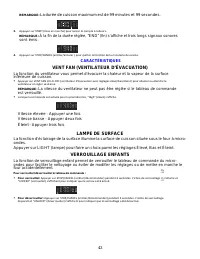
43 REMARQUE : La durée de cuisson maximum est de 99 minutes et 99 secondes. 3. Appuyer sur START (mise en marche) pour lancer le compte à rebours. REMARQUE : À la fin de la durée réglée, “END” (fin) s'affiche et trois longs signaux sonores sont émis. 4. Appuyer sur STOP/CANCEL (arrêter/annuler ) pou...
Page 44 - RAPPEL DE STATUT; USTENSILE DE CUISSON; UTILISABLES AU FOUR À MICRO-ONDES; UTILISATION DU FOUR À MICRO-ONDES
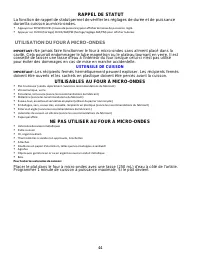
44 RAPPEL DE STATUT La fonction de rappel de statut permet de vérifier les réglages de durée et de puissance durant la cuisson au micro-ondes. • Appuyer sur POWER LEVEL (niveau de puissance) pour afficher le niveau de puissance réglé. • Appuyer sur CLOCK (horloge) CLOCK/AM/PM (horloge/réglage AM/PM)...
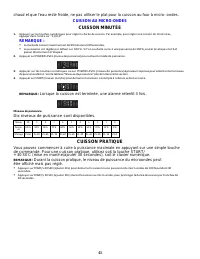
Page 45 - CUISSON AU MICRO-ONDES; CUISSON MINUTÉE; Lorsque la cuisson est terminée, une alarme retentit 3 fois.; Dix niveaux de puissance sont disponibles.; CUISSON PRATIQUE; être affiché mais pas réglé.
45 chaud et que l’eau reste froide, ne pas utiliser le plat pour la cuisson au four à micro- ondes. CUISSON AU MICRO-ONDES CUISSON MINUTÉE 1. Appuyer sur les touches numériques pour régler la durée de cuisson. Par exemple, pour régler une cuisson de 10 minutes, appuyer dans l’ordre sur “1,0,0,0”. RE...
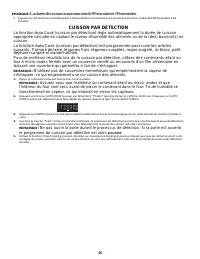
Page 46 - CUISSON PAR DÉTECTION; La fonction; transformerait en vapeur, ce qui induirait en erreur les capteurs.; le programme de cuisson par détection est alors
46 EMARQUE : La durée de cuisson maximum est de 99 minutes et 99 secondes. • Appuyer sur les touches numériques de 1 à 9 pour démarrer la cuisson à une puissance du micro-ondes de 100 % pendant 1 à 9 minutes. CUISSON PAR DÉTECTION La fonction Auto Cook (cuisson par détection) règle automatiquement l...
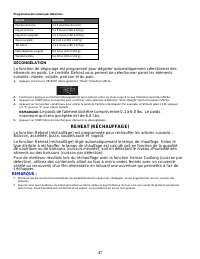
Page 47 - DÉCONGÉLATION; maximum qui sera acceptée est de 6,0 Lbs.
47 Programmes de cuisson par détection Article Quantité Pomme de terre 1 à 4 pommes de terre Légumes frais 1 à 3 tasses (140 à 420 g) Légumes surgelés 1 à 3 tasses (140 à 420 g) Repas surgelé 10 à 20 oz (283 à 567 g) Riz blanc 1 à 2 tasses (185 à 370 g) Petit-déjeuner surgelé 8 à 12 oz (227 à 340 g)...
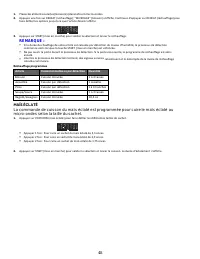
Page 48 - MAÏS ÉCLATÉ
48 1. Placez les aliments ou la (les) boisson(s) dans le four à micro-ondes. 2. Appuyez une fois sur REHEAT (réchauffage); “BEVERAGE” (boisson) s'affiche. Continuez d'appuyer sur REHEAT (réchauffage) pour faire défiler les options jusqu'à ce que l'article désiré s'affiche. 3. Appuyez sur START (mise...
Page 49 - NETTOYAGE; ENTRETIEN DU FOUR À MICRO-ONDES
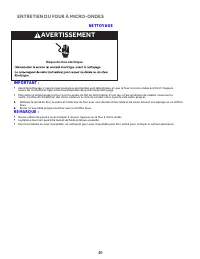
49 NETTOYAGE IMPORTANT : • Avant le nettoyage, s’assurer que toutes les commandes sont désactivées et que le four à micro-ondes est froid. Toujours suivre les instructions figurant sur les étiquettes des produits de nettoyage. • Pour éviter d’endommager le four à micro-ondes du fait de la formation ...
Page 50 - FILTRES; Filtres à graisse
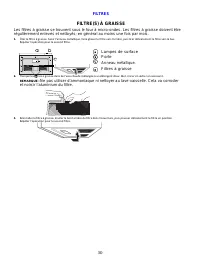
50 FILTRES FILTRE(S) À GRAISSE Les filtres à graisse se trouvent sous le four à micro-ondes. Les filtres à graisse doivent être régulièrement enlevés et nettoyés; en général au moins une fois par mois. 1. Ôter le filtre à graisse. Saisir l'anneau métallique, faire glisser le filtre vers l'arrière, p...
Page 51 - FILTRE À CHARBON; Filtre à charbon
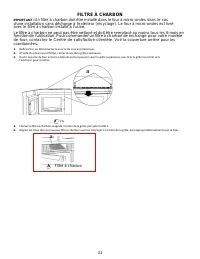
51 a FILTRE À CHARBON IMPORTANT : Un filtre à charbon doit être installé dans le four à micro-ondes dans le cas d'une installation sans décharge à l'extérieur (recyclage). Le four à micro-ondes est livré avec le filtre à charbon installé à l'usine. Le filtre à charbon ne peut pas être nettoyé et doi...
Page 52 - de porte lorsque la grille supérieure est réinstallée.; ÉCLAIRAGE
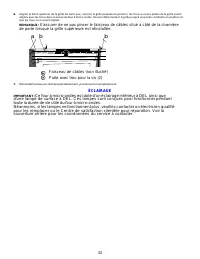
52 6. Aligner le bord supérieur de la grille de sorte que, une fois la grille poussée en position, les trous à vis des pattes de la grille soient alignés avec les trous dans la caisse du four à micro-ondes. Pousser délicatement la grille jusqu'à ce qu'elle s'emboîte en position et que les trous à vi...
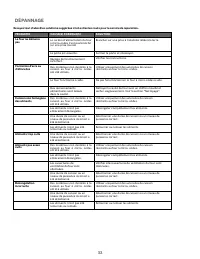
Page 53 - DÉPANNAGE
53 Essayez tout d’abord les solutions suggérées ici et evitez les couts pour le service de reparation. PROBLÈME CAUSE(S) POSSIBLE(S) SOLUTION Le four ne démarre pas Le cordon d’alimentation du four à micro-ondes n'est pas branché sur une prise murale. Brancher sur une prise à 3 alvéoles reliée à la ...
Page 55 - Registration Information; Avanti Registration Card
55 Registration Information Thank you for purchasing this fine Avanti product. Please fill out this form and return it to the following address within 100 days from the date of purchase and receive these important benefits: Avanti Products, LLC. P.O.Box 520604 – Miami, Florida 33152 Protect your p...
Page 56 - PRINTED IN CHINA