Page 2 - Quick Start Guide
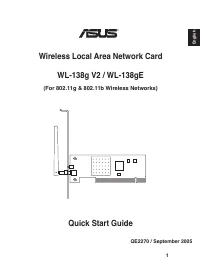
English 1 QE2270 / September 2005 Quick Start Guide Wireless Local Area Network Card WL-138g V2 / WL-138gE (For 802.11g & 802.11b Wireless Networks) ®
Page 3 - Quick Install Guide; System Requirements; To begin using the ASUS WLAN Card, you must have the; The Product Package; When you receive the ASUS WLAN Card package, it should; Installation Procedures; Insert the ASUS WLAN card into your computer.
2 ASUS WLAN Card Quick Install Guide English System Requirements To begin using the ASUS WLAN Card, you must have the following minimum requirements: • Windows XP/2000/ME/98SE• Standard 32-bit PCI Slot• 32MB system memory or larger• 300MHz processor or higher The Product Package When you receive the...
Page 5 - Reading the ASUS WLAN Status Indicators
4 ASUS WLAN Card Quick Install Guide English Reading the ASUS WLAN Status Indicators The ASUS WLAN card consists of one AIR indicator that shows the status of the ASUS WLAN Card. OFF: No wireless activity. Blinking: Transmitting or receiving wireless data. Orientating the Antenna The ASUS WLAN Card ...
Page 6 - ASUS WLAN Utility Quick Start; After installing the ASUS WLAN driver and utility, you may
ASUS WLAN Card 5 Quick Install Guide English 3. Encryption settings must also match those set in the access point. Talk with your network administrator if necessary. 4. You can also see the connection quality on the “Connection” page. Click OK to exit the utility. 5. Click Apply to save your setting...
Page 7 - Guide de démarrage rapide
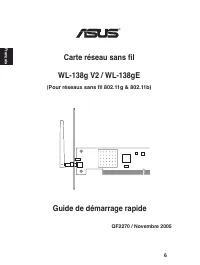
Français QF2270 / Novembre 2005 Guide de démarrage rapide Carte réseau sans fil WL-138g V2 / WL-138gE (Pour réseaux sans fil 802.11g & 802.11b) ® 6
Page 8 - Configuration requise; Avant dʼutiliser la carte WLAN ASUS, assurez-vous de satisfaire; Contenu de la boîte; Lors de lʼachat de votre carte WLAN ASUS, assurez-vous que; Procedures dʼinstallation; Suivez ces instructions pour configurer la carte
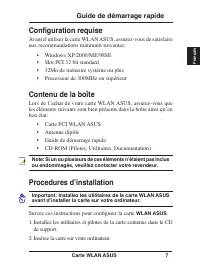
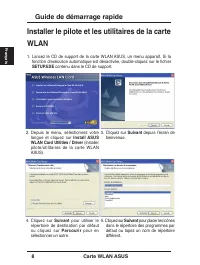
Carte WLAN ASUS 7 Guide de démarrage rapide Français Configuration requise Avant dʼutiliser la carte WLAN ASUS, assurez-vous de satisfaire aux recommandations minimum suivantes: • Windows XP/2000/ME/98SE• Slot PCI 32 bit standard• 32Mo de mémoire système ou plus• Processeur de 300MHz ou supérieur Con...
Page 10 - Lire les indicateurs dʼétat
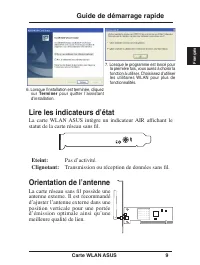
Carte WLAN ASUS 9 Guide de démarrage rapide Français 6. Lorsque lʼinstallation est terminée, cliquez sur Terminer pour quitter lʼassistant dʼinstallation. 7. Lorsque le programme est lancé pour la première fois, vous aurez à choisir la fonction à utiliser. Choisissez dʼutiliser les utilitaires WLAN ...
Page 11 - Configuration de lʼutilitaire WLAN; Une fois le pilote et les utilitaires de la carte WLAN installés,
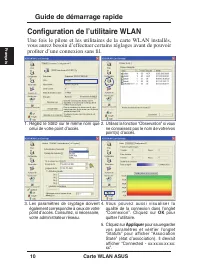
10 Carte WLAN ASUS Guide de démarrage rapide Français 3. Les paramètres de cryptage doivent également correspondre à ceux de votre point dʼaccès. Consultez, si nécessaire, votre administrateur réseau. 4. Vo u s p o u v e z a u s s i v i s u a l i s e r l a qualité de la connexion dans lʼonglet “Conn...
Page 13 - Schnellinstallation; Systemanforderungen; Installation; Das Produktpaket
12 ASUS WLAN-Karte Schnellinstallation Deutsch Systemanforderungen Um die ASUS WLAN-Karte verwenden zu können, muss Ihr System die folgenden Voraussetzungen erfüllen: • Windows XP/2000/ME/98SE • Standard 32-Bit PCI-Steckplatz • mind. 32MB Systemspeicher • mind. 300MHz-Prozessor Hinweis: Falls einer ...
Page 15 - Die ASUS WLAN-Statusanzeigen
14 ASUS WLAN-Karte Schnellinstallation Deutsch 6. Wenn das Setup beendet ist, klicken Sie “ Finish” , um den Installationsassistenten zu beenden. 7. Wenn das Programm zum ersten Mal ausgeführt wird, werden Sie gefragt, welche Funktionen Sie nutzen wollen. Wählen Sie die untere Option, um die ASUS-Pr...
Page 16 - Das ASUS WLAN-Programm
ASUS WLAN-Karte 15 Schnellinstallation Deutsch 3. Die Verschlüsselungseinstellungen müssen ebenfalls mit denen Ihres Access Points übereinstimmen. B i t t e n S i e , w e n n n ö t i g , I h r e n Netzwerkadministrator um Hilfe. 4. Sie können die Verbindungsqualität auch unter “Verbindung” überprüfe...
Page 18 - Руководство по быстрой установке; Системные требования
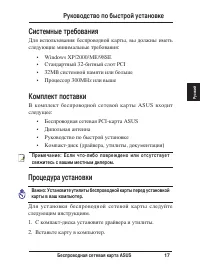
Беспроводная сетевая карта ASUS 17 Руководство по быстрой установке Русский Системные требования Для использования беспроводной карты, вы должны иметь следующие минимальные требования: • Windows XP/2000/ME/98SE• Стандартный 32-битный слот PCI• 32MB системной памяти или больше• Процессор 300MHz или в...
Page 19 - Установка драйверов и утилит
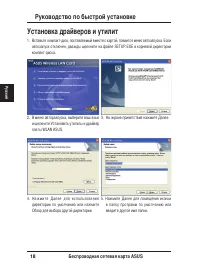
18 Беспроводная сетевая карта ASUS Руководство по быстрой установке Русский Установка драйверов и утилит 1. Вставьте компакт-диск, поставляемый вместе с картой, появится меню автозапуска. Если автозапуск отключен, дважды щелкните на файле SETUP.EXE в корневой директории компакт-диска. 3. На экране п...
Page 20 - Индикаторы состояния; Прием или передача данных.; Ориентация антенны
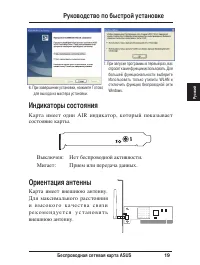
Беспроводная сетевая карта ASUS 19 Руководство по быстрой установке Русский 6. При завершении установки, нажмите Готово для выхода из мастера установки. 7. При запуске программы в первый раз, вас спросят какие функции использовать. Для большей функциональности выберите Использовать только утилиты WL...
Page 21 - Быстрый запуск утилиты ASUS
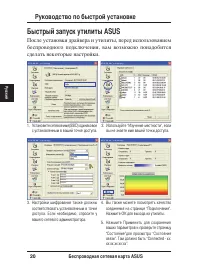
20 Беспроводная сетевая карта ASUS Руководство по быстрой установке Русский 3. Настройки шифрования также должны соответствовать установленным в точке доступа. Если необходимо, спросите у вашего сетевого администратора. 4. Вы также можете посмотреть качество соединения на странице “Подключение”. Наж...
Page 22 - Guía de Instalación Rápida
Español QS2270 / Noviembre 2005 Guía de Instalación Rápida Tarjeta de Red de Área Local Inalámbrica WL-138g V2 / WL-138gE (Para Redes Inalámbricas 802.11g & 802.11b) ® 21
Page 23 - Requerimientos del Sistema; Para comenzar a utilizar la tarjeta ASUS WLAN, su PC deberá; Contenidos; El paquete de la tarjeta ASUS WLAN deberá incluir los siguientes; Procedimiento de Instalación
22 Tarjeta ASUS WLAN Guía de Instalación Rápida Español Requerimientos del Sistema Para comenzar a utilizar la tarjeta ASUS WLAN, su PC deberá poseer los siguientes requerimientos mínimos: • Windows XP/2000/ME/98SE• Ranura PCI Estándar de 32-bit• 32MB o superior de memoria de sistema• Procesador de ...
Page 24 - Instalando el controlador y utilidades
Tarjeta ASUS WLAN 23 Guía de Instalación Rápida Español Instalando el controlador y utilidades de la tarjeta ASUS WLAN 1. Inserte el CD de soporte de la tarjeta ASUS WLAN. Un menú aparecerá de manera automática. Si la función de auto ejecución ha sido deshabilitada, haga doble clic en el archivo SET...
Page 25 - Indicadores de Estado de la Tarjeta ASUS WLAN
24 Tarjeta ASUS WLAN Guía de Instalación Rápida Español Indicadores de Estado de la Tarjeta ASUS WLAN La tarjeta ASUS WLAN contiene un indicador AIR que muestra el estado de la tarjeta ASUS WLAN. Apagado: No hay actividad inalámbrica. Parpadeando: Transmitiendo/recibiendo datos por vía inalámbrica. ...
Page 26 - Guía Rápida de las utilidades ASUS WLAN; Tras instalar el controlador y las utilidades de la tarjeta ASUS
Tarjeta ASUS WLAN 25 Guía de Instalación Rápida Español 3. La configuración de Encriptación debe coincidir con la información del Punto de Acceso. Contacte con su administrador de Red para más información. 4. También puede comprobar la calidad de la conexión en la página “Conexión”. Haga clic en Ace...
Page 27 - Guida allʼavviamento rapido
Italiano QI2270 / Novembre 2005 Guida allʼavviamento rapido Scheda WLAN (Wireless Local Area Network) WL-138g V2 / WL-138gE (Per reti wireless 802.11g e 802.11b) ® 26
Page 28 - Guida allʼinstallazione rapida; Requisiti di sistema; Per iniziare a usare la Scheda WLAN ASUS sono necessari:; Il prodotto; Quando si riceve la confezione della Scheda ASUS WLAN,; Le procedure di installazione; Inserire la scheda ASUS WLAN nel computer.
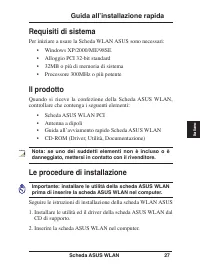
Scheda ASUS WLAN 27 Guida allʼinstallazione rapida Italiano Requisiti di sistema Per iniziare a usare la Scheda WLAN ASUS sono necessari: • Windows XP/2000/ME/98SE• Alloggio PCI 32-bit standard• 32MB o più di memoria di sistema• Processore 300MHz o più potente Il prodotto Quando si riceve la confezi...
Page 29 - Installazione delle utilità e del driver
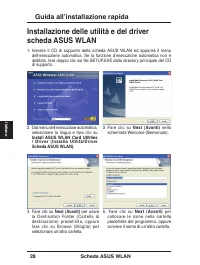
28 Scheda ASUS WLAN Guida allʼinstallazione rapida Italiano Installazione delle utilità e del driver scheda ASUS WLAN 1. Inserire il CD di supporto della scheda ASUS WLAN ed apparirà il menu dellʼesecuzione automatica. Se la funzione dʼesecuzione automatica non è abilitata, fare doppio clic sul file ...
Page 30 - Leggere gli indicatori di stato di ASUS WLAN
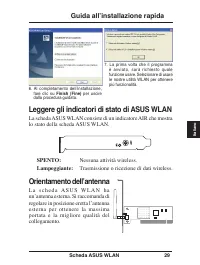
Scheda ASUS WLAN 29 Guida allʼinstallazione rapida Italiano Leggere gli indicatori di stato di ASUS WLAN La scheda ASUS WLAN consiste di un indicatore AIR che mostra lo stato della scheda ASUS WLAN. SPENTO: Nessuna attività wireless. Lampeggiante: Trasmissione o ricezione di dati wireless. Orientame...
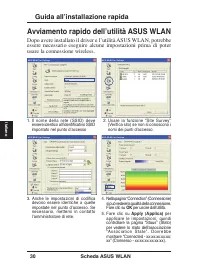
Page 31 - Avviamento rapido dellʼutilità ASUS WLAN; Dopo avere installato il driver e lʼutilità ASUS WLAN, potrebbe
30 Scheda ASUS WLAN Guida allʼinstallazione rapida Italiano 3. Anche le impostazioni di codifica devono essere identiche a quelle impostate nel punto dʼaccesso. Se necessario, mettersi in contatto lʼamministratore di rete. 4. Nella pagina “Connection” (Connessione) si può vedere la qualità della conn...
Page 33 - Hızlı Kurulum Kılavuzu; Kurulum Prosedürleri; ASUS WLAN kartını bilgisayarınıza takın.; Sistem Gereksinimleri; ASUS WLAN Kartını kullanmaya başlamak için, aşağıdaki asgari; Ürün Paketi; ASUS WLAN Kart paketini aldığınızda, aşağıdaki öğeleri
32 ASUS WLAN Kartı Hızlı Kurulum Kılavuzu Türkçe Kurulum Prosedürleri Önemli: ASUS WLAN Kartını bilgisayarınıza kurmadan önce ASUS WLAN kartının programlarını kurun. ASUS WLAN kartını kurmak için bu talimatları yerine getirin.1. ASUS WLAN kart programlarını ve sürücüsünü destek CDʼsinden kurun. 2. A...
Page 34 - ASUS WLAN Kartı Programlarının ve
ASUS WLAN Kartı 33 Hızlı Kurulum Kılavuzu Türkçe ASUS WLAN Kartı Programlarının ve Sürücüsünün Kurulması 1. ASUS WLAN Kart destek CDʼsini kurun ve otomatik çalıştır menüsü belirecektir. Otomatik çalıştır engellenmişse, destek CDʼsinin kök dizinindeki SETUP.EXEʼye çift tıklayın. 3. Welcome (Hoş Geldi...
Page 35 - ASUS WLAN Durum Göstergelerinin Okunması
34 ASUS WLAN Kartı Hızlı Kurulum Kılavuzu Türkçe ASUS WLAN Durum Göstergelerinin Okunması ASUS WLAN kartı bir adet HAVA göstergesinden oluşmakta olup ASUS WLAN Kartının durumunu göstermektedir. KAPALI: Kablosuz aktivite yok. Yanıp sönüyor: Kablosuz veri alıyor ve gönderiyor. Antenin Yönlendirilmesi ...
Page 36 - ASUS WLAN Programı Hızlı Başlangıcı; ASUS WLAN sürücüsünü ve programını kurduktan sonra,
ASUS WLAN Kartı 35 Hızlı Kurulum Kılavuzu Türkçe 3. Şifreleme ayarları da giriş noktasındaki ayarlar ile eşleşmelidir. Gerekirse ağ yöneticiniz ile konuşun. 4. Ay r ı c a “ C o n n e c t i o n ” ( B a ğ l a n t ı ) sayfasında bağlantı kalitesini de görebilirsiniz. Programdan çıkmak için OK (Tamam) ʼ...
Page 37 - Snelle installatiegids
H ollands QDu2270 / November 2005 Snelle installatiegids Draadloze netwerkkaart WL-138g V2 / WL-138gE (Voor draadloze netwerken met 802.11g & 802.11b) ® 36
Page 38 - Systeemeisen; Om met de installatie van de ASUS WLAN-kaart te beginnen, moet uw; Verpakking van het product; De verpakking van de ASUS WLAN-kaart, moet het volgende bevatten:; WLAN met de meegeleverde cd.; Installatieprocedures
ASUS WLAN-kaart 37 Snelle installatiegids H ollands Opmerking: Als een van deze voorwerpen ontbreekt of beschadigd is, vraag dan uw leverancier om instructies. Systeemeisen Om met de installatie van de ASUS WLAN-kaart te beginnen, moet uw systeem aan de volgende eisen voldoen: • Windows XP/2000/ME/9...
Page 39 - Installatie van de hulpprogrammaʼs en het
38 ASUS WLAN-kaart Snelle installatiegids H ollands Installatie van de hulpprogrammaʼs en het stuurprogramma van de ASUS WLAN-kaart 1. Leg de meegeleverde cd van de ASUS WLAN-kaart in de computer. Het autorun-menu verschijnt. Werkt autorun niet, dubbelklik dan op SETUP.EXE in het hoofdmenu van de cd...
Page 40 - De statusindicatoren van het ASUS WLAN
ASUS WLAN-kaart 39 Snelle installatiegids H ollands De statusindicatoren van het ASUS WLAN De ASUS WLAN-kaart bevat een AIR-indicator die de toestand van de ASUS WLAN-kaart toont. UIT: Geen draadloze activiteit. Knipperend: Er worden draadloze gegevens verzonden of ontvangen. De antenne oriënteren D...
Page 41 - Snelle start van hulpprogramma van ASUS WLAN; Na installatie van het stuurprogramma en hulpprogramma van
40 ASUS WLAN-kaart Snelle installatiegids H ollands 3. De instellingen voor de versleuteling moeten ook overeenkomen met het access-point. Bespreek dit met de netwerkbeheerder. 4. U ziet de verbindingskwaliteit op de pagina “Connection (Verbinding)”. Klik op OK om het hulpprogramma af te sluiten. 5....
Page 42 - Quick 설치 가이드
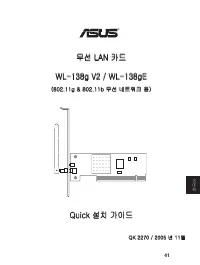
한 국어 QK 2270 / 2005 년 11월 Quick 설치 가이드 무선 LAN 카드 WL-138g V2 / WL-138gE (802.11g & 802.11b 무선 네트워크 용) ® 41
Page 43 - 시스템 요구사항
42 ASUS WLAN 카드 Quick 설치 가이드 한 국어 시스템 요구사항 ASUS WLAN 카드를 사용하기 전에, 다음의 최소 시스템 요구사항을 확인해 주십시오. • Windows XP/2000/ME/98SE• 표준형 32-bit PCI 슬롯• 시스템 메모리 32MB 이상 • 300MHz 프로세서 이상 제품 구성물 ASUS WLAN 카드를 구입한 후, 다음의 구성물이 모두 포함되어 있는지 확인해 주십시오. • ASUS WLAN PCI 카드• 양극 안테나• ASUS WLAN 카드 Quick 설치 가이드• CD-ROM 디스크 (드라...
Page 44 - ASUS WLAN 카드 유틸리티 & 드라이버 설치
ASUS WLAN 카드 43 Quick 설치 가이드 한 국어 ASUS WLAN 카드 유틸리티 & 드라이버 설치 1. ASUS WLAN 카드 지원 CD를 컴퓨터에 넣으면 자동 실행 메뉴가 나타납니 다. 만약 자동실행 기능이 작동하지 않으면, 지원 CD의 디렉토리 안에 있는 SETUP.EXE 파일을 더블 클릭해 주십시오. 3. 다음 버튼을 클릭해 주십시오. 4. 지정된 대상 폴더에 설치하려면, 다음 버튼을 눌러 주시고, 대상 폴더를 선택하려면, 찾아보기를 눌러 주십시오. 5. 지정된 프로그램 폴더를 사용하려 면, 다음 버튼을 눌...
Page 45 - ASUS WLAN 상태 표시등; 꺼짐; 지향 안테나
44 ASUS WLAN 카드 Quick 설치 가이드 한 국어 ASUS WLAN 상태 표시등 ASUS WLAN 카드는 ASUS WLAN 카드의 상태를 나타내는 1개의 AIR 상태 표시등이 부착되어 있습니다. 꺼짐 : 무선 기능이 작동하지 않는 상태 깜박거림 : 무선 데이터 송/수신 중인 상태 지향 안테나 ASUS WLAN 카드에는 외장 안테나를 설치할 수 있습니다. 최대 범위와 높은 연결 품질을 위해 외장 안테나는 똑바로 세워 주시기 바랍니다. 6. 설치가 완료되면, 완료 버튼을 눌러 설 치 마법사를 종료해 주십시오. 7. 프로그램을...
Page 46 - ASUS WLAN 유틸리티 사용
ASUS WLAN 카드 45 Quick 설치 가이드 한 국어 3. 암호화 설정도 사용 중인 AP와 똑 같이 설정해 주십시오. 다 자세한 정보는 네트워크 관리자에게 문의해 주십시오. 4. “연결” 항목에서 연결 품질을 확인 한 후, 확인 버튼을 눌러 설정 구성을 완료해 주십시오. 5. 적용 버튼을 눌러 설정을 저장한 후, “상태”항목을 클릭해 “연결 상태”를 확인해 주십시오. 다음과 같이 나타나면 정상입니다. “Connected - xx:xx:xx:xx:xx:xx”. ASUS WLAN 유틸리티 사용 ASUS WLAN 드라이버와 유틸티...
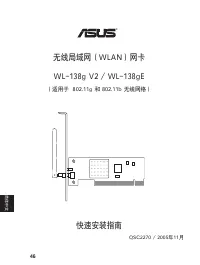
Page 48 - 快速安装指南; 系统环境需求
华硕无线网卡 47 快速安装指南 简体 中 文 系统环境需求 在安装华硕无线网卡前,请您先确认系统必需满足下列最低配置需求: • Windows XP/2000/ME/98SE • 标准 32 位 PCI 插槽 • 32MB 系统内存或更高 • 300MHz 处理器或更高 产品包装 当您打开华硕无线网卡包装盒后,请确认盒中是否包含以下配件: • 华硕无线 PCI 网卡 • 偶极天线 • 华硕无线网卡快速安装指南 • CD-ROM 光盘(内含驱动程序,应用软件和技术文 档) 注意:如果上述配件有遗失或损坏的话,请尽快与您的零售商联系。 安装步骤 重要提示:在将华硕无线网卡插入电脑以前,请先安装...
Page 49 - 安装华硕无线网卡应用软件及驱动程序
48 华硕无线网卡 快速安装指南 简体 中文 安装华硕无线网卡应用软件及驱动程序 1. 插入附赠光盘,接着系统会弹出光盘自动运行界面。如果您的系统禁用了自动 运行功能,请在光盘的根目录下找到 SETUP.EXE 文件,并双击打开它。 3. 进入欢迎界面后,点击 下一步 。 4. 点击 下一步, 使用系统默认的目标文 件 夹 , 或 点 击 浏 览 , 选 择 其 他 文 件 夹。 5. 再点击 下一步, 将图标放在默认的 程序文件夹中,或您也可以输入其 他文件夹名。 2. 选择一种语言,然后点击 安装华硕无 线网卡应用程序和驱动程序。
Page 50 - 了解华硕无线网卡的状态指示灯; 关闭; 安装天线
华硕无线网卡 49 快速安装指南 简体 中 文 了解华硕无线网卡的状态指示灯 华硕无线网卡上带有一个 AIR 指示灯,可以实时显示出 WLAN 网卡的状态。 关闭 : 非活动状态中。 闪烁 : 正传输或接收无线数据。 安装天线 华硕无线网卡有一个外接天线。您可以通过将天线垂直,使信号获取范围扩大,从而获得更好的网络连接质量。 6. 安装结束后,请点击 完成 退出安装 向导. 7. 程序第一次运行时,您需要选择欲 使用的功能,请选择第二项 仅使用 ASUS 工具程式 。
Page 51 - 华硕无线网卡应用程序快速安装
50 华硕无线网卡 快速安装指南 简体 中文 3. 加密设定也必须与您 AP 中的设置一 样。如有任何疑问,请与管理员联系。 4. 您 还 可 以 在 “ 连 接 ” 页 面 中 看 到网 络连接质量状况。点击 “确定” 退 出。 5. 点击 “应用” 保存您的设置,然后点 击 “状态” 页面查看连接状况。页 面应该会显示: “Connected-xx: xx:xx:xx:xx:xx” 。 华硕无线网卡应用程序快速安装 安装完华硕无线网卡驱动程序和应用程序后,您仍需要进行一些设置才能使用无线网络。 1. 将网络名 (SSID) 设置为与您 AP(无 线路由器)中的 SSID 名一样。. 2. ...














 Asus 1001P-MU17-WT
User Manual
Asus 1001P-MU17-WT
User Manual
 Asus 1 E1309
User Manual
Asus 1 E1309
User Manual
 Asus 1015E
User Manual
Asus 1015E
User Manual
 Asus 1064E - PIKE Storage Controller SAS
User Manual
Asus 1064E - PIKE Storage Controller SAS
User Manual
 Asus 136-480A
User Manual
Asus 136-480A
User Manual
 Asus 1225 Series
User Manual
Asus 1225 Series
User Manual
 Asus 13VH192C
Manual
Asus 13VH192C
Manual
 Asus 1U
User Manual
Asus 1U
User Manual
 Asus 1U Rackmount Barebone Server RS160-E3/PS4
User Manual
Asus 1U Rackmount Barebone Server RS160-E3/PS4
User Manual
 Asus 200/266 MHZ FSB AGP 4X
User Manual
Asus 200/266 MHZ FSB AGP 4X
User Manual
 Asus 1U Rackmount Chassis Kit R10-A2P4
User Manual
Asus 1U Rackmount Chassis Kit R10-A2P4
User Manual
 Asus 24T1E
User Manual
Asus 24T1E
User Manual
 Asus 22T1E
User Manual
Asus 22T1E
User Manual