Asus BS5000- Manuals
Asus BS5000– User Manual in PDF format online.
Manuals:
User Manual Asus BS5000
Summary
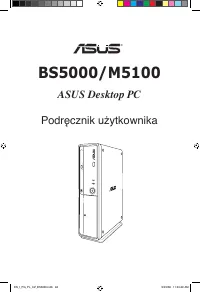
BS5000/M5100 ASUS Desktop PC User Manual ® EN_I_PG_PL_CZ_BS5000.indb 1 9/5/08 11:3:1 AM
English Copyright © 2008 ASUSTeK COMPUTER INC. All Rights Reserved. No part of this manual, including the products and software described in it, may be reproduced, transmitted, transcribed, stored in a retrieval system, or translated into any language in any form or by any means, except documentatio...
3 English ASUS contact information ASUSTeK COMPUTER INC. Address 15 Li-Te Road, Peitou, Taipei, Taiwan 1159 Telephone +886--894-3447 Fax +886--890-7798 E-mail [email protected] Web site www.asus.com.tw Technical Support Telephone +86-1-3849911 Online support support.asus.com ASUS COMPUTER INTERNATIO...
4 English Notices Federal Communications Commission Statement This device complies with Part 15 of the FCC Rules. Operation is subject to the following two conditions:• This device may not cause harmful interference, and• This device must accept any interference received including interference that ...
5 English Safety information Electrical safety • To prevent electrical shock hazard, disconnect the power cable from the electrical outlet before relocating the system. • When adding or removing any devices to or from the system, contact a qualified service technician or your retailer for help. Ensu...
6 English General precautions Before using the ASUS BS5000/M5100 Desktop PC, carefully read the general precautions below. Improper operation could lead to personal injury or damage to the product.• Before using the product, ensure that all components are correctly installed and all cables are corre...
7 English About this guide How this guide is organized This guide contains the following parts: 1. Chapter 1: System introduction This chapter gives a general description of ASUS BS5000/M5100 Desktop PC. The chapter lists the system features, including introduction on the front and rear panels. 2. C...
8 English Conventions used in this guide To ensure that you perform certain tasks properly, take note of the following symbols used throughout this guide. WARNING: Information to prevent injury to yourself when trying to complete a task. CAUTION: Information to prevent damage to the components when ...
9 English System package contents Check your BS5000/M5100 system package for the following items. Standard items 1. ASUS BS5000/M5100 Desktop PC with • ASUS Desktop PC x 1 • Foot stand x 1 • Mouse x 1 • Keyboard x 1 . Cables • AC power cord x 1 3. Accessories • AC power adapter x 1 • Mouse pad x 1 4...
Chapter 1 System introduction This chapter gives a general description of the desktop PC. The chapter lists the system features including introduction on the front and rear panels. EN_I_PG_PL_CZ_BS5000.indb 11 9/5/08 11:3:17 AM
1 Chapter 1: System introduction English 1.1 Front panel The ASUS BS5000/M5100 Desktop PC includes an ASUS motherboard, a power supply unit, a front panel, and a rear panel. All of these components are integrated in a system casing elaborately designed by ASUS.The illustrations below show the front ...
13 ASUS BS5000/M5100 English 1.2 Rear panel The system rear panel includes the power input port and several I/O ports that allow convenient connection of devices.The illustration below shows the rear panel and the components on it. 1. Air vents. These vents allow air ventilation. 3 1 2a 5 4 67 9 10 ...
14 Chapter 1: System introduction English Audio 2, 4, or 6-channel configuration Port Headset 2-channel 4-channel 6-channel Light Blue Line In Rear Speaker Out Rear Speaker Out Lime Line Out Front Speaker Out Front Speaker Out Pink Mic In Mic In Bass/Center 5. COM1 port. This port is for pointing de...
15 ASUS BS5000/M5100 English 1.3 Placement options 1.3.1 Horizontal placement Place your desktop PC horizontally. 1.3.2 Vertical placement Install the foot stand supplied in the system package. Place your desktop PC vertically. To install the foot stand:1. Locate the screw hole on the bottom of your...
16 Chapter 1: System introduction English 1.4 Connecting to the keyboard and the mouse The ASUS BS5000/M5100 Desktop PC is equipped with a PS/ keyboard and a USB mouse. Connect the PS/ keyboard to the PS/ keyboard port at the rear panel. Connect the USB mouse to a USB port either at the rear or fron...
Chapter 2 Getting started This chapter helps you to power up the system and install drivers and utilities from the support CD. EN_I_PG_PL_CZ_BS5000.indb 17 9/5/08 11:3:34 AM
18 Chapter : Getting started English 2.1 Installing an operating system This motherboard supports Windows ® XP / Vista operating systems (OS). Always install the latest OS version and the corresponding updates to maximize the features of your hardware. When you start the system for the first time, t...
ASUS BS5000/M5100 19 English If Autorun is NOT enabled on your computer, browse the contents of the Support CD to locate the file ASSETUP.EXE from the BIN folder. Double-click the ASSETUP.EXE to run the CD. Click an item to install 2.3.1 Running the Support CD Place the Support CD into the optical d...
ASUS BS5000/M5100 1 English 2.3.3 Utilities menu The Utilities menu shows the applications and other software that the motherboard supports. Tap an item from the screen to install. ASUS InstAll - Installation Wizard for Utilities Installs all of the utilities through the Installation Wizard. ASUS Up...
Chapter : Getting started English 2.3.4 Manuals menu The Support CD includes a list of supplementary user manuals. The manual is in PDF format. To open it, install the Adobe Acrobat Reader from the Utilities menu. 2.3.5 ASUS contact information Click the Contact tab to display the ASUS contact infor...
ASUS BS5000/M5100 3 English 2.3.6 Other information The icons on the top right corner of the screen give additional information on the motherboard and the contents of the Support CD. Click an icon to display the specified information. Browse this CD Displays the Support CD contents in graphical form...
4 Chapter : Getting started English Technical support Form Displays the ASUS Technical Support Request Form that you have to fill out when requesting technical support. Filelist Displays the contents of the Support CD and a brief description of each in text format. EN_I_PG_PL_CZ_BS5000.indb 4 9/5/08...
ASUS BS5000/M5100 5 English 2.4 ASUS AI Manager ASUS AI Manager allows you to launch AI Disk, AI Security, and AI Probe easily. 2.4.1 Installing AI Manager To install AI Manager on your computer:1. Place the Support CD into the optical drive. The CD automatically displays the Drivers menu if Autorun...
6 Chapter : Getting started English Click to switch between a full-screen AI Manager window and the Quick bar.Click to keep AI Manager in the taskbar.Click to close AI Manager. 2.4.4 Main Launch AI Disk, AI Security, or AI Probe from the Main menu. Click the small triangle to open or close the Main ...
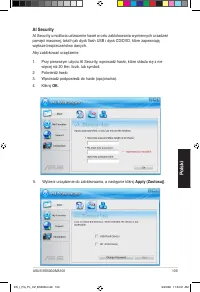
ASUS BS5000/M5100 7 English AI Security AI Security allows you to set passwords to lock your removable storage devices such as a USB flash disk and a CD/DVD disk, which ensures more security for your data.To lock a device: 1. If you are using AI Security for the first time, key in a password that co...
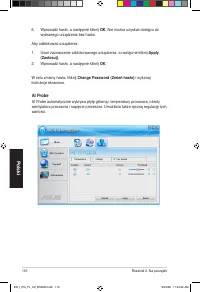
8 Chapter : Getting started English 6. Key in your password, then click OK . The device you selected cannot be accessed without the password. To unlock a device:1. Deselect the device you locked, then click Apply . . Key in your password, then click OK . To change your password, click Change Passwor...
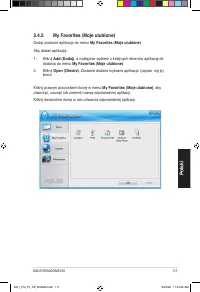
ASUS BS5000/M5100 9 English 2.4.5 My favorites Add your favorite applications to the My Favorites menu. To add an application:1. Click Add and then select from the succeeding screen the application you want to add to the My Favorites menu. . Click Open . The application you selected is added and its...
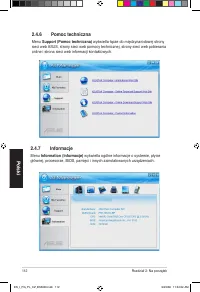
30 Chapter : Getting started English 2.4.6 Support The Support menu displays links to the ASUS international website, online technical support website, online download support website, and contact information website. 2.4.7 Information The Information menu displays the general information of your sy...
ASUS BS5000/M5100 31 English 2.6 Recovery CD (optional) The ASUS PC Recovery CD assists you in reinstalling the OS and restoring it to its original working state. Before using the recovery CD, copy your data files to a USB flash disk or to a network drive and make note of any customized configuratio...
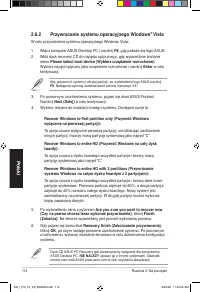
3 Chapter : Getting started English The ASUS PC Recovery CD is for ASUS Desktop PC only. DO NOT use it on other systems. Visit the ASUS website at www.asus.com for any updates. 2.6.2 Recovering a Windows ® Vista OS To recover a Windows Vista OS:1. Turn on your ASUS Desktop PC and press F8 when the A...
BS5000/M5100 ASUS Desktop PC Manuale Utente ® EN_I_PG_PL_CZ_BS5000.indb 34 9/5/08 11:3:47 AM
35 Italiano Copyright © 2008 ASUSTeK COMPUTER INC. Tutti i Diritti Riservati. Alcuna parte di questo manuale, compresi i prodotti e i software in esso descritti, può essere riprodotta,trasmessa, trascritta, archiviata in un sistema di recupero o tradotta in alcuna lingua, in alcuna forma e in alcun ...
36 Italiano Condizioni e Limiti di Copertura della Garanzia sul Prodotto Le condizioni di garanzia variano a seconda del tipo di prodotto e sono specificatamente indicate nel Certificato di Garanzia allegato, cui si fa espresso rinvio.Inoltre la presente garanzia non è valida in caso di danni o dife...
37 Italiano Licenza Software I prodotti ASUS possono essere corredati da software, secondo la tipologia del prodotto. I software, abbinati ai prodotti, sono in versione “OEM”: il software OEM viene concesso in licenza all’ utente finale, come parte integrante del prodotto; ciò significa che non può ...
38 Italiano Contatti ASUS ASUSTeK COMPUTER INC. Indirizzo 15 Li-Te Road, Peitou, Taipei, Taiwan 11259 Telefono +886--894-3447 Fax +886--890-7798 E-mail [email protected] Sito Web www.asus.com.tw Supporto Tecnico Telefono +86-1-3849911 Supporto Online support.asus.com ASUS COMPUTER INTERNATIONAL (Ame...
39 Italiano Comunicazioni Federal Communications Commission Statement This device complies with Part 15 of the FCC Rules. Operation is subject to the following two conditions:• This device may not cause harmful interference, and• This device must accept any interference received including interferen...
40 Italiano Avvertenza Batteria Ioni-Litio ATTENZIONE : Pericolo di esplosione se la batteria non è stata sostituita in modo corretto. Sostituire soltanto con un tipo uguale o equivalente a quello raccomandato dal produttore. Eliminare le batterie usate nel rispetto delle disposizioni del produttore...
41 Italiano Precauzioni Generali Prima di utilizzare ASUS BS5000/M5100 Desktop PC, leggere attentamente le precauzioni generali indicate di seguito. Un utilizzo non corretto potrebbe causare lesioni fisiche o danneggiare il prodotto. • Prima di utilizzare il prodotto, assicurarsi che tutti i compone...
4 Italiano Informazioni sul Manuale Come è organizzato il manuale Il manuale è suddiviso nelle seguenti parti: 1. Capitolo 1: Introduzione del Sistema Questo capitolo fornisce una descrizione generale del desktop PC ASUS BS5000/M5100 Desktop PC e delle caratteristiche del sistema, compreso il pannel...
43 Italiano Simboli Convenzionali Utilizzati nel Manuale Per essere sicuri di svolgere correttamente determinate operazioni, ricordare i seguenti simboli, ricorrenti nel manuale. AVVERTENZA: Informazioni per evitare di farsi male, nel tentativo di completare un’ operazione. ATTENZIONE: Informazioni ...
44 Italiano Contenuto della Confezione del Sistema Controllare che nella confezione del sistema ASUS BS5000/M5100 siano contenuti i seguenti articoli: Articoli Standard 1. ASUS BS5000/M5100 Desktop PC con • ASUS Desktop PC x 1 • Piedistallo x 1 • Mouse x 1 • Tastiera x 1 . Cavi • Cavo di alimentazio...
Capitolo 1 Introduzione del Sistema Questo capitolo fornisce una descrizione g e n e r a l e d e l d e s k t o p P C e d e l l e caratteristiche del sistema, compreso il pannello frontale e posteriore. EN_I_PG_PL_CZ_BS5000.indb 45 9/5/08 11:3:54 AM
1-46 Capitolo 1: Introduzione del Sistema Italiano 1.1 Pannello Frontale ASUS BS5000/M5100 Desktop PC comprende una scheda madre ASUS, un’ unità di alimentazione, un pannello frontale ed un pannello posteriore. Tutti questi componenti sono integrati in un’ elaborata intelaiatura del sistema, progett...
1-47 ASUS BS5000/M5100 Italiano 1.2 Pannello Posteriore Il pannello posteriore del sistema comprende una porta per l’ ingresso dell’ alimentazione e numerose porte I/O, che consentono di collegare facilmente vari dispositivi. L’ illustrazione sottostante mostra il pannello posteriore e i rispettivi ...
1-48 Capitolo 1: Introduzione del Sistema Italiano Configurazione Audio a 2, 4 o 6 Canali Porta Cuffie 2-canali 4-canali 6-canali Blu Chiaro Line In Uscita Altop. Posteriore Uscita Altop. Posteriore Lime Line Out Uscita Altop. Frontale Uscita Altop. Frontale Rosa Mic In Mic In Basso/Centrale 5. Port...
1-49 ASUS BS5000/M5100 Italiano 1.3 Opzioni di Posizionamento 1.3.1 Posizionamento Orizzontale Porre il desktop PC in senso orizzontale. 1.3.2 Posizionamento Verticale Installare il piedistallo fornito nella confezione del sistema e porre il desktop PC in senso verticale. Per installare il piedistal...
1-50 Capitolo 1: Introduzione del Sistema Italiano 1.4 Connessione con Tastiera e Mouse ASUS BS5000/M5100 Desktop PC è provvisto di una tastiera PS/2 e di un mouse USB. Collegare la tastiera PS/ all’ apposita porta sul pannello posteriore. Collegare il mouse alla porta USB sul pannello frontale o po...
Capitolo 2 Installazione e Utilizzo Questo capitolo illustra le modalità di accensione del sistema e di installazione di driver e utilità dal CD di Supporto. EN_I_PG_PL_CZ_BS5000.indb 51 9/5/08 11:33:14 AM
Português BS5000/M5100 ASUS Desktop PC Manual do utilizador ® EN_I_PG_PL_CZ_BS5000.indb 5 9/5/08 11:33:15 AM
54 Português Informação de Contactos ASUS ASUSTeK COMPUTER INC. Endereço 15 Li-Te Road, Peitou, Taipei, Taiwan 1159 Telefone +886--894-3447 Fax +886--890-7798 E-mail [email protected] Site Web www.asus.com.tw Assistência técnica Telefone +86-1-3849911 Assistência online support.asus.com ASUS COMPUTE...
56 Português Informação de Segurança Segurança eléctrica • Para evitar o perigo de electrocussão, desligue o cabo de alimentação da saída eléctrica, antes de mudar o sistema de lugar. • Quando adicionar ou remover quaisquer dispositivos ao/do sistema, contacte um técnico de serviço qualificado ou o ...
57 Português Precauções gerais Antes de utilizar o PC de Secretária ASUS Essentio ES5000/ES5000-P, leia cuidadosamente as precauções gerais descritas abaixo. O funcionamento impróprio pode causar lesões pessoais ou danos no produto. • Antes de utilizar o produto, certifique-se de que todos os compon...
58 Português Sobre este guia Como este guia é organizado Este guia contém as seguintes partes: 1. Capítulo 1: Introdução ao sistema Este capítulo dá uma descrição geral do ASUS Essentio PC de Secretária ES5000/ES5000-P. O capítulo enuncia as funcionalidades do sistema, incluindo a introdução aos pai...
59 Português Convenções usadas neste guia Para se certificar de que executa devidamente certas tarefas, anote os seguintes símbolos utilizados ao longo deste guia. AVISO: Informação que se destina a evitar que sofra lesões ao tentar concluir uma tarefa. CUIDADO: Informação que se destina a evitar qu...
60 Português Conteúdos do pacote de sistema Verifique se o seu pacote de sistema BS5000/M5100 contém os seguintes itens. Itens standard 1. PC de Secretária ASUS BS5000/M5100 com • 1 PC de Secretária ASUS • 1 Suporte • 1 Rato • 1 Teclado . Cabos • 1 Cabo de alimentação AC 3. Acessórios • 1 Adaptador ...
Capítulo 1 Introdução ao sistema Este capítulo dá uma descrição geral do PC de Secretária. O capítulo enuncia as funcionalidades do sistema, incluindo a introdução aos painéis frontal e traseiro. EN_I_PG_PL_CZ_BS5000.indb 61 9/5/08 11:33:1 AM
6 Capítulo 1: Introdução ao sistema Português 1.1 Painel frontal O PC de Secretária ASUS BS5000/M5100 inclui uma motherboard ASUS, uma unidade de alimentação eléctrica, um painel frontal e um painel traseiro. Todos estes componentes estão integrados num invólucro de sistema desenhado de forma elabor...
63 ASUS BS5000/M5100 Português 1.2 Painel traseiro O painel traseiro do sistema inclui a porta de entrada de energia e várias portas de entrada/saída que permitem a ligação conveniente de dispositivos.A ilustração abaixo mostra o painel traseiro e seus componentes. 1. Saídas de ar. Estas saídas perm...
64 Capítulo 1: Introdução ao sistema Português Configuração áudio de 2, 4 ou 6 canais Porta Auscultadores 2 canais 4 canais 6 canais Azul Claro Entrada de Linha Saída de Altifalante Traseiro Saída de Altifalante Traseiro Verde limão Saída de Linha Saída de Altifalante Frontal Saída de Altifalante Fr...
65 ASUS BS5000/M5100 Português 1.3 Opções de colocação 1.3.1 Colocação horizontal Coloque o seu PC de Secretária na horizontal. 1.3.2 Colocação vertical Instale o suporte fornecido no pacote de sistema. Coloque o seu PC de Secretária na vertical. Para instalar o suporte: 1. Localize o orifício do pa...
66 Capítulo 1: Introdução ao sistema Português 1.4 Ligar ao teclado e ao rato O PC de Secretária BS5000/M5100 está equipado com um teclado PS/ e um rato USB. Ligue o teclado PS/2 à porta do mesmo, situada no painel traseiro. Ligue o rato USB à porta USB, no painel traseiro ou no frontal. 1.5 Ligar a...
Capítulo 2 Primeiros passos Este capítulo ajuda-o a ligar o sistema e instalar controladores e utilitários a partir do CD de Apoio. EN_I_PG_PL_CZ_BS5000.indb 67 9/5/08 11:33:34 AM
68 Capítulo : Primeiros passos Português 2.1 Instalar um sistema operativo Esta motherboard suporta os sistemas operativos (SO) Windows ® XP / Vista. Instale sempre a última versão de SO e as actualizações correspondentes, para maximizar as funcionalidades do seu hardware. Quando arranca o sistema p...
ASUS BS5000/M5100 69 Português Se o Autorun (Execução automática) NÃO estiver activado no seu computador, pesquise nos conteúdos do DVD de Apoio para localizar o ficheiro ASSETUP. EXE a partir da pasta BIN. Dê um duplo clique em ASSETUP.EXE para executar o CD. Clique num item para instalar 2.3.1 Exe...
ASUS BS5000/M5100 71 Português 2.3.3 Menu Utilitários O menu Utilities (Utilitários) mostra as aplicações e outro software que a motherboard suporte. No menu, toque num item para instalar. ASUS InstAll - Assistente de Instalação para Utilitários Instala todos os utilitários através do Assistente de ...
ASUS BS5000/M5100 73 Português 2.3.6 Outras informações Os ícones no canto superior direito fornecem informação adicional sobre a motherboard e os conteúdos do CD de Apoio. Clique num ícone para mostrar a informação especificada. Pesquisar neste DVD Mostra os conteúdos do DVD de Apoio em formato grá...
74 Capítulo : Primeiros passos Português Formulário de assistência técnica Mostra o Formulário de Pedido de Assistência Técnica da ASUS, o qual terá de preencher quando solicitar assistência técnica. Lista de ficheiros Mostra os conteúdos do DVD de Apoio e uma breve descrição de cada um, em formato ...
ASUS BS5000/M5100 75 Português 2.4 ASUS AI Manager (Gestor AI ASUS) O ASUS AI Manager (Gestor AI ASUS) permite-lhe executar facilmente o AI Disk (Disco AI), o AI Security (Segurança AI) e o AI Probe (Teste AI). 2.4.1 Instalar o AI Manager (Gestor AI) Para instalar o AI Manager (Gestor AI) no seu com...
ASUS BS5000/M5100 79 Português 2.4.5 Os Meus Favoritos Adicione as suas aplicações preferidas ao menu My Favorites (Os Meus Favoritos) . Para adicionar uma aplicação:1. Clique em Add (Adicionar) e depois seleccione a partir do ecrã seguinte a aplicação que quer adicionar ao menu My Favorites (Os Meu...
80 Capítulo : Primeiros passos Português 2.4.6 Assistência O menu Support (Assistência) mostra hiperligações para o site internacional da ASUS, para o site de assistência técnica online, para o site de assistência a downloads online e para o site de informações de contacto. 2.4.7 Informações O menu ...
ASUS BS5000/M5100 81 Português 2.6 CD de Recuperação (opcional) O CD de Recuperação do PC ASUS ajuda-o a reinstalar o SO e a restaurá-lo para o seu estado de funcionamento original. Antes de utilizar o CD de Recuperação, copie os seus ficheiros de dados para uma memória portátil USB ou para uma unid...
85 Polski PL4030 Wydanie pierwsze V1Wrzesie�� 2008 �� 2008 008 Copyright © 2008 ASUSTeK COMPUTER INC. Wszelkie prawa zastrzeżone. Żadnej z części tego podręcznika, włącznie z opisem produktów i oprogramowania, nie można powielać, przenosić, przetwarzać, przechowywać w systemie odzyskiwania danych lu...
86 Polski Informacje kontaktowe ASUS ASUSTeK COMPUTER INC. Adres 15 Li-Te Road, Peitou, Taipei, Taiwan 1159 Telefon +886--894-3447 Faks +886--890-7798 E-mail [email protected] Strona sieci web www.asus.com.tw Pomoc techniczna Telefon +86-1-3849911 Pomoc online support.asus.com ASUS COMPUTER INTERNAT...
88 Polski Lithium-Ion Battery Warning CAUTION : Danger of explosion if battery is incorrectly replaced. Replace only with the same or equivalent type recommended by the manufacturer. Dispose of used batteries according to the manufacturer’s instructions. VORSICHT: Explosionsgetahr bei unsachgemäßen ...
89 Polski Ogólne środki ostrożności Przed użyciem komputera desktop PC ASUS BS5000/M5100 należy uważnie przeczytać ogólne, opisane poniżej środki ostrożności. Nieprawidłowe działanie może spowodować obrażenia ciała lub uszkodzenie produktu.• Przed użyciem tego produktu należy upewnić się,że prawidło...
90 Polski O tym podręczniku Sposób organizacji podręcznika Ten podręcznik zawiera następujące części: 1. Rozdział 1: Wprowadzenie do systemu Ten rozdział podaje ogólny opis ASUS Essentio Komputer desktop PC BS5000/M5100. Ten rozdział wymienia funkcje systemu, włącznie z omówieniem paneli przednich i...
91 Polski Konwencje stosowane w tej instrukcji Aby upewnić się, że określone działania wykonywane są prawidłowo należy uważać na następujące symbole, znajdujące się w tym podręczniku. OSTRZEŻENIE: Informacja o możliwości odniesienia obraże�� podczas wykonywania zadania. PRZESTROGA: Informacja o możl...
9 Polski Zawartość opakowania z systemem Sprawdź, czy opakowanie z systemem BS5000/M5100 zawiera następujące elementy . Standardowe elementy 1. Komputer dekstop PC ASUS BS5000/M5100 z • ASUS Desktop PC x 1 • Podstawka x 1 • Mysz x 1 • Klawiatura x 1 . Kable • Przewód zasilający prądu zmiennego x 1 3...
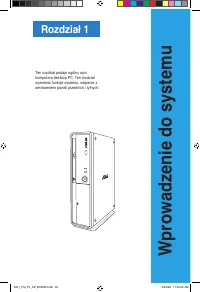
Rozdział 1 Wprowadzenie do systemu Ten rozdział podaje ogólny opis komputera desktop PC. Ten rozdział wymienia funkcje systemu, włącznie z omówieniem paneli przednich i tylnych. EN_I_PG_PL_CZ_BS5000.indb 93 9/5/08 11:33:54 AM
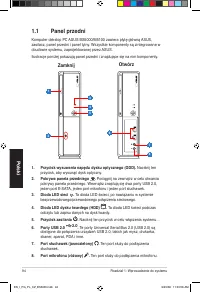
94 Rozdział 1: Wprowadzenie do systemu Polski 4 2 1 3 5 7 8 6 Zamknij Otwórz 1.1 Panel przedni Komputer dekstop PC ASUS BS5000/M5100 zawiera płytę główną ASUS, zasilacz, panel przedni i panel tylny. Wszystkie komponenty są zintegrowane w obudowie systemu, zaprojektowanej przez ASUS.Ilustracje poniże...
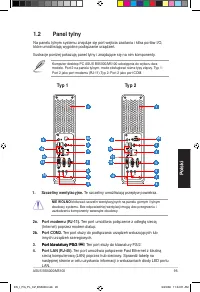
95 ASUS BS5000/M5100 Polski 3 1 2a 5 4 67 9 10 8 12 11 2a. Port modemu (RJ-11). Ten port umożliwia połączenie z odległą siecią (Internet) poprzez modem dialup. 2b. Port COM2. Ten port służy do podłączania urządze�� wskazujących lub innych urządze�� szeregowych. 3. Port klawiatury PS/2 Port klawiatur...
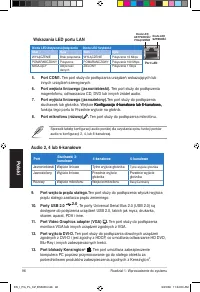
96 Rozdział 1: Wprowadzenie do systemu Polski 5. Port COM1. Ten port służy do podłączania urządze�� wskazujących lub innych urządze�� szeregowych. 6. Port wejścia liniowego (jasnoniebieski). Ten port służy do podłączenia magentofonu, odtwarzacza CD, DVD lub innych źródeł audio. 7. Port wyjścia linio...
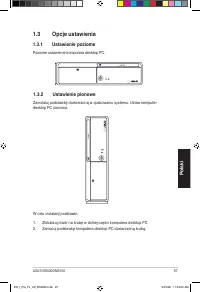
97 ASUS BS5000/M5100 Polski 1.3 Opcje ustawienia 1.3.1 Ustawienie poziome Poziome ustawienie komputera desktop PC. 1.3.2 Ustawienie pionowe Zainstaluj podstawkę dostarczoną w opakowaniu systemu. Ustaw komputer desktop PC pionowo. W celu instalacji podstawki: 1. Zlokalizuj otwór na śrubę w dolnej czę...
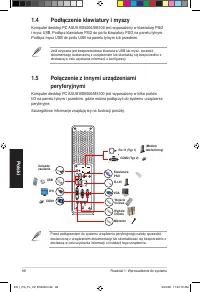
98 Rozdział 1: Wprowadzenie do systemu Polski Gniazdo zasilania USB VGA DVI Mikrofon Wyjście liniowe Wejście liniowe RJ-45 Klawiatura PS/2 COM1 RJ-11 (Typ 1) COM2 (Typ 2) (Modem telefoniczny) 1.4 Podłączenie klawiatury i myszy Komputer desktop PC ASUS BS5000/M5100 jest wyposażony w klawiaturę PS/2 i...
Rozdział 2 Na początek Ten rozdział pomaga we włączeniu zasilania systemu i instalacji sterowników oraz narzędzi z pomocniczego dysku CD. EN_I_PG_PL_CZ_BS5000.indb 99 9/5/08 11:34:11 AM
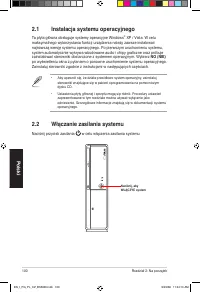
100 Rozdział 2: Na początek Polski Naciśnij, aby WŁĄCZYĆ system 2.1 Instalacja systemu operacyjnego Ta płyta główna obsługuje systemy operacyjne Windows ® XP / Vista. W celu maksymalnego wykorzystania funkcji urządzenia należy zawsze instalować najnowszą wersję systemu operacyjnego. Po pierwszym uru...
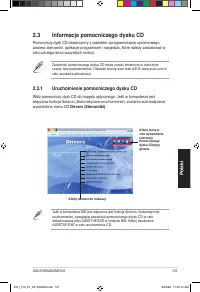
ASUS BS5000/M5100 101 Polski Kliknij element do instalacji Kliknij ikonę w celu wyświetlenia informacji Pomocniczego dysku CD/płyty główne 2.3.1 Uruchomienie pomocniczego dysku CD Włóż pomocniczy dysk CD do napędu optycznego. Jeśli w komputerze jest włączona funkcja Autorun (Automatyczne uruchomieni...
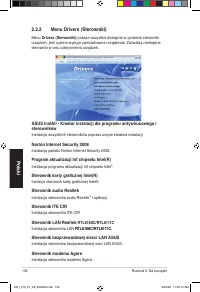
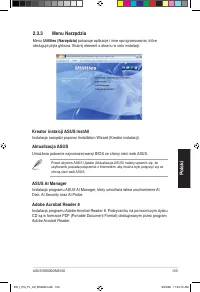
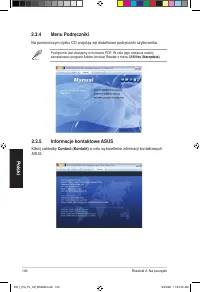
ASUS BS5000/M5100 103 Polski 2.3.3 Menu Narzędzia Menu Utilities (Narzędzia) pokazuje aplikacje i inne oprogramowanie, które obsługuje płyta główna. Stuknij element z ekranu w celu instalacji. Kreator instalcji ASUS InstAll Instalacja narzędzi poprzez Installation Wizard (Kreator instalacji). Aktual...
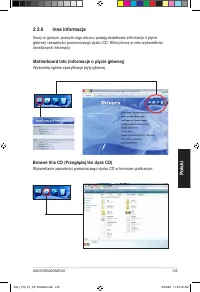
ASUS BS5000/M5100 105 Polski 2.3.6 Inne informacje Ikony w górnym, prawym rogu ekranu podają dodatkowe informacje o płycie głównej i zawartości pomocniczego dysku CD. Kliknij ikonę w celu wyświetlenia określonych informacji. Motherboard Info (Informacje o płycie głównej) Wyświetla ogólne specyfikacj...
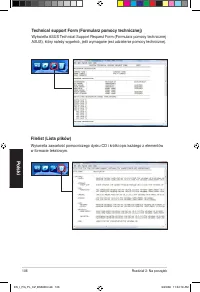
106 Rozdział 2: Na początek Polski Technical support Form (Formularz pomocy technicznej) Wyświetla ASUS Technical Support Request Form (Formularz pomocy technicznej ASUS), który należy wypełnić, jeśli wymagane jest udzielenie pomocy technicznej. Filelist (Lista plików) Wyświetla zawartość pomocnicze...
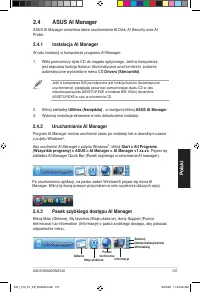
ASUS BS5000/M5100 107 Polski 2.4 ASUS AI Manager ASUS AI Manager umożliwia łatwe uruchomienie AI Disk, AI Security oraz AI Probe. 2.4.1 Instalacja AI Manager W celu instalacji w komputerze programu AI Manager:1. Włóż pomocniczy dysk CD do napędu optycznego. Jeśli w komputerze jest włączona funkcja A...
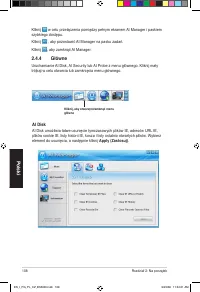
108 Rozdział 2: Na początek Polski Kliknij, aby otworzyć/zamknąć menu główne Kliknij w celu przełączenia pomiędzy pełnym ekranem AI Manager i paskiem szybkiego dostępu. Kliknij , aby pozostawić AI Manager na pasku zada��. Kliknij , aby zamknąć AI Manager. 2.4.4 Główne Uruchamianie AI Disk, AI Securi...
11 Rozdział 2: Na początek Polski 2.4.6 Pomoc techniczna Menu Support (Pomoc techniczna) wyświetla łącze do międzynarodowej strony sieci web ASUS, strony sieci web pomocy technicznej, strony sieci web pobierania online i strona sieci web informacji kontaktowych. 2.4.7 Informacje Menu Information (In...
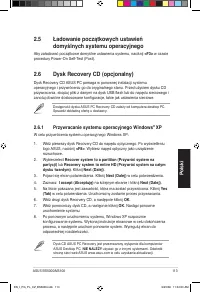
ASUS BS5000/M5100 113 Polski 2.6 Dysk Recovery CD (opcjonalny) Dysk Recovery CD ASUS PC pomaga w ponownej instalacji systemu operacyjnego i przywróceniu go do oryginalnego stanu. Przed użyciem dysku CD przywracania, skopiuj pliki z danymi na dysk USB flash lub do napędu sieciowego i zanotuj dowolne ...
BS5000/M5100 ASUS Desktop PC Uživatelská příručka ® EN_I_PG_PL_CZ_BS5000.indb 116 9/5/08 11:34:6 AM
117 Česky CZ4030První vydání V1 V1 Záři 2008 Copyright © 2008 ASUSTeK COMPUTER INC. Všechna práva vyhrazena. Bez výslovného písemného povolení firmy ASUSTeK COMPUTER INC. (“ASUS”) nesmí být žádná část této příručky včetně výrobků a softwaru v ní popsaných kopírována, přenášena, přepisována, ukládána...
118 Česky Kontaktní informace ASUS ASUSTeK COMPUTER INC. Adresa 15 Li-Te Road, Peitou, Taipei, Taiwan 1159 Telefon +886--894-3447 Fax +886--890-7798 E-mail [email protected] Web www.asus.com.tw Technická podpora Telefon +86-1-3849911 Online podpora support.asus.com ASUS COMPUTER INTERNATIONAL (Ameri...
10 Česky Lithium-Ion Battery Warning CAUTION : Danger of explosion if battery is incorrectly replaced. Replace only with the same or equivalent type recommended by the manufacturer. Dispose of used batteries according to the manufacturer’s instructions. VORSICHT: Explosionsgetahr bei unsachgemäßen A...
11 Česky Obecná bezpečnostní opatření Než začnete používat stolní PC ASUS BS5000/M5100, pečlivě si přečtěte níže uvedená obecná bezpečnostní opatření. Nevhodné použití může vést k poranění nebo poškození výrobku.• Před použitím výrobku zkontrolujte, zda jsou všechny součástky správně nainstalované a...
1 Česky O této příručce Jak je tato příručka uspořádána Tato příručka obsahuje následující části: 1. Kapitola 1: Představení systému Tato kapitola poskytuje obecný popis stolního počítače ASUS BS5000/ M5100. Tato kapitola obsahuje seznam vlastností systému, včetně představení jeho předního a zadního...
13 Česky Konvence, použité v této příručce Abyste provedli určité úkoly správně, všimněte si následujících symbolů, používaných v této příručce. VAROVÁNÍ: Informace, které zabrání vašemu zranění, když se snažíte dokončit úkol. VÝSTRAHA: Informace, které zabrání poškození součástek, když se snažíte d...
14 Česky Obsah systémového balení Zkontrolujte, zda vaše systémové balení BS5000/M5100 obsahuje následující položky. Standardní položky 1. Stolní počítač ASUS BS5000/M5100 a • Stolní počítač ASUS x 1 • Stojan x 1 • Myš x 1 • Klávesnice x 1 . Kabely • Napájecí kabel x 1 3. Příslušenství • Napájecí ad...
Kapitola 1 Představení systému Tato kapitola poskytuje obecný popis stolního počítače. Tato kapitola obsahuje seznam vlastností systému, včetně představení jeho předního a zadního panelu (stěny). EN_I_PG_PL_CZ_BS5000.indb 15 9/5/08 11:34:31 AM
16 Kapitola 1: Představení systému Česky 4 2 1 3 5 7 8 6 Zavřeno Otevřeno 1. Tlačítko pro vysunutí optické jednotky (ODD). Stisknutím tohoto tlačítka vysunete optickou jednotku. 2. Kryt předního panelu . Kryt předního panelu otevřete tahem směrem ven. Uvnitř jsou dva porty USB 2.0, jeden port E-SATA...
17 ASUS BS5000/M5100 Česky 3 1 2a 5 4 67 9 10 8 12 11 2a. Port LAN (RJ-11). Tento port slouží k připojení k místní síti (LAN) prostřednictvím telefonického modemu. 2b. Port COM2. Tento port je určen pro polohovací zařízení nebo jiná sériová zařízení. 3. Port klávesnice PS/2 . Tento port je pro kláve...
18 Kapitola 1: Představení systému Česky 5. Port COM1. T ento port je určen pro polohovací zařízení nebo jiná sériová zařízení. 6. Port Line In (světle modrý). Tento port připojí magnetofon, CD přehrávač, DVD přehrávač, nebo jiné audio zdroje. 7. Port Line Out (citrónově žlutý). Tento port slouží k ...
19 ASUS BS5000/M5100 Česky 1.3 Možnosti umístění 1.3.1 Vodorovné umístění Položte svůj stolní počítač vodorovně. 1.3.2 Svislé umístění Nainstalujte podstavec, dodaný v systémovém balení. Položte svůj stolní počítač svisle. Jak instalovat stojan: 1. Najděte otvor pro šroub na spodní straně vašeho poč...
130 Kapitola 1: Představení systému Česky Napájecí jack USB VGA DVI Mikrofon Line Out Line In RJ-45 PS/2 klávesnice COM1 RJ-11 (Typ 1) COM2 (Typ 2) Telefonický modem 1.4 Připojení klávesnice a myši Stolní počítač ASUS Essentio ES5000/ES5000-P se dodává s PS/2 klávesnicí a USB myší. Připojte PS/2 klá...
Kapitola 2 Začínáme Tato kapitola vám pomůže se zapnutím systému a s instalaci ovladačů a nástrojů z podpůrného CD. EN_I_PG_PL_CZ_BS5000.indb 131 9/5/08 11:34:49 AM
13 Kapitola 2: Začínáme Česky Stiskem tohoto tlačítka zapnete systém. 2.1 Instalace operačního systému Tato základní deska podporuje operační systémy (OS) Windows® XP / Vista. Vždy nainstalujte nejnovější verzi OS a příslušné aktualizace, abyste maximalizovali funkce vašeho hardwaru. Když systém pop...
ASUS BS5000/M5100 133 Česky Klepnutím na ikonu provedete instalaci Klepnutím na ikonu zobrazíte Podpůrné CD/ základní deska 2.3.1 Spuštění Podpůrného CD Vložte Podpůrné CD do optické jednotky. CD automaticky zobrazí nabídku Drivers (Ovladače) , pokud je na vašem počítači povoleno automatické spouště...
134 Kapitola 2: Začínáme Česky ASUS InstAll - Průvodce instalací antivirového programu a ovladačů Nainstaluje všechny ovladače pomocí průvodce instalací. Norton Internet Security 2008 Nainstaluje aplikaci Norton Internet Security 008. Aktualizační program Intel(R) Chipset Inf Instaluje aktualizační ...
ASUS BS5000/M5100 135 Česky 2.3.3 Nabídka Nástroje Nabídka Utilities (Nástroje) zobrazuje aplikace a ostatní software, který základní deska podporuje. Klepnutím na položku na obrazovce spustíte instalaci. ASUS InstAll – Instalační průvodce pro Nástroje Instaluje všechny nástroje pomocí Instalačního ...
ASUS BS5000/M5100 137 Česky 2.3.6 Jiné informace Ikony vpravo nahoře na obrazovce vám poskytnou další informace o základní desce a obsahu Podpůrného CD. Klepnutím na dané ikoně zobrazíte konkrétní informace. Info o základní desce Zobrazí obecné technické údaje pro základní desku. Procházet toto CD Z...
138 Kapitola 2: Začínáme Česky Formulář pro technickou podporu Zobrazí žádanku o technickou podporu ASUS, kterou musíte vyplnit, když žádáte o technickou podporu. Seznam souborů Zobrazí obsah Podpůrného CD a stručný popis každé položky v textovém formátu. EN_I_PG_PL_CZ_BS5000.indb 138 9/5/08 11:34:5...
ASUS BS5000/M5100 139 Česky 2.4 ASUS AI Manager ASUS AI Manager vám umožňuje snadno spustit AI Disk, AI Security, a AI Probe. 2.4.1 Instalace aplikace AI Manager Jak nainstalovat aplikaci AI Manager do vašeho počítače.1. Vložte Podpůrné CD do optické jednotky. CD automaticky zobrazí nabídku Drivers ...
144 Kapitola 2: Začínáme Česky 2.4.6 Podpora Nabídka Support (Podpora) zobrazuje odkazy na mezinárodní web firmy ASUS, web online technické podpory, web podpory online stahování, a web s kontaktními informacemi. 2.4.7 Informace Nabídka Information (Informace) zobrazuje obecné informace o vašem systé...
ASUS BS5000/M5100 145 Česky 2.6 Obnovovací CD (volitelné) Obnovovací CD počítače ASUS vám pomůže s reinstalací operačního systému a s jeho vrácením do původního, funkčního stavu. Než použijete Obnovovací CD, zkopírujte své datové soubory na USB flash disk nebo na síťový disk a poznačte si jakákoliv ...
Asus Manuals
-
Asus 1001P-MU17-WT
User Manual
-
Asus 1001P-MU17-WT
Manual
-
Asus 1 E1309
User Manual
-
Asus 1 E1309
Manual
-
Asus 1015E
User Manual
-
Asus 1064E - PIKE Storage Controller SAS
User Manual
-
Asus 136-480A
User Manual
-
Asus 136-480A
Manual
-
Asus 1225 Series
User Manual
-
Asus 13VH192C
Manual
-
Asus 136-485A
User Manual
-
Asus 136-485A
Manual
-
Asus 1U
User Manual
-
Asus 1U Rackmount Barebone Server RS120-E3 (PA4)
User Manual
-
Asus 1U Rackmount Barebone Server RS160-E3/PS4
User Manual
-
Asus 200/266 MHZ FSB AGP 4X
User Manual
-
Asus 200/266 MHZ FSB AGP 4X
Manual
-
Asus 1U Rackmount Chassis Kit R10-A2P4
User Manual
-
Asus 24T1E
User Manual
-
Asus 22T1E
User Manual