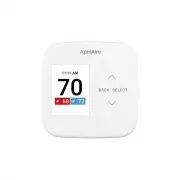
Page 3 - QUICK REFERENCE TO CONTROLS & DISPLAY; HOME SCREEN; AWAY; MAIN MENU; Mode
QUICK REFERENCE TO CONTROLS & DISPLAY HOME SCREEN 70 72 HEATING AWAY UP ARROW BACK EQUIPMENT STATUS SELECT (OPENS MENU FROM HOME SCREEN) ROOM TEMPERATURE DOWN ARROW ROOM TEMPERATURE SETTING EVENT STATUS MAIN MENU Main Menu Mode Fan Schedule Hold Heat Blast Main Menu ModeFan Schedule Hold Heat Bl...
Page 5 - OPERATION
OPERATION SELECT SYSTEM MODE (EM HEAT / HEAT / COOL / AUTO / OFF) 1. Press SELECT to enter Main Menu 2. Use or to select the Mode option 3. Press SELECT to enter Mode menu: 4. Use or to select the desired mode Heat: Thermostat controls only the heating system Cool: Thermostat controls only the cooli...
Page 7 - INDOOR AIR QUALITY FUNCTIONS
INDOOR AIR QUALITY FUNCTIONS EVENT-BASED™ AIR CLEANING (IF INSTALLED) 1. Select Air Cleaning from the Main Menu Air Cleaning has two temporary events and three persistent modes that can be set Air cleaning will activate the fan for the purpose of air cleaning 2. Events (temporary) 3 Hrs: When select...
Page 9 - Outdoor Temperature
SELECT to Save 55% RH RH Settings DEHUMIDIFIER CONTROL (IF INSTALLED) The thermostat can be configured, through the installer set-up, to control dehumidification with either a whole home dehumidifier or with the air conditioner (cooling unit). The thermostat will allow you to set the desired humidit...
Page 11 - PROGRAM SCHEDULE AND HOLDS
Ventilation has two temporary events and two permanent modes that can be set 3. Events (temporary) 3 Hours: Ventilation will be constantly energized for 3 hours and then the fresh air mode will return to Auto or Off depending on which mode was most recently active This option is used when fresh air ...
Page 13 - Modify
HOW TO MODIFY PROGRAM SCHEDULES 1. From the Schedule option in the Main Menu , you can turn the schedule on or off, and make changes to the schedule Modify: The event start time, temperature, fan mode, and controlling sensor (if installed) can be adjusted for each event of each day On/Off: When the ...
Page 15 - WI-FI MAINTENANCE AND TROUBLESHOOTING
DISABLING THE WI-FI RADIO To turn off the Wi-Fi radio on the thermostat, enter the Advanced Wi-Fi Settings menu (Menu > Settings > Wi-Fi > Advanced > Wi-Fi ON/OFF) Then select OFF and press SELECT This will turn off the Wi-Fi radio, but maintain all network settings. To turn the Wi-Fi ra...
Page 16 - SETUP MENU; TABLE 3; – USER SYSTEM SETTINGS TABLE; LIMITED WARRANTY; WARRANTY REGISTRATION
SETUP MENU TABLE 3 – USER SYSTEM SETTINGS TABLE WiFi WiFi connection mode, connection status, and advanced connection settings. Clock Set time (Automatically updates when connected to internet) Date Set date (Automatically updates when connected to internet) Display Display can be disabled during sl...
Page 17 - FCC AND ISED COMPLIANCE STATEMENTS
B2208825B • 61001877 • 1.22© 2022 AprilAire | aprilaire.com | 800.334.6011 U.S. Patent Numbers 8,146,376, 8,596,078, 9,874,366 and other patents pending. AprilAire reserves the right to change specifications without notice. FCC AND ISED COMPLIANCE STATEMENTS Contains FCC ID: TFB-1003 and QOQGM210PCo...