Page 2 - Deutsch; Inhalt; Français; Sommaire; Español; Indice; Indice; English; Contents
Inhalt 2 Deutsch Inhalt Übersicht der Bedienelemente ....................................... Seite 3Bedienungsanleitung ........................................................ Seite 4Technische Daten ............................................................... Seite 9Garantie ......................
Page 3 - Übersicht der Bedienelemente
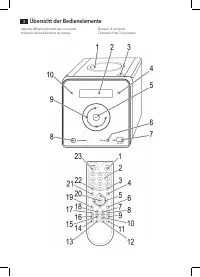
Liste des différents éléments de commande Indicación de los elementos de manejo Elementi di comando Overview of the Components Übersicht der Bedienelemente 3
Page 4 - Bedienungsanleitung; Allgemeine Sicherheitshinweise
Deutsch 4 Bedienungsanleitung Vielen Dank, dass Sie sich für unser Produkt entschieden haben. Wir wünschen Ihnen viel Freude mit dem Gerät. Symbole in dieser Bedienungsanleitung Wichtige Hinweise für Ihre Sicherheit sind besonders gekenn-zeichnet. Beachten Sie diese Hinweise unbedingt, um Unfälle un...
Page 5 - Spezielle Sicherheitshinweise; Bestimmungsgemäßer Gebrauch
Deutsch 5 Anweisungen, wie das Gerät zu benutzen ist. • Kinder sollten beaufsichtigt werden, um sicherzustellen, dass sie nicht mit dem Gerät spielen. Spezielle Sicherheitshinweise Dieses Gerät arbeitet mit einem Laser der Klasse 1. Übersicht der Bedienelemente 1 CD-Fach2 Display3 PUSH (drücken) CD-...
Page 6 - Allgemeine Bedienung
Deutsch 6 WARNUNG: Setzen Sie Batterien keiner hohen Wärme, wie z.B. Sonnen-schein, Feuer oder ähnlichem aus. Es besteht Explosions- gefahr! ACHTUNG: • Batterien können auslaufen und Batteriesäure verlieren. Wird die Fernbedienung längere Zeit nicht genutzt, entnehmen Sie die Batterien. • Ungleiche ...
Page 7 - Beschreibung der CD Tasten

Deutsch 7 Automatischer Sendersuchlauf Halten Sie die AUTO/STOP Taste (9) kurz gedrückt. Der gesamte Frequenzbereich wird dabei automatisch nach Sendern durchsucht. Die gefundenen Sender werden dabei in aufsteigender Reihenfolge auf den Speicherplätzen 1-30 gespeichert. HINWEIS: Eine nachträgliche Ä...
Page 8 - Programmierte Wiedergabe; Anschluss externer Geräte
Deutsch 8 INTRO (16) (INTRO erscheint im Display) Jeder Titel der CD wird jeweils 10 Sekunden lang angespielt. ALB+ oder ALB- (4/21) Drücken Sie diese Tasten während der Wiedergabe, um einen Ordner nach oben bzw. unten zu wechseln. Wird die Taste im Stopp-Modus gedrückt, erscheint ebenfalls kurz die...
Page 9 - Reinigung und Pflege; Technische Daten
Deutsch 9 ACHTUNG: Bevor Sie das USB Speichermedium entfernen, schalten Sie das Gerät mit der SOURCE Taste auf RADIO oder CD. AUX IN Buchse (6) Zum Anschluss von analogen Wiedergabegeräte. Über diese Buchse können Sie auch den Ton anderer Wiedergabegeräte wie MP3-Player, CD-Player usw. über die Laut...
Page 10 - Entsorgung
Deutsch 10 Geräts beruhen. Garantieansprüche sind ferner ausge-schlossen für leicht zerbrechliche Teile, wie zum Beispiel Glas oder Kunststoff. Schließlich sind Garantieansprüche ausgeschlossen, wenn nicht von uns autorisierte Stellen Arbeiten an dem Gerät vornehmen. 5. Durch Garantieleistungen wird...
Page 11 - Mode d’emploi; Conseils généraux de sécurité
Français 11 Mode d’emploi Merci d’avoir choisi notre produit. Nous espérons que vous saurez profiter votre appareil. Symboles de ce mode d’emploi Les informations importantes pour votre sécurité sont particu-lièrement indiquées. Veillez à bien respecter ces indications afin d’éviter tout risque d’ac...
Page 12 - Consignes de sécurité spéciales; Utilisation conforme
Français 12 • Les enfants doivent être surveillés afin de garantir qu’ils ne jouent pas avec l’appareil. Consignes de sécurité spéciales Cet appareil fonctionne avec un laser classe 1. Liste des différents éléments de commande 1 Compartiment à CD2 Écran3 PUSH (appuyer) pour ouvrir le tiroir à CD 4 I...
Page 13 - Conseils généraux d’utilisation
Français 13 ATTENTION : • Ne mélangez pas différents types de batteries, ou bien des batteries neuves avec des batteries usagées. • Ne jetez pas les batteries usagées avec les déchets ménagers. Veuillez les remettre à un point de collecte agrée ou bien les rapporter au revendeur. Sécurité de transpo...
Page 14 - Description des touches à CD
Français 14 NOTE : La séquence ne peut pas être changée ultérieurement. Les stations de radio préréglées seront perdues. Lecture de CD/MP3 Pour écouter un disque 1. Appuyez sur le bouton SOURCE (8) jusqu’à ce que le dISC apparaisse sur l’écran. Sinon, appuyez également sur le bouton CD (17) pour sél...
Page 15 - Programmation de la lecture; Connexion des appareils externes
Français 15 10+ (3) Sert à entrer directement un numéro de titre. • Appuyez une fois sur le bouton, les titres au-dessus de 10 peuvent être entrés. 01- s‘affiche. • Si un CD ou un dispositif de stockage USB contient plus de 19 titres, l’option d’entrée augmente de 10 titres à chaque fois que vous ap...
Page 16 - Nettoyage et entretien; En cas de problèmes; Données techniques; Élimination
Français 16 3. Vous pouvez entendre le son à partir de l’appareil externe via les haut-parleurs. Vous pouvez utiliser les boutons VOL+/VOL- (5) pour régler le volume. Les touches du CD ne sont plus actives. 4. Pour les autres fonctions, veuillez consulter le manuel de l’utilisateur de l’appareil aud...
Page 17 - Instrucciones de servicio; Indicaciones generales de seguridad
Español 17 Instrucciones de servicio Le agradecemos la confianza depositada en este producto y esperamos que disfrute de su uso. Símbolos en este manual de instrucciones Advertencias importantes para su seguridad están señaladas en especial. Siga estas advertencias incondicionalmente, para evitar ac...
Page 18 - Advertencias de seguridad especiales
Español 18 Advertencias de seguridad especiales Este aparato trabaja con un láser de la clase 1. Indicación de los elementos de manejo 1 Compartimento de CD2 Visualizador 3 PUSH (empujar) abrir bandeja de CD 4 IR Sensor para el mando a distancia 5 Botón (Reproducción/Pausa) 6 Conexión AUX IN 7 Conex...
Page 19 - Utilización general
Español 19 ATENCIÓN: • Las pilas pueden tener fugas y perder el ácido. Si no se utiliza el mando a distancia durante periodos prolonga-dos de tiempo, retire las pilas. • No mezcle distintos tipos de batería ni baterías nuevas y usadas. • No deseche las baterías con los residuos domésticos. Entréguel...
Page 20 - Tocar Compact Disks/MP3; Descripción de las teclas CD
Español 20 Tocar Compact Disks/MP3 Manera de reproducir un CD 1. Pulse el botón SOURCE (8) hasta que se muestre dISC en la pantalla. Alternativamente puede pulsar el botón CD (17) para seleccionar el modo CD. 2. Oprima el botón PUSH (3) para abrir el compartimien- to del CD (1). 3. Introduzca un dis...
Page 21 - Reproducción programada; Conexión de dispositivos externos
Español 21 • Si tiene más de 19 títulos en un CD o dispositivo USB, puede aumentar la opción de introducción en 10 títulos cada vez que pulse el botón. Aparecerá 02-, etc. en pantalla. Reproducción programada Permite la programación de una sucesión de títulos al azar. (Solamente para funcionamiento ...
Page 22 - Limpieza y conservación; Datos técnicos
Español 22 NOTA: Ponga el volumen del dispositivo externo a un nivel de audición adecuado. Limpieza y conservación AVISO: No sumerja la unidad en agua. • Antes de la limpieza, debe desenchufar el aparato.• Las manchas exteriores pueden limpiarse con un paño ligeramente húmedo, sin detergente adicion...
Page 23 - Istruzioni per l’uso; Norme di sicurezza generali; Avvertenze speciali per la sicurezza
Italiano 23 Istruzioni per l’uso Grazie per aver scelto il nostro prodotto. Vi auguriamo un buon utilizzo del dispositivo. Simboli per questo manuale di istruzioni per l’ uso Le indicazioni importanti per la propria sicurezza sono indicati appropriatamente. Osservare assolutamente queste indica-zion...
Page 24 - Elementi di comando
Italiano 24 Elementi di comando 1 Vano CD2 Visore 3 PUSH (Spingi) per aprire il vassoio CD 4 IR Sensore per il telecomando 5 Tasto (riproduzione/pausa) 6 Connessione AUX 7 Collegamento USB8 Tasto STANDBY (acceso/standby) 9 Tasti VOL+/VOL- (aumento/diminuzione del volume) / Tasti (traccia successiva/...
Page 25 - Uso generale
Italiano 25 Uso generale NOTA: • Alcuni tasti si trovano sia sull’apparecchio che sul telecomando. I tasti uguali si riferiscono alla medesima funzione. • L’utilizzo dell’unità è descritto dai tasti del telecoman - do. Telecomando a infrarossi Per il controllo wireless ad una distanza di ca. 4 metri...
Page 26 - Descrizione dei tasti CD; Ripetizione programmata
Italiano 26 Per un file MP3-CD: Il numero di file e trace viene visua- lizzato. 4. La lettura del CD inizierà dalla prima traccia. La traccia corrente o MP3 e il tempo di riproduzione trascorso viene visualizzato sul display. 5. Per estrarre un CD azionare il tasto AUTO/STOP (9) aprire il vano CD e ...
Page 27 - Riproduzione di musica in formato MP3; Connessione di dispositivi esterni; Pulizia e cura
Italiano 27 NOTA: • È anche possibile immettere direttamente i brani. Inserire la traccia desiderata con i tasti numerici del telecomando. • Quando la capacità di archiviazione delle tracce deve essere programmata è stata raggiunta, il messaggio “FULL” compare sul display. 3. Con il tasto / selezion...
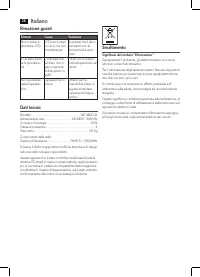
Page 28 - Rimozione guasti; Dati tecnici
Italiano 28 Rimozione guasti Sintomi Causa Soluzione Non si riesce a riprodurre il CD. Il CD non è inseri-to o lo è, ma non correttamente. Accertarsi che il disco sia inserito con la dicitura rivolta verso l’alto. Il CD salta duran-te la riproduzio-ne. Controllare che sul disco non ci siano impronte...
Page 29 - Instruction Manual; General Safety Instructions; Special safety information
English 29 Instruction Manual Thank you for choosing our product. We hope you will enjoy using the appliance. Symbols in these Instructions for Use Important information for your safety is specially marked. It is essential to comply with these instructions in order to avoid accidents and prevent dam...
Page 30 - Overview of the Components
English 30 Overview of the Components 1 CD compartment2 Display3 PUSH (push) open CD tray 4 IR Sensor for the remote control 5 (Play/Pause) button 6 AUX connection 7 USB connection8 STANDBY button (on/standby) 9 VOL+/VOL- buttons (Increase/decrease volume) b / (next/previous track) uttons 10 Control...
Page 31 - General Operation
English 31 • Remove the transport protection from the CD player if present before use. General Operation NOTE: • Some buttons are to be found both on the device itself and on the remote control. Buttons with the same designation have the same function. • Operation of the unit is described by the but...
Page 32 - Description of the CD buttons; Programmed Play
English 32 For an MP3-CD/file: The number of files and titles are then shown. 4. The CD will play from the first title. The current track, or MP3 and the elapsed playing time are shown on the display. 5. In order to remove a CD, please press the AUTO/STOP button (9), open the CD compartment and lift...
Page 33 - Playing back Music in MP3 Format; Connection of external devices; Cleaning and Maintenance
English 33 NOTE: • You can also directly enter the titles. Enter the de - sired title with the numeric buttons on the remote control. • When the storage capacity of the titles to be pro - grammed has been reached, the message “FULL” will appear on the display. 3. Select the next track with the / but...
Page 34 - Troubleshooting; Technical Data
English 34 Troubleshooting Symptoms Course Solution CD can not be played back. CD is not inserted or inserted incor-rectly. Ensure that the disc is inserted with the label facing upwards. CD jumps during playback. Check the disc for fingerprints, dirt or scratches. Check the disc for fingerprints, d...