Page 2 - Inhalt
Deutsch Inhalt Übersicht der Bedienelemente ...... Seite 3 Bedienungsanleitung ....................... Seite 4 Technische Daten .............................. Seite 11 Garantie ............................................... Seite 11 Entsorgung ......................................... Seite 12 Nede...
Page 3 - Übersicht der Bedienelemente
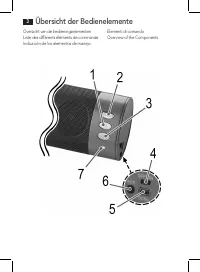
Overzicht van de bedieningselementenListe des différents éléments de commandeIndicación de los elementos de manejo Elementi di comandoOverview of the Components Übersicht der Bedienelemente 3
Page 4 - Deutsch; Bedienungsanleitung; Symbole in dieser Bedienungsanleitung; Sicherheitshinweise
Deutsch 4 Bedienungsanleitung Vielen Dank, dass Sie sich für unser Produkt entschieden haben. Wir wünschen Ihnen viel Freude mit dem Gerät. Symbole in dieser Bedienungsanleitung Wichtige Hinweise für Ihre Sicherheit sind besonders gekennzeichnet. Beachten Sie diese Hinweise unbedingt, um Unfälle und...
Page 5 - Kinder und gebrechliche Personen; Erstickungsgefahr; Spezielle Sicherheitshinweise für dieses Gerät; Rückseite; Lieferumfang
Deutsch 5 untersucht werden. Wird eine Beschädigung festgestellt, darf das Gerät nicht mehr benutzt werden. • Reparieren Sie das Gerät nicht selbst, sondern suchen Sie einen autorisierten Fach - mann auf. Kinder und gebrechliche Personen Zur Sicherheit Ihrer Kinder lassen Sie keine Verpackungsteile ...
Page 6 - Vor der Erstbenutzung; Eingebauten Akku aufladen; Standort
Deutsch 6 Vor der Erstbenutzung 1. Vor dem ersten Gebrauch muss der Akku des Gerätes aufgeladen werden. Gehen Sie hierfür vor, wie unter „ Eingebauten Akku aufladen “ beschrieben. Eingebauten Akku aufladen Das Gerät wird über den integrierten Lithium-Akku betrieben. Um den Akku aufzuladen, gehen Sie...
Page 7 - Kabelgebunden
Deutsch 7 Kabelgebunden 1. Verbinden Sie das 3,5mm Stereo-Klinkensteckerkabel mit einer externen Audioquelle. Verwenden Sie ggf. einen entsprechenden Adapter (nicht im Lieferumfang enthalten). 2. Stecken Sie das andere Ende des Kabels in die AUX Buchse (6) am Gerät.3. Schalten Sie den Lautsprecher e...
Page 8 - Bedienung; HINWEIS: Automatische Verbindung
Deutsch 8 3. Wählen Sie in Ihrem Abspielgeräte das Bluetooth Menü und melden Sie das Gerät in Ihrem Abspielgerät an. Beachten Sie hierfür die Bedienungsanleitung Ihres Abspielgerätes. Als Auswahl erscheint das Gerät „AEG LB 4713“ in Ihrem Abspiel-gerät. 4. Je nach Gerätehersteller, Modelle und Softw...
Page 10 - Wartung und Reinigung; Störungsbehebung; Symptome
Deutsch 10 Wartung und Reinigung ACHTUNG: Tauchen Sie das Gerät nicht ins Wasser! • Im Innern dieses Gerätes befinden sich keine vom Benutzer zu wartenden Teile.• Reinigen Sie den Lautsprecher mit einem leicht feuchten Tuch ohne Zusatzmittel. Störungsbehebung Symptome Mögliche Ursache Lösung Lautspr...
Page 11 - Technische Daten; Bluetooth; Hinweis zur Richtlinienkonformität
Deutsch 11 Technische Daten Modell: .................................................................................................................................. LB 4713 BTAudioanschluss: .................................................................................3,5 mm Stereo-Klinkensteck...
Page 12 - Service; SLI; Entsorgung; Batterieentsorgung
Deutsch 12 Service Im Service-/Garantiefall wenden Sie sich bitte an unseren Dienstleister SLI ( S ervice L ogistik I nternational) Internet-Serviceportal: www.sli24.de Sie können sich dort direkt anmelden und erhalten alle Informationen zur weiteren Vorge- hensweise Ihrer Reklamation. Über einen pe...
Page 13 - Nederlands; Gebruiksaanwijzing; Symbolen in deze bedieningshandleiding; Veiligheidsinstructies
Nederlands 13 Gebruiksaanwijzing Dank u voor het kiezen van ons product. We hopen dat u veel plezier aan het gebruik van het apparaat zult beleven. Symbolen in deze bedieningshandleiding Belangrijke aanwijzingen voor uw veiligheid zijn speciaal gekenmerkt. Neem deze aanwij-zingen strikt in acht om o...
Page 14 - Kinderen en gebrekkige personen; gevaar voor verstikking!; Speciale veiligheidsmaatregelen voor dit systeem; Overzicht van de bedieningselementen; Terug; Meegeleverde onderdelen
Nederlands 14 materiaalmoeheid. Als er schade wordt ontdekt mag het apparaat niet langer worden gebruikt. • Repareer het apparaat niet zelf, maar neem contact op met een geautoriseerde speci - alist. Kinderen en gebrekkige personen Laat om veiligheidsredenen geen verpakkingsdelen (plasticzak, doos, ...
Page 15 - Voor het eerste gebruik; Opladen Ingebouwde Batterij; Lokatie; Gebruik
Nederlands 15 Voor het eerste gebruik 1. Laad voor het eerste gebruik de batterij op. Voor details zie hoofdstuk “ Opladen Ingebouwde Batterij ”. Opladen Ingebouwde Batterij De speler wordt van stroom voorzien middels een ingebouwde oplaadbare lithium bat-terij. Laad de batterij als volgt op:1. Slui...
Page 16 - Via een kabel
Nederlands 16 Via een kabel 1. Sluit de 3,5 mm stereo RCA kabel aan op een externe geluidsbron. Gebruik indien nodig een geschikte adapter (niet meegeleverd). 2. Sluit het andere einde van de kabel aan op de AUX aansluiting (6) van het apparaat.3. Schakel de luidspreker in door de ON/OFF-schakelaar ...
Page 17 - OPMERKING: Automatische verbinding
Nederlands 17 4. Geef nu het wachtwoord “0000” in op uw speler, hoe, is afhankelijk van de fabri- kant, het model en de softwareversie van het apparaat. Als de apparaten succesvol gepaired zijn gaat het indicatielampje kort snel knipperen, en daarna langzaam. OPMERKING: • Afhankelijk van de fabrikan...
Page 18 - Onderhoud en Reiniging
Nederlands 18 OPMERKING: Schakel de luidspreker uit als u deze niet gebruikt, om de batterij te sparen. Pauze (1) • Druk kort op deze toets om het afspelen te pauzeren. • Druk de toets opnieuw in om verder te spelen. OPMERKING: Afhankelijk van de fabrikant, het model en de software versie van het ap...
Page 19 - Probleemoplossing; Symptomen; Technische gegevens
Nederlands 19 Probleemoplossing Symptomen Mogelijke oorzaak Oplossing Kan de luidspreker niet inschakelen Batterije leeg Laad de batterij op ( Pagina 15 ) Audiokabel is aangesloten Haal de kabel los. Geen audiosignaal tijdens een Bluetooth verbinding Luidspreker is uitgeschakeld Schakel de luidsprek...
Page 20 - Verwijdering; Batterijen verwijdering; Mileubescherming
Nederlands 20 Bluetooth Bluetooth ondersteuning: ................................................................................................ V 2.0 + EDR Bereik: .........................................................................................................................................
Page 21 - Français; Mode d’emploi; Symboles de ce mode d’emploi; Consignes de sécurité
Français 21 Mode d’emploi Merci d’avoir choisi notre produit. Nous espérons que vous saurez profiter votre appareil. Symboles de ce mode d’emploi Les informations importantes pour votre sécurité sont particulièrement indiquées. Veillez à bien respecter ces indications afin d’éviter tout risque d’acc...
Page 22 - Enfants et personnes fragiles; risque d’étouffement !; Consignes de sécurité spéciales du système; Aperçu des éléments de fonctionnement; Arrière; Pièces incluses
Français 22 • Ne réparez pas l’appareil vous-mêmes, contactez un spécialiste autorisé. Enfants et personnes fragiles Par mesure de sécurité vis-à-vis des enfants, ne laissez pas les emballages (sac en plasti-que, carton, polystyrène) à leur portée. AVERTISSEMENT ! Ne pas laisser les jeunes enfants j...
Page 23 - Avant la première utilisation; Recharger la Batterie intégrée; Emplacement
Français 23 Avant la première utilisation 1. Rechargez la batterie pendant avant la première utilisation Voir les détails dans le chapitre “ Recharger la Batterie Intégrée “. Recharger la Batterie intégrée Le lecteur est alimenté par sa batterie au lithium rechargeable intégrée. Pour recharger la ba...
Page 24 - Avec le câble
Français 24 Avec le câble 1. Branchez le câble RCA 3,5 mm stéréo à une source audio externe. Si besoin est, utilisez un adaptateur approprié (non fourni). 2. Insérez l’autre extrémité du câble dans la prise AUX (6) de l’appareil.3. Mettez le haut-parleur en marche en plaçant l’interrupteur ON/OFF (4...
Page 25 - Fonctionnement; NOTE : Connexion automatique
Français 25 4. Saisissez maintenant le mot de passe “0000” dans votre lecteur selon le fabricant de l’appareil, le modèle et la version du logiciel. Si le pairage des appareils est réussi, le témoin lumineux clignote rapidement puis lente - ment l’espace d’un instant. NOTE : • En fonction du fabrica...
Page 26 - Entretien et nettoyage
Français 26 NOTE : Pour économiser la batterie, éteignez le haut-parleur lorsque vous ne l’utilisez pas. Pause (1) • Appuyez brièvement sur ce bouton pour interrompre la lecture.• Appuyez à nouveau sur le bouton pour reprendre la lecture. NOTE : En fonction des fabricants de l’appareil, des modèles ...
Page 27 - Dépannage; Symptôme
Français 27 • Nettoyez le haut-parleur avec un chiffon légèrement humide et sans produit de net - toyage. Dépannage Symptôme Raison possible Solution Impossible de mettre le haut-parleur en marche Batterie vide Chargez la batterie ( Page 23 ) Le câble audio est débran - ché Branchez le câble. Aucun ...
Page 28 - Données techniques; Elimination; Elimination de la pile
Français 28 Données techniques Modèle : ................................................................................................................................ LB 4713 BT Connexion audio : ...................................................................................Connecteur stéréo 3...
Page 29 - Español; Instrucciones de servicio; Símbolos en este manual de instrucciones; Instrucciones de seguridad
Español 29 Instrucciones de servicio Le agradecemos la confianza depositada en este producto y esperamos que disfrute de su uso. Símbolos en este manual de instrucciones Advertencias importantes para su seguridad están señaladas en especial. Siga estas adver-tencias incondicionalmente, para evitar a...
Page 30 - Niños y personas débiles; ¡Existe peligro de asfixia!; Instrucciones de seguridad específicas para este sistema; Resumen de los elementos operativos; Parte trasera; Piezas suministradas
Español 30 • No intente reparar la unidad usted mismo, póngase en contacto con un especialista autorizado. Niños y personas débiles Para la seguridad de sus niños no deje material de embalaje (Bolsas de plástico, cartón, poliestireno etc.) a su alcance. ¡AVISO! No deje jugar a los niños con la lámin...
Page 31 - Primeros pasos; Carga de la batería integrada; Ubicación
Español 31 Primeros pasos 1. Cargue la batería antes del primer uso. Consulte el apartado “ Carga de la batería integrada ”. Carga de la batería integrada El reproductor se alimenta de una batería de litio recargable integrada. Para cargar la batería, siga estos pasos:1. Introduzca la clavija del mi...
Page 32 - Con cable; Registro en dispositivos (Emparejamiento)
Español 32 Con cable 1. Conecte el cable RCA estéreo de 3,5 mm a una fuente de audio externa. Si fuera necesario, emplee un adaptador apropiado (no incluido con el producto). 2. Introduzca el otro extreme del cable en el enchufe AUX (6) de la unidad. 3. Encienda el altavoz poniendo el interruptor de...
Page 33 - Funcionamiento; NOTA: Conexión automática
Español 33 4. Introduzca la clave “0000” en su reproductor, según el fabricante del dispositivo, el modelo y la versión de software. Si los dispositivos se han emparejado correctamente, el piloto parpadeará brevemente y después con más lentitud. NOTA: • Según el fabricante del dispositivo, deberá re...
Page 34 - Mantenimiento y limpieza
Español 34 Pausa (1) • Pulse revementeel botón para interrumpirla reproducción.• Vuelva a pulsar el botón para reanudar lareproducción. NOTA: Según el fabricante, modelo y versión de software del dispositivo, deberá iniciar la repro - ducción de música en su reproductor. Ajuste de volumen (2/3) Puls...
Page 35 - Solución de problemas; Síntoma; Datos técnicos
Español 35 Solución de problemas Síntoma Posible causa Solución No se puede encen-der el altavoz Batería gastada Cargue la batería ( Página 31 ) El cable de audio está conectado Desconectar el cable. Sin señal audio durante la conexión Bluetooth El altavoz está apagado Encienda el altavoz El altavoz...
Page 36 - Eliminación; Eliminación de batería
Español 36 Bluetooth Soporte Bluetooth: ............................................................................................................ V 2.0 + EDR Alcance: .....................................................................................................................................
Page 37 - Italiano; Istruzioni per l’uso; Simboli per questo manuale di istruzioni per l’ uso; Istruzioni di sicurezza
Italiano 37 Istruzioni per l’uso Grazie per aver scelto il nostro prodotto. Vi auguriamo un buon utilizzo del dispositivo. Simboli per questo manuale di istruzioni per l’ uso Le indicazioni importanti per la propria sicurezza sono indicati appropriatamente. Osserva-re assolutamente queste indicazion...
Page 38 - Bambini e persone fragili; Pericolo di soffocamento!; Istruzioni speciali di sicurezza per questo sistema; Panoramic degli elementi in funzione; Retro; Accessori inclusi; Prima dell’uso
Italiano 38 Bambini e persone fragili Per sicurezza tenere l’imballaggio (sacchetto di plastica, scatola, polistirolo, ecc,) fuori dalla portata dei bambini. AVVISO! Non lasciar giocare i bambini piccoli con la pellicola. Pericolo di soffocamento! Istruzioni speciali di sicurezza per questo sistema ...
Page 39 - Posizionamento; Con il cavo
Italiano 39 Caricamento della batteria integrata Il lettore è alimentato mediante la batteria al litio ricaricabile integrata. Caricare la batteria seguendo le seguenti istruzioni:1. Inserire lo spinotto Mini USB del cavo di ricarica nella presa (5) dell’apparecchio. Col- legare la presa USB a un co...
Page 40 - Cordless via Bluetooth
Italiano 40 Cordless via Bluetooth Bluetooth utilizza una tecnologia per il collegamento radio wireless di apparecchi a breve distanza. Gli apparecchi con Bluetooth standard trasmettono tra 2,402 e 2,480 GHz nella banda ISM ( I ndustrial, S cientific and M edical) (Industriale, Scientifica e medica)...
Page 41 - Funzionamento; NOTA: collegamento automatico
Italiano 41 NOTA: • A seconda dei produttori, è necessario effettuare nuovamente la registrazione (PAI - RING) prima di collegare gli apparecchi. • La compatibilità Bluetooth non può essere garantita per apparecchi (ad es. telefoni cellulari) messi in commercio in futuro. • Per garantire un collegam...
Page 42 - Manutenzione e pulizia
Italiano 42 NOTA: A seconda dei produttori, dei modelli e delle versioni di software, può essere necessario avviare il lettore musicale del dispositivo di riproduzione. Regolare il volume (2/3) Premere i tasti VOL + (2) e VOL ▬ (3), per regolare il volume desiderato passo per passo. NOTA: • Se si ra...
Page 43 - Ricerca dei guasti; Sintomi; Dati tecnici
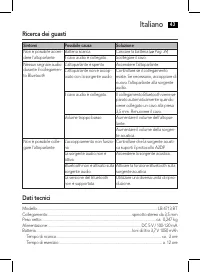
Italiano 43 Ricerca dei guasti Sintomi Possibile causa Soluzione Non è possibile accen-dere l'altoparlante Batteria scarica Caricare la batteria ( Pag. 39 ) Il cavo audio è collegato. Scollegare il cavo. Nessun segnale audio durante il collegamen-to Bluetooth L'altoparlante è spento. Accendere l'alt...
Page 44 - Smaltimento; Smaltimento batterie
Italiano 44 Bluetooth Supporto Bluetooth: .......................................................................................................... V 2.0 + EDR Range: .......................................................................................................................................
Page 45 - English; Instruction Manual; Symbols in these Instructions for Use; Safety instructions
English 45 Instruction Manual Thank you for choosing our product. We hope you will enjoy using the appliance. Symbols in these Instructions for Use Important information for your safety is specially marked. It is essential to comply with these instructions in order to avoid accidents and prevent dam...
Page 46 - Children and Frail Individuals; Special safety instructions for this system; Overview of the operating elements; Back; Supplied parts
English 46 Children and Frail Individuals In order to ensure your children’s safety, please keep all packaging (plastic bags, boxes, polystyrene etc.) out of their reach. WARNING! Caution! Do not allow small children to play with the foil as there is a danger of suffoca- tion! Special safety instruc...
Page 47 - Before First Use; Charge Integrated Battery; Location; Use
English 47 Before First Use 1. Charge the battery before first use. See details in chapter “ Charge Integrated Battery ”. Charge Integrated Battery The player is powered by the integrated rechargeable lithium battery. Charge the battery as follows:1. Insert the Mini USB plug from the charger cable i...
Page 48 - By cable
English 48 By cable 1. Connect the 3.5 mm stereo RCA cable to an external audio source. If required, use a suitable adapter (not included). 2. Insert the other end of the cable into the AUX jack (6) on the unit.3. Switch the speaker on by setting the ON/OFF switch (4) to “ON”.4. Adjust the volume on...
Page 49 - Operation; NOTE: Automatic connection
English 49 If the devices have been successfully paired, the indicator lamp briefly flashes rapidly and then slowly. NOTE: • Depending on the device manufacturer, you need to perform the registration (PAIR - ING) again to connect the devices. • The Bluetooth compatibility cannot be ensured for devic...
Page 50 - Maintenance and Cleaning
English 50 Pause (1) • Briefly press the button to pause playback. • Press the button again to continue playback. NOTE: Depending on the device manufacturers, models, and software versions you need to start the music playback in your player. Adjust Volume (2/3) Press the VOL + (2) and VOL ▬ (3) butt...
Page 51 - Troubleshooting; Symptoms; Technical Specifications
English 51 Troubleshooting Symptoms Possible cause Solution Cannot switch the speaker on Battery empty Charge the battery ( Page 47 ) Audio cable is connected Disconnect the cable. No audio signal during Bluetooth connection Speaker is switched off Switch the speaker on. Speaker is not paired to the...
Page 52 - Disposal; Battery disposal
English 52 Bluetooth Bluetooth support: ............................................................................................................. V 2.0 + EDR Range: ......................................................................................................................................





 AEG AREH30LF
User Manual
AEG AREH30LF
User Manual
 AEG AREI20XLF
User Manual
AEG AREI20XLF
User Manual
 AEG FFB72746PM
User Manual
AEG FFB72746PM
User Manual
 AEG PS254DB
User Manual
AEG PS254DB
User Manual
 AEG NIK85M00AZ
User Manual
AEG NIK85M00AZ
User Manual
 AEG DGE5662HB
User Manual
AEG DGE5662HB
User Manual
 AEG DGE5962HB
User Manual
AEG DGE5962HB
User Manual
 AEG HVB95450IB
User Manual
AEG HVB95450IB
User Manual
 AEG PL700
User Manual
AEG PL700
User Manual
 AEG W14120
User Manual
AEG W14120
User Manual
 AEG DC240
User Manual
AEG DC240
User Manual
 AEG T738A4OBC
User Manual
AEG T738A4OBC
User Manual
 AEG T858M6OBC
User Manual
AEG T858M6OBC
User Manual
 AEG T859M6OBC
User Manual
AEG T859M6OBC
User Manual
 AEG T959M6ORS
User Manual
AEG T959M6ORS
User Manual
 AEG IKE95771FB
User Manual
AEG IKE95771FB
User Manual
 AEG AREI9XLF
User Manual
AEG AREI9XLF
User Manual
 AEG A18SPC3
User Manual
AEG A18SPC3
User Manual
 AEG LF7384O4C
User Manual
AEG LF7384O4C
User Manual