Page 4 - GETTING TO KNOW YOUR PHONE
Warning: Always use the cables provided in the box. Use only the supplied adaptor. Using other power adapter may damage the unit. Note: Place the base unit within easy reach of the mains power socket. Never try to lengthen the mains power cable. The base station needs mains power for normal operatio...
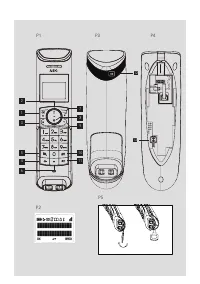
Page 5 - Display Icons and Symbols on the handset (See P2); Displays when the phonebook is accessed.
UK 3 In standby mode, press to make or answer a call. During a call, press to send a Flash signal for network services. 4 In standby mode, press to make or answer a call in speakerphone mode.During a call, press to switch between speakerphone and earpiece. 5 Press and hold to switch the key lock on ...
Page 6 - USING YOUR PHONE
5.3 Base Unit (See P3) # Icon Meaning 12 Lights up in Red when a handset is on the base to indicate it is charging. 13 Press to find/page all registered handsets. Press the button again, or any key on the handset to turn off the page signal. Press and hold to start registration process. 5.4 Text and...
Page 8 - PHONEBOOK
Note: You can switch the handset off to save battery life, if the handset is not on the base. IMPORTANT: When the handset is “OFF” , it cannot be used for making calls including emergency calls. It will not ring when there is an incoming call.To answer a call, you will need to switch it back on and ...
Page 10 - REDIAL LIST
If you have not subscribed to the Caller Line Identification service, the handset will display “UNKNOWN” when you receive the call and it will not be saved in the Call Log . Information about incoming calls varies by country and network operators. 8.1 Call Log The Call Log stores the last 20 externa...
Page 12 - If the unit is no longer under Guarantee, contact us via; CE DECLARATION; DECT
12.2 After the Guarantee has expired If the unit is no longer under Guarantee, contact us via www.aegtelephones.eu This product works with rechargeable batteries only. If you put nonrechargeable batteries in the handset and place it on the base, the handset will be damaged and this in NOT covered un...
Page 13 - Bitte ALLE Hinweise sorgfältig durchlesen.; VORGESEHENE VERWENDUNG
DE 1 UNSER EINSATZ FÜR DIE UMWELT Vielen Dank, dass Sie sich für dieses Produkt entschieden haben. Dieses Gerät wurde mit größter Sorgfalt entwickelt und zusammengebaut, um Ihnen ein exzellentes Produkt zu bieten und gleichzeitig die Umwelt zu schonen. Deshalb liegt diesem Produkt eine Kurzanleitung...
Page 14 - TELEFON IN BETRIEB NEHMEN; Einsetzen und Aufladen der Akkus
4 TELEFON IN BETRIEB NEHMEN 4.1 Anschließen der Basisstation (siehe P4) • Schließen Sie das Netzkabel (15) und das Telefonanschlusskabel (16) an der Basisstation an. • Stecken Sie anschließend das Netzteil an einer Steckdose (100-240 V AC, 50-60 Hz) ein und verbinden Sie das Telefonanschlusskabel mi...
Page 15 - DAS TELEFON – ERSTE SCHRITTE; Taste; Für Tastensperre ein/aus Taste gedrückt halten; Symbol; Zeigt an, dass das Telefonbuch geöffnet ist.
DE 5 DAS TELEFON – ERSTE SCHRITTE 5.1 Telefonhörer-Tasten Nr. Taste Funktion 1 Im Stand-by-Modus: Hauptmenü aufrufen In Menüs: Funktion/Option auswählen, bestätigen und speichern 2 In Menüs: Nach oben blättern Während Gesprächen/Nachrichtenwiedergabe: Lautstärke erhöhenIm Stand-by-Modus: Anrufübersi...
Page 19 - TELEFONBUCH; Rufnummer im Telefonbuch speichern
DE 6.10 Intern anrufen • Drücken Sie im Stand-by-Modus > Wenn nur 2 Mobilteile angemeldet sind, klingelt das andere Mobilteil automatisch. > Wenn mehr als 2 Mobilteile angemeldet sind, dann werden alle verfügbaren Mobilteilnummern angezeigt. • Drücken Sie die gewünschte Mobilteilnummer oder dr...
Page 23 - 3 CE-KONFORMITÄTSERKLÄRUNG
DE 12.1 Während der Garantielaufzeit • Trennen Sie die Basisstation von der Telefonleitung und der Stromversorgung. • Verpacken Sie alle Teile des Telefons in der Originalverpackung. • Bringen Sie das Gerät zu dem Händler, bei dem Sie es gekauft haben. Vergessen Sie nicht, Ihren Kaufbeleg mitzunehme...
Page 24 - NOTRE ENGAGEMENT; . Veuillez télécharger ce mode; IMPORTANTES CONSIGNES DE SÉCURITÉ; Débranchez cet appareil du secteur dans les cas suivants :; USAGE PRÉVU
1 NOTRE ENGAGEMENT Nous vous remercions d‘avoir acheté cet appareil. Nous l’avons conçu et assemblé avec le plus grand soin, afin de garantir votre sécurité et de protéger l’environnement. C’est pourquoi il est livré avec un guide de démarrage rapide comportant peu de pages, dans le but de sauvegard...
Page 25 - INSTALLATION DE VOTRE TÉLÉPHONE; Mise en place et charge des piles rechargeables
FR 4 INSTALLATION DE VOTRE TÉLÉPHONE 4.1 Connexion de la base (Voir P4) • Branchez le câble d’alimentation (15) et le cordon téléphonique (16) à la base. • Branchez l’adaptateur secteur à une prise de courant 100 – 240 V ca, 50 – 60 Hz et le cordon téléphonique à une prise téléphonique murale. Avert...
Page 26 - FAITES CONNAISSANCE AVEC VOTRE TÉLÉPHONE; En mode veille, appuyez pour ouvrir la liste des appels émis.
5 FAITES CONNAISSANCE AVEC VOTRE TÉLÉPHONE 5.1 Présentation du combiné et de la base # Icône Explication 1 En mode veille, appuyez pour ouvrir le menu principal. Appuyez pour sélectionner un élément ou pour enregistrer une entrée ou un réglage. 2 Dans les menus, appuyez pour défiler vers le haut. Pe...
Page 27 - UTILISATION DE VOTRE TÉLÉPHONE
FR S’affiche lorsque le combiné est souscrit et à portée de la base.Clignote lorsque le combiné est hors de portée ou cherche une base.S’affiche lorsqu'une sélection ou un réglage doit être confirmé. S’affiche en mode de saisie pour effacer le dernier chiffre.S’affiche dans les menus lorsque vous po...
Page 30 - RÉPERTOIRE
• Appuyez sur le numéro du combiné que vous souhaitez appeler ou appuyez sur pour appeler tous les combinés. Remarque: si le combiné appelé ne répond pas, ou si vous souhaitez annuler l’appel par l’interphone avant qu’il reçoive une réponse, appuyez sur pour revenir à l’appel extérieur. • Appuyez su...
Page 31 - PRÉSENTATION DU NUMÉRO (DÉPEND DU RÉSEAU)
FR • Appuyez sur jusqu’à « MODIFIER » (EDIT ENTRY), puis appuyez sur pour sélectionner. > Le nom s’affiche. • Modifiez le nom à l’aide du clavier et utilisez pour effacer des caractères. • Appuyez sur pour confirmer. • Modifiez le numéro, puis appuyez sur pour confirmer. > Vous entendez un bip...
Page 32 - LISTE DES APPELS ÉMIS
9 LISTE DES APPELS ÉMIS La liste des appels émis conserve en mémoire les 10 derniers numéros appelés. Chaque numéro peut comporter un maximum de 24 chiffres. 9.1 Accéder à la liste des appels émis • Dans l’écran d’accueil, appuyez sur . • Appuyez sur pour défiler dans la liste des appels émis. > ...
Page 35 - Alle aanwijzingen aandachtig doorlezen.; BEDOELD GEBRUIK
NL 1 ONZE ZORG Wij willen u bedanken voor de aankoop van dit product. Bij de ontwikkeling en montage van dit product stonden u en het milieu centraal. Daarom krijgt u bij dit product een verkorte installatiehandleiding, zodat er minder papier wordt gebruikt en er dus minder bomen moeten worden gekap...
Page 36 - UW TELEFOON INSTALLEREN
4 UW TELEFOON INSTALLEREN 4.1 Aansluiten van het basisstation (zie P4) • Het netsnoer (15) en het telefoonsnoer (16) op het basisstation aansluiten. • Steek de adapter in een 100 - 240 Vac, 50 - 60 Hz stopcontact en de telefoonlijn aan op een telefoonaansluiting. Waarschuwing: Gebruik uitsluitend de...
Page 37 - UW TELEFOON LEREN KENNEN; Ingedrukt houden om toetsenblokkering in- of uit te schakelen.
NL 5 UW TELEFOON LEREN KENNEN 5.1 Overzicht van de handset en het basisstation # Symbool Betekenis 1 Vanuit standby indrukken om het hoofdmenu te openen. Indrukken om een item te selecteren of een invoer of instelling op te slaan. 2 Vanuit de menu-modus indrukken om naar boven te scrollen. Tijdens e...
Page 38 - UW TELEFOON GEBRUIKEN
Verschijnt als de handset is aangemeld en binnen het bereik is van het basisstation is.Knippert als de handset buiten bereik is of naar een basisstation zoekt.Gaat aan als de bevestiging van een keuze of programmering beschikbaar is. Gaat aan tijdens bewerken telefoonboek om laatste cijfer te wissen...
Page 41 - TELEFOONBOEK
NL 6.11 Een externe oproep doorschakelen naar een andere handset • Druk tijdens de oproep op om de externe oproep in de wacht te zetten. > De intercom start onmiddellijk te rinkelen als er slechts 2 geregistreerde handsets zijn. > Als er meer dan 2 geregistreerde handsets zijn, zullen de hands...
Page 42 - NUMMERWEERGAVE (AFHANGKELIJK VAN HET NETWERK)
7.3 Gegevens in het telefoonboek veranderen • Druk vanuit het startscherm op om het telefoonboek te openen. • Druk op om de gegevens die u wilt wijzigen te selecteren. • Druk op om de menuopties van het telefoonboek te openen. • Druk op voor “BEWERK GEGEV” (EDIT ENTRY) en druk dan op om te selectere...
Page 45 - TECHNISCHE GEGEVENS
NL 14 HET TOESTEL AFDANKEN (MILIEU) Aan het einde van de levensduur van het product mag u dit product niet weggooien met het normale huishoudafval, maar moet u het product naar een inzamelingspunt voor de recycling van elektrische en elektronische apparatuur brengen. Dat wordt aangegeven met het sym...
Page 46 - PERCHÉ CI TENIAMO; . Vi suggeriamo di scaricare la guida utente; IMPORTANTI ISTRUZIONI DI SICUREZZA; Leggere attentamente in modo da comprendere tutte le istruzioni.; USO PREVISTO
1 PERCHÉ CI TENIAMO Grazie per aver acquistato questo prodotto. Il presente prodotto è stato progettato e assemblato con la massima cura per l‘utente e l‘ambiente. Per questo motivo, forniamo in dotazione una guida rapida di installazione allo scopo di ridurre il numero di pagine e di conseguenza l‘...
Page 47 - INSTALLAZIONE DEL TELEFONO
IT 4 INSTALLAZIONE DEL TELEFONO 4.1 Collegare la base (vedere P4) • Collegare il cavo di alimentazione (15) ed il cavo della linea telefonica (16) alla base. • Inserire l’alimentatore ad una presa di alimentazione a 50 - 60Hz, 100 - 240V ca ed il cavo della linea telefonica ad una presa telefonica. ...
Page 48 - CONOSCERE IL TELEFONO; Tenere premuto per attivare o disattivare il blocco tasti.
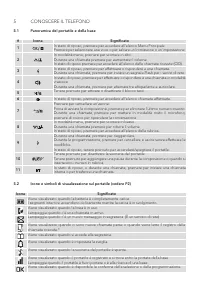
5 CONOSCERE IL TELEFONO 5.1 Panoramica del portatile e della base # Icona Significato 1 In stato di riposo, premere per accedere all'elenco Menu Principale. Premere per selezionare una voce o per salvare un'immissione o un'impostazione. 2 In modalità menu, premere per scorrere in alto. Durante una c...
Page 49 - UTILIZZO DEL TELEFONO
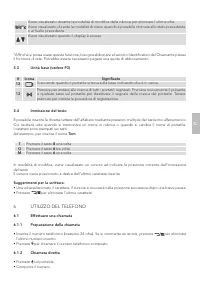
IT Viene visualizzato durante la modalità di modifica della rubrica per eliminare l'ultima cifra.Viene visualizzato durante la modalità di menu quando è possibile ritornare allo stato precedente o al livello precedente.Viene visualizzato quando il display è acceso. *Affinché si possa usare questa fu...
Page 52 - RUBRICA; Memorizzare un contatto in rubrica
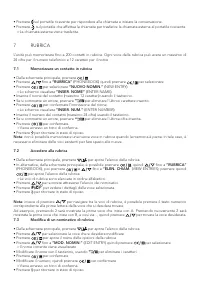
• Premere sul portatile ricevente per rispondere alla chiamata e iniziare la conversazione. • Premere sul portatile che effettua la chiamata per trasferire la chiamata esterna al portatile ricevente. > La chiamata esterna viene trasferita. 7 RUBRICA L’unità può memorizzare fino a 200 contatti in ...
Page 54 - 0 IMPOSTAZIONI
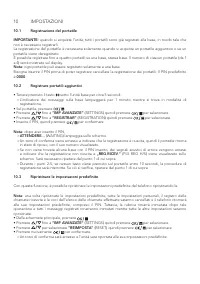
10 IMPOSTAZIONI 10.1 Registrazione del portatile IMPORTANTE: quando si acquista l’unità, tutti i portatili sono già registrati alla base, in modo tale che non è necessario registrarli.La registrazione del portatile è necessaria solamente quando si acquista un portatile aggiuntivo o se un portatile v...
Page 55 - PULIZIA E CURA; danni permanenti non coperti dalla garanzia.; GARANZIA E ASSISTENZA; Ricordarsi di includere l‘adattatore di alimentazione.; DICHIARAZIONE CE
IT 11 PULIZIA E CURA Non pulire nessuna parte dell’unità con benzene, diluenti o altri solventi chimici per evitare di causare danni permanenti non coperti dalla garanzia. Se necessario, pulire con un panno inumidito. Tenere l‘apparecchio telefonico lontano da fonti di calore, dall’umidità e protett...
Page 56 - SPECIFICHE TECNICHE
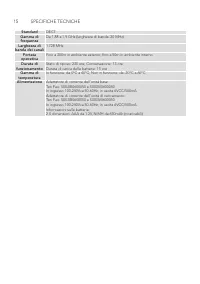
15 SPECIFICHE TECNICHE Standard DECT Gamma di frequenza Da 1.88 a 1.9 GHz (larghezza di banda: 20 MHz) Larghezza di banda dei canali 1.728 MHz Portata operativa Fino a 300m in ambiente esterno; fino a 50m in ambiente interno Durata di funzionamento Stato di riposo: 230 ore; Conversazione: 13 oreDura...
Page 59 - SW; Håll denna intryckt för låsa eller låsa upp knappsatsen.; Ikoner och Symbolen på handenheten (Se P2); Visas när du missat ett samtal eller när du läser samtalsloggen.*; Ikon
SW 2 Tryck på denna för att bläddra uppåt i menyläge. Tryck på denna för att öka ljudet vid samtal eller avlyssning av meddelanden.Tryck på denna i standbyläge för att gå till uppringningsloggen. 3 Tryck på denna för att ringa eller besvara ett samtal i standbyläge. Tryck på denna vid samtal för att...
Page 60 - ANVÄNDNING AV TELEFONEN
12 Visas med Röd färg när handenheten är på basenheten för att visa att den laddar. 13 Tryck på denna för att söka/hitta alla registrerade handenheter. Tryck på samma knapp igen, eller på en valfri knapp på handenheten för att stänga av signalen. Häll knappen intryckt för att börja registreringsproc...
Page 62 - TELEFONBOK
Obs: Du kan stänga av handenheten för att spara batterierna om handenheten inte sitter i basenheten. VIKTIGT: När handenheten är ”AV” (OFF), kan den inte användas för att ringa, inklusive nödsamtal. Den ringer inte vid inkommande samtal.För att kunna besvara samtal måste du slå på den igen, och ge d...
Page 66 - EG-FÖRSÄKRAN OM ÖVERENSSTÄMMELSE; Digitalt Förbättrad Trådlös Telekommunikation (DECT)
• Återlämna enheten till den butik där du köpte den och se till att ta med inköpskvittot. • Kom ihåg att inkludera nätadaptern. 12.2 Efter garantiperiodens slut Om enheten inte längre omfattas av garantin, kontaktar du oss via www.aegtelephones.eu Produkten fungerar bara med uppladdningsbara batteri...
Page 68 - INSTALOWANIE TELEFONU; Instalowanie i ładowanie akumulatorków
4 INSTALOWANIE TELEFONU 4.1 Podłączanie bazy (zob. P4) • Podłącz kabel zasilania (15) i przewód telefoniczny (16) do bazy. • Podłącz zasilacz do gniazda sieciowego 100 - 240 V AC, 50 - 60 Hz, a przewód telefoniczny do gniazda telefonicznego. Ostrzeżenie: Używaj wyłącznie kabli dołączonych do telefon...
Page 69 - TWÓJ TELEFON; Ogólne informacje o słuchawce i bazie
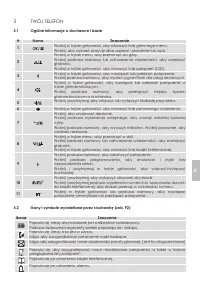
PL 5 TWÓJ TELEFON 5.1 Ogólne informacje o słuchawce i bazie # Ikona Znaczenie 1 Wciśnij w trybie gotowości, aby otworzyć listę głównego menu. Wciśnij, aby wybrać pozycję albo zapisać ustawienie lub wpis. 2 Wciśnij w trybie menu, aby przewinąć do góry. Wciśnij podczas rozmowy lub odtwarzania wiadomoś...
Page 70 - KORZYSTANIE Z TELEFONU
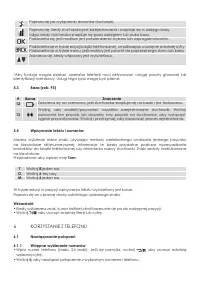
Pojawia się po wyłączeniu dzwonka słuchawki.Pojawia się, kiedy słuchawka jest zarejestrowana i znajduje się w zasięgu bazy. Miga, kiedy słuchawka znajduje się poza zasięgiem lub szuka bazy. Podświetla się, jeśli możliwe jest potwierdzenie wyboru lub zaprogramowania.Podświetla się w trybie edycji ksi...
Page 73 - Przenoszenie połączenia zewnętrznego do innej słuchawki; KSIĄŻKA TELEFONICZNA; Zapisywanie kontaktów w książce telefonicznej
PL • Jeśli w ciągu minuty od inicjacji połączenia nie będzie odpowiedzi ze strony słuchawki odbierającej, połączenie zostanie automatycznie anulowane. • Jeśli w bazie nie zarejestrowano więcej słuchawek, po wydaniu 4 sygnałów dźwiękowych urządzenie powróci do trybu gotowości. 6.11 Przenoszenie połąc...
Page 74 - WYŚWIETLANIE DANYCH ROZMÓWCY (USŁUGA ZALEŻNA OD SIECI); Rejestr połączeń
Uwaga: Zamiast przeglądania książki telefonicznej za pomocą możesz także wcisnąć przycisk numeryczny odpowiadający pierwszej literze wpisu, który chcesz znaleźć. Przykładowo jeśli wciśniesz 2, zostanie wyświetlony pierwszy wpis zaczynający się na literę A. Ponowne wciśnięcie 2 wyświetli pierwszy wpi...
Page 75 - LISTA PONOWNEGO WYBIERANIA; Otwieranie listy ponownego wybierania; USTAWIENIA; Rejestracja słuchawki
PL • Za pomocą przycisków znajdź funkcję usuwanie (DELETE), a następnie wciśnij przycisk aby wybrać. > Wyświetli się zapytanie potwierdzić? (CONFIRM?). • Ponownie wciśnij przycisk aby potwierdzić. > Wyemitowany zostanie sygnał potwierdzenia. • Wciśnij przycisk aby powrócić do trybu gotowości. ...
Page 77 - DEKLARACJA WE; skontaktuj się z lokalnym organem administracji.; DANE TECHNICZNE; Digital Enhanced Cordless Telecommunication (DECT)
PL 13 DEKLARACJA WE Produkt jest zgodny z podstawowymi wymogami i innymi istotnymi przepisami dyrektywy R&TTE 1999/5/WE. Deklarację zgodności można znaleźć na stronie: www.aegtelephones.eu 14 UTYLIZACJA URZĄDZENIA (ŚRODOWISKO) Po zakończeniu użytkowania produktu nie należy go wyrzucać do zwykłeg...
Page 79 - Τοποθέτηση και φόρτιση των επαναφορτιζόμενων μπαταριών
GR 3 ΧΡΗΣΗ ΓΙΑ ΤΗΝ ΟΠΟΙΑ ΠΡΟΟΡΙΖΕΤΑΙ Αυτό το τηλέφωνο προορίζεται για σύνδεση σε δημόσιο αναλογικό τηλεφωνικό δίκτυο ή σε αναλογική εσωτερική γραμμή ενός συμβατού τηλεφωνικού κέντρου. 4 ΕΓΚΑΤΑΣΤΑΣΗ ΤΟΥ ΤΗΛΕΦΩΝΟΥ 4.1 Σύνδεση του σταθμού βάσης (βλ. P4) • Συνδέστε το καλώδιο τροφοδοσίας (15) και το καλ...
Page 80 - ΓΝΩΡΙΜΙΑ ΜΕ ΤΟ ΤΗΛΕΦΩΝΟ ΣΑΣ; Επισκόπηση του ακουστικού και του σταθμού βάσης
• Πατήστε για πρόσβαση στο “ΕΠΙΛΟΓΕΣ ΑΣΥΡΜΑΤΟΥ ΑΚΟΥΣΤΙΚΟΥ” (HANDSET OPTS) και κατόπιν πατήστε για επιλογή. • Πατήστε για πρόσβαση στο “ΓΛΩΣΣΑ” (LANGUAGE) και κατόπιν πατήστε για επιλογή. • Πατήστε για να επιλέξετε τη γλώσσα προτίμησης και κατόπιν πατήστε για επιβεβαίωση. > Εκπέμπεται ένας ηχητικό...
Page 82 - ΧΡΗΣΗ ΤΟΥ ΤΗΛΕΦΩΝΟΥ
5.4 Εισαγωγή κειμένου και αριθμών Μπορείτε να επιλέξετε διάφορους χαρακτήρες πατώντας επανειλημμένα τα αλφαριθμητικά πλήκτρα. Αυτό είναι χρήσιμο, για παράδειγμα, για την αποθήκευση ενός ονόματος στον τηλεφωνικό κατάλογο ή για τη μετονομασία του ακουστικού σας. Οι χαρακτήρες είναι εκτυπωμένοι στα πλή...
Page 85 - ΤΗΛΕΦΩΝΙΚΟΣ ΚΑΤΑΛΟΓΟΣ; Αποθήκευση επαφής στον τηλεφωνικό κατάλογο
GR • Πατήστε στο ακουστικό που κάνει την κλήση για να μεταφέρετε την εξωτερική κλήση στο ακουστικό λήψης. > Η εξωτερική κλήση μεταφέρεται. 7 ΤΗΛΕΦΩΝΙΚΟΣ ΚΑΤΑΛΟΓΟΣ Η μονάδα μπορεί να αποθηκεύσει έως 200 εγγραφές τηλεφωνικού καταλόγου. Κάθε εγγραφή του τηλεφωνικού καταλόγου μπορεί να αποτελείται το...
Page 86 - ΕΜΦΑΝΙΣΗ ΚΑΛΟΥΝΤΑ (ΕΞΑΡΤΑΤΑΙ ΑΠΟ ΤΟ ΔΙΚΤΥΟ); Αρχείο κλήσεων
• Πατήστε για να ανοίξετε τις επιλογές μενού τηλεφωνικού καταλόγου. • Πατήστε για να μεταβείτε στην επιλογή „ΕΠΕΞ. ΕΓΓΡΑΦ“ (EDIT ENTRY) και, στη συνέχεια, πατήστε για επιλογή. > Εμφανίζεται το τρέχον όνομα. • Επεξεργαστείτε το όνομα χρησιμοποιώντας το πληκτρολόγιο, χρησιμοποιώντας το πλήκτρο για ...
Page 87 - ΛΊΣΤΑ ΕΠΑΝΆΚΛΗΣΗΣ; Πρόσβαση στη λίστα επανάκλησης; ΡΥΘΜΙΣΕΙΣ; Εγγραφή ακουστικού
GR > Εκπέμπεται ένας ήχος επιβεβαίωσης. • Πατήστε για να επιστρέψετε στη λειτουργία ετοιμότητας. 9 ΛΊΣΤΑ ΕΠΑΝΆΚΛΗΣΗΣ Η λίστα επανάκλησης αποθηκεύει τους 10 τελευταίους αριθμούς που κλήθηκαν. Για κάθε εγγραφή μπορεί να εμφανιστεί ένας αριθμός 24 το πολύ ψηφίων. 9.1 Πρόσβαση στη λίστα επανάκλησης •...
Page 88 - Επαναφορά της μονάδας; ΚΑΘΑΡΙΣΜΟΣ ΚΑΙ ΦΡΟΝΤΙΔΑ; Εάν χρειαστεί, καθαρίστε το με ένα ελαφρά βρεγμένο πανί.; ΕΓΓΥΗΣΗ ΚΑΙ ΣΕΡΒΙΣ; Για όσο διάστημα η μονάδα καλύπτεται από την εγγύηση
10.3 Επαναφορά της μονάδας Με αυτήν τη λειτουργία, μπορείτε να επαναφέρετε το τηλέφωνό σας στις προεπιλεγμένες ρυθμίσεις του. Σημείωση: Με την επαναφορά, όλες οι προσωπικές σας ρυθμίσεις, καθώς και οι εγγραφές του αρχείου κλήσεων και της λίστας επανάκλησης, διαγράφονται και το τηλέφωνο επανέρχεται σ...
Page 89 - βελτιωμένη ασύρματη τηλεπικοινωνία); Εύρος συχνοτήτων; Έως 300m σε εξωτερικούς χώρους, έως 50m σε εσωτερικούς χώρους; Διάρκεια λειτουργίας; Χρόνος φόρτισης μπαταρίας: 15 ώρες; Ηλεκτρική ισχύς; Μετασχηματιστής μονάδας βάσης:
GR 13 ΔΗΛΩΣΗ CE Το προϊόν αυτό συμμορφούται με τις ουσιώδεις απαιτήσεις και τις λοιπές σχετικές διατάξεις της Ευρωπαϊκής Οδηγίας 1999/5/ΕΚ περί τερματικού ραδιοφωνικού και τηλεπικοινωνιακού εξοπλισμού (R&TTE). Μπορείτε να βρείτε τη Δήλωση συμμόρφωσης στη διεύθυνση: www.aegtelephones.eu 14 ΑΠΟΡΡΙ...
Page 90 - PORQUE NOS IMPORTA; . Por favor, descargue la guía de usuario completa; INSTRUCCIONES DE SEGURIDAD IMPORTANTES; Lea y comprenda todas las instrucciones.
1 PORQUE NOS IMPORTA Gracias por comprar este producto. Este producto ha sido diseñado y montado con el máximo cuidado para usted y el medio ambiente. Es por esto que proporcionamos con este producto con una guía de instalación rápida para así reducir la cantidad de papel (páginas) y por lo tanto ev...
Page 91 - INSTALACIÓN DEL TELÉFONO; Instalación y carga de las baterías recargables
ES 4 INSTALACIÓN DEL TELÉFONO 4.1 Conexión de la base (Ver P4) • Conecte el cable de alimentación de la red (15) y el cable de la línea telefónica (16) a la base. • Conecte el adaptador de corriente a un enchufe 100 - 240 Vac, 50 - 60Hz y el cable de la línea telefónica a una toma de línea telefónic...
Page 92 - FAMILIARIZARSE CON SU TELÉFONO; Mantega pulsado para bloquear o desbloquear el teclado.
5 FAMILIARIZARSE CON SU TELÉFONO 5.1 Resumen del terminal # Icono Significado 1 En modo reposo, pulse para entrar a la lista principal de menú.Pulse para seleccionar una opción, o para guardar una entrada o ajuste. 2 En el modo menú, pulse para desplazarse hacia arriba.Durante una llamada o reproduc...
Page 93 - UTILIZAR SU TELÉFONO
ES Se enciende durante el modo de edición de la agenda para borrar el último dígito. Se enciende durante el modo de menú cuando se puede volver al estado anterior o paso anterior. Se activa cuando la pantalla está encendida. *Se debe suscribir al servicio de correo de voz o de identificación de llam...
Page 96 - AGENDA DE CONTACTOS
• Pulse el número de terminal que desea llamar y pulse para llamar a todos los terminales. Indicación: Si no hay respuesta del terminal que está llamando, o desea cancelar la llamada interna antes de que sea respondida, pulse para volver a la llamada externa. • Pulse en el terminal que recibe la lla...
Page 98 - LISTA DE RELLAMADA
9 LISTA DE RELLAMADA La lista de rellamada guarda los últimos 10 números marcados. Se puede visualizar un máximo de 24 dígitos para cada entrada 9.1 Acceder a la Lista de Rellamada • Desde la pantalla de inicio, pulse . • Pulse para ver la lista de rellamada. > El último número marcado será el pr...
Page 101 - Leia e compreenda todas as instruções.; UTILIZAÇÃO PRETENDIDA
PT 1 PORQUE NOS PREOCUPAMOS Obrigado por comprar este produto. Este produto foi concebido e montado com a máxima preocupação por si e pelo ambiente. É por isso que fornecemos este produto com um guia de instalação rápida, para reduzir a quantidade de papel (páginas) e, consequentemente, salvar árvor...
Page 102 - INSTALAR O SEU TELEFONE
4 INSTALAR O SEU TELEFONE 4.1 Ligar a Estação de Base (Ver P4) • Ligue o cabo de alimentação principal (15) e o cabo da linha telefónica (16) à estação de base. • Ligue o adaptador de potência a uma tomada elétrica de 100 - 240Vac, 50 - 60Hz e o cabo da linha telefónica a uma ficha de linha telefóni...
Page 103 - CONHECER O SEU TELEFONE; Mantenha pressionado para bloquear ou desbloquear o teclado
PT 5 CONHECER O SEU TELEFONE 5.1 Vista Geral do Telefone # Ícone Significado 1 No modo standby, pressione para entrar na lista do Menu Principal.Pressione para selecionar um item ou para guardar uma entrada ou configuração. 2 No modo menu, pressione para deslocar para cima.Durante uma chamada ou rep...
Page 104 - USAR O SEU TELEFONE
Liga-se quando a confirmação da seleção ou a programação estão disponíveis. Liga-se durante o modo de edição da agenda telefónica para apagar o último dígito.Liga-se durante o modo do menu quando puder voltar para o estado anterior ou para o passo anterior.Liga-se quando o ecrã está ligado. *Tem de ...
Page 107 - AGENDA TELEFÓNICA
PT • Pressione o número do telefone ao qual deseja telefonar ou pressione para telefonar para todos os telefones. Nota: Se não houver resposta por parte do telefone para o qual está a ligar, ou se desejar cancelar a chamada de intercomunicação antes que esta seja atendida, pressione para voltar para...
Page 108 - INDICAÇÃO DE QUEM LHE TELEFONA (DEPENDENTE DA REDE)
7.3 Modificar uma Entrada da Agenda Telefónica • A partir do ecrã inicial, pressione para abrir a lista da agenda telefónica. • Pressione para selecionar a entrada que pretende modificar. • Pressione para abrir o menu de opções da agenda telefónica. • Pressione até “Editar Entrada” (EDIT ENTRY) e po...
Page 110 - LIMPEZA E CUIDADO; Mantenha o seu sistema de telefone afastado de; GARANTIA E MANUTENCÃO; Lembre-se de incluir o adaptador principal.; DECLARAÇÃO CE
• Pressione para selecionar “Restaurar” (RESET) e depois pressione para selecionar. • Pressione outra vez para confirmar. > Ouve-se um som de confirmação e a unidade é restaurada para as configurações que vinham por defeito. 11 LIMPEZA E CUIDADO Não limpe nenhuma peça do seu telefone com benzeno,...






 AEG AREH30LF
User Manual
AEG AREH30LF
User Manual
 AEG AREI20XLF
User Manual
AEG AREI20XLF
User Manual
 AEG FFB72746PM
User Manual
AEG FFB72746PM
User Manual
 AEG PS254DB
User Manual
AEG PS254DB
User Manual
 AEG NIK85M00AZ
User Manual
AEG NIK85M00AZ
User Manual
 AEG DGE5662HB
User Manual
AEG DGE5662HB
User Manual
 AEG DGE5962HB
User Manual
AEG DGE5962HB
User Manual
 AEG HVB95450IB
User Manual
AEG HVB95450IB
User Manual
 AEG PL700
User Manual
AEG PL700
User Manual
 AEG W14120
User Manual
AEG W14120
User Manual
 AEG DC240
User Manual
AEG DC240
User Manual
 AEG T738A4OBC
User Manual
AEG T738A4OBC
User Manual
 AEG T858M6OBC
User Manual
AEG T858M6OBC
User Manual
 AEG T859M6OBC
User Manual
AEG T859M6OBC
User Manual
 AEG T959M6ORS
User Manual
AEG T959M6ORS
User Manual
 AEG IKE95771FB
User Manual
AEG IKE95771FB
User Manual
 AEG AREI9XLF
User Manual
AEG AREI9XLF
User Manual
 AEG A18SPC3
User Manual
AEG A18SPC3
User Manual
 AEG LF7384O4C
User Manual
AEG LF7384O4C
User Manual