Page 3 - PRODUCT REGISTRATION; SAFETY INFORMATION
Page 3 ENGLISH Thank you for purchasing our BLACK+DECKER product. This easy-to-use manual will guide you in getting the best use of your fan. Remember to record the model and serial numbers. They are on a label on the rear. Staple your receipt to your manual. You will need it to obtain warranty serv...
Page 4 - IMPORTANT SAFETY INSTRUCTIONS; CAUTION
Page 4 ENGLISH SAFETY INFORMATION IMPORTANT SAFETY INSTRUCTIONS 1. READ ALL INSTRUCTIONS BEFORE USE2. Never insert fingers, pencils, or any other object through the grill when fan is running 3. Disconnect fan when moving from one location to another.4. Disconnect fan when not in use and before clean...
Page 5 - any solid state speed control devices.; SAVE THESE INSTRUCTIONS; HOUSEHOLD USE ONLY
Page 5 ENGLISH SAFETY INFORMATION 13. To reduce the risk of fire or electric shock, DO NOT use this fan with any solid state speed control devices. 14. Do not use outdoors.15. Ensure that the fan is switched off from the supply mains before removing the grille. SAVE THESE INSTRUCTIONS HOUSEHOLD USE ...
Page 7 - Remote
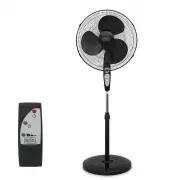
Page 7 ENGLISH Page 7 PARTS & FEATURES SET UP & USE Base 7-shape Bolt Remote Blade Front grill Plastic nut Motor shaft Oscillation Control Knob Motorhousing Rear grill Head Unit Thumb screw Internal pole Control Panel Tighten Spinner Loosen Fasten Height adjustment ring Extension pole Remote...
Page 8 - ASSEMBLY OF BASE & COLUMN UNIT; Loosen
Page 8 ENGLISH Page 8 SET UP & USE ASSEMBLY OF BASE & COLUMN UNIT 1. Unscrew the 7-shape Bolt from the Extension Pole. (see Fig. 1) 2. Insert the extension pole in the base and tighten the 7-shape Bolt. (see Fig. 2) 3. From the extension pole, loosen the height adjustment ring and adjust the...
Page 9 - GRILL & FAN BLADE ASSEMBLY
Page 9 ENGLISH Page 9 GRILL & FAN BLADE ASSEMBLY WARNING: Never attempt to run the fan without the grill in place and properly secured. Failure to have the grill in place can result in serious injury. 1. Unscrew the spinner clockwise and the plastic nut counterclockwise to remove both of them. F...
Page 10 - OPERATION INSTRUCTIONS
Page 10 ENGLISH SET UP & USE OPERATION INSTRUCTIONS REMOTE CONTROL (Fig. 8) Point the remote control at the receiver on body of the fan and press the desired button. The remote control will work at distances of up to roughly five meters (16 feet) and an angle of 30 degrees left and right of the ...
Page 11 - CONTROL PANEL
Page 11 ENGLISH SET UP & USE Page 11 Fig. 9 POWER TIMER 0.5 1 2 4 CONTROL PANEL (Fig. 9) ON/SPEED/OFF The key serves two purposes. To turn fan ON and OFF and to set desired speed. Press key to turn fan ON and you are at LOW speed. Press again and it will move to MEDIUM speed. Press again and it ...
Page 12 - REPLACING THE FUSE
Page 12 ENGLISH Page 12 Page 12 SET UP & USE REPLACING THE FUSE • Disconnect fan from power outlet by grabbing the plug at the end of the cord. Do not unplug by pulling the cord itself • Open fuse cover located in the side of the power cord plug by sliding it toward the plug blades • Remove fuse...
Page 13 - TROUBLESHOOTING & WARRANTY; IMPORTANT; DO NOT RETURN THIS PRODUCT TO THE STORE; SPECIFICATIONS
Page 13 ENGLISH Page 13 Page 13 TROUBLESHOOTING & WARRANTY BEFORE YOU CALL FOR SERVICE IF THE APPLIANCE FAILS TO OPERATE: A) Check to make sure that the appliance is plugged in securely. If it is not, remove the plug from the outlet, wait 10 seconds and plug it in again securely. B) Check for a ...
Page 17 - Número de modelo; REGISTRO DEL PRODUCTO; INFORMACIÓN DE SEGURIDAD
Página 17 ESPAÑOL Gracias por comprar nuestro producto BLACK+DECKER.Este manual fácil de usar le guiará para hacer el mejor uso de su ventilador. Recuerdo anotar el número de modelo y los números de serie.Se encuentran en una etiqueta en la parte posterior. Grape el recibo de compra a su manual.Lo n...
Page 18 - PELIGRO; ADVERTENCIA
Página 18 ESPAÑOL INFORMACIÓN DE SEGURIDAD INSTRUCCIONES IMPORTANTES DE SEGURIDAD 1. LEA TODAS LAS INSTRUCCIONES ANTES DEL USO2. Nuca coloque los dedos, lápices, o cualquier otro objeto a través de la rejilla cuando el ventilador esté en uso. 3. Desconecte el ventilador cuando lo esté moviendo de un...
Page 19 - No coloque el cable bajo ningún tipo de alfombrado.No cubra el; GUARDE ESTAS INSTRUCCIONES; ÚNICAMENTE USO DOMÉSTICO
Página 19 ESPAÑOL INFORMACIÓN DE SEGURIDAD 12. No coloque el cable bajo ningún tipo de alfombrado.No cubra el cable con tapetes, camineros, alfombras o coberturas similares.No encamine el cable bajo muebles o aparatos.Organice el cable lejos de áreas de tránsito y donde no se pueda tropezar con él. ...
Page 21 - PARTES Y FUNCIONALIDADES
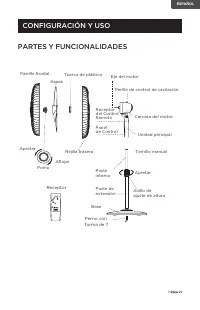
Página 21 ESPAÑOL Page 21 PARTES Y FUNCIONALIDADES CONFIGURACIÓN Y USO Base Perno con forma de 7 Receptor Aspas Parrilla frontal Tuerca de plástico Eje del motor Perilla de control de oscilación Carcasa del motor Rejilla trasera Unidad principal Tornillo manual Poste interno Panel de Control Apretar...
Page 22 - CONFIGURACIÓN Y USO
Página 22 ESPAÑOL CONFIGURACIÓN Y USO ENSAMBLAJE DE LA BASE Y EL POSTE 1. Desatornille el perno con forma de 7 del poste de extensión.(vea Fig. 1) 2. Inserte el poste de extensión en la base y aprete el perno con forma de 7. (vea Fig. 2) 3. En el poste de extensión, afloje el anillo de ajuste de alt...
Page 23 - ENSAMBLAJE DE LA REJILLA Y LAS ASPAS; Acople; INSTALACIÓN DE LAS PILAS DEL CONTROL REMOTO
Página 23 ESPAÑOL ENSAMBLAJE DE LA REJILLA Y LAS ASPAS ADVERTENCIA: Nunca intente intente usar el ventilador sin la rejilla en su lugar y adecuadamente asegurada.No tener la rejilla colocada puede resultar en lesiones graves. 1. Gire el pomo en sentido horario y la tuerca de plástico en sentido anti...
Page 25 - PANEL DE CONTROL
Página 25 ESPAÑOL CONFIGURACIÓN Y USO Fig. 9 POWER TIMER 0.5 1 2 4 PANEL DE CONTROL (Fig. 9) ENCENDIDO/VELOCIDAD/APAGADO El botón cumple con dos funciones.Para ENCENDER y APAGAR el ventilador y para elegir la velocidad deseada.Presione el botón para ENCENDER el ventilador en la velocidad BAJA.Presio...
Page 26 - LIMPIEZA Y MANTENIMIENTO
Página 26 ESPAÑOL CONFIGURACIÓN Y USO REMPLAZAR EL FUSIBLE • Desconecte el ventilador de la toma de corriente tomando el enchufe al final del cable.No lo desenchufe tirando del cable. • Abra la cubierta del fusible ubicada en el lado del enchufe del cable de alimentación deslizándola hacia las clavi...
Page 27 - ESPECIFICACIONES; SOLUCIÓN DE PROBLEMAS Y GARANTÍA; IMPORTANTE; NO DEVUELVA ESTE PRODUCTO A LA TIENDA
Página 27 ESPAÑOL Intente solucionar su problema mediante el siguiente cuadro. Si el aparato aún no funciona correctamente, contacte al centro de atención al cliente de, o el centro de servicio autorizado de W Appliance Co. más cercano.Los clientes no deben nunca intentar solucionar problemas de com...
Page 31 - ENREGISTREMENT DU PRODUIT; INFORMATIONS DE SÉCURITÉ
Page 31 FRANÇAIS Merci d’avoir acheté notre produit BLACK+DECKER. Ce manuel facile à utiliser vous guidera dans l’utilisation optimale de votre ventilateur. N’oubliez pas d’enregistrer les numéros de modèle et de série. Ils sont sur une étiquette à l’arrière. Agrafez votre reçu à votre manuel. Vous ...
Page 32 - CONSIGNES DE SÉCURITÉ; ATTENTION; AVERTISSEMENT
Page 32 FRANÇAIS INFORMATIONS DE SÉCURITÉ CONSIGNES DE SÉCURITÉ IMPORTANTES 1. LIRE TOUTES LES INSTRUCTIONS AVANT UTILISATION2. Ne jamais insérer les doigts, les crayons ou tout autre objet à travers la grille lorsque le ventilateur est en marche. 3. Débranchez le ventilateur lorsque vous vous dépla...
Page 33 - des carpettes, des tapis de couloir ou des revêtements similaires.; SAUVEGARDER CES INSTRUCTIONS; USAGE DOMESTIQUE SEULEMENT
Page 33 FRANÇAIS INFORMATIONS DE SÉCURITÉ 12. Ne pas passer le cordon sous un tapis. Ne pas couvrir le cordon avec des carpettes, des tapis de couloir ou des revêtements similaires. Ne pas faire passer le cordon sous des meubles ou des appareils. Disposez le cordon loin de la zone de circulation pou...
Page 35 - PIÈCES & CARACTÉRISTIQUES
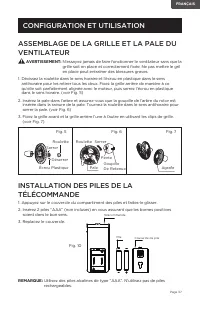
Page 35 FRANÇAIS Page 35 PIÈCES & CARACTÉRISTIQUES CONFIGURATION ET UTILISATION Base Boulon à 7 formes Télécommande Pale Grille Avant Écrou Plastique Arbre Du Moteur Bouton De Commande d'Oscillation Boîtier Du Moteur Grille Arrière Unité De Tête Vis Papillon Poteau Interne Panneau De Commande Se...
Page 36 - CONFIGURATION ET UTILISATION
Page 36 FRANÇAIS CONFIGURATION ET UTILISATION ASSEMBLAGE DE L’UNITÉ DE BASE ET DE COLONNE 1. Dévissez le Boulon à 7 formes du Poteau d’Extension. (voir Fig. 1) 2. Insérez le poteau d’extension dans la base et serrez le Boulon à 7 formes. (voir Fig. 2) 3. À partir du poteau d’extension, desserrez la ...
Page 39 - PANNEAU DE COMMANDE
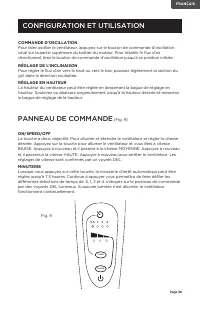
Page 39 FRANÇAIS CONFIGURATION ET UTILISATION Page 39 Fig. 9 POWER TIMER 0.5 1 2 4 PANNEAU DE COMMANDE (Fig. 9) ON/SPEED/OFF La touche a deux objectifs. Pour allumer et éteindre le ventilateur et régler la vitesse désirée. Appuyez sur la touche pour allumer le ventilateur et vous êtes à vitesse BASS...
Page 40 - NETTOYAGE ET ENTRETIEN
Page 40 FRANÇAIS Page 40 CONFIGURATION ET UTILISATION REMPLACEMENT DU FUSIBLE • Débranchez le ventilateur de la prise de courant en saisissant la fiche à l’extrémité du cordon. Ne débranchez pas en tirant le cordon lui-même • Ouvrez le couvercle du fusible situé sur le côté de la fiche du cordon d’a...
Page 41 - DÉPANNAGE ET GARANTIE; NE PAS RETOURNER CE PRODUIT AU MAGASIN; SPÉCIFICATIONS; VENTILATEURS SUR PIED 16”: BFSR16B, BFSR16W
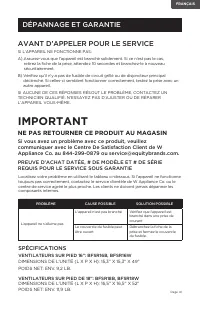
Page 41 FRANÇAIS DÉPANNAGE ET GARANTIE AVANT D’APPELER POUR LE SERVICE SI L’APPAREIL NE FONCTIONNE PAS: A) Assurez-vous que l’appareil est branché solidement. Si ce n’est pas le cas, retirez la fiche de la prise, attendez 10 secondes et branchez-le à nouveau sécuritairement. B) Vérifiez qu’il n’y a ...
Page 44 - Printed in China
March 2019 Printed in China BLACK & DECKER, BLACK+DECKER, the BLACK & DECKER and BLACK+DECKER logos and product names and the orange and black color scheme are trademarks of The Black & Decker Corporation, used under license. All rights reserved.BLACK & DECKER, BLACK+DECKER, y los lo...