Page 2 - Warnung
2 Lesen Sie diese Gebrauchsanweisung sorgfältig durch, bewahren Sie sie für späteren Gebrauch auf, machen Sie sie anderen Benutzern zugänglich und beachten Sie die Hinweise. DEUTSCH Warnung • Das Gerät ist nur für den Einsatz im häuslichen/privaten Umfeld bestimmt, nicht im gewerblichen Bereich. • D...
Page 3 - Inhaltsverzeichnis; Zum Kennenlernen
3 1. Lieferumfang .........................................................3 2. Zeichenerklärung .................................................4 3. Bestimmungsgemäßer Gebrauch .......................4 4. Warn- und Sicherheitshinweise ..........................4 5. Gerätebeschreibung ................
Page 4 - Zeichenerklärung; Bestimmungsgemäßer Gebrauch; kann Personen- oder Sachschäden verursachen.; Stromschlag
4 2. Zeichenerklärung Auf dem Gerät, in der Gebrauchsanweisung, auf der Verpackung und auf dem Typschild des Ge- räts werden folgende Symbole verwendet: Warnung Warnhinweis auf Verletzungsgefahren oder Gefahren für Ihre Gesundheit Hersteller Achtung Sicherheitshinweis auf mögliche Schä- den an Gerät...
Page 7 - Brandgefahr; Reparatur; Handhabung; Achtung
7 Brandgefahr Warnung Bei nicht bestimmungsgemäßem Gebrauch bzw. Missachtung der vorliegenden Gebrauchsanweisung besteht unter Umständen Brandgefahr! • Betreiben Sie das Gerät nie unter einer Abdeckung, wie z.B. Decke, Kissen, etc. • Betreiben Sie das Gerät nie in der Nähe von Benzin oder anderen le...
Page 8 - Gerätebeschreibung
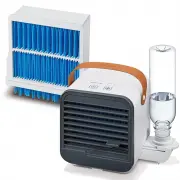
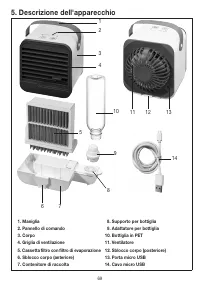
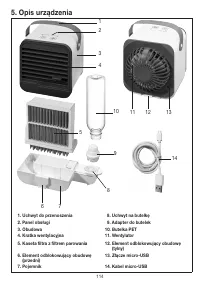
8 5. Gerätebeschreibung 12 3 4 5 6 7 8 9 10 11 12 13 14 1. Tragegriff 8. Flaschenhalterung 2. Bedienpanel 9. Flaschenadapter 3. Gehäuse 10. PET-Flasche 4. Lüftungsgitter 11. Ventilator 5. Filterkassette mit Verdunstungsfilter 12. Gehäuseentriegelung (hinten) 6. Gehäuseentriegelung (vorne) 13. Micro-...
Page 9 - Display und Tasten; Tischventilator entnehmen; Wasser im Auffangbehälter befindet, um Überlaufen zu vermeiden.
9 Display und Tasten 5 3 2 1 4 1 EIN/AUS-Taste Zum Ein/Ausschalten des Geräts 2 VENTILATOR-Taste Zum Einstellen der Geschwindigkeit des Ventilators 3 VENTILATOR-Anzeige 1 = niedrige Geschwindigkeit 2 = mittlere Geschwindigkeit 3 = hohe Geschwindigkeit 4 FILTER-Anzeige Wenn die FILTER-Anzeige leuchte...
Page 10 - Tischventilator bedienen; Wasser
10 Tischventilator bedienen 1. Ziehen Sie am Tischventilator die seitliche Flaschenhalte- rung heraus. 2. Füllen Sie die mitgelieferte PET-Flasche mit kaltem Trinkwas- ser. Je kälter das Trinkwasser, desto besser der Kühleffekt. Achten Sie darauf, dass das Trinkwasser sauber, ohne Koh- lensäure und ...
Page 12 - Verdunstungsfilter wechseln
12 Verdunstungsfilter wechseln Sie sollten den Verdunstungsfilter nach 1000 Betriebsstunden durch einen Neuen ersetzen. Nach 1000 Betriebsstunden leuchtet auf dem Display die FILTER-Anzeige auf. Um den Verdun- stungsfilter zu wechseln, gehen Sie wie folgt vor: 1. Vergewissern Sie sich, dass der Tisc...
Page 13 - Reinigung und Pflege
13 7. Reinigung und Pflege Warnung Vergewissern Sie sich vor jeder Reinigung, dass der Tischventilator ausgesteckt ist! Verdunstungsfilter wechseln Achtung Der Verdunstungsfilter sollte nach 1000 Betriebsstunden gewechselt werden (siehe Kapitel „Verdun- stungsfilter wechseln“). Sollte der Verdunstun...
Page 15 - Technische Angaben
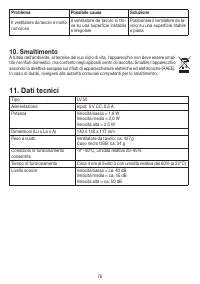
15 11. Technische Angaben Type LV 50 Stromversorgung Input: 5 V DC, 0,5 A Leistung Niedrige Geschwindigkeit = 1,8 W Mittlere Geschwindigkeit = 2,0 W Hohe Geschwindigkeit = 2,5 W Maße (L x B x H) 140 x 140 x 117 mm Leergewicht Tischventilator: ca. 427 g Micro-USB-Kabel: ca. 34 g Zul. Betriebsbedingun...
Page 17 - Warning
17 Read these instructions for use carefully and keep them for later use, be sure to make them accessible to other users and observe the information they contain. ENGLISH Warning • The device is only intended for domestic/private use, not for commer- cial use. • This device may be used by children o...
Page 18 - Table of contents; Getting to know your device; Included in delivery
18 1. Included in delivery ............................................18 2. Signs and symbols .............................................19 3. Intended use .......................................................19 4. Warnings and safety notes ................................19 5. Device descripti...
Page 19 - Signs and symbols; Warnings and safety notes; in personal injury or material damage.; of the reach of small children.
19 2. Signs and symbols The following symbols are used on the device, in these instructions for use, on the packaging and on the type plate for the device: Warning Warning notice indicating a risk of injury or damage to health Manufacturer Important Safety note indicating possible damage to the devi...
Page 20 - Electric shock
20 Electric shock Warning As with every electrical device, use this table fan carefully and cautiously, in order to avoid hazards due to electric shock. • Do not use the device if there is visible damage to the device or accessories (e.g. if the cable or mains adapter are damaged, if the motor fan d...
Page 22 - Risk of fire; Repairs; Handling; Important
22 Risk of fire Warning There may be a risk of fire if the device is used improperly or these instructions for use are ignored. • Never operate the device underneath a cover, such as a blanket, pillow, etc. • Never operate the device near petrol or other highly flammable substances. • To reduce the ...
Page 23 - Device description
23 5. Device description 12 3 4 5 6 7 8 9 10 11 12 13 14 1. Carrying handle 8. Bottle holder 2. Control panel 9. Bottle adapter 3. Housing 10. PET bottle 4. Ventilation grille 11. Fan 5. Filter cartridge with evaporation filter 12. Housing release (rear) 6. Housing release (front) 13. Micro USB port...
Page 24 - Display and buttons; Removing the table fan; there is water in the water basin.
24 Display and buttons 5 3 2 1 4 1 ON/OFF button To switch the device on/off 2 FAN button For setting the speed of the fan 3 FAN indicator 1 = low speed 2 = medium speed 3 = high speed 4 FILTER indicator If the FILTER indicator is illuminated, it means you must replace the evaporation filter 5 ON/OF...
Page 25 - Operating the table fan; Water
25 Operating the table fan 1. Pull the bottle holder out of the side of the table fan. 2. Fill the supplied PET bottle with cold drinking water. The cold- er the drinking water, the better the cooling effect. Make sure that the drinking water is clean, not carbonated, and no warm- er than 40°C. If t...
Page 27 - Replacing the evaporation filter
27 Replacing the evaporation filter The evaporation filter should be replaced with a new one after 1000 operating hours. After 1000 operating hours have elapsed, the FILTER indicator will light up on the display. To replace the evaporation filter, proceed as follows: 1. Ensure that the table fan is ...
Page 28 - Cleaning and maintenance; Accessories and replacement parts
28 7. Cleaning and maintenance Warning Ensure that the table fan is switched off before any cleaning operation! Replacing the evaporation filter Important The evaporation filter should be replaced after 1000 operating hours (see “Replacing the evaporation filter” chapter). If the evaporation filter ...
Page 30 - Technical specifications
30 11. Technical specifications Type LV 50 Power supply Input: 5 V DC, 0.5 A Output low speed = 1.8 W medium speed = 2.0 W high speed = 2.5 W Dimensions (L x W x H) 140 x 140 x 117 mm Weight when empty Table fan: approx. 427 g Micro USB cable: approx. 34 g Permissible operating conditions -9°~50°C, ...
Page 32 - Avertissement
32 Lisez attentivement cette notice, conservez-la pour un usage ultérieur, mettez-la à disposition des autres utilisateurs et suivez les consignes qui y figurent. FRANÇAIS Avertissement • L’appareil ne doit être utilisé que dans un environnement domestique/ privé et non dans un cadre professionnel. ...
Page 33 - Table des matières; Familiarisation avec l’appareil
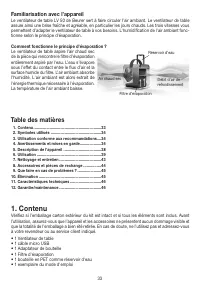
33 1. Contenu ...............................................................33 2. Symboles utilisés ...............................................34 3. Utilisation conforme aux recommandations ....34 4. Avertissements et mises en garde....................34 5. Description de l’appareil ..............
Page 34 - Symboles utilisés; Utilisation conforme aux recommandations; susceptible d’entraîner des dommages corporels ou matériels.; les conduites d’air hors de portées des jeunes enfants.
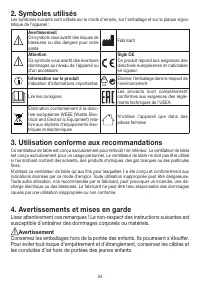
34 2. Symboles utilisés Les symboles suivants sont utilisés sur le mode d’emploi, sur l’emballage et sur la plaque signa- létique de l’appareil : Avertissement Ce symbole vous avertit des risques de blessures ou des dangers pour votre santé Fabricant Attention Ce symbole vous avertit des éventuels d...
Page 35 - Décharge électrique
35 Décharge électrique Avertissement Comme tout appareil électrique, ce ventilateur de table doit être utilisé avec pré- caution et prudence afin d'éviter les dangers dus aux chocs électriques. • N’utilisez pas l’appareil si l’appareil ou les accessoires présentent des dommages visibles (par exemple...
Page 37 - Risque d’incendie; Réparation; Utilisation; Attention
37 Risque d’incendie Avertissement Toute utilisation inappropriée ou non conforme au présent mode d’emploi peut en- traîner un risque d’incendie ! • N’utilisez jamais l’appareil dans un endroit couvert, sous une couverture ou des coussins par exemple. • N’utilisez jamais l’appareil à proximité d’ess...
Page 38 - Description de l’appareil
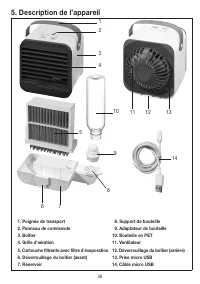
38 5. Description de l’appareil 12 3 4 5 6 7 8 9 10 11 12 13 14 1. Poignée de transport 8. Support de bouteille 2. Panneau de commande 9. Adaptateur de bouteille 3. Boîtier 10. Bouteille en PET 4. Grille d'aération 11. Ventilateur 5. Cartouche filtrante avec filtre d'évaporation 12. Déverrouillage d...
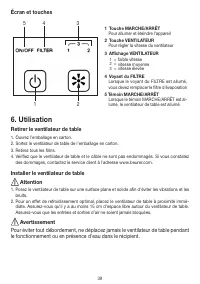
Page 39 - Écran et touches; Retirer le ventilateur de table; le fonctionnement ou en présence d'eau dans le récipient.
39 Écran et touches 5 3 2 1 4 1 Touche MARCHE/ARRÊT Pour allumer et éteindre l'appareil 2 Touche VENTILATEUR Pour régler la vitesse du ventilateur 3 Affichage VENTILATEUR 1 = faible vitesse 2 = vitesse moyenne 3 = vitesse élevée 4 Voyant du FILTRE Lorsque le voyant du FILTRE est allumé, vous devez r...
Page 40 - Utilisation du ventilateur de table; Eau
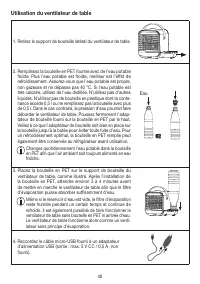
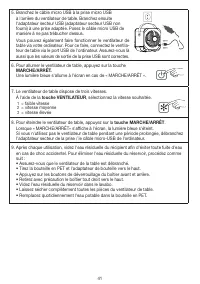
40 Utilisation du ventilateur de table 1. Retirez le support de bouteille latéral du ventilateur de table. 2. Remplissez la bouteille en PET fournie avec de l'eau potable froide. Plus l'eau potable est froide, meilleur est l'effet de refroidissement. Assurez-vous que l'eau potable est propre, non ga...
Page 42 - Remplacer le filtre d'évaporation
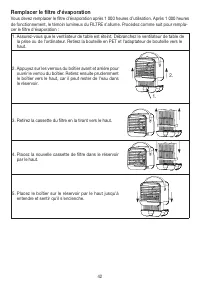
42 Remplacer le filtre d'évaporation Vous devez remplacer le filtre d'évaporation après 1 000 heures d’utilisation. Après 1 000 heures de fonctionnement, le témoin lumineux du FILTRE s’allume. Procédez comme suit pour rempla- cer le filtre d'évaporation : 1. Assurez-vous que le ventilateur de table ...
Page 43 - Nettoyage et entretien
43 6. Pour éteindre le voyant du FILTRE après le remplace- ment du filtre, appuyez simultanément sur la touche MARCHE/ARRÊT et la touche VENTILATEUR pendant 10 secondes. Si vous souhaitez remplacer le filtre avant la fin des 1 000 heures de fonctionnement, procédez comme suit : Appuyez simultanément...
Page 44 - Accessoires et pièces de rechange
44 Stockage Si vous n’utilisez pas l’appareil pendant une période prolongée, nous vous recommandons de le ranger nettoyé dans son emballage d’origine sans rien poser dessus. Remplacement de la bouteille en PET Remplacez la bouteille en PET dès que des dépôts calcaires blancs ou d'autres saletés se f...
Page 46 - Caractéristiques techniques
46 11. Caractéristiques techniques Type LV 50 Alimentation électrique Entrée : 5 V DC, 0,5 A Puissance Faible vitesse = 1,8 W Vitesse moyenne = 2,0 W Haute vitesse = 2,5 W Dimensions (L/l/H) 140 x 140 x 117 mm Poids à vide Ventilateur de table : env. 427 g Câble micro-USB : env. 34 g Conditions d‘ut...
Page 48 - Advertencia
48 Lea atentamente estas instrucciones de uso, consérvelas para su futura utilización, póngalas a disposición de otros usuarios y respete las indicaciones. ESPAÑOL Advertencia • Este aparato se ha diseñado exclusivamente para su uso privado o en el hogar y no para uso industrial. • Este aparato pued...
Page 49 - Índice; Información general; Artículos suministrados
49 1. Artículos suministrados .....................................49 2. Explicación de los símbolos ..............................50 3. Uso previsto ........................................................50 4. Indicaciones de advertencia y de seguridad ...50 5. Descripción del aparato ...............
Page 50 - Explicación de los símbolos; Indicaciones de advertencia y de seguridad; caciones puede ocasionar daños personales o materiales.; tos de aire fuera del alcance de los niños pequeños.
50 2. Explicación de los símbolos En el aparato, en las instrucciones de uso, en el embalaje y en la placa de características del apa- rato se utilizan los siguientes símbolos: Advertencia Indicación de advertencia sobre peli- gro de lesiones u otros peligros para la salud Fabricante Atención Indica...
Page 51 - Descarga eléctrica
51 Descarga eléctrica Advertencia Como todos los aparatos eléctricos, este ventilador de sobremesa debe utilizarse con extremo cuidado para evitar recibir una descarga eléctrica. • No utilice el aparato si este o sus accesorios presentan daños visibles (por ejem- plo, si el cable o el adaptador de r...
Page 53 - Peligro de incendio; Reparación; Manejo; Atención
53 Peligro de incendio Advertencia En determinadas circunstancias, el uso indebido del aparato o el incumplimiento de las presentes instrucciones puede ocasionar un peligro de incendio. • No use nunca el aparato si está cubierto, p. ej.; por una manta, un cojín, etc. • No utilice nunca el aparato ce...
Page 54 - Descripción del aparato
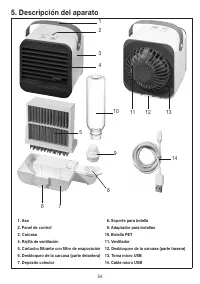
54 5. Descripción del aparato 12 3 4 5 6 7 8 9 10 11 12 13 14 1. Asa 8. Soporte para botella 2. Panel de control 9. Adaptador para botellas 3. Carcasa 10. Botella PET 4. Rejilla de ventilación 11. Ventilador 5. Cartucho filtrante con filtro de evaporación 12. Desbloqueo de la carcasa (parte trasera)...
Page 55 - Pantalla y botones; Retirar el ventilador de sobremesa; haya agua en el recipiente colector para evitar desbordamientos.
55 Pantalla y botones 5 3 2 1 4 1 Botón de encendido y apagado Para el encendido y apagado del aparato 2 Botón VENTILADOR Para ajustar la velocidad del ventilador. 3 Indicador de VENTILADOR 1 = velocidad baja 2 = velocidad media 3 = velocidad alta 4 Indicador «FILTER» Si el indicador FILTER está enc...
Page 56 - Manejar el ventilador de mesa; Agua
56 Manejar el ventilador de mesa 1. Extraiga el soporte lateral de la botella del ventilador de so- bremesa tirando de él. 2. Llene la botella de PET suministrada con agua potable fría. Cuanto más fría esté el agua potable, mayor será el efecto de refrigeración. Asegúrese de que el agua potable esté...
Page 58 - Cambiar el filtro de evaporación
58 Cambiar el filtro de evaporación Debería sustituir el filtro de evaporación después de 1000 horas de funcionamiento por uno nuevo. Tras 1000 horas de funcionamiento, el indicador «FILTER» se ilumina permanentemente en rojo en la pantalla. Para cambiar el filtro de evaporación, proceda del modo si...
Page 59 - Limpieza y cuidado
59 6. Para apagar el indicador FILTER después de cam- biar el filtro, mantenga pulsados el botón de ENCENDIDO/APAGADO y el botón VENTILADOR simul táneamente durante 10 segundos. Si desea cambiar el filtro antes de que transcurran las 1000 ho- ras de funcionamiento, proceda del siguiente modo: Manten...
Page 60 - Accesorios y piezas de repuesto; Resolución de problemas
60 Cambio de la botella de PET Sustituya la botella de PET cuando se formen depósitos de cal blanca u otros residuos en la bo- tella de PET. Atención No limpie la botella de PET en el lavavajillas. La botella de PET no es apta para el lavavajillas. 8. Accesorios y piezas de repuesto Para adquirir ac...
Page 63 - ITALIANO; Avvertenza; di sicurezza e comprendono i rischi ad esse correlati.
63 Leggere attentamente le presenti istruzioni per l'uso, conservarle per impieghi futuri, renderle accessibili ad altri utenti e attenersi alle indicazioni. ITALIANO Avvertenza • L'apparecchio è destinato solo a uso domestico/privato e non commer- ciale. • Questo apparecchio può essere utilizzato d...
Page 64 - Indice; Introduzione
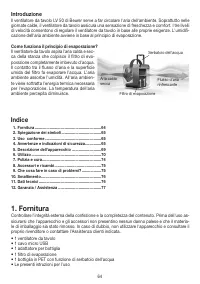
64 1. Fornitura ..............................................................64 2. Spiegazione dei simboli .....................................65 3. Uso conforme ....................................................65 4. Avvertenze e indicazioni di sicurezza ...............65 5. Descrizione dell'ap...
Page 65 - Spiegazione dei simboli; Avvertenze e indicazioni di sicurezza; indicazioni può provocare danni alle persone o alle cose.; ria fuori dalla portata dei bambini.; Scossa elettrica
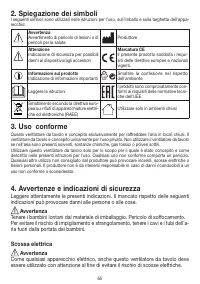
65 2. Spiegazione dei simboli I seguenti simboli sono utilizzati nelle istruzioni per l'uso, sull'imballo e sulla targhetta dell'appa- recchio: Avvertenza Avvertimento di pericolo di lesioni o di pericoli per la salute Produttore Attenzione Indicazione di sicurezza per possibili danni al dispositivo...
Page 68 - Pericolo di incendio; riscaldanti, stufe o radiatori per ridurre il rischio di incendio.; Riparazione; rivenditore autorizzato.; Impiego; Attenzione; • Non appoggiare alcun oggetto sopra l'apparecchio.
68 Pericolo di incendio Avvertenza In caso di uso non conforme o mancato rispetto delle presenti istruzioni per l'uso, sussiste il pericolo d'incendio! • Non coprire mai l'apparecchio durante l'uso, ad esempio con una coperta, un cuscino, ecc... • Non azionare l'apparecchio in prossimità di benzina ...
Page 70 - Display e pulsanti; Estrazione del ventilatore da tavolo; funzione o se nel contenitore di raccolta è presente acqua.
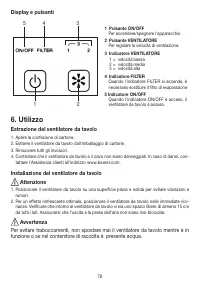
70 Display e pulsanti 5 3 2 1 4 1 Pulsante ON/OFF Per accendere/spegnere l'apparecchio 2 Pulsante VENTILATORE Per regolare la velocità di ventilazione. 3 Indicatore VENTILATORE 1 = velocità bassa 2 = velocità media 3 = velocità alta 4 Indicatore FILTER Quando l'indicatore FILTER si accende, è necess...
Page 71 - Azionamento del ventilatore da tavolo; Acqua
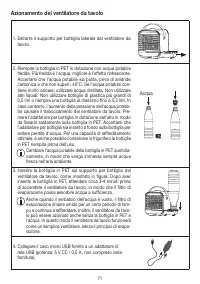
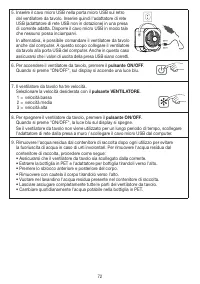
71 Azionamento del ventilatore da tavolo 1. Estrarre il supporto per bottiglia laterale dal ventilatore da tavolo. 2. Riempire la bottiglia in PET in dotazione con acqua potabile fredda. Più fredda è l'acqua, migliore è l'effetto rinfrescante. Accertarsi che l'acqua potabile sia pulita, priva di ani...
Page 73 - Sostituzione del filtro di evaporazione
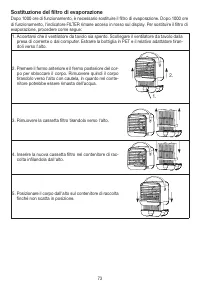
73 Sostituzione del filtro di evaporazione Dopo 1000 ore di funzionamento, è necessario sostituire il filtro di evaporazione. Dopo 1000 ore di funzionamento, l'indicatore FILTER rimane acceso in rosso sul display. Per sostituire il filtro di evaporazione, procedere come segue: 1. Accertarsi che il v...
Page 75 - Accessori e ricambi
75 Attenzione Non lavare la bottiglia in PET in lavastoviglie. La bottiglia in PET non è lavabile in lavastoviglie. 8. Accessori e ricambi Per l'acquisto di accessori e ricambi visitare www.beurer.com o rivolgersi all'Assistenza clienti del proprio Paese (consultare l'elenco con gli indirizzi). Inol...
Page 78 - Uyarı
78 Bu kullanım kılavuzunu dikkatle okuyun, ileride kullanmak üzere saklayın, diğer kullanıcıların erişebilmesini sağlayın ve içindeki yönergelere uyun. TÜRKÇE Uyarı • Cihaz ticari kullanım için değil, yalnızca evde/kişisel amaçlarla kullanıl- mak üzere tasarlanmıştır. • Bu cihaz, 8 yaş ve üzeri ço...
Page 79 - İçindekiler; Ürün özellikleri
79 1. Teslimat kapsamı ...............................................79 2. İşaretlerin açıklaması .........................................80 3. Amacına uygun kullanım ....................................80 4. Uyarılar ve güvenlik yönergeleri ........................80 5. Cihaz açıklaması ............
Page 80 - İşaretlerin açıklaması; Amacına uygun kullanım; maya veya maddi hasara neden olabilir.; erişemeyeceği yerlerde saklanmalıdır.
80 2. İşaretlerin açıklaması Cihazın üzerinde, kullanım kılavuzunda, ambalajında ve model etiketinde aşağıdaki simgeler kul- lanılmıştır: Uyarı Yaralanma tehlikelerine veya sağlığınız- la ilgili tehlikelere yönelik uyarı Üretici Dikkat Cihazda ve aksesuarlarda meydana gelebilecek hasarlara yönelik g...
Page 81 - Elektrik çarpması
81 Elektrik çarpması Uyarı Elektrik çarpmasından kaynaklanan tehlikeleri önlemek için, her elektrikli cihaz gibi bu masa tipi fanın da dikkatle ve sağduyuyla kullanılması gerekir. • Cihazda veya aksesuarda görünür bir hasar varsa cihazı kullanmayın (örneğin elektrik kablosu veya elektrik adaptörü za...
Page 83 - Yangın tehlikesi; Onarım; Kullanırken dikkat edilmesi gereken noktalar; Dikkat
83 Yangın tehlikesi Uyarı Amacına uygun olmayan kullanım veya bu kullanım kılavuzunun dikkate alınmaması gibi durumlar yangın tehlikesine yol açar! • Cihazı battaniye veya yastık gibi nesnelerle örterek kullanmayın. • Cihazı hiçbir zaman benzin veya benzeri gibi kolay alev alabilen maddelerin ya- kı...
Page 85 - Göstergeler ve düğmeler; Masa tipi fanın ambalajından çıkarılması; fanı kesinlikle hareket ettirmeyin.
85 Göstergeler ve düğmeler 5 3 2 1 4 1 AÇMA/KAPATMA düğmesi Cihazı açar ve kapatır 2 FAN düğmesi Fan hızını ayarlar 3 FAN göstergesi 1 = düşük hız 2 = orta hız 3 = yüksek hız 4 FILTER göstergesi FILTER göstergesi yandığında, buharlaştır- ma filtresini değiştirmeniz gerekir 5 ON/OFF göstergesi ON/OFF...
Page 86 - Masa tipi fanın kullanılması; Su
86 Masa tipi fanın kullanılması 1. Masa tipi fanın yan tarafındaki şişe tutucusunu dışarı çekin. 2. Cihazla birlikte verilen PET şişeyi soğuk içme suyuyla doldu- run. İçme suyu ne kadar soğuksa, soğutma etkisi de o kadar iyi olur. İçme suyunun temiz olmasına, karbonik asit içerme- mesine ve 40°C'den...
Page 88 - Buharlaştırma filtresinin değiştirilmesi
88 Buharlaştırma filtresinin değiştirilmesi 1000 çalışma saatinden sonra buharlaştırma filtresini yenisiyle değiştirmeniz gerekir. 1000 ça- lışma saatinden sonra FILTER göstergesi yanmaya başlar. Filtreyi değiştirmek için aşağıdakileri yapın: 1. Masa tipi fanın kapalı olduğundan emin olun. Masa tipi...
Page 89 - Aksesuarlar ve yedek parçalar
89 7. Temizlik ve bakım Uyarı Her temizleme işleminden önce masa tipi fanın fişinin prizden çıkarılmış olduğundan emin olun! Buharlaştırma filtresinin değiştirilmesi Dikkat Buharlaştırma filtresi 1000 çalışma saatinden sonra değiştirilmelidir (“Buharlaştırma filtresinin değiş- tirilmesi” bölümüne ba...
Page 90 - Sorunların giderilmesi
90 9. Sorunların giderilmesi Sorun Olası neden Çözüm Masa tipi fan açılmıyor. Masa tipi fan prize takılma- mıştır. Masa tipi fanı uygun bir prize veya bilgisayara bağlayın. Masa tipi fan arızalıdır. Lütfen müşteri hizmetlerine başvurun: www.beurer.com Hava geçişi yetersiz Buharlaştırma filtresi kirl...
Page 93 - Предупреждение
93 Внимательно прочтите инструкцию по применению, сохраните ее для последующего использования, держите в месте, доступном для других пользователей, и следуйте ее указаниям. РУССКИЙ Предупреждение • Прибор предназначен только для домашнего/индивидуального ис- пользования. Использование прибора в ком...
Page 94 - Содержание; Ознакомительная информация
94 1. Комплект поставки ...........................................94 2. Пояснения к символам ....................................95 3. Использование по назначению ......................95 4. Предостережения и указания по технике безопасности................................95 5. Описание прибора ......
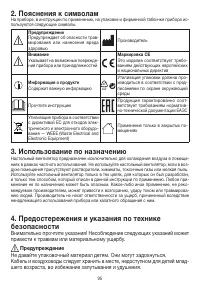
Page 95 - Пояснения к символам; Использование по назначению; привести к травмам или материальному ущербу.; Не давайте упаковочный материал детям. Они могут задохнуться.
95 2. Пояснения к символам На приборе, в инструкции по применению, на упаковке и фирменной табличке прибора ис- пользуются следующие символы. Предупреждение Предупреждает об опасности трав- мирования или нанесения вреда здоровью Производитель Внимание Указывает на возможные поврежде- ния прибора или...
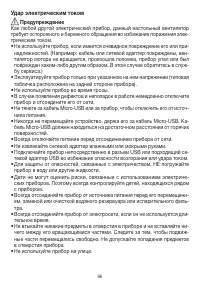
Page 96 - Удар электрическим током
96 Удар электрическим током Предупреждение Как любой другой электрический прибор, данный настольный вентилятор требует осторожного и бережного обращения во избежание поражения элек- трическим током. • Не используйте прибор, если имеется очевидное повреждение его или при- надлежностей. (Например: каб...
Page 98 - Опасность пожара; Ремонт; Обслуживание прибора; Внимание
98 Опасность пожара Предупреждение Использование прибора не по назначению или несоблюдение правил, указан- ных в данной инструкции по применению, при определенных обстоятельствах может привести к пожару! • Не накрывайте прибор во время использования, например одеялом или по- душкой и т. д. • Никогда...
Page 100 - Дисплей и кнопки; Распаковка настольного вентилятора; в приемной емкости воды, чтобы избежать переливания через край.
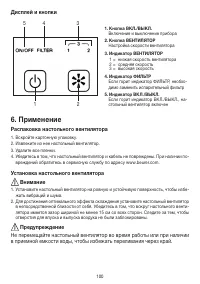
100 Дисплей и кнопки 5 3 2 1 4 1. Кнопка ВКЛ./ВЫКЛ. Включение и выключение прибора 2. Кнопка ВЕНТИЛЯТОР Настройка скорости вентилятора 3. Индикатор ВЕНТИЛЯТОР 1 = низкая скорость вентилятора 2 = средняя скорость 3 = высокая скорость 4. Индикатор ФИЛЬТР Если горит индикатор ФИЛЬТР, необхо- димо замен...
Page 101 - Управление настольным вентилятором; Вода
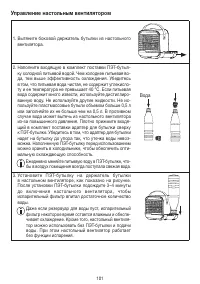
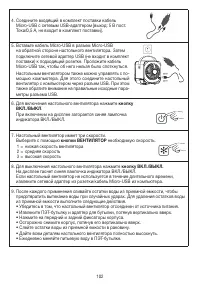
101 Управление настольным вентилятором 1. Вытяните боковой держатель бутылки из настольного вентилятора. 2. Наполните входящую в комплект поставки ПЭТ-бутыл- ку холодной питьевой водой. Чем холоднее питьевая во- да, тем выше эффективность охлаждения. Убедитесь в том, что питьевая вода чистая, не сод...
Page 103 - Замена испарительного фильтра
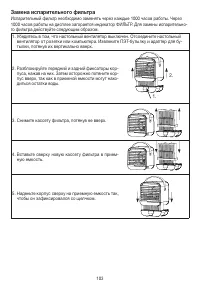
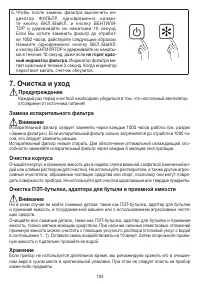
103 Замена испарительного фильтра Испарительный фильтр необходимо заменять через каждые 1000 часов работы. Через 1000 часов работы на дисплее загорается индикатор ФИЛЬТР. Для замены испарительно- го фильтра действуйте следующим образом. 1. Убедитесь в том, что настольный вентилятор выключен. Отсоеди...
Page 105 - Аксессуары и запасные детали; Что делать при возникновении проблем
105 Замена ПЭТ-бутылки Заменяйте ПЭТ-бутылку сразу же после образования в ней белых известковых отложений или других загрязнений. Внимание Не мойте ПЭТ-бутылку в посудомоечной машине. ПЭТ-бутылка непригодна для мытья в по- судомоечной машине. 8. Аксессуары и запасные детали Аксессуары и запасные дет...
Page 107 - Технические данные
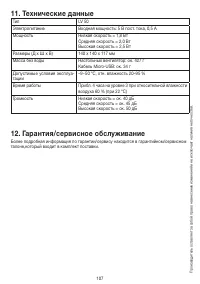
107 11. Технические данные Тип LV 50 Электропитание Входная мощность: 5 В пост. тока, 0,5 А Мощность Низкая скорость = 1,8 Вт Средняя скорость = 2,0 Вт Высокая скорость = 2,5 Вт Размеры (Д x Ш x В) 140 x 140 x 117 мм Масса без воды Настольный вентилятор: ок. 427 г Кабель Micro-USB: ок. 34 г Допустим...
Page 108 - Ostrzeżenie; dzenia i są świadome zagrożeń wynikających z jego użytkowania.
108 Należy dokładnie przeczytać niniejszą instrukcję obsługi, zachować ją i przechowywać w miejscu dostępnym dla innych użytkowników oraz przestrzegać podanych w niej wskazówek. POLSKI Ostrzeżenie • Urządzenie jest przeznaczone wyłącznie do użytku domowego/prywat- nego, a nie do celów komercyjnych. ...
Page 109 - Spis treści; Informacje ogólne; Zawartość opakowania
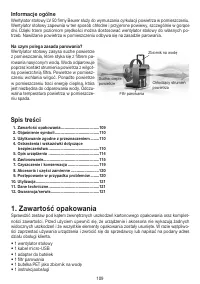
109 1. Zawartość opakowania....................................109 2. Objaśnienie symboli .........................................110 3. Użytkowanie zgodne z przeznaczeniem ........110 4. Ostrzeżenia i wskazówki dotyczące bezpieczeństwa ...............................................110 5. Opis urz...
Page 110 - Objaśnienie symboli; Użytkowanie zgodne z przeznaczeniem; wek może doprowadzić do obrażeń ciała i szkód materialnych.; należy przechowywać w miejscu niedostępnym dla małych dzieci.
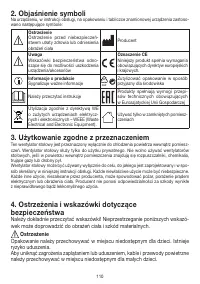
110 2. Objaśnienie symboli Na urządzeniu, w instrukcji obsługi, na opakowaniu i tabliczce znamionowej urządzenia zastoso- wano następujące symbole: Ostrzeżenie Ostrzeżenie przed niebezpieczeń- stwem utraty zdrowia lub odniesienia obrażeń ciała Producent Uwaga Wskazówki bezpieczeństwa odno- szące się...
Page 111 - Porażenie prądem elektrycznym
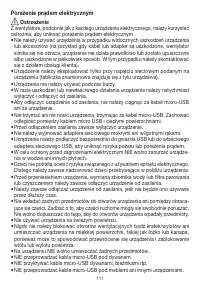
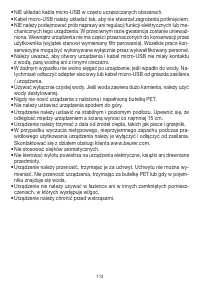
111 Porażenie prądem elektrycznym Ostrzeżenie Z wentylatora, podobnie jak z każdego urządzenia elektrycznego, należy korzystać ostrożnie, aby uniknąć porażenia prądem elektrycznym. • Nie należy używać urządzenia w przypadku widocznych uszkodzeń urządzenia lub akcesoriów (na przykład gdy kabel lub ad...
Page 113 - Zagrożenie pożarowe; Naprawa; Obsługa; Uwaga
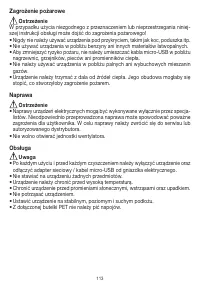
113 Zagrożenie pożarowe Ostrzeżenie W przypadku użycia niezgodnego z przeznaczeniem lub nieprzestrzegania niniej- szej instrukcji obsługi może dojść do zagrożenia pożarowego! • Nigdy nie należy używać urządzenia pod przykryciem, takim jak koc, poduszka itp. • Nie używać urządzenia w pobliżu benzyny ...
Page 115 - Wyświetlacz i przyciski; Wyjmowanie wentylatora stołowego; pracy lub gdy w zbiorniku znajduje się woda.
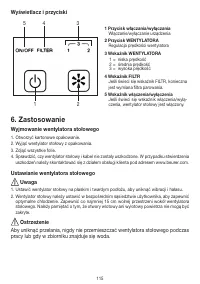
115 Wyświetlacz i przyciski 5 3 2 1 4 1 Przycisk włączania/wyłączania Włączanie/wyłączanie urządzenia 2 Przycisk WENTYLATORA Regulacja prędkości wentylatora 3 Wskaźnik WENTYLATORA 1 = niska prędkość 2 = średnia prędkość 3 = wysoka prędkość 4 Wskaźnik FILTR Jeśli świeci się wskaźnik FILTR, konieczna ...
Page 116 - Obsługa wentylatora stołowego; Woda
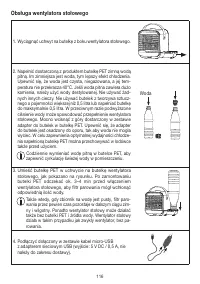
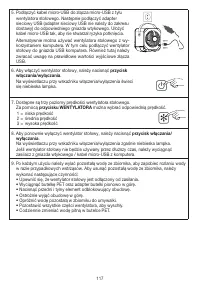
116 Obsługa wentylatora stołowego 1. Wyciągnąć uchwyt na butelkę z boku wentylatora stołowego. 2. Napełnić dostarczoną z produktem butelkę PET zimną wodą pitną. Im zimniejsza jest woda, tym lepszy efekt chłodzenia. Upewnić się, że woda jest czysta, niegazowana, a jej tem- peratura nie przekracza 40°...
Page 118 - Wymiana filtra parowania
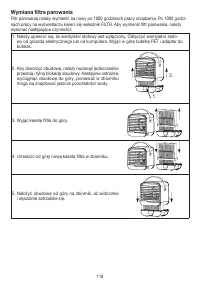
118 Wymiana filtra parowania Filtr parowania należy wymienić na nowy po 1000 godzinach pracy urządzenia. Po 1000 godzi- nach pracy na wyświetlaczu świeci się wskaźnik FILTR. Aby wymienić filtr parowania, należy wykonać następujące czynności: 1. Należy upewnić się, że wentylator stołowy jest wyłączon...
Page 119 - Czyszczenie i konserwacja
119 6. Aby po wymianie filtra wyłączyć wskaźnik FILTR, naci- snąć i przytrzymać przez 10 sekund jednocześnie przy- cisk włączania/wyłączania i przycisk WENTYLATORA. Jeśli użytkownik chce wymienić filtr przed upływem 1000 godzin pracy, należy wykonać następujące czynności: Nacisnąć i przytrzymać jedn...
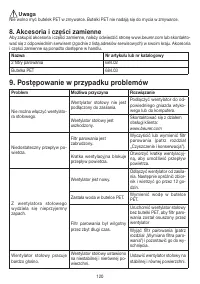
Page 120 - Akcesoria i części zamienne; Postępowanie w przypadku problemów
120 Uwaga Nie wolno myć butelek PET w zmywarce. Butelki PET nie nadają się do mycia w zmywarce. 8. Akcesoria i części zamienne Aby zakupić akcesoria i części zamienne, należy odwiedzić stronę www.beurer.com lub skontakto- wać się z odpowiednim serwisem (zgodnie z listą adresów serwisowych) w swoim k...