BenQ PD3220U - User Manual
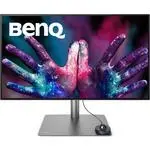
This Quick Guide covers the BenQ DesignVue Designer Monitor PD Series, focusing on its setup, connectivity, and basic configuration. The document highlights essential topics like physical assembly with the included stand, cable connections (video, audio, USB), and integration of the Hotkey Puck G2 for quick control. It also addresses advanced features such as Thunderbolt™ 3 support for multi-monitor daisy-chaining and Display Pilot software for display management and color calibration. The guide emphasizes practical setup and connectivity rather than detailed troubleshooting or maintenance.


USB
Video
Audio
7
8
1
2
3
4
5
6
DP to mini-DP
-5° ~ 20°
7
8
or
or
HDMI
Thunderbolt™ 3
USB-C™
(optional)
Hotkey Puck G2
2
1
1
2
3
3
3
3
9
USB
or
9
10
Hotkey Puck G2
10
PD3220U
PD2725U / PD3220U
PD2720U
Quick Start Guide
Regulatory
Statements
Safety
Instructions
How to use
Hotkey Puck G2
DesignVue Designer Monitor | PD Series
DN: PD20U-EQ-V1
© 2020 BenQ Corporation. All rights reserved. Rights of modification reserved.
LCD Monitor
Quick Start Guide
10-90% 0-3000m
0-40°C
10-60% 0-12000m
-20-60°C
P/N: 4J.XXXXX.XXX
"Loading the manual" means you need to wait until the file loads and becomes available for online reading. Some manuals are very large, and the time they take to appear depends on your internet speed.
Was this manual helpful?
Helpful for 3 of 3 readers
About this manual
- Brand
- BenQ
- Model
- PD3220U
- Document type
- User Manual
- Category
- Monitor
- Language(s)
- English
- Pages
- 2
- File size
- 2.5 MB
- Format
Ask a question
Related manuals
More BenQ Monitors models

Other BenQ appliances
 BenQ CP120 Manual
 BenQ CP220 Manual
 BenQ DC 3410 Manual
 BenQ E700 Manual
- BenQ E900 Manual
- BenQ E900W Manual
 BenQ FP71G Manual
- BenQ FP71G+ Manual
 BenQ FP73G Manual
 BenQ FP91G Manual
 BenQ FP91GP Manual
- BenQ FP91GX Manual
 BenQ FP92W Manual
 BenQ FP202W Manual
 BenQ FP222W Manual
 BenQ FP241VW Manual
 BenQ FP241W Manual
 BenQ FP557s Manual
 BenQ FP731 Manual